-
-
This may be the cause. Please make sure the notches in any combined throttle for eng and cvf match. See this thread: http://www.elvastower.com/forums/ind...post__p__78725Chris
"True rail fans have two favorite railroads. The B&O and one other."Comment
-
Thanks Chris. The Ruebelandbahn loco however has no combined throttle (the Bernina EMUs do).
In the Ruebelanbahn loco the .eng block about dynamic brakes is as follows:
Brake_Dynamic ( 0 1 0.04 0
NumNotches ( 1
Notch ( 0 1 Dummy )
)
)
and the related .cvf block is as follows
Lever (
Type ( DYNAMIC_BRAKE LEVER )
Position ( 0 0 32 32 )
Style ( SPRUNG )
MouseControl ( 1 )
NumFrames ( 0 0 0 )
NumPositions ( 1 0 )
NumValues ( 1 0 )
Orientation ( 0 )
DirIncrease ( 0 )
ScaleRange ( 0 1 )
)
CarlosigpicComment
-
-
Clovis Sub Crashed
I created an activity in Activity Generator for the Clovis Sub, the one in the TrainSim library. 5 hours plus into the activity it crashed.
HaroldComment
-
-
Chris
"True rail fans have two favorite railroads. The B&O and one other."Comment
-
I lost the original save. I loaded a fresh copy of OpenRails from a new directory. Ran from the save point and went further down the line. Saved that session. Now it won't run that save. Open Rails crashes. Forgot that the saves are all in the same AppData directory.
Since the log file won't upload here is the file.
"Open Rails is starting...
Version = 0.7.0.905
Build = 0.0.4362.22137 11/12/2011 12:17
Logfile = C:\Users\Big Sluggo\Desktop\OpenRailsLog.txt
------------ ---------- ------------ ---------- ------------ ---------- --------
Alerter = (registry) True
BrakePipeChargingRate = 21
DataLogger = False
DynamicShadows = (registry) True
FullScreen = (registry) True
GraduatedRelease = (registry) True
Logging = True
LoggingFilename = OpenRailsLog.txt
LoggingPath = C:\Users\Big Sluggo\Desktop
MSTSBINSound = (registry) True
Precipitation = (registry) True
Profiling = False
ProfilingFrameCount = 1000
ScreenshotPath = C:\Users\Big Sluggo\Pictures\Open Rails
ShaderModel = 0
ShadowAllShapes = False
ShadowMapBlur = True
ShadowMapCount = 4
ShadowMapDistance = 0
ShadowMapResolution = 1024
ShowErrorDialogs = True
SoundDetailLevel = 5
TrainLights = (registry) True
UseAdvancedAdhesion = True
VerticalSync = False
ViewingDistance = 2000
ViewingFOV = 45
WindowGlass = (registry) True
WindowPosition_Activity = (registry) 50, 50
WindowPosition_Compass = (registry) 50, 0
WindowPosition_DriverAid = (registry) 100, 100
WindowPosition_Help = (registry) 30, 50
WindowPosition_NextStation = (registry) 0, 100
WindowPosition_Switch = (registry) 0, 41
WindowPosition_TrackMonitor = (registry) 0, 30
WindowPosition_TrainOperations = (registry) 50, 42
WindowSize = (registry) 1920x1080
Wire = (registry) True
WorldObjectDensity = 10
------------ ---------- ------------ ---------- ------------ ---------- --------
Mode = Resume Activity
Activity = C:\Train Simulator\ROUTES\atsfcs\ACTIVITIES\First_Belen.act
------------ ---------- ------------ ---------- ------------ ---------- --------
Loading TRK TDB SIGCFG DAT ACT RDB CARSPAWN
Warning: Unknown ControlStyle PRESSED in C:\Train Simulator\trains\trainset\SD402\CABVIEW\sd402.cvf: line 242
Warning: Unknown ControlStyle PRESSED in C:\Train Simulator\trains\trainset\Dash9\CABVIEW\dash9.cvf: line 125
Warning: Unknown ControlStyle PRESSED in C:\Train Simulator\trains\trainset\Dash9\CABVIEW\dash9.cvf: line 133
Warning: Unknown ControlStyle PRESSED in C:\Train Simulator\trains\trainset\Dash9\CABVIEW\dash9.cvf: line 125
Warning: Unknown ControlStyle PRESSED in C:\Train Simulator\trains\trainset\Dash9\CABVIEW\dash9.cvf: line 133
Information: OpenAL using device DirectSound
ENV SIGCFG TTYPECSTTTTTTTTTWSSSSSSS
Information: c:\train simulator\routes\atsfcs\textures\acleantrack1.ace
Information: c:\train simulator\global\shapes\a2t500mstrt.s"
Need a better save mechanism.
Harold
EDIT: The saves at that point on the route were very slow.Last edited by hminky; 12-21-2011, 17:38.Comment
-
Marias Pass - Auto Train Setout Activity
Got this when I clicked on Work Order in the F1 window along with a lockup:
The Pop-ups didn't show up in the Marias Pass - Columbia Plywood set-out activityOpen Rails is starting...
Version = 0.7.0.905
Build = 0.0.4362.22137 11/12/2011 12:17
Logfile = C:\Users\Big Sluggo\Desktop\OpenRailsLog.txt
------------ ---------- ------------ ---------- ------------ ---------- --------
Alerter = False
BrakePipeChargingRate = 21
DataLogger = False
DynamicShadows = (registry) True
FullScreen = (registry) True
GraduatedRelease = (registry) True
Logging = True
LoggingFilename = OpenRailsLog.txt
LoggingPath = C:\Users\Big Sluggo\Desktop
MSTSBINSound = (registry) True
Precipitation = (registry) True
Profiling = False
ProfilingFrameCount = 1000
ScreenshotPath = C:\Users\Big Sluggo\Pictures\Open Rails
ShaderModel = 0
ShadowAllShapes = False
ShadowMapBlur = True
ShadowMapCount = 4
ShadowMapDistance = 0
ShadowMapResolution = 1024
ShowErrorDialogs = True
SoundDetailLevel = 5
TrainLights = (registry) True
UseAdvancedAdhesion = True
VerticalSync = False
ViewingDistance = 2000
ViewingFOV = 45
WindowGlass = (registry) True
WindowPosition_Activity = (registry) 50, 50
WindowPosition_Compass = (registry) 50, 0
WindowPosition_DriverAid = (registry) 100, 100
WindowPosition_Help = (registry) 30, 50
WindowPosition_NextStation = (registry) 0, 100
WindowPosition_Switch = (registry) 0, 40
WindowPosition_TrackMonitor = (registry) 0, 29
WindowPosition_TrainOperations = (registry) 50, 41
WindowSize = (registry) 1920x1080
Wire = (registry) True
WorldObjectDensity = 10
------------ ---------- ------------ ---------- ------------ ---------- --------
Mode = Activity
Activity = C:\Train Simulator\ROUTES\USA2\ACTIVITIES\autotrnsetout.act
------------ ---------- ------------ ---------- ------------ ---------- --------
Loading TRK TDB SIGCFG DAT ACT RDB CARSPAWN
Warning: Unknown ControlStyle PRESSED in C:\Train Simulator\trains\trainset\Dash9\CABVIEW\dash9.cvf: line 125
Warning: Unknown ControlStyle PRESSED in C:\Train Simulator\trains\trainset\Dash9\CABVIEW\dash9.cvf: line 133
Warning: Unknown ControlStyle PRESSED in C:\Train Simulator\trains\trainset\DASH9\CABVIEW\dash9.cvf: line 125
Warning: Unknown ControlStyle PRESSED in C:\Train Simulator\trains\trainset\DASH9\CABVIEW\dash9.cvf: line 133
Information: OpenAL using device DirectSound
ENV SIGCFG TTYPECSTTTTTTTTTW
Information: Unknown world block Hazard (0x0000016D) first seen in C:\Train Simulator\ROUTES\USA2\World\w-012557+014760.w
SSSSSSS TRP(default)SSSSSSSSSSSSS$WSSSS$WWWSSSSSSSSSSSSSSS SSSSSSS$WWWSSSSSSSSSSSS$WSS$CCS C(repeats) CCCCCCCCCCCCCCCCC
Error: System.NullReferenceException: Object reference not set to an instance of an object.
at ORTS.Popups.HelpWindow.<>c__DisplayClassc.<.ctor>b __5(ControlLayout cl)
at ORTS.Popups.HelpWindow.Layout(ControlLayout layout)
at ORTS.Popups.Window.Layout()
at ORTS.Popups.HelpWindow.label_Click(Control control, Point point)
at ORTS.Popups.Control.OnClick(Point mouseControlLocation)
at ORTS.Popups.Control.MouseClick(WindowMouseEvent e)
at ORTS.Popups.Control.HandleMouseUp(WindowMouseEvent e)
at ORTS.Popups.ControlLayout.HandleMouseUp(WindowMous eEvent e)
at ORTS.Popups.ControlLayout.HandleMouseUp(WindowMous eEvent e)
at ORTS.Popups.ControlLayout.HandleMouseUp(WindowMous eEvent e)
at ORTS.Popups.ControlLayout.HandleMouseUp(WindowMous eEvent e)
at ORTS.Popups.ControlLayout.HandleMouseUp(WindowMous eEvent e)
at ORTS.Popups.WindowControlLayout.HandleMouseUp(Wind owMouseEvent e)
at ORTS.Popups.Window.MouseUp()
at ORTS.Popups.WindowManager.HandleUserInput(ElapsedT ime elapsedTime)
at ORTS.Viewer3D.HandleUserInput(ElapsedTime elapsedTime)
at ORTS.UpdaterProcess.Update()
at ORTS.UpdaterProcess.UpdateLoop()
at ORTS.ORTraceListener.TraceEventInternal(TraceEvent Cache eventCache, String source, TraceEventType eventType, Int32 id, String format, Object[] args)
at ORTS.ORTraceListener.TraceEvent(TraceEventCache eventCache, String source, TraceEventType eventType, Int32 id, String format, Object[] args)
at System.Diagnostics.TraceInternal.TraceEvent(TraceE ventType eventType, Int32 id, String format, Object[] args)
at System.Diagnostics.Trace.TraceError(String format, Object[] args)
at ORTS.ORTraceListener.WriteLine(Object o)
at System.Diagnostics.TraceInternal.WriteLine(Object value)
at System.Diagnostics.Trace.WriteLine(Object value)
at ORTS.Viewer3D.ProcessReportError(Exception error)
at ORTS.UpdaterProcess.UpdateLoop()
at System.Threading.ThreadHelper.ThreadStart_Context( Object state)
at System.Threading.ExecutionContext.runTryCode(Objec t userData)
at System.Runtime.CompilerServices.RuntimeHelpers.Exe cuteCodeWithGuaranteedCleanup(TryCode code, CleanupCode backoutCode, Object userData)
at System.Threading.ExecutionContext.RunInternal(Exec utionContext executionContext, ContextCallback callback, Object state)
at System.Threading.ExecutionContext.Run(ExecutionCon text executionContext, ContextCallback callback, Object state)
at System.Threading.ThreadHelper.ThreadStart()
Pop-ups show up in East Metro but after saving they don't show again which is nice. I hate those little messages, I prefer "sandbox", work order and map.
HaroldLast edited by hminky; 12-21-2011, 20:44.Comment
-
We can reproduce the issue on our systems. There's a bug report filed.
Just tested the activity and pop-ups do work. You get one immediately as you leave the main line with instructions on what to do. Some of the later messages are dependant on other actions.
Save & Restore has not been implemented for Activities in this release. We're working on getting those "little messages" working in the future :>)Chris
"True rail fans have two favorite railroads. The B&O and one other."Comment
-
It would be nice if they were optional, just having the work order and map is great, makes it feel like working a railroad. The "little messages" make it a game and not a simulation.
That is what I hate about "scenarios" in Railworks, that "go to destination Q2, go to destination Q3". Sorta like playing an RPG while reading a guide.
HaroldComment
-
I'm enjoying running with high speed trains the french LGV-Med line (using OR).
I would like however to show this strange behaviour of the overhead wire above some rail sections (overhead wire being side shifted and not above center of tracks).
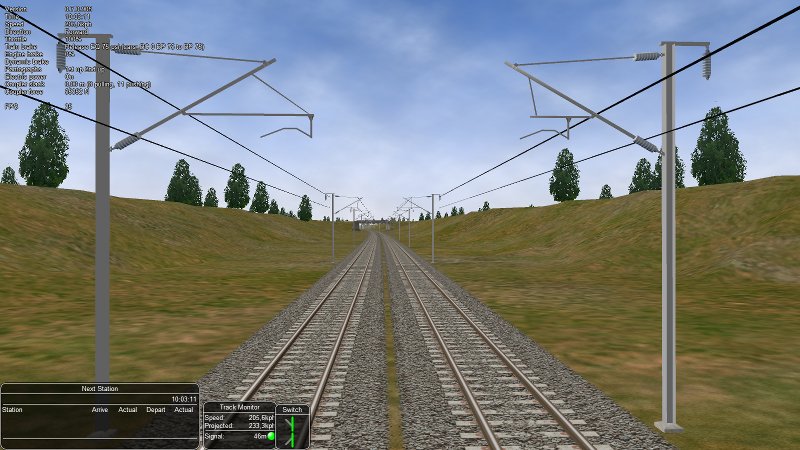
On MSTS the overheadwire is OK. If the OR team needs specific additional info, pls tell me what I should provide.
CarloLast edited by csantucci; 12-25-2011, 05:39.sigpicComment


Comment