Feature Requests Implemented

Collapse
X
 
  • Time
  • Show
Clear All
new posts
  • eric
    9500 Post Veteran and Administrator


    • Dec 2002
    • 9583
    • NS MP245.4 CNO&TP South District
    • English, SQL
    • General

    #31
    Originally posted by kapitaen
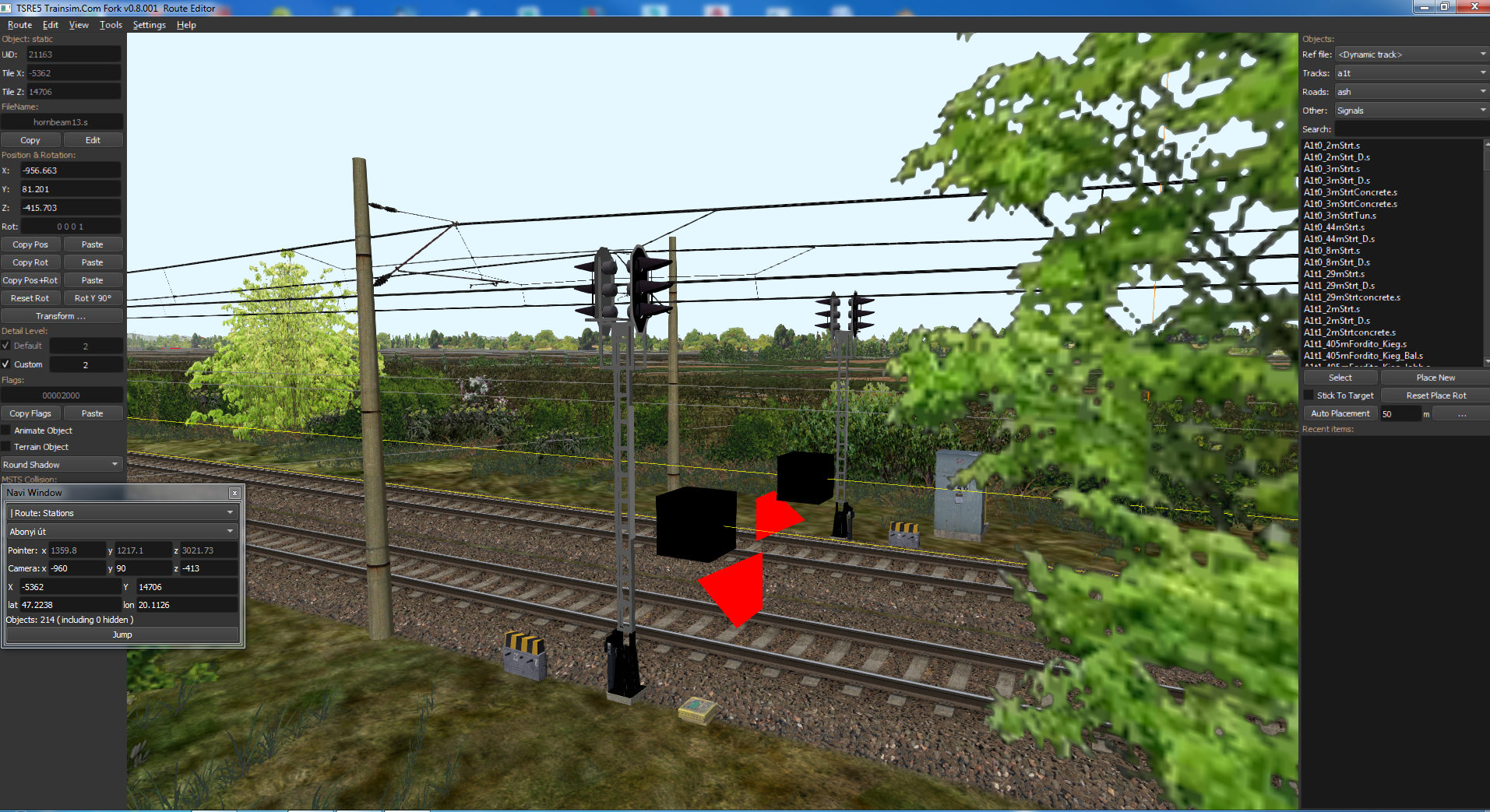
    Secondly, it is very difficult to recognise in which direction the red signal pyramid is pointing when setting the signals. You always have to position the camera over it first. Perhaps there is a possibility that this pyramid can cast a shadow or that the incidence of light on the sides can be displayed differently.
    This could be problematic, but maybe there's a third option... This object isn't a shape -- it's being calculated and rendered, so I don't know that it can cast shadows on-demand.

    Here's the original:

    capture_500450.jpg

    I can put a gap at the back to help make it clearer as where the point is when viewed from the front, top and sides:

    capture_500452.jpg

    I can also make it "invisible" from behind:

    capture_500449.jpg

    or simply visibly smaller from behind:

    capture_500451.jpg

    I'll include that in the testing release later tonight if you want to give it a look.
    Last edited by eric; 02-28-2024, 21:01.
    If you like what you see here at Trainsim.com, be it the discussions and knowledge in the forums, or items available in our library, I hope you'll consider a paid membership to help support keeping the site operating.... Thanks!

    Comment

    • eric
      9500 Post Veteran and Administrator


      • Dec 2002
      • 9583
      • NS MP245.4 CNO&TP South District
      • English, SQL
      • General

      #32
      As I was working on Jan's request from above... I came up with a couple questions and need some input from other route builders....


      After placing a signal, the red pyramid marker doesn't physically move. When I click on it, the related shape moves, and I can use the flip button in the properties box to change its direction.

      It's been ages since I placed signals, and I don't remember if the red pyramids were stationary or moved like they did in MSTS.

      Is this a correct behavior for TSRE?

      I suspect it is because I see some rather sloppy TrItem placements for the signals in my own routes (shocking, and no surprise) yet the signals themselves are lined up correctly.

      The second question may be a little more tectonic in terms of a change....

      I find that the pyramid pointing away from the block being protected is contradictory to how the pyramids are used elsewhere... With the siding and platform pyramids, they string together the start and end of what they define. Makes perfect sense as the pyramids come to a point and the connecting line forms....

      Not so on the signal -- the point arguably is in the direction the light should be seen from, but intuitively, I'd think this has been wrong for 20 years, and it should point into the block it protects.

      To avoid confusion... I came up with this.... I might be able to make it an option in the next testing version:

      Two of the sloppier placements... it's obviously protecting more than the 0 to 10m segment between the arrow tips...

      capture_500456.jpg capture_500454.jpg

      These are a little cleaner because they're mostly absolute signals:

      capture_500457.jpg capture_500458.jpg capture_500455.jpg

      This would match the nomenclature used by the ORTS Trackviewer as well.

      Thoughts?
      If you like what you see here at Trainsim.com, be it the discussions and knowledge in the forums, or items available in our library, I hope you'll consider a paid membership to help support keeping the site operating.... Thanks!

      Comment

      • Laci1959
        New Member
        • Jun 2018
        • 9

        #33


        Hello.

        The mobility of the red pyramids is very lacking. Especially in cases where it has to be placed on the bridge structure shown in the pictures. I would be glad.
        I also like the second option. Note that for many people, habit is king. Sometimes with me too.
        The signal in the picture is a shape, but signals in two directions with the SignalFlags ( BACK_FACING ) setting. This is the reverse light option. Perhaps the two arrows pointing in opposite directions would be good for it?

        Sincerely, Laci1959​

        Comment

        • kapitaen
          Senior Member

          • May 2010
          • 331
          • Germany
          • German + a little bit English
          • MSOR

          #34
          In the MSTS it was possible to select the signal pyramid and then move it along the track. The signal itself followed automatically. This was the first hard changeover to the TSRE. Already with GermanRailroads 1, the signals were placed 3m to 5m in front of the pyramids, because in the tasks there was often an abort due to a red signal being passed over, even though you were still clearly in front of the signal. The MSTS Edi was the better option for placing the pyramid.
          Pyramid and light signal point in the direction of the approaching train. This means that the pyramid actually points against the direction of travel. Changing it would mean another rearrangement!​
          Your version looks good.

          Greetings Jan

          Select

          Screen Shot 02-29-24 at 09.24 AM.jpg

          Move

          Screen Shot 02-29-24 at 09.24 AM 001.jpg

          Comment

          • eric
            9500 Post Veteran and Administrator


            • Dec 2002
            • 9583
            • NS MP245.4 CNO&TP South District
            • English, SQL
            • General

            #35
            Thanks for confirming the non-movement. I can look at why that can't be done, yet the platform and siding can which are also TrItems.

            If you like what you see here at Trainsim.com, be it the discussions and knowledge in the forums, or items available in our library, I hope you'll consider a paid membership to help support keeping the site operating.... Thanks!

            Comment

            • GokuMK
              Senior Member

              • Oct 2015
              • 729
              • Poland

              #36
              Originally posted by eric
              Thanks for confirming the non-movement. I can look at why that can't be done, yet the platform and siding can which are also TrItems.
              You can just enable it for signals too if you want. I didn't do it because there was no one willing to test this important change.

              Comment

              • GokuMK
                Senior Member

                • Oct 2015
                • 729
                • Poland

                #37
                Originally posted by Laci1959


                Hello.

                The mobility of the red pyramids is very lacking. Especially in cases where it has to be placed on the bridge structure shown in the pictures. I would be glad.
                Change placement mode to stick to all and you can place items on bridges etc too.

                Comment

                • eric
                  9500 Post Veteran and Administrator


                  • Dec 2002
                  • 9583
                  • NS MP245.4 CNO&TP South District
                  • English, SQL
                  • General

                  #38
                  Originally posted by GokuMK
                  You can just enable it for signals too if you want. I didn't do it because there was no one willing to test this important change.
                  Agreed, it's messing with the TDB. I found the code to try under the PlatformObj but haven't quite figured out where the select is redirecting to the signal as opposed to the TrackObj. That's this afternoon's reading....

                  Sent from my SM-S911U using Tapatalk

                  If you like what you see here at Trainsim.com, be it the discussions and knowledge in the forums, or items available in our library, I hope you'll consider a paid membership to help support keeping the site operating.... Thanks!

                  Comment

                  • CSRX
                    13500 Post Veteran


                    • Oct 2005
                    • 13646
                    • Lincoln, ME
                    • English
                    • ORTS

                    #39
                    Originally posted by GokuMK
                    TSRE v5 was incomplete and didn't worked with QuadTree. Routes made using v5 are "broken".

                    You can fix QT in MSTS QT editor. Maybe there are other tools.
                    I fixed my routes using hidden functions in TSRE code.
                    MSTS editors do not work at all on windows 11, which is why I use TSRE.

                    Thanks for the advice/help anyways..
                    Last edited by CSRX; 02-29-2024, 20:29.
                    -Shawn K-
                    MEC Mountain Subdivision - Trackwork 70%, Scenery 35%
                    ​

                    Comment

                    • landnrailroader
                      4000 Post Veteran


                      • Nov 1999
                      • 4171
                      • Jacksonville,, FL, USA.
                      • ORTS

                      #40
                      One of the most vexing issues I see in TSRE has to do with the object selection panel at the top right. The slider is a dark grey on a black background and I find the dang thing very difficult to see. Is there any possibility of making the slider a lighter color, even a lighter gray would help a lot?

                      Jerry Sullivan

                      Comment

                      • eric
                        9500 Post Veteran and Administrator


                        • Dec 2002
                        • 9583
                        • NS MP245.4 CNO&TP South District
                        • English, SQL
                        • General

                        #41
                        Colors are moderately easy to make configurable. I'll try to get it into next week's testing release.

                        landnrailroader Well, you learn something new every day..... Apparently it's already possible to go with something other than the dark theme....

                        For a theme that presumably matches the one for your PC's system settings, change or add the following setting:

                        systemTheme = true

                        capture_500461.jpg
                        Attached Files
                        Last edited by eric; 03-01-2024, 19:14.
                        If you like what you see here at Trainsim.com, be it the discussions and knowledge in the forums, or items available in our library, I hope you'll consider a paid membership to help support keeping the site operating.... Thanks!

                        Comment

                        • landnrailroader
                          4000 Post Veteran


                          • Nov 1999
                          • 4171
                          • Jacksonville,, FL, USA.
                          • ORTS

                          #42
                          That did itt. In my case the black areas changed to white.

                          Jerry

                          Comment

                          • denglihong
                            New Member
                            • Jan 2024
                            • 18
                            • Mianyang, Sichuan, China
                            • Chinese, C#

                            #43
                            There is another bug, if I remove a switch from the track database and then add it back to the track database, two JNodePosNs will appear in the world file. This can usually be detected by TSUtil, but TSUtil cannot fix this error (it will remove the switch from the world file when fixing the error). This is the only way to manually fix it (video attached). Can you fix this issue?
                            Attached Files

                            Comment

                            • eric
                              9500 Post Veteran and Administrator


                              • Dec 2002
                              • 9583
                              • NS MP245.4 CNO&TP South District
                              • English, SQL
                              • General

                              #44
                              I've fixed the double JNode issue in v8.003. It's not checked into Git yet, but I do a compare in the Save function to check that the position of the JNode matches the object, and set a flag so that only one is written. I'm traveling today but will PM you the fix.
                              If you like what you see here at Trainsim.com, be it the discussions and knowledge in the forums, or items available in our library, I hope you'll consider a paid membership to help support keeping the site operating.... Thanks!

                              Comment

                              • GokuMK
                                Senior Member

                                • Oct 2015
                                • 729
                                • Poland

                                #45
                                Originally posted by CSRX
                                So Eric, is it possible to have something to fix the Quadtree for routes that may be broken, or is this going to be a situation where myself or others are going to be SOL, as this is what it seems for those that can't use the original MSTS editors, Route Riter or have zero knowledge on how the trick the current TSRE into doing so....
                                As a route builder, you can just have QT disabled for affected, old routes. But don't ask for it to be disabled by default, so that no new routes are damaged.

                                Comment

                                Working...