TSRE Changes / Wish List

Collapse
X
 
  • Time
  • Show
Clear All
new posts
  • kapitaen
    Senior Member

    • May 2010
    • 331
    • Germany
    • German + a little bit English
    • MSOR

    #211
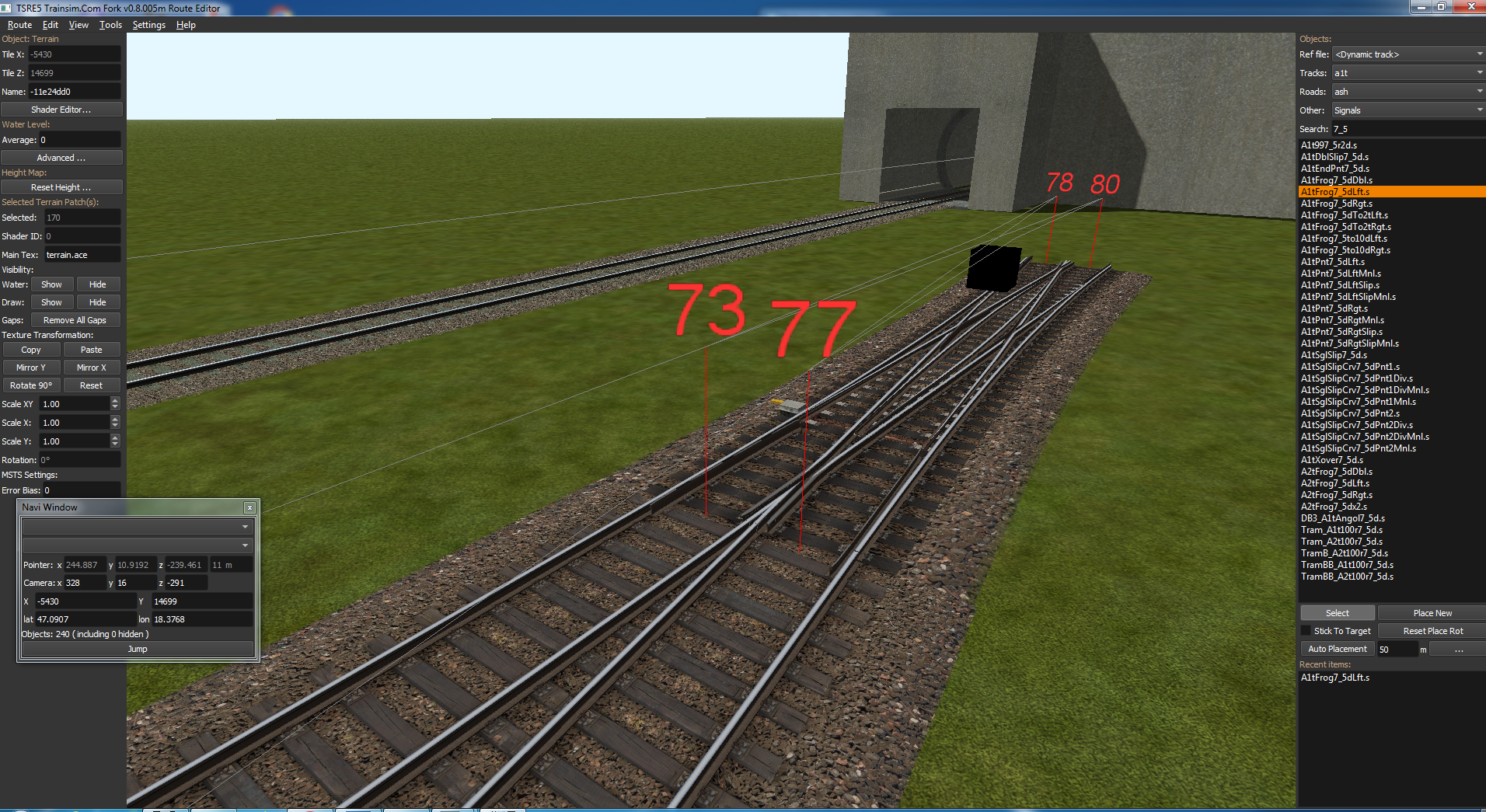
    Norbert has illustrated a few turnouts in simplified form for GermanRailrods. The DB3_A1tDblSlip7_5d.s created in this way has no animation and has continuous tracks. There are no replacement shapes for the corresponding A1tPnt7_5dLftSlip.s and A1tPnt7_5dRgtSlip.s. As a result, these two shapes disrupt the appearance.

    Screen Shot 01-28-25 at 10.34 PM.jpg

    In the published route, these two shapes have been lowered until they are no longer visible. For many turnouts, however, it is easier to make these two shapes invisible using the "winter method".
    To do this, both shapes are switched to BlendATex and the ACleanTrack2.ace is given an alpha channel.
    This makes these shapes invisible. Unfortunately, this also applies to the rails of the dynamic tracks.
    In OpenRails, however, everything is displayed correctly.

    Screen Shot 01-28-25 at 10.38 PM.jpg

    Jan

    Comment

    • ruifonseca
      1
      • Nov 1999
      • 100
      • Lisboa, Portugal.

      #212
      Actually I probablly will never use that lenght. My layouts dont really use straight DT.
      But I do extensively use Dt on curves. What i do need the straight in DT for is, as a guide. So I am sure that the curve tangent follows the precise heading of a track. the longer i get that, the more accurate i can be.

      Comment

      • eric
        9500 Post Veteran and Administrator


        • Dec 2002
        • 9583
        • NS MP245.4 CNO&TP South District
        • English, SQL
        • General

        #213
        Painting Tools Upgrade...

        After using the painting tool a bit over the past month, I've added a few tweaks that might be useful to those who also do terrain painting.

        The top two tokens in Settings.txt are new, and will be available when the next texting version is released in a few days.

        The next six tokens are already present in v8.002 onward, and allow you to predefine your preferred Brush and Enbankment settings.
        Code:
        preloadTextures = "UP-MedGrey-64.bmp,arizona.png,concrete-noform.ace"    // new v8.005p
        terrainBrushColor = "#1B2E29"                                            // new v8.005p
        
        terrainBrushSize = 25                                                    // existing v8.x
        terrainBrushIntensity = 70                                               // existing v8.x
        terrainSize = 1                                                          // existing v8.x
        terrainEmbankment = 2                                                    // existing v8.x
        terrainCut = 2                                                           // existing v8.x
        terrainRadius = 9                                                        // existing v8.x
        capture_5100309.jpg Preloaded Textures

        In Settings.txt, you can now specify up to seven textures that will be pre-loaded in the Texture picker. These would go in the following token:
        The BMP, PNG, or ACE files used here need to be in your TERRTEX directory.

        If you open up a route where they don't exist, they won't be loaded nor will there be an error.

        Preferred Brush Color

        Currently, this defaults to black (#000000), but I prefer something else for asphalt roads... the terrBrushColor token will take an HTML encoded color value, or a named color. It does not support RGB or CYMK values.

        PinPoint Brush

        When doing terrain height adjustments, it's not hard to wind up with a Florida Sinkhole where you only intended to take out a few shovels of dirt... Clicking PinPoint set up the brush to the bare minimum needed for doing precision adjustments.

        Restore Defaults

        This should be self-explanatory, but if you've made adjustments to the size, intensity, or the embankment settings, this will restore whatever was in your Settings.txt preferences or the defaults in the program.


        Hope everyone finds these useful. Feel free to suggest others.
        Last edited by eric; 02-12-2025, 17:03.
        If you like what you see here at Trainsim.com, be it the discussions and knowledge in the forums, or items available in our library, I hope you'll consider a paid membership to help support keeping the site operating.... Thanks!

        Comment

        • Timbit
          Senior Member


          • Nov 1999
          • 448
          • Nepean,Ontario
          • English
          • MSOR

          #214
          Hi Eric,
          I use TSRE for the consists and activities. I really like it. Is there a way that when looking at an activity or consists that a car is missing, it would highlight it in red or yellow, and that way, your eye would catch it faster? This is just a thought that it might help those looking for a missing car or engine.
          Thanks for your time.
          Tim

          Comment

          • Laci1959
            New Member
            • Jun 2018
            • 9

            #215
            Hello.

            I have such an object, I'd be happy to share it if you're interested. It uses DB3 textures. Unfortunately, its animation doesn't work, only in the Shape View program. I think it's a consequence of the strict coding. A shape file only knows one animation, and DB3_A1tDblSlip7_5d has two at both ends.
            If there's a demand, I can even provide it in 3ds format.


            Best regards, Laci1959

            Comment

            • Laci1959
              New Member
              • Jun 2018
              • 9

              #216
              Hello.

              Objects can be rotated by 90 degrees with a dedicated button. In addition, by clicking the Transform... button, you can rotate the object by up to 0.5 degrees.
              After clicking the Auto Placement button, by clicking the ... button, you can set the offset and rotation relative to the railway track or road. You don't need the telepole.dat file either. If you set it up correctly, the fence will follow the road nicely. You can even place houses with the appropriate side distance. You can use the Z button to limit the following of the railway or road.

              Best regards, Laci1959

              Comment

              • mnowosad
                Senior Member

                • May 2010
                • 126

                #217
                New version from Goku
                TSRE5_v0.7.014.exe 17-Jan-2025 17:37

                https://www.youtube.com/playlist?lis...SIYbL4sRM-VMd7

                Comment

                • scottb613
                  2500 Post Veteran


                  • Apr 2003
                  • 2848
                  • Downeast Maine (soon)
                  • ORTS

                  #218
                  Originally posted by mnowosad
                  Hi Folks,

                  Is there any change list - or - clue to what's been changed?

                  Regards,
                  Scott

                  <a href=https://www.trainsim.com/forums/filedata/fetch?filedataid=80663&type=full title=thumb_80663.png >thumb_80663.png</a>​ My Blender Models

                  Comment

                  • eric
                    9500 Post Veteran and Administrator


                    • Dec 2002
                    • 9583
                    • NS MP245.4 CNO&TP South District
                    • English, SQL
                    • General

                    #219
                    Originally posted by scottb613
                    Is there any change list - or - clue to what's been changed?
                    Nope, and the only item I see updated on GitHub was a pull request that upped the ceiling for dynamic track values and was submitted over a year ago.

                    I haven't created a push/pull from my fork, but that's also assuming that he's kept GitHub updated. I'm admittedly behind on updating the repository during testing. The Stable releases are all up, though, and anyone can create a request to pull that up to his master.
                    If you like what you see here at Trainsim.com, be it the discussions and knowledge in the forums, or items available in our library, I hope you'll consider a paid membership to help support keeping the site operating.... Thanks!

                    Comment

                    • scottb613
                      2500 Post Veteran


                      • Apr 2003
                      • 2848
                      • Downeast Maine (soon)
                      • ORTS

                      #220
                      Originally posted by eric
                      Nope, and the only item I see updated on GitHub was a pull request that upped the ceiling for dynamic track values and was submitted over a year ago.

                      I haven't created a push/pull from my fork, but that's also assuming that he's kept GitHub updated. I'm admittedly behind on updating the repository during testing. The Stable releases are all up, though, and anyone can create a request to pull that up to his master.
                      Hi Eric,

                      Thanks for your insights - I took a cursory look around - didn't notice anything obvious.

                      Regards,
                      Scott
                      <a href=https://www.trainsim.com/forums/filedata/fetch?filedataid=80663&type=full title=thumb_80663.png >thumb_80663.png</a>​ My Blender Models

                      Comment

                      • scottb613
                        2500 Post Veteran


                        • Apr 2003
                        • 2848
                        • Downeast Maine (soon)
                        • ORTS

                        #221
                        Hi Eric,

                        One thing I’ve noticed - is when is when using Dynamic Track - when you Flex to join to the far end - the track DB line doesn’t merge perfectly - while it’s close there’s definitely a separation - more in elevation than lateral movement. It makes for a definite jolt when you ride over the joint. You can smooth it out by manually playing with the grade/elevation - and it’s better for driving - however - if you zoom in tight on the yellow track DB line - there’s always a minute space.

                        Just an FYI - don’t know how difficult it would be to fix - but if you use Dynamic Track - it would be massively better to make the connection perfectly each time.

                        Thanks.

                        Regards,
                        Scott
                        <a href=https://www.trainsim.com/forums/filedata/fetch?filedataid=80663&type=full title=thumb_80663.png >thumb_80663.png</a>​ My Blender Models

                        Comment

                        • eric
                          9500 Post Veteran and Administrator


                          • Dec 2002
                          • 9583
                          • NS MP245.4 CNO&TP South District
                          • English, SQL
                          • General

                          #222
                          Is that happening with my version, Goku's, or both?

                          I know he's using a floating point value -- I'm using 7, he's using 8. The lower FPV has solved those gaps in other places, but I haven't touched Flex, nor do I plan to.
                          If you like what you see here at Trainsim.com, be it the discussions and knowledge in the forums, or items available in our library, I hope you'll consider a paid membership to help support keeping the site operating.... Thanks!

                          Comment

                          • yellowdog
                            1500 Post Veteran


                            • Nov 1999
                            • 1586
                            • .
                            • MSOR

                            #223
                            I noticed that the consist editor on goku's latest version didn't display rolling stock correctly. Just weird pink blocks. I'm on mobile, so no screenshots available atm.

                            Comment

                            • scottb613
                              2500 Post Veteran


                              • Apr 2003
                              • 2848
                              • Downeast Maine (soon)
                              • ORTS

                              #224
                              Originally posted by eric
                              Is that happening with my version, Goku's, or both?

                              I know he's using a floating point value -- I'm using 7, he's using 8. The lower FPV has solved those gaps in other places, but I haven't touched Flex, nor do I plan to.
                              Hi Eric,

                              I’ve been using your version since you started the mods. Let me try Goku’s version and see if there’s any difference. LOL - yeah - I kind of figured Flex was one of the more complex functions in TSRE. I still don’t understand why sometimes I get the vector window and sometimes I don’t. Sometimes it goes off to limbo - if I move my relative camera position - then it works.

                              Regards,
                              Scott

                              <a href=https://www.trainsim.com/forums/filedata/fetch?filedataid=80663&type=full title=thumb_80663.png >thumb_80663.png</a>​ My Blender Models

                              Comment

                              • eric
                                9500 Post Veteran and Administrator


                                • Dec 2002
                                • 9583
                                • NS MP245.4 CNO&TP South District
                                • English, SQL
                                • General

                                #225
                                Flex can be useful as an approximation tool.. I've used it as a complex ruler for getting curve, straight and elevation change dimensions for a gap, and then will delete the DT and replace it with fixed sections.

                                I know there was a placement issue at one point that Dave Nelson pointed out with not recognizing top of rail ( 0.12m to 0.19m ) vs axis zero... does that seem to be the approximate vertical difference?
                                If you like what you see here at Trainsim.com, be it the discussions and knowledge in the forums, or items available in our library, I hope you'll consider a paid membership to help support keeping the site operating.... Thanks!

                                Comment

                                Working...