-
-
I had installed here the TSRE v0.69, very outdated I know. Then today I downloaded the v8.004 from the library. But there is one thing, that I'm miss from the old one compare to this new version. When using the Route Editor on the v0.69 I was able to zoom in and zoom out using the scrol on the mouse, now on the v8.004, the scrol on the mouse only allow me to go forward or backward, is there any possibility where can I fix that option again on this new version ? Thanks
Comment
-
The camera is locked by default -- you can unlock it with the "." (period) key.
You can also unlock it by default within the Settings.txt file: lockCamera = falseLast edited by eric; 05-28-2024, 14:48.If you like what you see here at Trainsim.com, be it the discussions and knowledge in the forums, or items available in our library, I hope you'll consider a paid membership to help support keeping the site operating.... Thanks!Comment
-
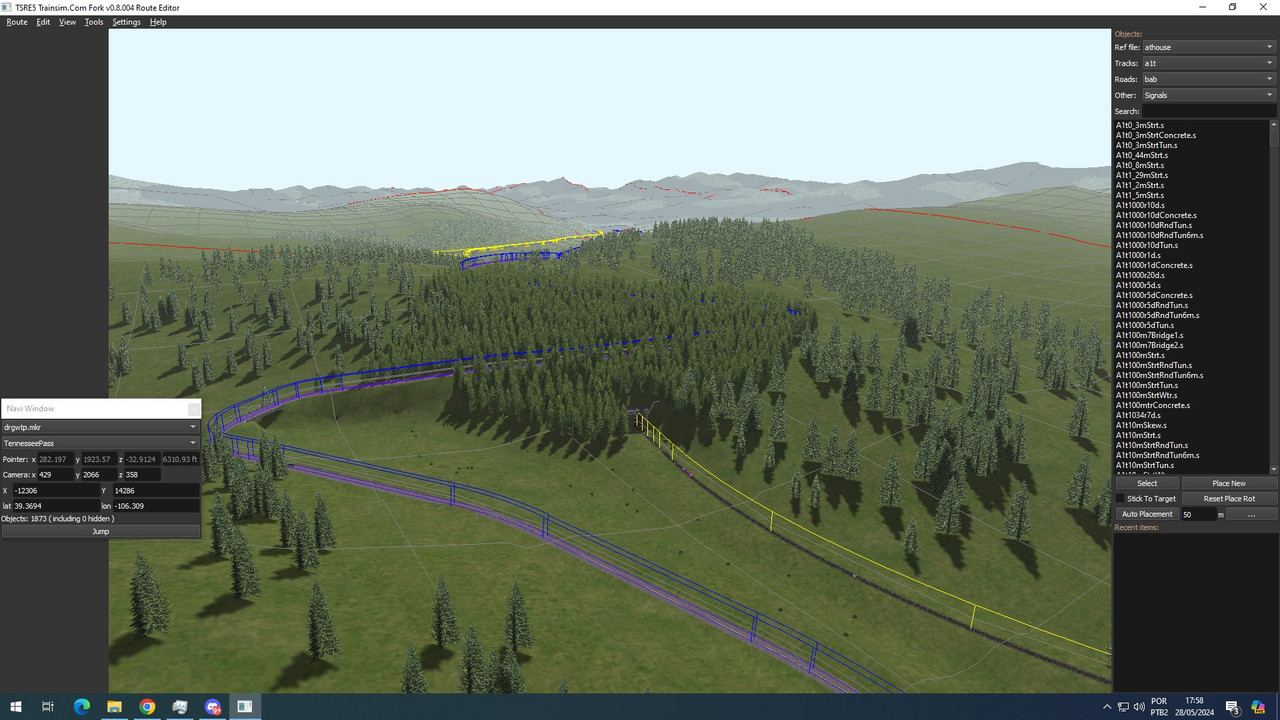
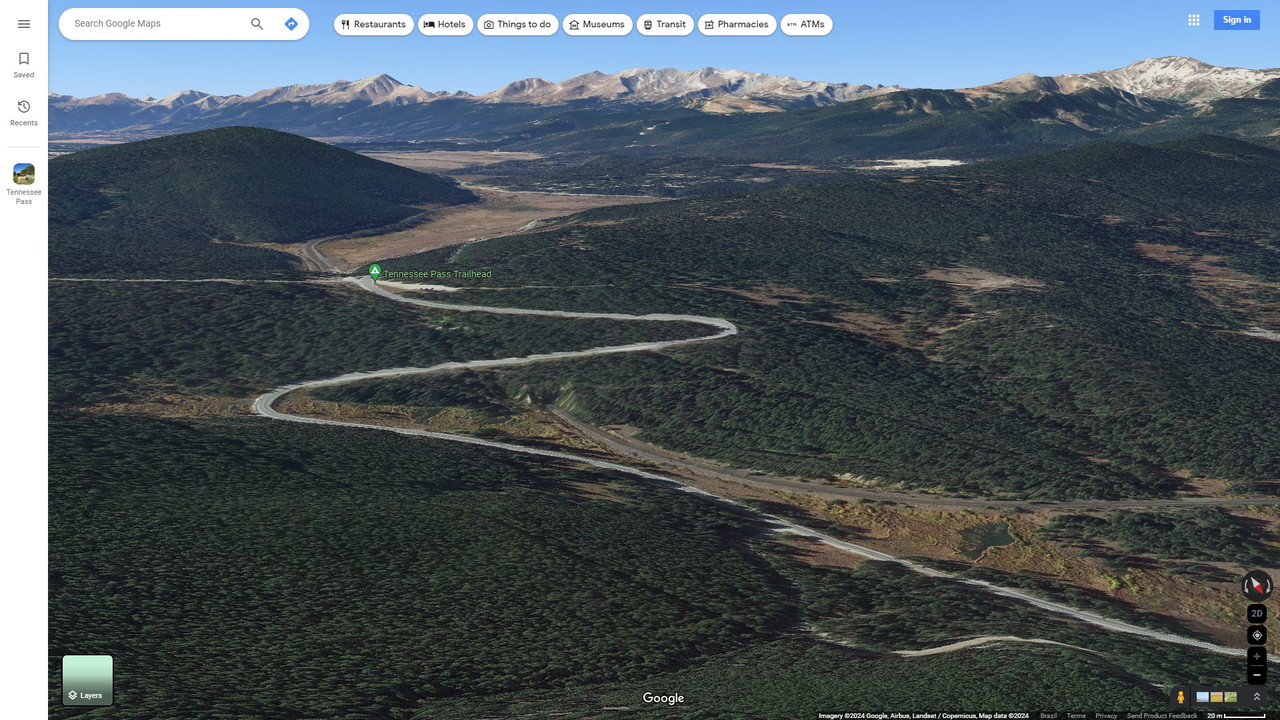
Thanks Eric, worked just like the older version . Now I can ''fly'' a bit more further on the editor. I started to do a ''reforestation'' on the summit area of the Tennessee Pass, with the help of Google Maps, if there was a chance to ''copy and paste'', the mountains from the satellite images (2nd photo) to the game, would be awesome.
Comment
-
About locking a camera to the ground in new version is a bit strange decision to me.
If you edit track or making one, it is not better for camera to be above and move freely? When you have overview of a "situation" above?
Leaving camera unlocked from the beginning would be very reasonable. What was the reason behind the decision to lock camera to the ground in the new version? Was really a lot of people supporting this change? Or was this decision just from you alone?
Making it for a user, who never thought about this option that from the ground you can see more, was reasonable is very interesting to me.
Have a good day.Comment
-
It looks like some of the pickup points in OR are not available in TSRE. Would it be possible to add them as it will save manual editing of the World files.
The current list in OR is as follows:
HTML Code:None = 0, FreightGrain = 1, FreightCoal = 2, FreightGravel = 3, FreightSand = 4, FuelWater = 5, FuelCoal = 6, FuelDiesel = 7, FuelWood = 8, // Think this is new to OR and not recognised by MSTS FuelSand = 9, // New to OR FreightGeneral = 10, // New to OR FreightLivestock = 11, // New to OR FreightFuel = 12, // New to OR FreightMilk = 13, // New to OR SpecialMail = 14, // New to OR Container = 15 // New to OR
Comment
-
I can get that into the next testing release.If you like what you see here at Trainsim.com, be it the discussions and knowledge in the forums, or items available in our library, I hope you'll consider a paid membership to help support keeping the site operating.... Thanks!Comment
-
Eric has done a great job on enhancing various aspects of TSRE, for which I for one am very grateful. However, it seems to me there is one area of TSRE that still needs considerable attention and this is the Activity Editor, which I believe Goku left unfinished when he was forced to give up development of TSRE. I have only used it to write simple test activities but a trainsim colleague of mine, Richard Stevenson, has encountered significant problems when attempting to write fairly sophisticated activities. Richard has successfully written a large number of activities for my Chiltern route and for other routes using MSTS AE. He now needs to migrate to using TSRE AE since MSTS AE is no longer capable of opening my route*. However, in doing so he has encountered some very frustrating issues. I can do no better than quote from a recent email I received from him in which he comments on the issues he has faced in using TSRE AE.
"From the point of view of writing more complicated activities, the biggest issue is that in an MSTS/OR activity AI traffic is written into both the act file and the trf, although slightly differently in each case, but needs to exist in both in order to appear on screen when driven.
When an AI service is created in the editor, the trf file is updated but the act is not. Sometimes it can be made to by making another change in the activity - such as its length - in order to trigger both files to be saved when ‘save’ is chosen, though this is not always a certainty and other, manual, work needs to be done on the act file afterwards.
It seems that on occasion the act and trf files revert back to an earlier version, though I haven’t yet discovered why or at what point. It seems to be random, though there will, of course, be a reason. If the trf changes are not saved, I suspect that perhaps the act file being out of sync changes the trf file back to what it thinks it should be. This can be seen by saving times for the appearance of AI traffic and then the times suddenly reverting to those of an earlier version.
I also suspect that the AE struggles with manual changes being made to the files, which can be required sometimes to insert missing AI traffic into the act file. Perhaps it is reverting to an earlier version as a result.
Whatever the actual reason, it can make it very difficult to make progress with an activity, the feeling being that one is swimming against the current and occasionally losing ground.
There is also an issue with placing static consists. In a busy environment, this can take the form of multiple consists being placed in one location or very close together. Then there needs to be an edit to remove what is unnecessary, also tricky as it is not easy to select each consist to remove.
As a fix there needs to be a means to prevent the overlaying of multiple static consists.
Paths can also be a problem in the TSRE AE. It seems all too easy to create a bad path which looks fine, leading to AI services not appearing without any obvious reason why. Some assumptions are perhaps being made in the path editor to create these. How do you know a path is bad and its replacement is good when it looks like the original one?"
I have neither the knowledge nor the skill to tackle making fixes for any of these problems. I sincerely hope that there is someone out there - Eric perhaps? - who is prepared to invest the time and energy in improving this aspect of TSRE.
Martin
*This is an entirely separate problem, which Slipperman has been looking into so far without success. For a long period in the development of my Chiltern route, though I was now using TSRE for further editing it was still possible to open the route in MSTS AE in order to create activities. Then at some point MSTS AE refused to open the route any longer and now gives the error message "Failed to open track database". Hence Richard's attempts to use TSRE to write activities for the route.Comment
-
I have no plans to rework the activity editor, admittedly because it's not a part of the tool I use. My interests are in route building, not activity running, and when I do anything activity related, I'm using timetables in ORTS, not activities. I just don't have the time or interest to dive into understanding how the various files need to interact for activities when 99% of what I do can be done in a timetable file.
If someone wants to come up with code improvements for the AE functions, I am more than willing to roll those into the Fork and help debug them. Likewise for terrain improvements, reading GeoTiff, terrain painting, etc.If you like what you see here at Trainsim.com, be it the discussions and knowledge in the forums, or items available in our library, I hope you'll consider a paid membership to help support keeping the site operating.... Thanks!Comment
-
The activity editor under TSRE "Mostly works" however as was said it was basically unfinished or has a few errors in it. I've been working a "rework" of the contributed software "Track View" to include an activity editor within that basic framework. Several things keep popping up that tend to slow progress on that effort....Knee surgeries, family issues, etc...and occasionally a laziness streak...After all, I'm retired.....so working on code is more of a hobby for me than anything else. Also, When I was programming....C and C++ were just started out and c# was a figment of someones imagination....Being an "old school" programmer also provides roadblocks when I start looking at Object Oriented Programming. One of the most helpful tools for me in understanding Obj. programming...has been a very Old DBMS programming language called Visual Foxpro. it's a xbase DBMS programming language that support was terminated by MS 2010-15. MS has since released the source code for VFP and few hobbyist have provided some support for it...anyway......
I got off track.....TSRE will not update an activity file with new traffic or updated traffic if one already exists within an activity. However if you remove the traffic from the activity...("and modifiy one of the basic elements of the activity. I always add a second to starttime when removing traffic...then subtract a second when I readd a traffic file)....then select the newly modified traffic file and hit save you can readd/modify the traffic file that is contained in the activity file.
Also TSRE currently doesn't support all the "Openrails" specifics of an activity. things such as "modifying an AI waitpoint" or "automatically enabling AI horns at crossings (also enables player train horns sounding when running player train in Auto mode) those still have to be done manually. I'm not positive but I don't think it handles "include" files in activities. (BTW, in my reworked version of the activity editor, the traffic is handle as an include file from the traffic folder).....anyway.....
FYI....right now I'm stuck on the drawing/resizing of a track database....I guess I'll go back to figuring that out...
later
Amtrak115Comment
-
Simply because it is being done in C#, accommodating the activity editor within TrackViewer is absolutely the right place for it.If you like what you see here at Trainsim.com, be it the discussions and knowledge in the forums, or items available in our library, I hope you'll consider a paid membership to help support keeping the site operating.... Thanks!Comment
-
Eric, One of the other things I've been working on and trying to figure out is a generic way to spawn TSRE's Consist Editor from within Code....No use reworking a very workable app...just use it....
on the other hand, I wish Consist Editor had a few more features that it currently doesn't have or implemented.....
Amtrak115Comment
-
I fully understand your position, Eric. Like you, I am primarily interested in route building and tend to write simple activities merely to test out additions and changes to my route. I have often thought about experimenting with timetable mode but do not have the necessary information for creating authentic timetables for the period of my route.
Your work, amtrak115, sounds extremely interesting. I imagine though that you are nowhere near being in a position to share your progress, right? Anyway, I hope that at some time in the future it will result in a better Activity Editor for everyone.
MartinComment
-
In reference to the chart above, originally posted a while back, that all depends on who's data base your looking at. Rule one of statics: Find the right group to ask that supports your theory. (RE; find the right nine dentists that will recommend your toothpaste out of ten you ask first.) Anyway, to keep this hobby alive we need to be able to reach users of lower end computers as well. Having the ability to switch texture size, if possible would be a way to go. (Could larger texture be resized smaller by some sort of utility within the program?)Geary "Mr. Hart" Gerhardt - Owner and CEO of Hart Rail Lines, Hart Commuter Railways, and Hart Rail Cars. Also the defunct Hart Electric Transit.
Its Your Train Sim World, sim as you please.Comment


Comment