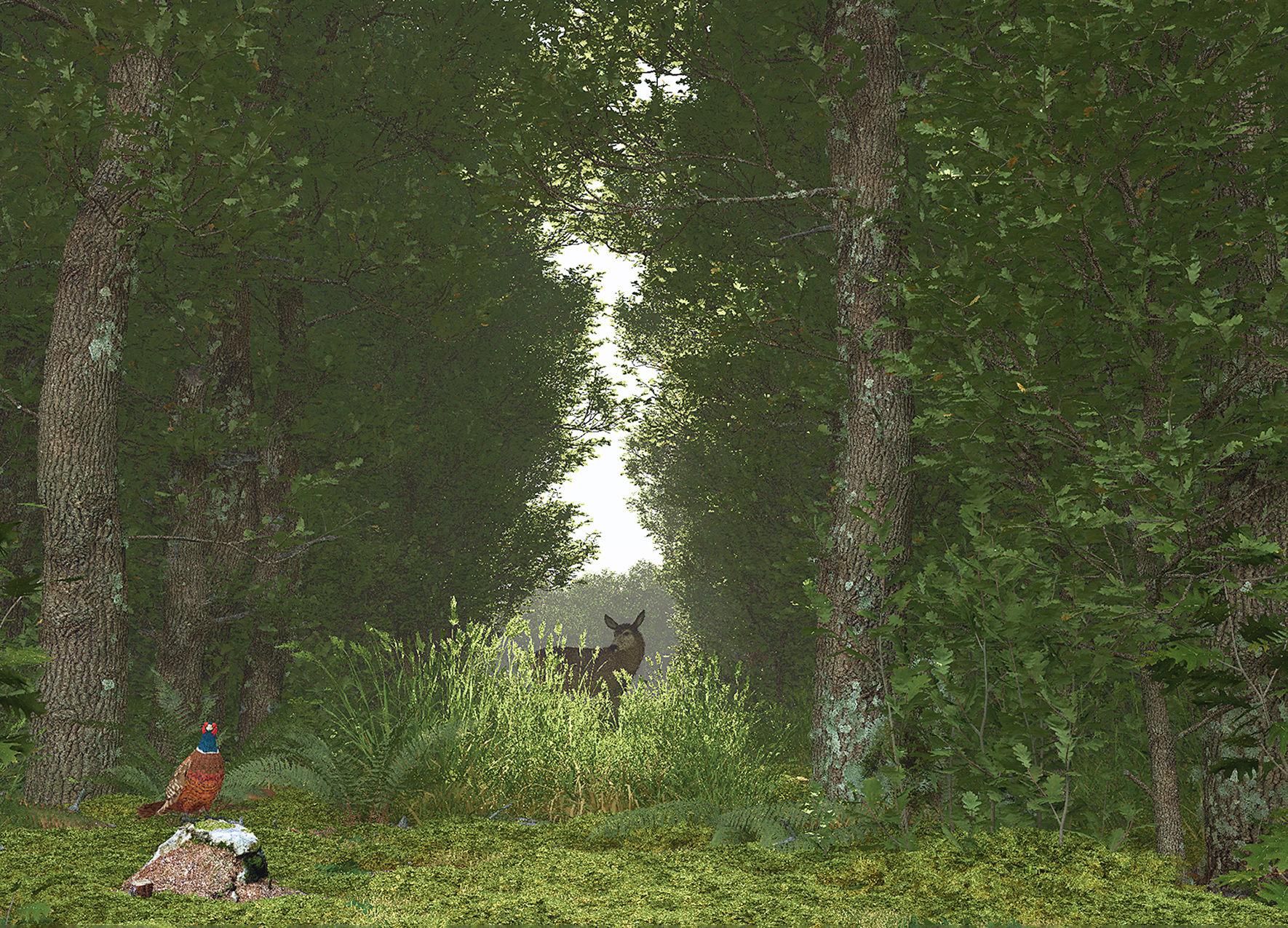
Free Vegetation Software - PlantFactory

Collapse
X
 
  • Time
  • Show
Clear All
new posts
  • scottb613
    2500 Post Veteran


    • Apr 2003
    • 2848
    • Downeast Maine (soon)
    • ORTS

    #1

    Free Vegetation Software - PlantFactory

    Hi Folks,

    Download VUE, PlantFactory, and PlantCatalog for free to create 3D environments, procedural vegetation, and realistic digital renderings.


    Credit for the FYI:
    TrainSimJack


    Looking to create high quality textures for all your vegetation needs - you need to look no further than PlantFactory. It used to be payware but now it's free - it appears to have been an industry standard.

    While it uses Geometry Nodes which can be a bit overwhelming for the uninitiated - there are vast libraries of content included. These libraries include all kinds of easily tunable parameters so that no two trees are identical (the beauty of Geometry Nodes). There are a bunch of tutorials online.

    Basic Categories
    • Random Seed Parameter (mathematical not biological)
    • Age
    • Health
    • Season
    • Size

    The seasons seem to realistically color the trees for Autumn and Winter has nice trees without leaves. We can get away from the overly saturated autumn colors and white winter leaves we see so often. It can produce 3D trees as well - but I haven't figured out if there is a way to keep the poly count under control. You need to download all the extra libraries to get the full content which offers a wide variety of vegetation from around the world.

    The potential here is vast and the variation endless.

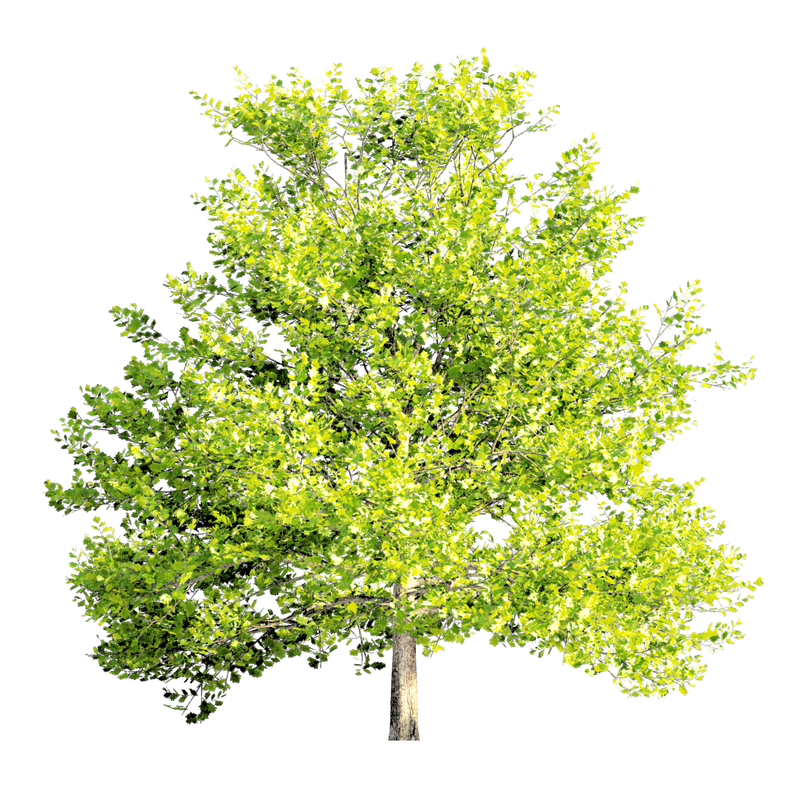
    At first - I thought I would have to export the models to Blender to make my textures - but no - it has an advanced render engine built in and will export your foliage isolated from the backdrop with a respective alpha channel file.

    A couple hours of playing around to become familiar:


    Regards,
    Scott

    <a href=https://www.trainsim.com/forums/filedata/fetch?filedataid=80663&type=full title=thumb_80663.png >thumb_80663.png</a>​ My Blender Models
  • qballbandit
    6500 Post Veteran

    • Jan 2006
    • 6522
    • Elgin Il., USA.
    • MSOR

    #2
    Oh man... I really need to retire so I can have more hours for this kind of stuff. Thanks Scott!
    Neil

    Chicago Railroading Fan

    Comment

    • scottb613
      2500 Post Veteran


      • Apr 2003
      • 2848
      • Downeast Maine (soon)
      • ORTS

      #3
      Originally posted by qballbandit
      Oh man... I really need to retire so I can have more hours for this kind of stuff. Thanks Scott!
      Hi Neil,

      Happy to help. Yeah - I've made my own vegetation for all the routes I normally run - for years - tired of searching for applicable textures with enough resolution - now I can just make my own. I use 1024's across the board and you can set any resolution in PF - this will be SOOO much better. They use HD PBR textures in PF - the results I've been generating are absolutely outstanding. Takes some memory - my old 16GB machine complains occasionally and I need to restart - this will work better on my primary machine with 32GB of RAM.

      Best of luck.

      Regards,
      Scott
      <a href=https://www.trainsim.com/forums/filedata/fetch?filedataid=80663&type=full title=thumb_80663.png >thumb_80663.png</a>​ My Blender Models

      Comment

      • rrdiesel87
        Senior Member


        • Mar 2007
        • 372
        • Hanover, PA
        • General

        #4
        This is very interesting! I need to look in to this as well.
        Andrew Collins

        CSX Sand Patch Grade for ORTS (65%)

        www.youtube.com/@rrdiesel87
        www.trainsimulations.net

        Comment

        • Erick_Cantu
          1000 Post Veteran


          • Jun 2004
          • 1041
          • Brighton, MA 02135
          • General

          #5
          Hmmmm, this is useful. I had several ideas for making low-resource trees that are a little more advanced than cruciform trees, but the textures were a barrier. I took a bunch of photos, but never really got around to building up the gumption to editing them and building alpha channels. This eliminates that barrier.

          The main thing I had in mind was to ensure that a large number of trees are placed in a single map. Texture vertex counts are certainly important, but a much more important consideration is drawcall counts. OR will batch all static scenery objects that use the same texture into a single drawcall, so placing each tree model's textures into an individual image instead of placing them all into a single image is a huge waste of resources. This should free up resources for higher-poly trees. The single biggest thing that could be done to make trees better would be to make the bottom portion of the trunk 3D at the lowest LOD - even a simple 4-sided structure that is placed just outside of the boundaries of the alpha texture, mapped to the trunk portion of that texture, should do.

          More advanced trees could use some simple planes placed perpendicular to the main canopy. This is how the default trees are rendered in TS20xx (although these planes are rendered as sprites that always face the camera). If you look at the default US2 trees and shrubs, many of them are actually built this way to a degree.
          Erick Cantu
          North American V-Scale
          Facebook | Email
          Those who would give up essential liberty, to purchase a little gasoline, deserve neither liberty nor gasoline.

          Comment

          • scottb613
            2500 Post Veteran


            • Apr 2003
            • 2848
            • Downeast Maine (soon)
            • ORTS

            #6
            Originally posted by rrdiesel87
            This is very interesting! I need to look in to this as well.
            Originally posted by Erick_Cantu
            Hmmmm, this is useful. I had several ideas for making low-resource trees that are a little more advanced than cruciform trees, but the textures were a barrier. I took a bunch of photos, but never really got around to building up the gumption to editing them and building alpha channels. This eliminates that barrier.

            The main thing I had in mind was to ensure that a large number of trees are placed in a single map. Texture vertex counts are certainly important, but a much more important consideration is drawcall counts. OR will batch all static scenery objects that use the same texture into a single drawcall, so placing each tree model's textures into an individual image instead of placing them all into a single image is a huge waste of resources. This should free up resources for higher-poly trees. The single biggest thing that could be done to make trees better would be to make the bottom portion of the trunk 3D at the lowest LOD - even a simple 4-sided structure that is placed just outside of the boundaries of the alpha texture, mapped to the trunk portion of that texture, should do.

            More advanced trees could use some simple planes placed perpendicular to the main canopy. This is how the default trees are rendered in TS20xx (although these planes are rendered as sprites that always face the camera). If you look at the default US2 trees and shrubs, many of them are actually built this way to a degree.
            Hi Folks,

            Yeah - this is going to work very well for me.

            I'll have to load up DTG TS again and take a closer look at the trees - they certainly look far better than anything we have in ORTS.


            Regards,
            Scott

            <a href=https://www.trainsim.com/forums/filedata/fetch?filedataid=80663&type=full title=thumb_80663.png >thumb_80663.png</a>​ My Blender Models

            Comment

            • docmartin
              Member

              • Dec 2004
              • 99
              • Bossier City, LA, USA

              #7
              I followed the link and tried to download. However, no matter which option I chose I always got the error message "This site cannot be reached."

              Comment

              • scottb613
                2500 Post Veteran


                • Apr 2003
                • 2848
                • Downeast Maine (soon)
                • ORTS

                #8
                Originally posted by docmartin
                I followed the link and tried to download. However, no matter which option I chose I always got the error message "This site cannot be reached."
                Hi...

                I think it may be something on your end - I just clicked the link and got this:
                PF.jpg

                Pop Up Blocker? When you click "Download" it has a Pop Up that confirms you agree with the EULA.

                Regards,
                Scott
                <a href=https://www.trainsim.com/forums/filedata/fetch?filedataid=80663&type=full title=thumb_80663.png >thumb_80663.png</a>​ My Blender Models

                Comment

                • docmartin
                  Member

                  • Dec 2004
                  • 99
                  • Bossier City, LA, USA

                  #9
                  Thanks, Scott. But, yes, I got as far as the Pop Up but once I had agreed with the EULA and then selected a download I got the error message.
                  Cheers, Martin

                  Comment

                  • scottb613
                    2500 Post Veteran


                    • Apr 2003
                    • 2848
                    • Downeast Maine (soon)
                    • ORTS

                    #10
                    Originally posted by docmartin
                    Thanks, Scott. But, yes, I got as far as the Pop Up but once I had agreed with the EULA and then selected a download I got the error message.
                    Cheers, Martin
                    Hi Martin,

                    Sorry for your troubles - I just tested it - my download started immediately.

                    Other than your Antivirus or Security Software preventing the download - I can't think of anything else off the top of my head.

                    The total download for all the files is probably in excess of 20GB - so you need bandwidth as well.

                    Maybe someone else will have some better ideas.
                    😉

                    Regards,
                    Scott
                    <a href=https://www.trainsim.com/forums/filedata/fetch?filedataid=80663&type=full title=thumb_80663.png >thumb_80663.png</a>​ My Blender Models

                    Comment

                    • pwillard
                      3000 Post Veteran


                      • Nov 1999
                      • 3070
                      • Cumming Ga
                      • ORTS

                      #11
                      Was going to mention this software about a year ago... but I was convinced it would make trees that were too complex.

                      http://www.railsimstuff.com
                      Just Blender now, 3DCrafter only when I have to.
                      Formerly The Keystone Works (All Permissions Granted)
                      Things I work on: https://github.com/pwillard

                      Comment

                      • scottb613
                        2500 Post Veteran


                        • Apr 2003
                        • 2848
                        • Downeast Maine (soon)
                        • ORTS

                        #12
                        Originally posted by pwillard
                        Was going to mention this software about a year ago... but I was convinced it would make trees that were too complex.
                        Hi Pete,

                        Yeah - that still might be true - but the 2D renders are awesome.
                        😉

                        Regards,
                        Scott
                        <a href=https://www.trainsim.com/forums/filedata/fetch?filedataid=80663&type=full title=thumb_80663.png >thumb_80663.png</a>​ My Blender Models

                        Comment

                        • CSXT Q-317
                          Senior Member


                          • Mar 2008
                          • 346
                          • Ohio USA
                          • ORTS

                          #13
                          Says download links are coming soon on my end.
                          M. Payne

                          Comment

                          • scottb613
                            2500 Post Veteran


                            • Apr 2003
                            • 2848
                            • Downeast Maine (soon)
                            • ORTS

                            #14
                            Originally posted by CSXT Q-317
                            Says download links are coming soon on my end.
                            Hi Folks,

                            Yep - I see that issue now as well.

                            I don't have an answer - as others have stated - it's been out and free for a while - this isn't something new. There are many videos stating same. Glad I took the time to download them while I could. Perhaps this is a temporary issue?

                            Regards,
                            Scott
                            <a href=https://www.trainsim.com/forums/filedata/fetch?filedataid=80663&type=full title=thumb_80663.png >thumb_80663.png</a>​ My Blender Models

                            Comment

                            • scottb613
                              2500 Post Veteran


                              • Apr 2003
                              • 2848
                              • Downeast Maine (soon)
                              • ORTS

                              #15
                              Originally posted by CSXT Q-317
                              Says download links are coming soon on my end.
                              Hi Folks,

                              FYI: The download links appear to be back again.

                              Regards,
                              Scott

                              <a href=https://www.trainsim.com/forums/filedata/fetch?filedataid=80663&type=full title=thumb_80663.png >thumb_80663.png</a>​ My Blender Models

                              Comment

                              Working...