For the love of Alcos (RS-3)

Collapse
X
 
  • Time
  • Show
Clear All
new posts
  • scottb613
    2500 Post Veteran


    • Apr 2003
    • 2848
    • Downeast Maine (soon)
    • ORTS

    #106
    Hi Folks,

    So - copying Marek's format - I have the following as posted below for a CVF. I also animated the [THROTTLE:0:0] with 9 keyframes (-10 degrees on each increment) - 0 being idle - 8 being notch 8.

    When loaded - the throttle starts off in the MAX notch 8 position and does not move until I hit notch 7 and notch 8 - when I hit 7 and 8 - it decreases by one notch each. It does move - so THAT's progress.

    Any ideas? I tried setting the [DirIncrease] to 0 - same result.

    Thanks.

    Code:
    SIMISA@@@@@@@@@@JINX0D0t______
    
    
    Tr_CabViewFile (
        Position ( 1.5 3.7 6.2 )
        Direction ( 13 -17 0 )
        EngineData ( SD402 )
        CabViewControls ( 1
            Lever (
                Type ( THROTTLE LEVER )
                Position ( 500 500 500 500 )
                Style ( NOTCHED )
                MouseControl ( 1 )
                NumFrames ( 16 2 8 )
                NumPositions ( 9 8 7 6 5 4 3 2 1 0 )
                NumValues ( 9 0 0.125 0.25 0.375 0.5 0.625 0.75 0.875 1 )
                Orientation ( 0 )
                DirIncrease ( 1 )
                ScaleRange ( 0 1 )
            )
        )
    )​
    Regards,
    Scott
    <a href=https://www.trainsim.com/forums/filedata/fetch?filedataid=80663&type=full title=thumb_80663.png >thumb_80663.png</a>​ My Blender Models

    Comment

    • scottb613
      2500 Post Veteran


      • Apr 2003
      • 2848
      • Downeast Maine (soon)
      • ORTS

      #107
      Hi Folks,

      Disregard...

      One animated working throttle.

      Fixed it - it doesn't work by mouse but I use a hardware controller so that doesn't matter to me.

      What's [EngineData] referring to?

      For the record - you do need [NumFrames] on 3D Cab only.


      Code:
      SIMISA@@@@@@@@@@JINX0D0t______
      
      
      Tr_CabViewFile (
          Position ( 1.5 3.7 6.2 )
          Direction ( 13 -17 0 )
          EngineData ( SD402 )
          CabViewControls ( 1
              Lever (
                  Type ( THROTTLE LEVER )
                  Position ( 500 500 500 500 )
                  Style ( NOT_SPRUNG )
                  MouseControl ( 1 )
                  NumFrames ( 16 2 8 )
                  NumPositions ( 0 1 2 3 4 5 6 7 8 9 )
                  NumValues ( 9 0 0.125 0.25 0.375 0.5 0.625 0.75 0.875 1 )
                  Orientation ( 0 )
                  DirIncrease ( 1 )
                  ScaleRange ( 0 1 )
              )
          )
      )​
      Regards,
      Scott
      Last edited by scottb613; 12-16-2024, 19:04.
      <a href=https://www.trainsim.com/forums/filedata/fetch?filedataid=80663&type=full title=thumb_80663.png >thumb_80663.png</a>​ My Blender Models

      Comment

      • superheatedsteam
        Senior Member


        • Jun 2004
        • 764
        • Perth, WA, Australia.

        #108
        I don't know what the EngineData is for, but it is present in the original MSTS .CVF files and matches the first string in the Engine and Wagon sections of the corresponding .ENG file.

        I have just tested and NumFrames() is required in the .CVF file in the 3DCABVIEW folder. When it was not present, the mouse pointer would not move the handle and throttle handle was in the RUN 8 position on program start up. I have NumFrames( 9 1 9 ) for the .CVF located in the 3DCABVIEW folder.
        ​

        Comment

        • scottb613
          2500 Post Veteran


          • Apr 2003
          • 2848
          • Downeast Maine (soon)
          • ORTS

          #109
          Originally posted by superheatedsteam
          I don't know what the EngineData is for, but it is present in the original MSTS .CVF files and matches the first string in the Engine and Wagon sections of the corresponding .ENG file.

          I have just tested and NumFrames() is required in the .CVF file in the 3DCABVIEW folder. When it was not present, the mouse pointer would not move the handle and throttle handle was in the RUN 8 position on program start up. I have NumFrames( 9 1 9 ) for the .CVF located in the 3DCABVIEW folder.
          ​
          Hi Marek,

          Thanks - yep - concur - the following has a working throttle and reverser - thanks to your graciously supplied reference.

          Now that you mention where SD402 is coming from - I would guess that's how it gets info on the engine state to populate actual gauges? I haven't seen a problem with using your SD402 value because I don't have any gauges yet - just a thought?

          Code:
          SIMISA@@@@@@@@@@JINX0D0t______
          
          
          Tr_CabViewFile (
              Position ( 1.5 3.7 6.2 )
              Direction ( 13 -17 0 )
              EngineData ( SD402 )
              CabViewControls ( 2
                  Lever (
                      Type ( THROTTLE LEVER )
                      Position ( 500 500 500 500 )
                      Style ( NOTCHED )
                      MouseControl ( 1 )
                      NumFrames ( 16 2 8 )
                      NumPositions ( 0 1 2 3 4 5 6 7 8 9 )
                      NumValues ( 9 0 0.125 0.25 0.375 0.5 0.625 0.75 0.875 1 )
                      Orientation ( 0 )
                      DirIncrease ( 1 )
                      ScaleRange ( 0 1 )
                  )
                  TriState (
                      Type ( DIRECTION TRI_STATE )
                      Position ( 100 100 100 100 )
                      NumFrames ( 3 1 3 )
                      Style ( NONE )
                      MouseControl ( 1 )
                      Orientation ( 0 )
                      DirIncrease ( 0 )
                  )
              )
          ​
          Regards,
          Scott
          <a href=https://www.trainsim.com/forums/filedata/fetch?filedataid=80663&type=full title=thumb_80663.png >thumb_80663.png</a>​ My Blender Models

          Comment

          • superheatedsteam
            Senior Member


            • Jun 2004
            • 764
            • Perth, WA, Australia.

            #110
            Hi Scott,

            Sorry I don't know why the EngineData() is present in the CVF file. The CVF for the 3D cab view is based on the CVF for the 2D cab view so it may be just a remnant from the MSTS format.

            There is only one reference to EngineData that I could find in the OR source code and I could not determine it purpose. When I removed it from the CVF file in the 3DCABVIEW folder it did not appear to affect the 3D cab view functionality or generate any errors in the OR log file.

            Cheers,

            Marek.
            ​

            Comment

            • pwillard
              3000 Post Veteran


              • Nov 1999
              • 3070
              • Cumming Ga
              • ORTS

              #111
              WITHOUT engine data and having no comments, would it be clear what the CVF file is setup for?
              http://www.railsimstuff.com
              Just Blender now, 3DCrafter only when I have to.
              Formerly The Keystone Works (All Permissions Granted)
              Things I work on: https://github.com/pwillard

              Comment

              • Erick_Cantu
                1000 Post Veteran


                • Jun 2004
                • 1041
                • Brighton, MA 02135
                • General

                #112
                I'd think that the simplest way to make that clear would be the CVF filename, or placing a comment at the top level, or both. I've never had EngineData entries in my 3D cab CVF files and it's never caused an issue.

                One thing for you to consider in the future: If you make a version with dynamic brakes, locomotives of this vintage used the same lever for the throttle and dynamic brake lever. The best way to do this is to make the throttle lever the child of a dummy part animated for dynamic brake operation. This will look goofy in your 3D program (the lever will move twice as far as its nominal range) but will work fine in-sim. The combined control approach that a few have used so far is flawed because it's way too easy to put the throttle into set/up when reducing power to idle. The real things still have a hard detent at idle and then need to have an operation done before using dynamic brakes (using the transition lever to switch to dynamic braking mode), so the dummy setup makes more sense by far. I have a demo model that isn't yet release-ready that I can send you if you want to see how it works in action.
                Erick Cantu
                North American V-Scale
                Facebook | Email
                Those who would give up essential liberty, to purchase a little gasoline, deserve neither liberty nor gasoline.

                Comment

                • scottb613
                  2500 Post Veteran


                  • Apr 2003
                  • 2848
                  • Downeast Maine (soon)
                  • ORTS

                  #113
                  Originally posted by superheatedsteam
                  Hi Scott,

                  Sorry I don't know why the EngineData() is present in the CVF file. The CVF for the 3D cab view is based on the CVF for the 2D cab view so it may be just a remnant from the MSTS format.

                  There is only one reference to EngineData that I could find in the OR source code and I could not determine it purpose. When I removed it from the CVF file in the 3DCABVIEW folder it did not appear to affect the 3D cab view functionality or generate any errors in the OR log file.

                  Cheers,

                  Marek.
                  ​
                  Originally posted by pwillard
                  WITHOUT engine data and having no comments, would it be clear what the CVF file is setup for?
                  Originally posted by Erick_Cantu
                  I'd think that the simplest way to make that clear would be the CVF filename, or placing a comment at the top level, or both. I've never had EngineData entries in my 3D cab CVF files and it's never caused an issue.

                  One thing for you to consider in the future: If you make a version with dynamic brakes, locomotives of this vintage used the same lever for the throttle and dynamic brake lever. The best way to do this is to make the throttle lever the child of a dummy part animated for dynamic brake operation. This will look goofy in your 3D program (the lever will move twice as far as its nominal range) but will work fine in-sim. The combined control approach that a few have used so far is flawed because it's way too easy to put the throttle into set/up when reducing power to idle. The real things still have a hard detent at idle and then need to have an operation done before using dynamic brakes (using the transition lever to switch to dynamic braking mode), so the dummy setup makes more sense by far. I have a demo model that isn't yet release-ready that I can send you if you want to see how it works in action.
                  Hi Folks,

                  Thanks so much for all the info. Working through it - Geoff gave me some ideas on how to make the throttle mouse grab point on the throttle grip instead of the throttle origin. The Throttle is the only thing not working with the mouse currently.

                  As for that second lever in the throttle slot - I don't really know what to do with it - I just moved it off to about 195 off the Lubber Line - and currently don't plan to animate it?

                  This unit doesn't have dynamics - Andre (used to drive these) - mentioned that transition era units probably didn't have self-lapping brakes. Debating on whether I should change the physics.

                  I'm not 100% on Erick's comment yet - let me digest for a bit.

                  Since some animations have very high numbers - there was no way I was going to manually move and key frame each position by hand - wrote a little diddy - ehm ehm - script - to handle it. I don't know if it will be useful to anyone else. Assign the number of frames - Key Frame the Min and Max position - leave the item selected - run the script - it will Move and Key Frame - every Frame in between. Just run it in your scripting panel.

                  Blender Python Script to Key Frame an Animated Control
                  Code:
                  import bpy
                  
                  # Ensure an object is selected
                  selected_objects = bpy.context.selected_objects
                  if not selected_objects:
                      raise ValueError("No object selected")
                  
                  obj = selected_objects[0]
                  action = obj.animation_data.action
                  
                  # Get fcurves for rotation
                  rotation_curves = [curve for curve in action.fcurves if curve.data_path.endswith("rotation_euler")]
                  
                  # Store keyframe data
                  keyframe_data = {}
                  for curve in rotation_curves:
                      for keyframe in curve.keyframe_points:
                          frame = int(keyframe.co.x)
                          value = keyframe.co.y
                          axis = curve.array_index
                          if frame not in keyframe_data:
                              keyframe_data[frame] = {}
                          keyframe_data[frame][axis] = value
                  
                  # Identify the first and last keyframes
                  first_frame = min(keyframe_data.keys())
                  last_frame = max(keyframe_data.keys())
                  
                  # Insert new keyframes
                  for axis in range(3):
                      if axis in keyframe_data[first_frame] and axis in keyframe_data[last_frame]:
                          first_value = keyframe_data[first_frame][axis]
                          last_value = keyframe_data[last_frame][axis]
                          step = (last_value - first_value) / (last_frame - first_frame)
                          for frame in range(first_frame + 1, last_frame):
                              value = first_value + step * (frame - first_frame)
                              rotation_curves[axis].keyframe_points.insert(frame, value)
                  
                  # Update the scene
                  bpy.context.scene.frame_set(bpy.context.scene.frame_current)​
                  Regards,
                  Scott
                  <a href=https://www.trainsim.com/forums/filedata/fetch?filedataid=80663&type=full title=thumb_80663.png >thumb_80663.png</a>​ My Blender Models

                  Comment

                  • scottb613
                    2500 Post Veteran


                    • Apr 2003
                    • 2848
                    • Downeast Maine (soon)
                    • ORTS

                    #114
                    Hi Folks,

                    OK - I had to go to a 4096-texture sheet to make the cab look decent - since you are so close to the textures in the 3D Cab View. No noticeable impact on performance - the textures for the entire locomotive are currently uncompressed 32 bit (DDS u8888) - and I'm testing on an old machine. You really HAVE TO bake Ambient Occlusion into the texture to make it look good - all the lighting and shading in the pix is AO. I'm pretty pleased with the start - it looks so good in the sim as well. Now - I'm excited as to how this will ultimately turn out. The cab is coming out kind of dark - which seems to work in the sim - so to simplify my gauge work - I think I'll just leave all the gauges lit. Once you go 3D Cab - you can NEVER go back - embrace the 3D Cabs...


                    Cab.jpg


                    Regards,
                    Scott
                    Last edited by scottb613; 12-20-2024, 20:10.
                    <a href=https://www.trainsim.com/forums/filedata/fetch?filedataid=80663&type=full title=thumb_80663.png >thumb_80663.png</a>​ My Blender Models

                    Comment

                    • CSRX
                      13500 Post Veteran


                      • Oct 2005
                      • 13646
                      • Lincoln, ME
                      • English
                      • ORTS

                      #115
                      My good lord Scott that looks incredible!
                      -Shawn K-
                      MEC Mountain Subdivision - Trackwork 70%, Scenery 35%
                      ​

                      Comment

                      • superheatedsteam
                        Senior Member


                        • Jun 2004
                        • 764
                        • Perth, WA, Australia.

                        #116
                        I find Blender bakes 'interior' AO to dark for me. When I import the AO into GIMP I give it +4 stops of exposure to lighten it up.
                        ​

                        Comment

                        • scottb613
                          2500 Post Veteran


                          • Apr 2003
                          • 2848
                          • Downeast Maine (soon)
                          • ORTS

                          #117
                          Originally posted by CSRX
                          My good lord Scott that looks incredible!
                          Hi Shawn,

                          Thanks - I was pretty enthusiastic about - it's my first real cab. I can see the potential.

                          Originally posted by superheatedsteam
                          I find Blender bakes 'interior' AO to dark for me. When I import the AO into GIMP I give it +4 stops of exposure to lighten it up.
                          ​
                          Hi Marek,

                          While I've used it before - the cab initially came out pretty bumpy with the AO texture - it wasn't very smooth - POVray in 3DC I think did a better job - IIRC. I came across some info where it mentioned you really should be running with 512 or even 1024 Samples to get good results on a 4096 - I was initially using 25 - the version now is 56. It will probably take an hour or more to crunch the HD ones. I ran it through some Denoise Tools in PSP. Much better - it comes out a bit lighter than shown in ORTS - I do run ReShade.

                          In PSP we have layer types - that allow you to adjust how a texture is applied on top of another. I typically use one called Multiply which makes the result Darker - and - Dodge which makes the result lighter - while transferring the info to the textures below. It makes it pretty it easy to control the relative brightness of the final output - this is set to 80/80 translucency.

                          Thanks for the interest.

                          Regards,
                          Scott
                          <a href=https://www.trainsim.com/forums/filedata/fetch?filedataid=80663&type=full title=thumb_80663.png >thumb_80663.png</a>​ My Blender Models

                          Comment

                          • scottb613
                            2500 Post Veteran


                            • Apr 2003
                            • 2848
                            • Downeast Maine (soon)
                            • ORTS

                            #118
                            Hi Folks,

                            Primary controls animated and working.

                            Remapped the entire cab for some shape and UVmap improvements (higher pixel density). Still more 3D details to add - a couple missing gauges and switches - panel door latches - windshield wipers - throttle and reverser position indicators. Plenty of 2D texture work - untextured parts - gauge faces - panel lines - bolt heads - baseboard trim - trim for the overhead insulation - some shadow and shading.

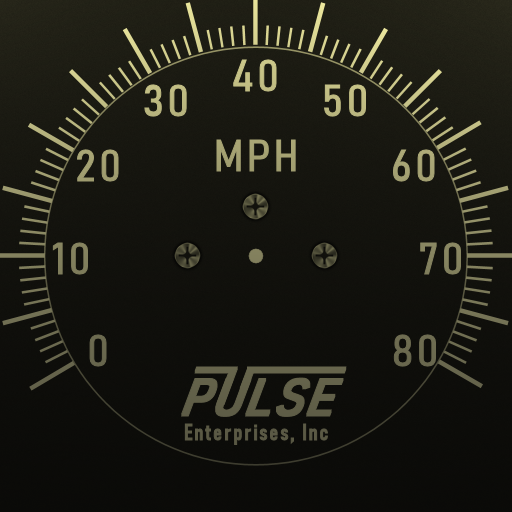
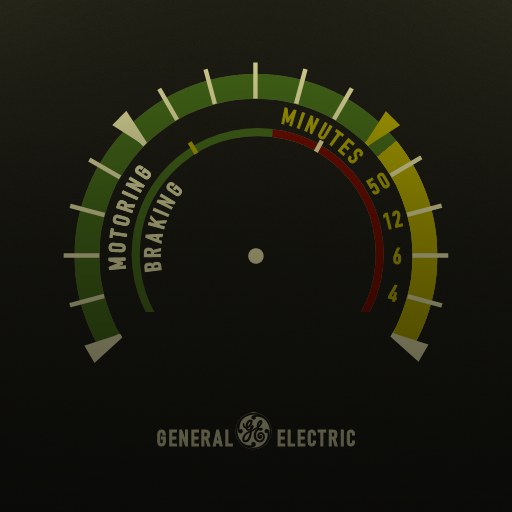
                            If anyone has any detailed images of what the gauge faces should look like - voltmeter - ammeter - both air brake pressure gauges - it would be REALLY helpful. The speedometer and load meter are already in.


                            Custom gauges take some real effort...


                            Hand Drawn Speedometer


                            Hand Drawn Load Meter


                            Regards,
                            Scott
                            Last edited by scottb613; 12-27-2024, 07:43.
                            <a href=https://www.trainsim.com/forums/filedata/fetch?filedataid=80663&type=full title=thumb_80663.png >thumb_80663.png</a>​ My Blender Models

                            Comment

                            • Whatever2006
                              Senior Member

                              • Aug 2022
                              • 615
                              • Philippines
                              • English, Nonsensical Things and Passive Spitefulness.
                              • General

                              #119
                              Promising stuff there Scott.
                              Motto: Loneliness stands by with me and my own isolation.

                              Comment

                              • scottb613
                                2500 Post Veteran


                                • Apr 2003
                                • 2848
                                • Downeast Maine (soon)
                                • ORTS

                                #120
                                Originally posted by Whatever2006
                                Promising stuff there Scott.
                                Hi Eoin,

                                Hah - I'm not a "diesel guy" - but for a diesel - she seems to be coming along pretty nicely.

                                Thanks.

                                Regards,
                                Scott

                                <a href=https://www.trainsim.com/forums/filedata/fetch?filedataid=80663&type=full title=thumb_80663.png >thumb_80663.png</a>​ My Blender Models

                                Comment

                                Working...