


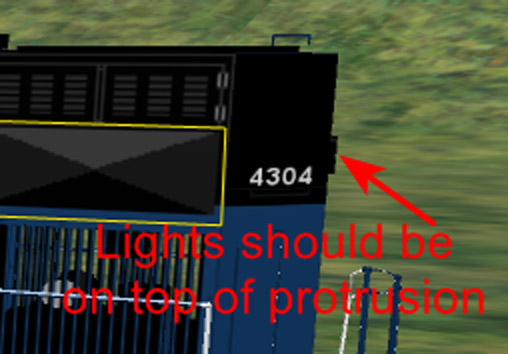
For a model of a SD70ACe locomotive, the rear lights are not quite in the correct position. The lights are positioned a bit too high. The lights should be located on the protrusion a bit further down.
I have tried just moving (actually copying) the rear lights (texture) down and applying the change to the associated *ace image file. But the moved (copied) lights texture appears beneath the rear protrusion and not on top of it!
So, how to get the rear lights texture to appear on top of the rear protrusion?
rear_lights; lights down here.png
rear_protrusion; lights on top.png
I have tried just moving (actually copying) the rear lights (texture) down and applying the change to the associated *ace image file. But the moved (copied) lights texture appears beneath the rear protrusion and not on top of it!
So, how to get the rear lights texture to appear on top of the rear protrusion?
rear_lights; lights down here.png
rear_protrusion; lights on top.png




Comment