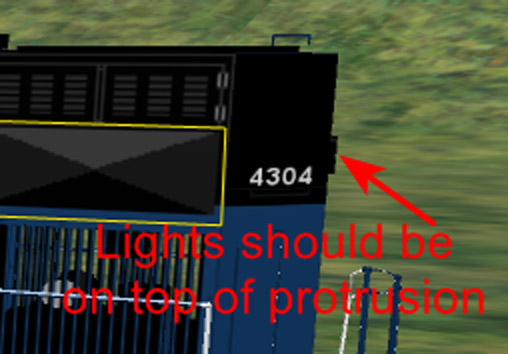
Moving Locomotive Rear Lights

Collapse
X
 
  • Time
  • Show
Clear All
new posts
  • meeshu
    Senior Member
    • May 2010
    • 373

    #1

    Moving Locomotive Rear Lights

    For a model of a SD70ACe locomotive, the rear lights are not quite in the correct position. The lights are positioned a bit too high. The lights should be located on the protrusion a bit further down.

    I have tried just moving (actually copying) the rear lights (texture) down and applying the change to the associated *ace image file. But the moved (copied) lights texture appears beneath the rear protrusion and not on top of it!

    So, how to get the rear lights texture to appear on top of the rear protrusion?

    rear_lights; lights down here.png
    rear_protrusion; lights on top.png
  • superheatedsteam
    Senior Member


    • Jun 2004
    • 764
    • Perth, WA, Australia.

    #2
    This might help. https://www.trainsim.com/forums/foru...rts-of-texture

    Comment

    • meeshu
      Senior Member
      • May 2010
      • 373

      #3
      Thanks, but I was quite aware of my earlier thread regarding modifying shapes. That thread doesn't answer my question. In any case I'm not modifying shape(s) here.

      For this situation here, all I want to know is how to apply part of texture to a raised portion of the shape.

      Comment

      • superheatedsteam
        Senior Member


        • Jun 2004
        • 764
        • Perth, WA, Australia.

        #4
        Sorry I miss-understood your post. I thought the 'protrusion' the arrow is pointing to in the lower of the 2 images was the geometry for the light unit.

        Comment

        • yellowdog
          1500 Post Veteran


          • Nov 1999
          • 1586
          • .
          • MSOR

          #5
          You have to find where the raised portion is mapped on the texture(s). You've discovered that it isn't mapped to the section where you moved the light.
          ​​

          Comment

          • geepster775
            2500 Post Veteran


            • Sep 2006
            • 2846
            • .
            • General

            #6
            Looks like this is a shape file mismatch involving Danny Becks old freeware stuff. 4304 is not a Mullan number.

            I am also unaware of which shape file features this individually mapped part outlined in yellow. This is not a feature of the original Danny Beck MRL pack or Mullan pack. If you want help you need to be a little more detailed in what you are attempting. P.S. answer your PMs


            My Open Rails videos https://www.youtube.com/@lakecities3663/videos

            Comment

            • CSRX
              13500 Post Veteran


              • Oct 2005
              • 13646
              • Lincoln, ME
              • English
              • ORTS

              #7
              The area the headlights are on, should be flat. There is no major "bump" where the headlights sit on.

              Discover the magic of the internet at Imgur, a community powered entertainment destination. Lift your spirits with funny jokes, trending memes, entertaining gifs, inspiring stories, viral videos, and so much more from users.
              -Shawn K-
              MEC Mountain Subdivision - Trackwork 70%, Scenery 35%
              ​

              Comment

              • oper190
                1000 Post Veteran


                • May 2010
                • 1498
                • Port Charlotte, FL
                • English
                • MSOR

                #8

                As far as lights are concerned, it is possible that a Rail Road might have spec'd lights to be in different locations, or later changed them.

                Case in point, LIRR M1/M3s originally only had the two lower headlights:
                m3.jpg
                Later the upper headlights were added, some with one, others with two:
                m3a.jpg
                Therefore no two maybe exactly alike.
                Geary "Mr. Hart" Gerhardt - Owner and CEO of Hart Rail Lines, Hart Commuter Railways, and Hart Rail Cars. Also the defunct Hart Electric Transit.
                Its Your Train Sim World, sim as you please.

                Comment

                • meeshu
                  Senior Member
                  • May 2010
                  • 373

                  #9
                  The locomotive in question is the MRL SD70ACe unit number 4304, which does exist.

                  The "protrusion" at the rear of the locomotive is slightly exaggerated, but this is supposed to be the rear lights fixture. It does protrude very slightly. It is not perfectly flat.

                  No PM's that I can see at the moment?

                  Just to clarify what I'm wanting to do as it seems there may be some confusion.

                  The existing rear lights as positioned on the corresponding *.ace texture file, places the rear lights just a bit above the protrusion (the protrusion is where the lights should be located) on the body of the locomotive instead.

                  I'm wanting to place the rear lights part of the *.ace texture file on the protrusion.

                  I tried moving the rear lights part of the *.ace texture file down to the position of the rear lights protrusion, but the resulting rear lights appeared beneath the protrusion and not on the end of the protrusion as wanted.

                  So it seems that maybe some editing of the shape file (adjusting texture placement coordinates) is required to specify that the rear lights part of the *ace texture file should be positioned slightly outwards to correspond with the end of the protrusion(?). Yes?

                  I'm not yet concerned with any other issues with the locomotive model. I'm focussing on the rear lights positioning for now.

                  Comment

                  • yellowdog
                    1500 Post Veteran


                    • Nov 1999
                    • 1586
                    • .
                    • MSOR

                    #10
                    Please see my response above. The area where you want the lights to appear isn't mapped "logically" to the area where you think it should be. This is very common. So now you have to find where it IS mapped. This probably has nothing to do with shape editing and everything to do with you figuring out where, exactly, the texture is mapped.

                    Comment

                    • geepster775
                      2500 Post Veteran


                      • Sep 2006
                      • 2846
                      • .
                      • General

                      #11
                      Yes, 4304 does exist, in the old Danny Beck pack, but your shape file is not original to that pack. So where did it come from? Where did the mismatch between shape and texture originate?

                      Last edited by geepster775; 09-29-2025, 15:28.
                      My Open Rails videos https://www.youtube.com/@lakecities3663/videos

                      Comment

                      • CSRX
                        13500 Post Veteran


                        • Oct 2005
                        • 13646
                        • Lincoln, ME
                        • English
                        • ORTS

                        #12
                        That "protruding" part, is NOT the headlight location. That part has something totally different going on for it, that is why not all SD70M-2 or SD70ACe's have that item. The headlights are either above that part, or below that part, like I showed with the NBSR 6409 (same specs as the MRL 4304 minus the M-2 difference).
                        -Shawn K-
                        MEC Mountain Subdivision - Trackwork 70%, Scenery 35%
                        ​

                        Comment

                        • PerryPlatypus
                          Senior Member

                          • Jun 2009
                          • 951
                          • Spokane, WA
                          • English
                          • MSOR

                          #13
                          The low res, somewhat cartoonish textures in the original post make me think this may be from the super old freeware MRL units in the file library here, mrlsd70a.zip. Hard to tell with such a tiny screenshot though, and no other context by op.
                          ~Sean Kelly~
                          SP Shasta Route for Open Rails: https://www.trainsimulations.net/sp-shasta​
                          MRL Mullan Pass for Open Rails: https://www.trainsimulations.net/mullanpass

                          Comment

                          • lineman
                            Senior Member

                            • Mar 2007
                            • 539
                            • Phoenix AZ
                            • General

                            #14
                            The texture seems to be from the Dwight Miller SD70Ace's from early MSTS.

                            Comment

                            • dlfrenchmd
                              Senior Member


                              • Sep 2010
                              • 127
                              • Winchester, KY
                              • English
                              • MSOR

                              #15
                              I am probably missing something, but my first thought was using photoshop or equivalent modifying software to copy/paste a rectangle of the lights where you show you want to move them, and cover the original with a corresponding rectangle copied from the black. Since it is an .ace file, you will have to convert it to TARGA or something and back when finished unless your software works with .ace files.
                              Dan

                              Comment

                              Working...