Official v645 Thread

Collapse
This topic is closed.
X
X
 
  • Time
  • Show
Clear All
new posts
  • twpol
    Senior Member
    • Oct 2009
    • 434
    • United Kingdom

    #226
    Originally posted by kox
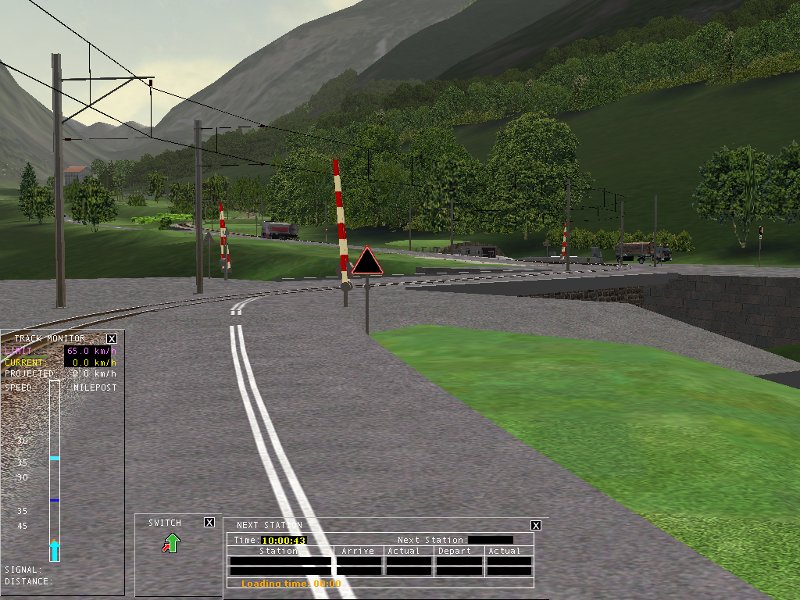
    Why i claim it was not a signal that stops the train? Because that is NOT a signal(and i didn't see that bug until i linked that screenshot)! That's a level crossing, but in OR somehow it behaves like signal.
    The train stops because there is a red signal there. Why there is a signal there and why it is red is what is actually interesting but you've wasted too much of my time for any further investigation right now.

    Originally posted by kox
    BTW here is the comment with the screenshot https://www.trainsim.com/vbts/showth...49#post1669049 #214
    That was an edit you made after posting and well after I replied. One of the many, many problems with forums, but whatever.
    James Ross
    Open Rails Management Team
    sigpic

    Comment

    • longiron
      1000 Post Veteran and Moderator

      • Jan 2007
      • 1453
      • Just south of NYC

      #227
      Originally posted by scottb613
      One note: While looking through alpha windows - outside looking in - on some passenger cars - the far wall on the opposite side of the coach was invisible...
      Thanks for the huge effort you guys are putting forth !!!
      Scott,
      Thanks for the vote of confidence. We still have work to do on alpha sorting - which is the effect you are seeing.

      BTW, pay some attention to driving steamers, you can start to see some of the new steam physics. As you advance the cutoff and/or throttle, usage rises quickly. But it takes some time before the steam generation gets the benefit of the increased draft.
      Chris
      "True rail fans have two favorite railroads. The B&O and one other."

      Comment

      • mikephfl
        Senior Member
        • Jul 2004
        • 524
        • Clearwater, FL

        #228
        I think that the fact that the OR team is letting this community beta-test their work is just as looney tunes as the project they have undertaken. I say that in jest of of course. Based on this thread there is obviously a huge demand for a good modern train simulator that uses our investment in MSTS. I think the OR team deserves a load of gratitude from us all in that not only are they doing this, but it will be a free product. That being said I think the demands from people on here that their favorite route needs to run perfectly with the latest release of OR is ridiculous. We are working with a very beta version of a sophisticated piece of software and need to respect the team, their efforts, and what can be done in their spare time. I admit to starting out with "this doesn't work like you said it would" reply on here but I have now realized we need to be more respectful of the OR team and the product they are developing.

        Lets stop demanding that this version of OR does what we want and simply report issues we see and help the team resolve them by some minor trouble shooting on our own. If you aren't up to that, then just sit back and wait to see what develops with the next version. Hope I didn't step on too many toes with this but I just felt it needed to be said.

        Mike
        Mike
        Proud Supporter of OR
        Creator of YardMaster
        "Thanks for using YardMaster"

        Comment

        • mnjrr

          #229
          Thank you Scott and Mike for your support of OR.

          Comment

          • twpol
            Senior Member
            • Oct 2009
            • 434
            • United Kingdom

            #230
            Originally posted by mikephfl
            I think that the fact that the OR team is letting this community beta-test their work is just as looney tunes as the project they have undertaken. I say that in jest of of course.
            There's nothing quite like releasing software to find the issues.


            The feedback from all parts of the community is important and has generally been good but I'd just like to reiterate a few key points:
            • The OR log, "OpenRailsLog.txt", found on your desktop, is vital to understanding many issues and if in any doubt please include the whole thing as an attachment.
            • Pictures are good for showing visual problems but please remember to describe what you see and what you expected to see - not everyone will see the same obvious problem with the picture you do.
            • Name the route, activity and whatever is needed for someone with no existing content to experience the problem themselves. If they're free and public, including links is also a helpful.
            • Remember that many features that do exist are incomplete - some more than others. There are also many features that do not exist yet but which are planned.
            Thanks again for the feedback and sorry if I seem somewhat annoyed sometimes.
            James Ross
            Open Rails Management Team
            sigpic

            Comment

            • scottb613
              2500 Post Veteran


              • Apr 2003
              • 2848
              • Downeast Maine (soon)
              • ORTS

              #231
              Hi Chris,

              Me ?? Drive Steam ??? NEVER !!!


              I didn't realize the steam physics were so far along... Will do...

              All,

              Yeah - I'm with Mike - I've seen many posts where it seemed the original poster thought OR was a finished product... I think the OR Team is just getting warmed up - the current version is just a test bed to showcase what the team has been working so hard on... It's still not at the stage where it is expected to be a fully functional train simulator... OR is the absolute best thing that has happened to the train-sim community since MS released MSTS... I have seriously high hopes for it... A train-sim made by a bunch of talented guys - who know train-sims - and - who are not driven by deadlines or profit margins... I bet the original modeler - who made the default GP-38 was actually embarrassed to release his/her work - but - if you only have like two days to build a locomotive - you do what you can do... So yeah - down the road - OR should be to MSTS - as 3DTS Feather River is to the Default Marias Pass... We have such an opportunity here - the beauty of the open architecture is it can always be a "Work in Progress" - some new guy comes along with a great new idea or angle - it can be incorporated into the sim...

              I'll be eagerly following this saga...
              Last edited by scottb613; 03-12-2011, 19:35.
              <a href=https://www.trainsim.com/forums/filedata/fetch?filedataid=80663&type=full title=thumb_80663.png >thumb_80663.png</a>​ My Blender Models

              Comment

              • csantucci
                Senior Member
                • Nov 1999
                • 856
                • Torino, Italy.

                #232
                After some investigation I was able to find out the reason of another problem that didn't allow me to run some Bernina activities.

                This is the error I get

                runactivity.exe : Error : 0 : System.InvalidOperationException: The type you are using for T in this method is an invalid size for this resource.
                in Microsoft.Xna.Framework.Graphics.Texture.GetAndVal idateSizes[T](_D3DSURFACE_DESC* pSurface, UInt32* pdwFormatSize, UInt32* pdwElementSize)
                in Microsoft.Xna.Framework.Graphics.Texture2D.CopyDat a[T](Int32 level, Nullable`1 rect, T[] data, Int32 startIndex, Int32 elementCount, UInt32 options, Boolean isSetting)
                in Microsoft.Xna.Framework.Graphics.Texture2D.GetData[T](Int32 level, Nullable`1 rect, T[] data, Int32 startIndex, Int32 elementCount)
                in ORTS.CABTextureManager.Disassemble(GraphicsDevice graphicsDevice, Texture2D tex, Int32 width, Int32 height, Int32 FramesCount, String FileName)
                in ORTS.CABTextureManager.DisassembleTexture(Graphics Device graphicsDevice, String FileName, Int32 width, Int32 height, Int32 FramesCount)
                in ORTS.CabViewDiscreteRenderer..ctor(CVCWithFrames cvc, Viewer3D viewer, MSTSLocomotive car, CabShader shader)
                in ORTS.CabRenderer..ctor(Viewer3D viewer, MSTSLocomotive car)
                in ORTS.MSTSLocomotiveViewer..ctor(Viewer3D viewer, MSTSLocomotive car)
                in ORTS.MSTSElectricLocomotiveViewer..ctor(Viewer3D viewer, MSTSElectricLocomotive car)
                in ORTS.MSTSElectricLocomotive.GetViewer(Viewer3D viewer)
                in ORTS.TrainDrawer.Load(RenderProcess renderProcess)
                in ORTS.Viewer3D.Load(RenderProcess renderProcess)
                in ORTS.RenderProcess.Initialize()
                in Microsoft.Xna.Framework.Game.Run()
                in ORTS.Viewer3D.Run()
                in ORTS.Program.Start(IEnumerable`1 options, String[] args)

                As can be imagined from the above lines, it was a cabview issue of one of our trainsets (specifically, of the dual power Gem locomotive). In such cabview many levers and indicators are not graphically implemented, but they need to be present to see the line at the bottom of the screen when you want to enter commands (e.g. Train Brake 37%). In the cabview I originally solved it inserting levers and indicators of another cabview, and replacing the graphics .ace files with a 256x256 blank .ace file. MSTS accepts this. ORTS accepts this only if there is not a NumFrames line in the lever/indicator block. If there is such, it is necessary for ORTS that the dimensions of the blank .ace file are less or equal of the dimensions of the lever/indicator block as set in the third and fourth parameter of the Position line. So I created a new blank .ace file, only 4x4 wide, and the problem disappeared.
                I annex here the file for the few using the Bernina route and reading this topic. It must be unzipped and put in folder Train simulator Bernina/Trains/Trainset/RhB_Gem/Cabview overwriting the existing blank.ace file. blank.zip
                I also annex here the .zip of the uncompressed version of file w-005761+014667.w , that solves the other big problem that prevents the route running around Pontresina. So there is no need to wait for a new version of ORTS to run in such surroundings. The file must be unzipped and put in folder Train Simulator Bernina/Routes/Bernina_Pass/World . w-005761+014667.zip .
                Those two small changes should allow a nicer playing of the Bernina route with ORTS 645.

                I allow myself to make a proposal to ORTS people managing activity handling, and specifically AI handling. At the moment ORTS does not always spawn AI trains. Sometimes it does not start them (and this is explicitly stated in the ORTS docs), specially basing on path conflict. In my opinion - as an activity writer that I am - it is the activity writer's responsibility to insert AI trains under specific traffic conditions. It is his responsibility to provide that these trains do not provide deadlocks. If they provide deadlocks, he will find them out during activity testing and he will change the AI insertion. So in my opinion ORTS should spawn (start) all AI trains foreseen in the activity. If the activity writer inserted an AI train, there was a reason for this.
                Thank you again to all the ORTS team for the big effort and results! Waiting also for transfer implementation and deletion of terrain at tunnel entrance!

                Carlo
                sigpic

                Comment

                • longiron
                  1000 Post Veteran and Moderator

                  • Jan 2007
                  • 1453
                  • Just south of NYC

                  #233
                  Originally posted by csantucci
                  I allow myself to make a proposal to ORTS people managing activity handling, and specifically AI handling. At the moment ORTS does not always spawn AI trains. Sometimes it does not start them (and this is explicitly stated in the ORTS docs), specially basing on path conflict. In my opinion - as an activity writer that I am - it is the activity writer's responsibility to insert AI trains under specific traffic conditions. It is his responsibility to provide that these trains do not provide deadlocks. If they provide deadlocks, he will find them out during activity testing and he will change the AI insertion. So in my opinion ORTS should spawn (start) all AI trains foreseen in the activity. If the activity writer inserted an AI train, there was a reason for this.

                  Thank you again to all the ORTS team for the big effort and results! Waiting also for transfer implementation and deletion of terrain at tunnel entrance!

                  Carlo
                  Carlo,
                  Thanks for the insights into the Bernia errors. As for the AI issues, quite frankly OR started down a road that was very similar to MSTS/RW. What you see is a partial implementation of the old approach with some elements of a totally new one. Give us a few months, I believe you will be impressed with our progress.
                  Chris
                  "True rail fans have two favorite railroads. The B&O and one other."

                  Comment

                  • csantucci
                    Senior Member
                    • Nov 1999
                    • 856
                    • Torino, Italy.

                    #234
                    I would like to mention three further issues (maybe not the last ones...):
                    1) The sound volume of a passing AI train when heard from the player train (either from cab or from cameraview 2) is much lower than in MSTS, and too low in my opinion;
                    2) I don't get the Doppler effect on sounds;
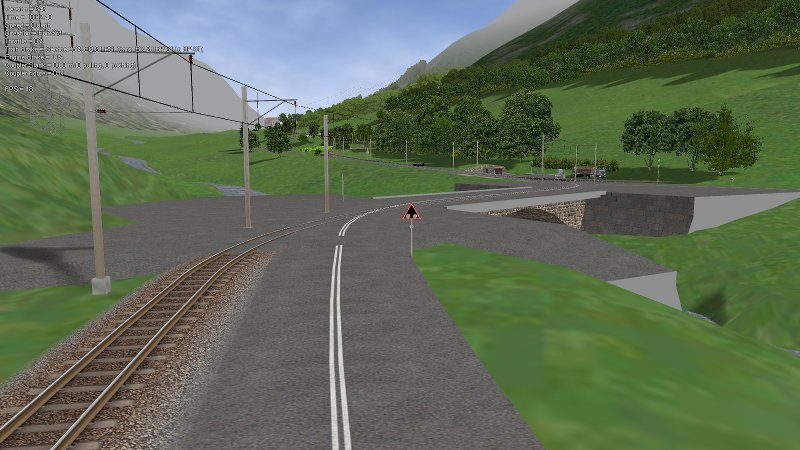
                    3) At least in a case crossing level barriers don't appear, see below the difference between MSTS and ORTS


                    Regards

                    Carlo
                    Last edited by csantucci; 03-13-2011, 08:58.
                    sigpic

                    Comment

                    • longiron
                      1000 Post Veteran and Moderator

                      • Jan 2007
                      • 1453
                      • Just south of NYC

                      #235
                      Originally posted by csantucci
                      I would like to mention three further issues (maybe not the last ones...):
                      1) The sound volume of a passing AI train when heard from the player train (either from cab or from cameraview 2) is much lower than in MSTS, and too low in my opinion;
                      2) I don't get the Doppler effect on sounds;
                      Sound volume currently is based on distance from the viewport, we have some tweaking to do. Doppler effects is on the short term roadmap to be added, along with a much improved sound implementation overall.

                      Originally posted by csantucci
                      3) At least in a case crossing level barriers don't appear, see below the difference between MSTS and ORTS
                      Carlo
                      Route and location would assist us in debugging the issue.
                      Thanks
                      Chris
                      "True rail fans have two favorite railroads. The B&O and one other."

                      Comment

                      • csantucci
                        Senior Member
                        • Nov 1999
                        • 856
                        • Torino, Italy.

                        #236
                        @Longiron:
                        The missing crossing gates are in the Bernina route, in tile -5754 14654, near the station of Campocologno. One of them has following coordinates: -715.852 563.552 200.809 . The other ones are nearby.

                        Carlo
                        sigpic

                        Comment

                        • OTTODAD
                          1
                          • Feb 2001
                          • 32344
                          • England
                          • General

                          #237
                          Just to let the team know that after me experimenting a lot with the MSTS routes folders, trying to pin down why routes would not load in ORTS and find a cause for the UNKNOWN locomotives errors, I suddenly can run all of them which the exception of some activities which still show UNKNOWN locos, using mainly my Santa-Fe Explorer and German Graphics-15 locos.

                          I can use the Santa-Fe Explorers in ORTS EXPLORE route mode but not when used in activities. Attached is it's powercar *.ENG file.

                          There are still some occasions when after having done something else on my computer or having been on the Internet ORTS refuses to load and I have to re-start my computer.

                          No problem, not going to use it a lot until after the next beta.

                          O t t o
                          Attached Files

                          Comment

                          • csantucci
                            Senior Member
                            • Nov 1999
                            • 856
                            • Torino, Italy.

                            #238
                            As already said, I have log errors related to signals in the Bernina route. I try here to detail one of them.
                            In the ORTS error log I get:
                            runactivity.exe : Error : 0 : System.IO.InvalidDataException: {TileX:-5763 TileZ:14668 X:-653,11 Y:1778,87 Z:-176,87} signal 1790 unit 1 has invalid sub-object node-name HEAD2.
                            in ORTS.SignalShape.SignalShapeHead..ctor(Viewer3D viewer, SignalShape signalShape, Int32 index, SignalHead signalHead, SignalItem mstsSignalItem, SignalSubObj mstsSignalSubObj)
                            in ORTS.SignalShape..ctor(Viewer3D viewer, SignalObj mstsSignal, String path, WorldPosition position, ShapeFlags flags)


                            runactivity.exe : Error : 0 : System.IO.InvalidDataException: {TileX:-5763 TileZ:14668 X:-653,11 Y:1778,87 Z:-176,87} signal 1790 unit 2 has invalid sub-object node-name KENNUNG1.
                            in ORTS.SignalShape.SignalShapeHead..ctor(Viewer3D viewer, SignalShape signalShape, Int32 index, SignalHead signalHead, SignalItem mstsSignalItem, SignalSubObj mstsSignalSubObj)
                            in ORTS.SignalShape..ctor(Viewer3D viewer, SignalObj mstsSignal, String path, WorldPosition position, ShapeFlags flags)

                            This refers to following signal block in world file of tile -5763 14668 :

                            Signal (
                            UiD ( 1790 )
                            FileName ( CHLGruppenausfahrsignal2L.s )
                            Position ( -653.11 1778.87 -176.87 )
                            QDirection ( 0 -0.697791 0 0.716302 )
                            VDbId ( 4294967295 )
                            StaticDetailLevel ( 0 )
                            SignalSubObj ( 00000007 )
                            SignalUnits ( 3
                            SignalUnit ( 0
                            TrItemId ( 0 1936 )
                            )
                            SignalUnit ( 1
                            TrItemId ( 0 1938 )
                            )
                            SignalUnit ( 2
                            TrItemId ( 0 2077 )
                            )
                            )

                            In file sigcfg.dat I find following description for this type of signal:

                            SignalShape (
                            "CHLGruppenausfahrsignal2L.s"
                            "CHL Gruppenausfahrsignal_2L"
                            SignalSubObjs ( 3
                            SignalSubObj ( 0
                            "HEAD1"
                            "Signal Head 1"
                            SigSubType ( SIGNAL_HEAD )
                            SigSubSType ( "ChLGruppenausfSignal2L" )
                            )
                            SignalSubObj ( 1
                            "HEAD2"
                            "Abfrage GruppenRichtung"
                            SigSubType ( SIGNAL_HEAD )
                            SignalFlags ( BACK_FACING )
                            SigSubSType ( "ChLGruppenabfrage" )
                            )
                            SignalSubObj ( 2
                            "KENNUNG1"
                            "Kennung"
                            SigSubType ( SIGNAL_HEAD )
                            SigSubSType ( "CHLKennungNormal" )
                            )
                            )
                            )

                            As errors refer to SignalSubobjs' 1 and 2 I report here also their description in sigcfg.dat

                            SignalType ( "ChLGruppenabfrage"
                            SignalFnType ( DISTANCE )
                            SignalLightTex ( "ltex" )
                            SignalDrawStates ( 1 SignalDrawState ( 0 "Red" ) )
                            SignalAspects ( 7
                            SignalAspect ( STOP "Red" )
                            SignalAspect ( RESTRICTING "Red" )
                            SignalAspect ( APPROACH_1 "Red" )
                            SignalAspect ( APPROACH_2 "Red" )
                            SignalAspect ( APPROACH_3 "Red" )
                            SignalAspect ( CLEAR_1 "Red" )
                            SignalAspect ( CLEAR_2 "Red" )
                            )
                            SignalNumClearAhead ( 3 )
                            )

                            SignalType ( "CHLKennungNormal"
                            SignalFnType ( REPEATER )
                            SignalLightTex ( "ltex" )
                            SignalDrawStates ( 1 SignalDrawState ( 0 "Red" ) )
                            SignalAspects ( 1 SignalAspect ( STOP "Red" ) )
                            SignalNumClearAhead ( 1 )
                            )

                            In file sigscr.dat the description of these last subobjects is as follows:

                            SCRIPT ChLGruppenAbfrage
                            // ChL GruppenAbfrage, fragt die CHLGruppenRichtungsmarke ab.

                            extern float block_state ();
                            extern float route_set ();
                            extern float next_sig_lr ();
                            extern float this_sig_lr ();
                            extern float opp_sig_lr ();
                            extern float def_draw_state ();
                            extern float state;
                            extern float draw_state;
                            extern float enabled;
                            extern float sig_feature();
                            float next_state;

                            next_state = next_sig_lr (SIGFN_DISTANCE);

                            state = next_state;

                            // Die Anzeige erfolgt über das SCRIPT ChLGruppenAusfSignal
                            ///////////////////////////////////////////////////////////////////////////////
                            SCRIPT CHLKennungNormal

                            extern float state;

                            state = SIGASP_STOP;

                            ///////////////////////////////////////////////////////////////////////////////

                            I hope this helps. Further info can be provided if required.

                            Moreover referring to the standard route Marias Pass and the standard activity Auto-train with set-out, the first signal that is encountered shows a red, but it is not recognized by the track monitor neither I get problems when trespassing it.

                            Carlo
                            sigpic

                            Comment

                            • scottb613
                              2500 Post Veteran


                              • Apr 2003
                              • 2848
                              • Downeast Maine (soon)
                              • ORTS

                              #239
                              Hi Chris,

                              Spent some time driving steam today with OR... Man - you guys are making it hard to go back to MSTS with the improved visuals... Yep - looks like you have a realistic balance of steam consumption using the regulator and reverser... Are they the only steam controls that work in 645 ??? There is no water level or coal usage - so I shouldn't be trying to hand fire the boiler - right ??? Keep up the good work - if there is anything specific you would like me to look at as far as steam goes - I'm pretty familiar with hand firing in MSTS... LOL - I fired "Auto" and I drive had fired all the time...


                              One thing on physics - the train sure seems to coast forever without power applied...

                              On a side note - has there been any discussion on the possibility of adding Direct-X true joystick controls to OR ??? LOL - I'm so tired of counting key presses to program my CH Products joysticks to work with MSTS...
                              <a href=https://www.trainsim.com/forums/filedata/fetch?filedataid=80663&type=full title=thumb_80663.png >thumb_80663.png</a>​ My Blender Models

                              Comment

                              • jjtang
                                Senior Member
                                • Nov 1999
                                • 200
                                • .

                                #240
                                Originally posted by csantucci
                                @Longiron:
                                The missing crossing gates are in the Bernina route, in tile -5754 14654, near the station of Campocologno. One of them has following coordinates: -715.852 563.552 200.809 . The other ones are nearby.

                                Carlo
                                It was due to my misunderstanding of the LevelCrData of crossings in the .w file. I thought none 0 values always mean invisible, actually 0000001 means invisible and silent, 0000006 means silent but visible. I will update it into the code and have it fixed.

                                Comment

                                Working...