TSRE GenX - MAX OVERHAUL

Collapse
X
 
  • Time
  • Show
Clear All
new posts
  • eric
    9500 Post Veteran and Administrator


    • Dec 2002
    • 9583
    • NS MP245.4 CNO&TP South District
    • English, SQL
    • General

    #91
    I suggested elsewhere that splines could somewhat easily be constructed from multiple sections of flex track. Plot the points needed using a ruler, and apply flex between the points as needed.

    No ORTS support needed, and in theory you could leave each piece editable.

    Sent from my SM-S911U using Tapatalk


    If you like what you see here at Trainsim.com, be it the discussions and knowledge in the forums, or items available in our library, I hope you'll consider a paid membership to help support keeping the site operating.... Thanks!

    Comment

    • GokuMK
      Senior Member

      • Oct 2015
      • 729
      • Poland

      #92
      Originally posted by eric
      I suggested elsewhere that splines could somewhat easily be constructed from multiple sections of flex track. Plot the points needed using a ruler, and apply flex between the points as needed.

      No ORTS support needed, and in theory you could leave each piece editable.
      Yes, for tracks only it can be done without editing ORTS because it's procedural object generator supports tracks. Supporting other objects is very limited by it's Track Profile definitions.

      Comment

      • GokuMK
        Senior Member

        • Oct 2015
        • 729
        • Poland

        #93
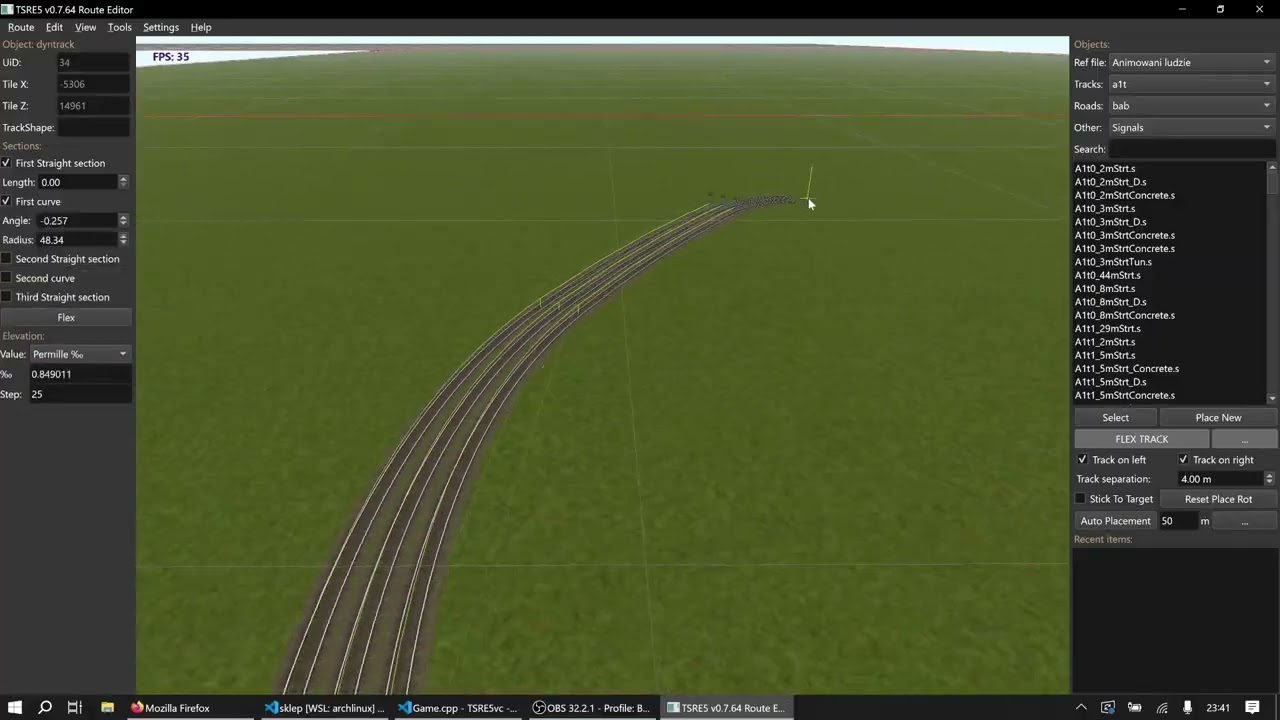
        Anyway, on Github I put another experimental feature -> flex track placement like in other train sims.
        Limited to only simple tracks, but you can play around.


        Comment

        • scottb613
          2500 Post Veteran


          • Apr 2003
          • 2848
          • Downeast Maine (soon)
          • ORTS

          #94
          Hi Folks,

          All GREAT information - I am transcribing this as noted - which I keep for reference.

          I had given wires a bunch of thought - one option I came up with - but I've done nothing to test or implement.

          Proposal: Automatic span/wire generation from attachment points in TSRE

          A streamlined alternative to a full loft-object system is the extension of TSRE’s existing auto-gantry and repeated-object placement workflow. This extension would accommodate objects such as telephone poles, utility lines, fences, pipes, cables, and other repeated route-side features.

          The core concept relies on source models including named attachment points within the exported shape hierarchy. Examples include:
          wire_01
          wire_02
          wire_03
          wire_04

          Future implementations could include:
          board_01
          board_02
          pipe_01
          rail_01

          These attachment points would function as visible or invisible helper nodes/subobjects placed in a 3D tool (such as Blender) at the exact required span attachment positions. This eliminates the need for a separate configuration file, as the attachment data resides entirely within the shape itself. TSRE would be responsible for detecting matching attachment-point names on consecutive placed objects and automatically generating the intervening span geometry.

          Workflow:
          1. Construct a pole, post, fence, or support model featuring named attachment points.
          2. Export the model to MSTS/ORTS shape format, ensuring the preservation of the named helper nodes/subobjects.
          3. Utilize TSRE’s existing auto-placement/auto-gantry tools to position a sequence of objects.
          4. Define the run by selecting or grouping the placed objects, or by utilizing the placement sequence directly.
          5. TSRE sorts the objects into run order and identifies matching attachment-point names.
          6. TSRE generates span geometry connecting the matching points.
          7. The resulting geometry is baked into MSTS/ORTS-compatible shape formats.

          Run Detection and Termination:
          Initial implementations should rely on user-selected or grouped objects to explicitly define the run, ending where the selection terminates, rather than scanning the entire route.

          Additional safety rules to implement include:
          - Restricting connections to compatible shapes or templates.
          - Restricting connections to matching attachment names.
          - Halting generation if the subsequent object exceeds a maximum span distance.
          - Halting or issuing a warning upon detecting sharp angle changes.
          - Accommodating explicit start, end, or branch markers in future iterations.

          Span Settings:
          Generated span types should feature adjustable variables, including:
          - Span type (wire, cable, board, pipe, rail, chain, etc.).
          - Width, diameter, or thickness.
          - Sag amount between supports.
          - Number of curve segments.
          - Material or texture.
          - Maximum span length.
          - Attachment-name prefix (e.g., wire_, board_, pipe_).

          Sag could initially function as a simple midpoint drop for telephone wires, eventually evolving into a realistic catenary curve. Rigid spans, such as fence boards, would utilize zero sag to generate a rectangular board or strip between matching attachment points.

          Baked Output:
          Generated geometry can be written as:
          - One generated shape per span.
          - One generated shape for the entire run.
          - One generated shape per tile or section.

          A per-tile or per-section generated shape represents the safest compromise. While a single generated shape for the entire run reduces object counts and keeps the route tidy, runs crossing tile boundaries introduce challenges for editing, regenerating, and culling efficiently.

          Optimal approach for tile borders:
          1. Generate the complete span/run in world coordinates.
          2. Split the geometry precisely at tile boundaries.
          3. Convert each respective section into local tile coordinates.
          4. Save one generated shape/object per tile or section.

          This ensures near-perfect visual continuity across tile borders by deriving both sides from a unified world-space curve.

          Implementation Notes:
          The Blender MSTS/ORTS exporter serves as a useful reference for writing compatible `.s` shape files, demonstrating the shape-file structure even if TSRE does not require Blender at runtime. This approach bypasses the immediate need for a full general-purpose loft editor. Placed objects remain standard route objects, with TSRE augmented to detect named attachment points, order selected/grouped runs, and generate connecting span shapes. Over time, this foundation supports expansion into broader stretchable/loft-style features for fences, cables, pipes, walls, hedges, and similar route details.
          I more than welcome any ideas and suggestions - especially from those who have a grasp on how to actually code it.

          Keep them coming.

          Nice procedural track demonstration - almost Trainz like - very cool and impressive.

          I believe we can do a great deal here - more than I thought - whether we get ORTS support or not.

          I am taking your advice - I'm just trying to get to a stable state - GenX v0.8 is in the oven - then work on the software upgrades.

          Thanks.

          Regards,
          Scott
          Last edited by scottb613; 07-29-2026, 17:45.
          <a href=https://www.trainsim.com/forums/filedata/fetch?filedataid=80663&type=full title=thumb_80663.png >thumb_80663.png</a>​ My Blender Models

          Comment

          • GokuMK
            Senior Member

            • Oct 2015
            • 729
            • Poland

            #95
            7. The resulting geometry is baked into MSTS/ORTS-compatible shape formats.
            This does lots of heavy lifting here. Split AI idea into staged tasks, as this shape exporter is crucial step to make anything. Use task and feature md files if you don't use that yet. But when you have shape writer, better use it for exporting ruler and shape teplate based fences etc instead of reinventing the wheel. Anyway - the AI agent has already present 3d result inthere for shape exporter testing. Template in track properties is also good starting point for shape gen testing.

            Comment

            • scottb613
              2500 Post Veteran


              • Apr 2003
              • 2848
              • Downeast Maine (soon)
              • ORTS

              #96
              Originally posted by GokuMK
              Anyway, on Github I put another experimental feature -> flex track placement like in other train sims.
              Limited to only simple tracks, but you can play around.
              Hi Piotr,

              Hah - epiphany - do you know what this would be absolutely perfect for - ROADS - where you don't need super smooth curves and perfect connections - man - select your style of road and click away - then hit [F] - the hours this would save. Need a few dynamic intersections - serious potential.


              Hi Folks,

              GRADES

              I work in Percent - do we truly need our grades carried out to 6 places?

              Code:
              -0.250001
              All it does is show inherent error when it gets out that far - would two places be sufficient for display?


              Thanks.

              Regards,
              Scott
              <a href=https://www.trainsim.com/forums/filedata/fetch?filedataid=80663&type=full title=thumb_80663.png >thumb_80663.png</a>​ My Blender Models

              Comment

              • CSRX
                13500 Post Veteran


                • Oct 2005
                • 13646
                • Lincoln, ME
                • English
                • ORTS

                #97
                Scott, looking at my many track charts and grade charts. Only once or twice does it go beyond three digits. I think I have had it as 0.008 and 0.012 a few times, but rare. So maybe just three, or even just four placements, would be fine.
                -Shawn K-
                MEC Mountain Subdivision - Trackwork 70%, Scenery 35%
                ​

                Comment

                • scottb613
                  2500 Post Veteran


                  • Apr 2003
                  • 2848
                  • Downeast Maine (soon)
                  • ORTS

                  #98
                  Originally posted by CSRX
                  Scott, looking at my many track charts and grade charts. Only once or twice does it go beyond three digits. I think I have had it as 0.008 and 0.012 a few times, but rare. So maybe just three, or even just four placements, would be fine.
                  Hi Shawn,

                  Thanks for your insights - I know you place a great deal of track.

                  Yeah - I typically use .25 transitions - although it does not display the best in ORTS HUD.

                  I'll give it some thought.


                  Regards,
                  Scott


                  <a href=https://www.trainsim.com/forums/filedata/fetch?filedataid=80663&type=full title=thumb_80663.png >thumb_80663.png</a>​ My Blender Models

                  Comment

                  • scottb613
                    2500 Post Veteran


                    • Apr 2003
                    • 2848
                    • Downeast Maine (soon)
                    • ORTS

                    #99
                    Hi Folks,

                    The following major updates and fixes have been implemented in the TSRE GenX v0.8 release.

                    Release tag: v0.8
                    Repository: scottb613/TSRE5-SCOmod

                    Capture.jpg

                    TSRE GenX v0.8 running release work list
                    Updated 2026-07-30

                    TERRAIN AND WATER
                    • DONE - The F2 Terrain Editor now has a clearer painting workflow with improved labels, UI-scaled controls, validated numeric fields, and the Conform TDB/RDB database brush. It includes paired Main/Snow TERRTEX previews, recent and active swatches, validated ACE/DDS/common-image loading, seasonal mirroring, clearer tool groups, and a pinnable Track Bias helper.
                    • DONE - Added the Waterbed Offset brush for rivers with sloping tile-water planes. It applies a strictly negative offset from the locally interpolated water level while preserving normal brush size, feathering, and Undo. Invalid samples and non-water patches are skipped safely. Height-brush processing was also streamlined to remove redundant terrain lookups and Undo passes.
                    • DONE - Automatic Water and Water Helper now share one persistent, terrain-snapped Water Ruler. It supports continuous placement, saved-ruler recovery, adjustable height and search distance, bounded shoreline scanning, seamless joins, Undo Last, status guidance, and completion sound without loading the full route. One latched toggle starts or removes the ruler, while Process Water Tiles ends placement and leaves the result visible.


                    ROUTE MANAGEMENT AND DATA SAFETY
                    • DONE - The shared Hacks popup is available under • Advanced in Track, Static Object, and Terrain Patch properties. Its launch buttons share the same latched orange state, and track repairs remain disabled without a selected live track. Route Cleanup includes Remove All Interactives, Reset All TERRTEX, Water Tiles Off, and Delete Instances for static, gantry, and collision objects. Delete Instances loads every world tile and removes all matching type/filename instances as one Undo operation. The terrain cleanup tools use atomic tile replacement, separate read/save failure reporting, and safe TERRTEX deletion only after a tile saves successfully. F2 Terrain Utilities is now the focused Track Bias helper.
                    • DONE - Route tools now include Open Route Folder for immediate access to the active route and Create Route Health Report for diagnostic review. The report scans every route world file with AutoFix disabled, records load failures and missing assets, distinguishes valid and duplicate world/sound UIDs, checks TrackShape and SectionIdx definitions, handles the optional route skydome correctly, atomically writes one report in the route folder, and opens it in a standard Copy All review window.
                    • DONE - Route database saving is coordinated and crash-safe across TDB/TIT/TSECTION, RDB/RIT, and modified TRK files. Same-folder atomic replacement, rolling per-route backups, rollback, interrupted-save recovery, truthful status reporting, and visible error feedback prevent a partial save from silently leaving mismatched route databases.
                    • DONE - Fixed a repeatable Route Editor crash when reopening a route in the same process. Traffic IDs no longer contaminate the activity list, traffic-file deduplication is case-insensitive without altering filesystem paths, and invalid activity entries are skipped safely instead of being dereferenced.
                    • DONE - Returning from Route Edit to Main Load now clears route-owned markers, selectors, Undo history, object selection, group/copy state, and Water Helper state. A newly selected route correctly rebuilds markers, Object Selection categories, consists, services, traffic, car spawners, and OR weather transitions.


                    SETTINGS
                    • DONE - Settings are stored exclusively per user in AppData settings.json, with atomic saving, timestamped backups, damaged-file recovery, reset-to-default support, and no runtime dependency on legacy settings.txt. F12 View Markers now loads at startup, so enabling marker-file display also checks View > Markers and displays the route marker file without another manual step.
                    • DONE - AppData housekeeping now keeps only the five newest timestamped settings backups and three newest damaged-settings diagnostics. Route-specific AppData folders are created only when route state is actually written; obsolete empty folders are removed at startup. Crash-safe route database generations remain independently capped at five per route.


                    DYNAMIC TRACK
                    • DONE - Dynamic Track, Classic Flex, and NextGen Auto-Flex now share dependable procedural/fallback materials, a track-following selection outline, a continuous world-space TrackDB guide, normal percent-grade and section information, and a direction-neutral transactional connection solver. The visible mesh and TrackDB vectors are generated from the same endpoint plane, tangent frames, grade, and internal curve-to-straight transitions. Candidates that backtrack, form unintended U-turns, miss either connection, or fail endpoint, tangent, or internal-seam tolerances are rejected without damaging the existing object. Level, graded, and grade-direction-reversed connections were verified with smooth train operation in both directions.


                    ACTIVITY PATH EDITOR
                    • DONE - The F4 Activity Path Editor now provides complete New, Edit, and Clone sessions with cancellation rollback, Undo/Redo, live switch recalculation, reverse and wait points, advanced shunting operations, passing sidings, natural-end routing, stable metadata, stronger PAT validation, atomic saving, and clearer map presentation. The Path Meta Data popup follows the shared GenX editor-dialog style with a dimmed application caption, single orange title, scaled form, and role-accented OK/Cancel controls.
                    • DONE - Stale, disconnected, open-ended, or partly unreadable PAT files can be repaired without terminating the editor. Invalid TrackDB and platform references are skipped with warnings, surviving endpoints remain editable, and unreadable passing branches can be omitted from the draft without changing the original file until Save Path.
                    • DONE - F4 switch throws now provide truthful feedback. Successful main or passing-path recalculations use the established track-placement click; rejected throws restore the previous draft and use the error buzzer. Trailing-point no-op throws are recognized as rejected self-alignment rather than being reported as false successes.


                    SEARCH, PROPERTIES, AND MAP IMAGERY
                    • DONE - Category Search now provides ALL, Tracks, Roads, and Other filters, search-within-category behavior, cleaner Scale Rail grouping, Reset, and a bounded Recent Items list.
                    • DONE - Pasting an object now counts as a placement and adds that object to Recent Items.
                    • DONE - Object Properties panels are being revised for clearer grouping, consistent labels, useful read-only data, common control behavior, and simpler workflows. Selected terrain properties already omit the unused Shader launcher while retaining Shader ID information.
                    • DONE - F3 now uses one GenX provider workflow with keyless OSM Vector plus separately preserved Google, Mapbox, and Custom settings, adjustable map resolution, and live provider changes without a duplicate F12 Map tab.


                    APPLICATION STARTUP AND WINDOWS
                    • DONE - Main Load now appears before the Route Editor and its OpenGL/tool windows are constructed. Load and Restore retain editor reuse without the former artifacts. Delayed PropertiesRuler initialization removes transient standalone field artifacts.
                    • DONE - First-run and Reset settings use a portable baseline: capped frame rate, 2 km object range, 4096-pixel map imagery, neutral UI scale, bounded logs, no machine-specific paths, and conservative cleanup/rebuild options. Main Load is the single startup path, and the Route Editor opens with Properties, Tools, and Control Panel in their intended layout.
                    • DONE - Utility windows now share compact Pin controls, helper framing, UI-scale-aware sizing, position persistence, snapping, mutually exclusive helper visibility, consistent interaction sounds, clearer movement states, and reliable shutdown even when hide-on-close helpers remain open. The Control Panel is shown only after the Route Editor is visible, preventing its pinned tool window from appearing during startup.
                    • DONE - The Route Editor Compass is consolidated into one compact native 8:1 heading tape at half its former display size. It uses a wider, shorter gray presentation with readable direction letters and ticks, two-color cardinal accents, one seamless North marker, no unreadable degree numbers, correct aspect ratio, safe viewport-edge spacing, and atomically persistent View-menu visibility.


                    CONSIST EDITOR
                    • DONE - Consist Editor is available through Main Load in an isolated child process using the selected MSTS/ORTS root and returns when CE exits. Process isolation prevents CE OpenGL and static caches from changing Route Editor lighting or distant-terrain textures. Retired standalone command-line, startup-setting, IDE-preset, and batch-file launch paths were removed from active projects and builds. CE opens maximized with the official GenX caption, orange CONSIST EDITOR title, a selectable root-path subtitle, restrained role-colored launcher actions, and a Route list that excludes Windows shortcuts.
                    • DONE - Rolling-stock compatibility and presentation are more resilient. Normalized .inc paths are resolved through ordered ORTS and MSTS candidates while preserving valid parent-directory paths, and shared .inc definition fragments remain out of stock lists while normal include parsing continues. Preview overlays use one restrained caption size with ellipsis for long names and a compact type/unit marker. Genuinely unresolved stock receives a selectable, scalable, non-mirroring MISSING card with clear selection, Delete/context-menu removal, and right-click Swap Missing with Selected Stock that preserves the chosen replacement.
                    • DONE - Consist Editor presentation and settings now match the rest of GenX. Consist and Shape preview background colors persist independently per user. Popups use dimmed application captions, compact spacing, role-accented controls, concise orange titles with subtitles only for distinct sections, and red warning titles with yellow warning triangles and safe defaults for destructive or unsaved-change decisions.
                    • DONE - Consist Editor production cleanup now releases consist source files and inserted include buffers automatically, removes dead CE and UnsavedDialog declarations, and preserves both CameraFree movement overload sets. Focused static checks and the incremental Release x64 build completed successfully.


                    SHARED INTERFACE AND DIALOGS
                    • DONE - F12 Settings received a production audit and cleanup. It reloads current disk/runtime values whenever opened, keeps its F12/menu state synchronized after Save or window close, creates collision-safe millisecond backups, correctly loads MSTS Shadows and snapping radius, honors Load Activities, uses a valid server-auth mode field, and no longer exposes route-owned superelevation. Reset now clears map credentials/provider state to true 4096-pixel defaults, stale F12 map instructions point to F3, and unused helpers, state, and duplicate includes were removed.
                    • DONE - Confirmations, warnings, critical messages, important completion notices, and unsaved-change dialogs center on the active monitor after final sizing. Destructive and overwrite confirmations use one UI-scaled GenX warning style with a red title, yellow warning symbol, green Yes, red No, Escape rejection, and No as the safe default. New Route uses the matching non-destructive orange utility style.
                    • DONE - Existing colored interface treatments are unified around restrained green, blue, orange, red, and muted-yellow role colors. Checked buttons use muted orange, cyan status buttons use palette blue, active controls retain readable charcoal text, non-destructive warning titles use muted yellow, and Water Helper notifications use a cleaner charcoal-and-yellow card. Existing control geometry, accent placement, interaction behavior, destructive red warning treatment, and dim orange TITLE/SUBTITLE styling remain unchanged.


                    MAINTENANCE
                    • DONE - Removed superseded OverwriteDialog and CELoadWindow sources, headers, generated MOC files, build objects, and references from every maintained qmake project. Obsolete tracked machine-specific qmake outputs were removed and are now ignored; the locally generated Release x64 Makefile remains the active build definition.


                    ACKNOWLEDGMENTS

                    Special thanks to Eric-from-Trainsim. Work and ideas shared by Eric provided the foundation for several features adapted and integrated into TSRE GenX v0.8: the F3 imagery-provider workflow; safer ORTS/MSTS rolling-stock .inc path resolution; the Main Load and isolated Consist Editor launcher workflow; and the Route Health Report concept. His original contributions and direction helped make these parts of the release possible.


                    Regards,
                    Scott
                    ​
                    <a href=https://www.trainsim.com/forums/filedata/fetch?filedataid=80663&type=full title=thumb_80663.png >thumb_80663.png</a>​ My Blender Models

                    Comment

                    • scottb613
                      2500 Post Veteran


                      • Apr 2003
                      • 2848
                      • Downeast Maine (soon)
                      • ORTS

                      #100
                      Hi Folks,

                      Test Points:
                      • As discussed with Shawn - I added a water ruler - you need to have defined shoreline, and your water height has to be set below the shoreline. Place the ruler making sure your points are on the bottom - even with a sloping river. Do a good-sized chunk maybe five or ten tiles - the ruler path line can exceed the shoreline bounds - and when you hit process - it will scan from these points - find the shoreline - and enable every water patch it finds from shoreline to shoreline - and sets the proper height above terrain. It will make seamless connections from tile to tile - within the limitations of ORTS. Any terrain highpoints - set the new water brush to the height you want the terrain below water patches - paint a few strokes and you're done. I did 100 miles worth of river on Paul's CT River in like 15 minutes after toggling all water patches to off. It would have taken me many hours using the old tools.
                      • As discussed with Randy - fixed the Object Selection search on F1.
                      • As discussed with Randy - add a new option on F2 to set a terrain bias - to eliminate 8" floating track.
                      • Looking for feedback on Grade Helper and Grade Lock.
                      • Looking for feedback on Seasonal Mirror painting.
                      • Looking for feedback on F4 Path Editor which should be fully functional and complete.

                      Regards,
                      Scott
                      <a href=https://www.trainsim.com/forums/filedata/fetch?filedataid=80663&type=full title=thumb_80663.png >thumb_80663.png</a>​ My Blender Models

                      Comment

                      • scottb613
                        2500 Post Veteran


                        • Apr 2003
                        • 2848
                        • Downeast Maine (soon)
                        • ORTS

                        #101
                        Hi Folks,

                        A couple other important points for those who don't like reading the long form.
                        • Settings.txt is gone - all settings are saved via F12 in appData\Local\TSRE as JSON - with backups.
                        • I adjusted the default settings to be as friendly to low end PC's as practical.
                        • Implemented atomic saves to route critical files - changes are written to tmp files - then moved to production file after validation - backups stored in appData\Local\TSRE.
                        • Consist Editor is now started via the main Load screen - using the same directory search as the route editor.
                        • Consist Editor now flags missing content with placeholders - so you don't get a destroyed consist view if you delete a piece of rolling stock.

                        v0.9 will be the QT6 and CMake - upgrade.

                        Regards,
                        Scott
                        Last edited by scottb613; 07-31-2026, 09:56.
                        <a href=https://www.trainsim.com/forums/filedata/fetch?filedataid=80663&type=full title=thumb_80663.png >thumb_80663.png</a>​ My Blender Models

                        Comment

                        • eric
                          9500 Post Veteran and Administrator


                          • Dec 2002
                          • 9583
                          • NS MP245.4 CNO&TP South District
                          • English, SQL
                          • General

                          #102
                          Will be interested to see the JSON parsing. That was a struggle for some of the consist editor items because C++ and QT5 didn’t have native tools. AI helped a lot.
                          If you like what you see here at Trainsim.com, be it the discussions and knowledge in the forums, or items available in our library, I hope you'll consider a paid membership to help support keeping the site operating.... Thanks!

                          Comment

                          • scottb613
                            2500 Post Veteran


                            • Apr 2003
                            • 2848
                            • Downeast Maine (soon)
                            • ORTS

                            #103
                            Originally posted by eric
                            Will be interested to see the JSON parsing. That was a struggle for some of the consist editor items because C++ and QT5 didn’t have native tools. AI helped a lot.
                            Hi Eric,

                            Yeah - I have not started a wholesale replacement of config files - just the files native to TSRE like settings - remembered window positions and stuff like that.

                            I've started the QT6 CMake upgrade - thanks to Piotr, Peter, and yourself - it's almost like following a recipe card.

                            I am more impressed by the day on how Piotr was able to create such a vast body of code - by himself - a monumental task - you truly cannot grasp the full scope until you start going through it. What a gift he has given us.


                            Thanks.

                            Regards,
                            Scott
                            <a href=https://www.trainsim.com/forums/filedata/fetch?filedataid=80663&type=full title=thumb_80663.png >thumb_80663.png</a>​ My Blender Models

                            Comment

                            • GokuMK
                              Senior Member

                              • Oct 2015
                              • 729
                              • Poland

                              #104
                              Originally posted by eric
                              Will be interested to see the JSON parsing. That was a struggle for some of the consist editor items because C++ and QT5 didn’t have native tools. AI helped a lot.
                              It is not true, QT has plenty of ways to read JSON files, as it is common among web apps - most popular type of apps.
                              Example of one approach:


                              I am against of moving from STF to JSON due to performance reasons. Robust JSON parsers are much slower. Good luck with loading all con files if all your wast database is in JSON format.
                              Of course there are ways to read them faster, list like there are robust and slow XML parsers, but also very fast parsers, I used in TSRE.

                              For settings JSON is a great choice. I wanted to implement next gen settings in JSON too.
                              Last edited by GokuMK; 08-01-2026, 06:25.

                              Comment

                              • yellowdog
                                1500 Post Veteran


                                • Nov 1999
                                • 1586
                                • .
                                • MSOR

                                #105
                                Hi, Scott

                                Thanks for all of you work on this! I'm excited to see where these efforts can go. I'm definitely not a superuser of TSRE, so I'm not able to test and comment to the degree that others can. But I did notice that there can only be one instance (or even component) of TSRE GenX running at a time. I have several different content folders installed on my side, and I have found it useful in the past to be able to open different instances of TSRE to do a side-by-side comparison of the contents. I have also found it useful to be able to pull up the ShapeViewer while simultaneously having the Consist Editor open. With GenX I'm not able to do those things, because it gives the error message "TSRE is already running." This happens if I try to run a 2nd instance of TSRE5.exe, or if I have TSRE5.exe running, and then try to open ShapeViewer.bat. As I said, I'm not a superuser, so there may be good reason for this change. But I wanted to bring it to you attention for consideration if possible.

                                Comment

                                Working...