Tile Expert?

Collapse
X
 
  • Time
  • Show
Clear All
new posts
  • scottb613
    2500 Post Veteran


    • Apr 2003
    • 2848
    • Downeast Maine (soon)
    • ORTS

    #1

    Tile Expert?

    Hi Folks,

    I am trying to recreate a basic function of Mosaic - in C - that doesn't choke on large files - due to being a 32-bit program.

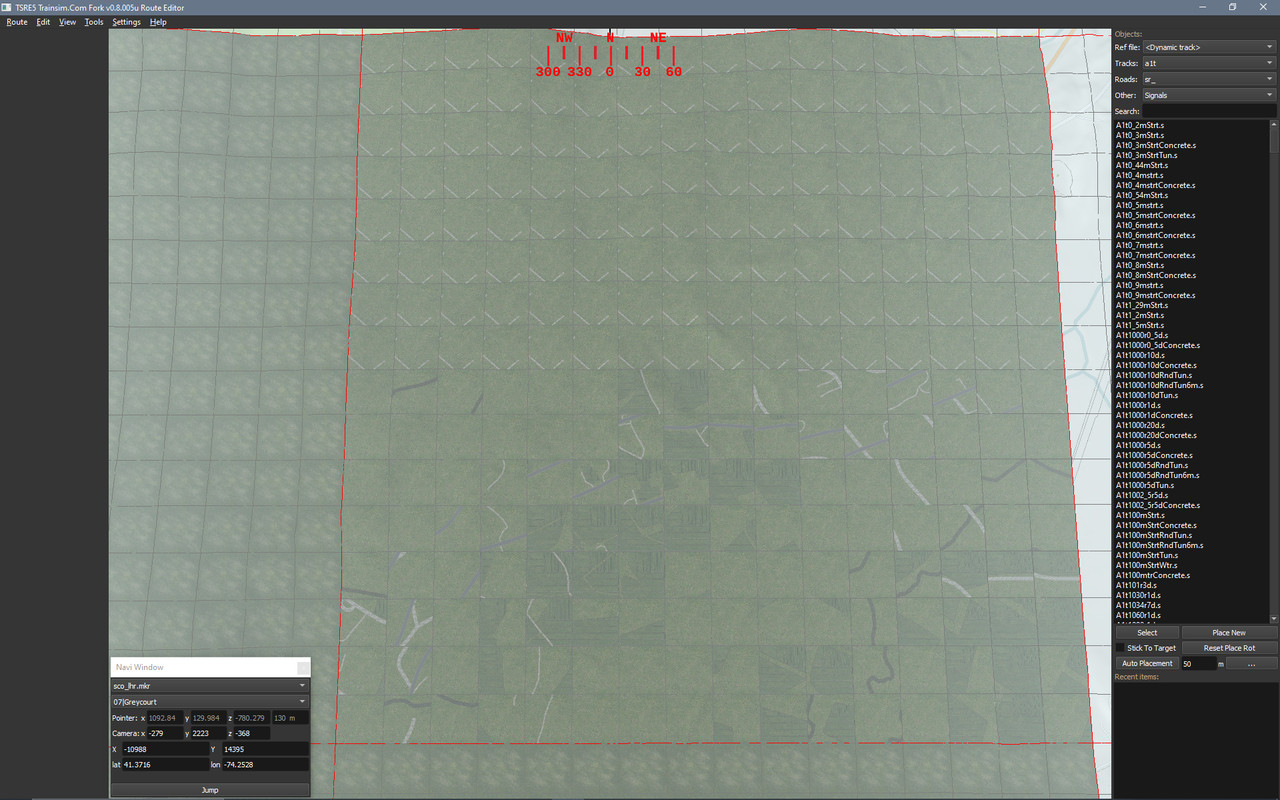
    I noticed the MAP FILES used by TSRE are very convenient - as they color different aspects of the map in unique colors. Primary Roads, Secondary Roads, Water, Crop Fields, Buildings, Forests are all clearly defined. This makes it extremely easy to [SELECT] these items via any graphics program and apply textures to them.

    I want 1024 Terrtex so I resized the maps to 16,384 x 16,384 pixels (a tile has 256 patches - 16x16) - a pretty large graphic image by any standards - then textured same. Since the shapes on the map have no antialias and have large "jaggies" - you need to be familiar with editing your selection in your paint program (smooth, expand, contract, antialias, feather).
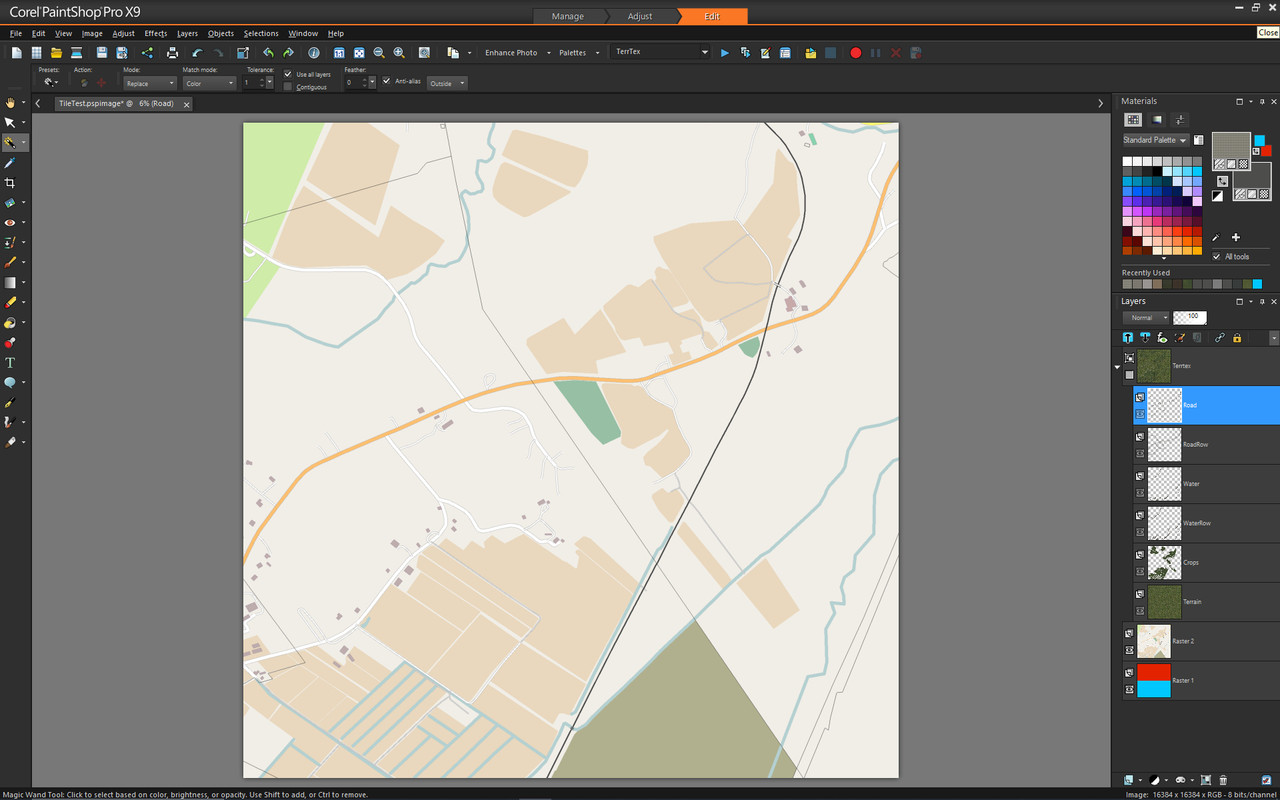
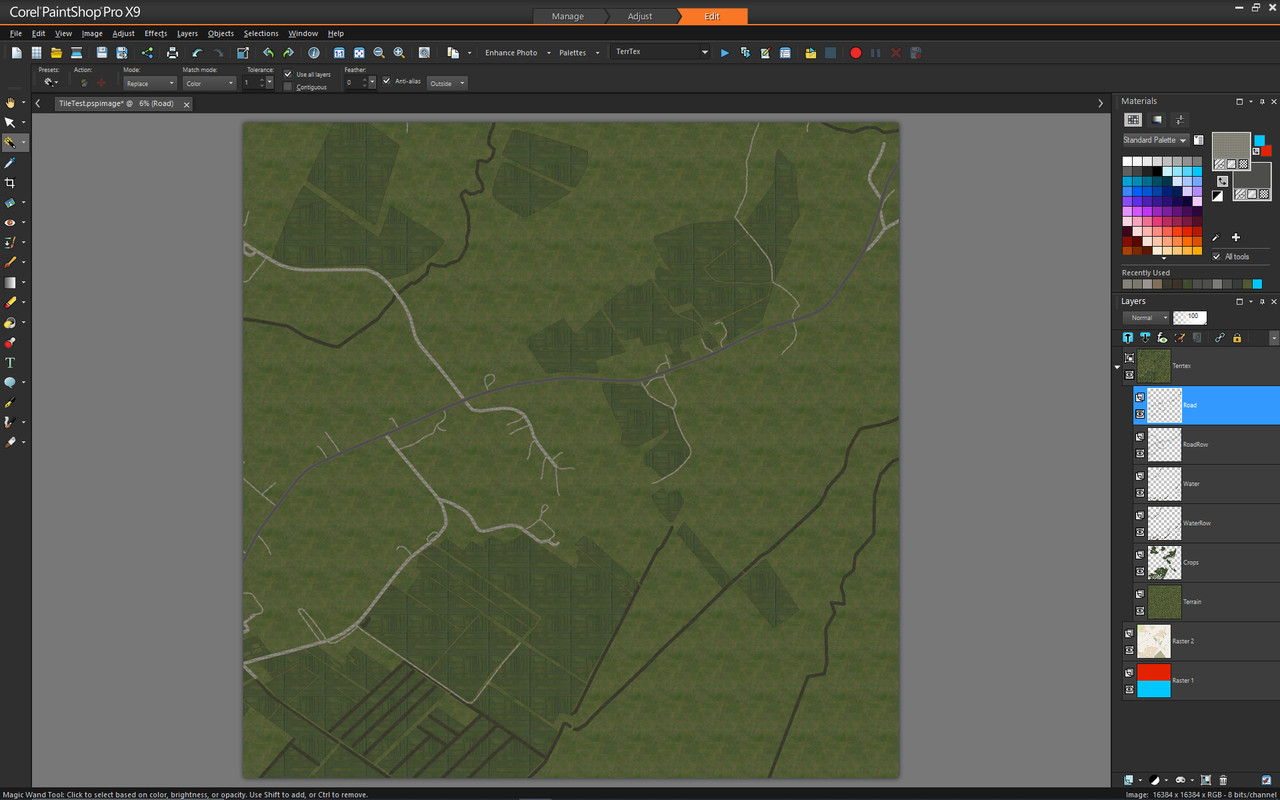


    I have my C program dicing up my saved image into 256 (1024x1024) patches via ImageMagick - works great.

    My issue - is converting the map image name to the hex needed for the patch names. Everything I've tried fails. TSRE clearly knows how to associate the map image on the left with the hex name on the right. I realize the map name is - kind of - the coordinates of the tile.
    • -110214358.png → expected: 04bea74c
    • -110214363.png → expected: 04bea480
    • -110174365.png → expected: 04bea530
    • -109954388.png → expected: 04bbc26c
    • -109894401.png → expected: 04bb3bb0
    Does anyone know how to convert this?

    I can easily create the required ACE files from patches using AceIt.

    Then I need to edit the Tiles.

    I think I can uncompress the Tiles (*.t) via zlib.

    Regards,
    Scott


    <a href=https://www.trainsim.com/forums/filedata/fetch?filedataid=80663&type=full title=thumb_80663.png >thumb_80663.png</a>​ My Blender Models
  • pgroenbaek
    Member
    • Jan 2024
    • 98
    • Denmark
    • ORTS

    #2
    Hi Scott,

    Really nice idea on using the terrain maps for this, might end up doing something like this myself

    Here are some lines in the TSRE5 codebase that might be useful on the naming:

    This is how TSRE calculates the terrain map .png names: https://github.com/eric-from-trainsi...indow.cpp#L237

    And I think this is the function that creates the .t tile filenames: https://github.com/eric-from-trainsi...rrain.cpp#L403

    You can probably compute tileX and tileY from the .png name and then use the logic of the other function to get the tile name.

    Looks like the tile name function is called like this:

    Code:
    name = getTileName((int) x, (int) -y);
    So keep the -y in mind.

    I didn't try doing this myself, but these are just code lines I found doing a quick search in the TSRE codebase that you might find useful.
    - Peter

    Route Projects: DK24
    Utilities and Tools: ShapeIO, ShapeEdit, TrackshapeUtils

    Comment

    • scottb613
      2500 Post Veteran


      • Apr 2003
      • 2848
      • Downeast Maine (soon)
      • ORTS

      #3
      Hi...

      Thanks much. Let me see if I can figure this out.

      Yeah - from my testing this has great potential. If I get this code working - I plan to upload it. Operation - is simply drag and drop your large textured map image on the executable - and it - should - do all the required processing - hands off.

      The processing in your graphics program is very intensive for such large files - so - image editors that support macros work best - it can take 5 minutes or more to smooth "jaggies".

      It also helps to border all your textures with a dirt band - so underneath all the textures clearly visible - is a slightly oversized dirt texture - creating a nice border.

      Regards,
      Scott
      <a href=https://www.trainsim.com/forums/filedata/fetch?filedataid=80663&type=full title=thumb_80663.png >thumb_80663.png</a>​ My Blender Models

      Comment

      • EldoradoRailroad
        Senior Member

        • May 2010
        • 212

        #4
        Scott,

        If you are able to decipher with your "Lone Ranger" decoder wheel the nomenclature then you have done EXCELLENT detective work! I toyed with those numbers to see if it was a 2's complement offshoot, no dice, at least not yet. If you can, keep us posted on the secret that would be great, if not spectacular. Whenever I look at the Feather River Route and the numbering system used I know that M. Nelson had a system for the tiles. I guess that method is in dark as the author pursues an alternate life.

        Years ago I needed to know what the translation was between world file names and lat/long that we would see on screen. I cannot recall whether it was for MSTS or OpenRails. As I recall there has been a consistent "bug" between what is shown onscreen in OpenRails for lat/long and where the camera actually is. If James has fixed this bug, which he knew about, but could not find the time to fix, I apologize. But in my case it was code from RouteRiter that solved the problem I was trying to solve, and the author gave me that snippet of compiled java code. I do not have the source, but if the source is available, someplace, that might help.

        Like you, Mosaic in its current state, with no memory management, was a PITA, with constant crashes as the memory limit was reached. There are many routes, free and otherwise that would benefit enormously from the code you are trying to assemble. In same cases I opted to update tiles to 4090x4096 by hand, because there were so few of those base "ace" files to work with. So what you are proposing is a quantum leap. If anything, if you are able to assemble this program and not have the source "lost", like with Mosaic, then you would have done a huge service to this community. Github?

        Hats off to you,
        Steve

        PS: By the title, I thought you were looking for somebody to re-tile a bathroom!

        Comment

        • scottb613
          2500 Post Veteran


          • Apr 2003
          • 2848
          • Downeast Maine (soon)
          • ORTS

          #5
          Originally posted by EldoradoRailroad
          Scott,

          If you are able to decipher with your "Lone Ranger" decoder wheel the nomenclature then you have done EXCELLENT detective work! I toyed with those numbers to see if it was a 2's complement offshoot, no dice, at least not yet. If you can, keep us posted on the secret that would be great, if not spectacular. Whenever I look at the Feather River Route and the numbering system used I know that M. Nelson had a system for the tiles. I guess that method is in dark as the author pursues an alternate life.

          Years ago I needed to know what the translation was between world file names and lat/long that we would see on screen. I cannot recall whether it was for MSTS or OpenRails. As I recall there has been a consistent "bug" between what is shown onscreen in OpenRails for lat/long and where the camera actually is. If James has fixed this bug, which he knew about, but could not find the time to fix, I apologize. But in my case it was code from RouteRiter that solved the problem I was trying to solve, and the author gave me that snippet of compiled java code. I do not have the source, but if the source is available, someplace, that might help.

          Like you, Mosaic in its current state, with no memory management, was a PITA, with constant crashes as the memory limit was reached. There are many routes, free and otherwise that would benefit enormously from the code you are trying to assemble. In same cases I opted to update tiles to 4090x4096 by hand, because there were so few of those base "ace" files to work with. So what you are proposing is a quantum leap. If anything, if you are able to assemble this program and not have the source "lost", like with Mosaic, then you would have done a huge service to this community. Github?

          Hats off to you,
          Steve

          PS: By the title, I thought you were looking for somebody to re-tile a bathroom!
          Hi Steve,

          Hah - yeah - Doug graciously provided the key...

          I spent many hours trying to figure it out - when you have the key - it's easy....

          Code:
          /// Encode tile coords to ORTS/TSRE hex
          std::string tsreHexFromTileCoords(int x, int z) {
              static const char hd[] = {
                  '0','1','4','5','3','2','7','6',
                  'c','d','8','9','f','e','b','a'
              };
              char id[10]{'-','0','0','0','0','0','0','0','0','\0'};
              x += 16384;
              z = 16384 - z - 1;
              x <<= 1;  z <<= 1;
              for (int i = 1; i < 9; ++i) {
                  int s = 16 - 2 * i;
                  int m = 3 << s;
                  int idx = ((x & m) >> s) + 4 * ((z & m) >> s);
                  id[i] = hd[idx];
              }
              return std::string(id);
          }

          Run Log (I need to fix the double hyphen prefix in the ACE file name)
          Code:
          SCO_mosaic v1.43
          Logging to: C:\Users\scott\Desktop\New folder\SCO_mosaic.log
          Started. CWD=C:\Users\scott\Desktop\New folder
          Source: C:\Users\scott\Desktop\New folder\T-10988_14395.png
          Using INI: C:\Users\scott\Desktop\New folder\SCO_mosaic.ini
          AceIt path: E:\MSTS Tools\AceIt\aceit.exe
          Created directory: C:\Users\scott\Desktop\New folder\Terrtex
          Patches per side: 16
          Parsed TileX=-10988, TileZ=14395
          Hex ID: -04bbc480
          Launching: "E:\MSTS Tools\AceIt\aceit.exe" "C:\Users\scott\Desktop\New folder\Terrtex\-04bbc480_0_0.png" "Terrtex\--04bbc480_0_0.ace" /uncompressed /cab /quiet
          Wrote ACE: Terrtex\--04bbc480_0_0.ace
          Launching: "E:\MSTS Tools\AceIt\aceit.exe" "C:\Users\scott\Desktop\New folder\Terrtex\-04bbc480_0_1.png" "Terrtex\--04bbc480_0_1.ace" /uncompressed /cab /quiet
          Wrote ACE: Terrtex\--04bbc480_0_1.ace
          Launching: "E:\MSTS Tools\AceIt\aceit.exe" "C:\Users\scott\Desktop\New folder\Terrtex\-04bbc480_0_2.png" "Terrtex\--04bbc480_0_2.ace" /uncompressed /cab /quiet
          Wrote ACE: Terrtex\--04bbc480_0_2.ace
          Launching: "E:\MSTS Tools\AceIt\aceit.exe" "C:\Users\scott\Desktop\New folder\Terrtex\-04bbc480_0_3.png" "Terrtex\--04bbc480_0_3.ace" /uncompressed /cab /quiet
          Wrote ACE: Terrtex\--04bbc480_0_3.ace
          Launching: "E:\MSTS Tools\AceIt\aceit.exe" "C:\Users\scott\Desktop\New folder\Terrtex\-04bbc480_0_4.png" "Terrtex\--04bbc480_0_4.ace" /uncompressed /cab /quiet
          Wrote ACE: Terrtex\--04bbc480_0_4.ace
          Launching: "E:\MSTS Tools\AceIt\aceit.exe" "C:\Users\scott\Desktop\New folder\Terrtex\-04bbc480_0_5.png" "Terrtex\--04bbc480_0_5.ace" /uncompressed /cab /quiet
          Wrote ACE: Terrtex\--04bbc480_0_5.ace
          Launching: "E:\MSTS Tools\AceIt\aceit.exe" "C:\Users\scott\Desktop\New folder\Terrtex\-04bbc480_0_6.png" "Terrtex\--04bbc480_0_6.ace" /uncompressed /cab /quiet
          Wrote ACE: Terrtex\--04bbc480_0_6.ace
          Launching: "E:\MSTS Tools\AceIt\aceit.exe" "C:\Users\scott\Desktop\New folder\Terrtex\-04bbc480_0_7.png" "Terrtex\--04bbc480_0_7.ace" /uncompressed /cab /quiet
          Wrote ACE: Terrtex\--04bbc480_0_7.ace
          Launching: "E:\MSTS Tools\AceIt\aceit.exe" "C:\Users\scott\Desktop\New folder\Terrtex\-04bbc480_0_8.png" "Terrtex\--04bbc480_0_8.ace" /uncompressed /cab /quiet
          Wrote ACE: Terrtex\--04bbc480_0_8.ace
          Launching: "E:\MSTS Tools\AceIt\aceit.exe" "C:\Users\scott\Desktop\New folder\Terrtex\-04bbc480_0_9.png" "Terrtex\--04bbc480_0_9.ace" /uncompressed /cab /quiet
          Wrote ACE: Terrtex\--04bbc480_0_9.ace
          Launching: "E:\MSTS Tools\AceIt\aceit.exe" "C:\Users\scott\Desktop\New folder\Terrtex\-04bbc480_0_10.png" "Terrtex\--04bbc480_0_10.ace" /uncompressed /cab /quiet
          I did load up Mosaic again - I've certainly spent a great deal of time with Mosaic to create ROW - in the past - it was an absolutely painful process but the only game in town. Thankfully TSRE can do that now. Yeah - the program crashes all the time with file sizes in common use today. It's a shame that Demex and Mosaic was never shared on GitHub - by John. It would probably be fairly easy to convert to 64-bit. My little program will never do many of the things Mosaic does.

          I'm now up to figuring out Tiles...

          I think this is the only part of the Tile I need to be concerned with... Why do we have an AlphaTerrain? Is the naming convention of terrain_shader textures the only thing that assigns a texture to a patch? I have no clue what terrain_uvcalcs do...

          Code:
              terrain_shaders ( 2
                  terrain_shader ( DetailTerrain
                      terrain_texslots ( 2
                          terrain_texslot ( "terrain.ace" 1 0 )
                          terrain_texslot ( "microtex.ace" 1 1 )
                      )
                      terrain_uvcalcs ( 2
                          terrain_uvcalc ( 1 0 0 0 )
                          terrain_uvcalc ( 2 0 1 32 )
                      )
                  )
                  terrain_shader ( AlphaTerrain
                      terrain_texslots ( 1
                          terrain_texslot ( "terrain.ace" 1 0 )
                      )
                      terrain_uvcalcs ( 1
                          terrain_uvcalc ( 1 0 0 0 )
                      )
                  )
              )
          LOL - I could use a tile guy - too.


          Regards,
          Scott
          <a href=https://www.trainsim.com/forums/filedata/fetch?filedataid=80663&type=full title=thumb_80663.png >thumb_80663.png</a>​ My Blender Models

          Comment

          • scottb613
            2500 Post Veteran


            • Apr 2003
            • 2848
            • Downeast Maine (soon)
            • ORTS

            #6
            Hi Folks,

            Someone brought up the fact - that we need "bleed edges" on the textures. I recall a setting in Mosaic - but what does that really mean - what do I need to do to my diced texture patches? Alpha edges or something?

            Regards,
            Scott

            <a href=https://www.trainsim.com/forums/filedata/fetch?filedataid=80663&type=full title=thumb_80663.png >thumb_80663.png</a>​ My Blender Models

            Comment

            • scottb613
              2500 Post Veteran


              • Apr 2003
              • 2848
              • Downeast Maine (soon)
              • ORTS

              #7
              Hi Folks,

              OK - it's clear - I don't know what I'm doing.

              I first loaded 128 patches (half a tile) of my image via Mosaic - which works. I can only do half a tile - as soon as I try to mess with the other half - Mosaic crashes - even after I restart Mosaic going back in to work on the same tile again - Mosaic crashes when I try to save. I'm only capable of processing half a tile - I don't know what happens if I try to work a different tile in the same area - doesn't matter. Mosaic will not work.

              Textures are just a quick test but look pretty good - again - only half a tile. The roads will be certainly passable if not directly adjacent to the tracks - far easier than trying to get real roads to follow terrain. The textures are 1024x1024 uncompressed with no MipMaps - the same as if edited by TSRE.


              So - I thought I would try taking the same tile formatted by Mosaic - do a manual edit - and simply substitute my textures in place of the Mosaic textures. I added the same - copying the format for all 256 patches.

              No joy - just a jumbled mess. I don't know enough about tiles to modify them.


              My failed attempt at a "t" file edit:
              -04bbc480.txt

              Stalled - for now.

              Regards,
              Scot


              ​
              Attached Files
              <a href=https://www.trainsim.com/forums/filedata/fetch?filedataid=80663&type=full title=thumb_80663.png >thumb_80663.png</a>​ My Blender Models

              Comment

              • pgroenbaek
                Member
                • Jan 2024
                • 98
                • Denmark
                • ORTS

                #8
                Nice job so far. Definitely interested in the outcome of this.

                From what I can see comparing your original image and the jumbled mess, there is order to the jumbledness of the patches.

                There is something off about the orientation of the patches, and it looks like the outermost column belongs on the other side like this:

                Image1.jpg

                The patches are possibly flipped both horizontally and vertically as well (or maybe not depending on the camera orientation). The bottom half of the jumbled patches seem to be the top half of the original image.
                - Peter

                Route Projects: DK24
                Utilities and Tools: ShapeIO, ShapeEdit, TrackshapeUtils

                Comment

                • scottb613
                  2500 Post Veteran


                  • Apr 2003
                  • 2848
                  • Downeast Maine (soon)
                  • ORTS

                  #9
                  Hi Peter,

                  Excellent - we are on the same page - first I had to flip the entire texture - both vertically and horizontally - before dicing. I put down a gid of horizontal lines as an overlay - along with cardinal headings. Fortunately - it appears that there ISN'T a rotation issue on the patches - as the lines stayed intact. In addition - I think I have to mirror each and every patch in the horizontal - I'm doing it now. It takes so long to crunch a tile worth of textures with AceIt - it kills me.

                  Please keep your insights coming - I could use all the help I can get.


                  Progress...

                  Regards,
                  Scott
                  <a href=https://www.trainsim.com/forums/filedata/fetch?filedataid=80663&type=full title=thumb_80663.png >thumb_80663.png</a>​ My Blender Models

                  Comment

                  • scottb613
                    2500 Post Veteran


                    • Apr 2003
                    • 2848
                    • Downeast Maine (soon)
                    • ORTS

                    #10
                    Originally posted by pgroenbaek
                    Nice job so far. Definitely interested in the outcome of this.

                    From what I can see comparing your original image and the jumbled mess, there is order to the jumbledness of the patches.

                    There is something off about the orientation of the patches, and it looks like the outermost column belongs on the other side like this:

                    The patches are possibly flipped both horizontally and vertically as well (or maybe not depending on the camera orientation). The bottom half of the jumbled patches seem to be the top half of the original image.
                    Hi Peter,

                    Damn - my patch mirror code didn't work - but the patches are at least in the general vicinity of where they belong. Another 20 minutes wasted.

                    I think there might be a skew in the rows too - if only someone documented all this...


                    Little progress...


                    SCO.jpg

                    Regards,
                    Scott
                    <a href=https://www.trainsim.com/forums/filedata/fetch?filedataid=80663&type=full title=thumb_80663.png >thumb_80663.png</a>​ My Blender Models

                    Comment

                    • scottb613
                      2500 Post Veteran


                      • Apr 2003
                      • 2848
                      • Downeast Maine (soon)
                      • ORTS

                      #11
                      Hi Folks,

                      By jove - I think I have it.


                      So - I don't know if this is due to me using a Mosaic format for the model to define my Tile (*.t) - or just inherent to the way ORTS/TSRE operates. I had to flip my entire source image in both the vertical and horizontal before dicing. After dicing - I had to flip each of the 256 patches in both the vertical and horizontal - to get everything to line up.

                      If anyone comes along who has a better understanding of the parameters using in a Tile (*.t) file - I could still really use some help.

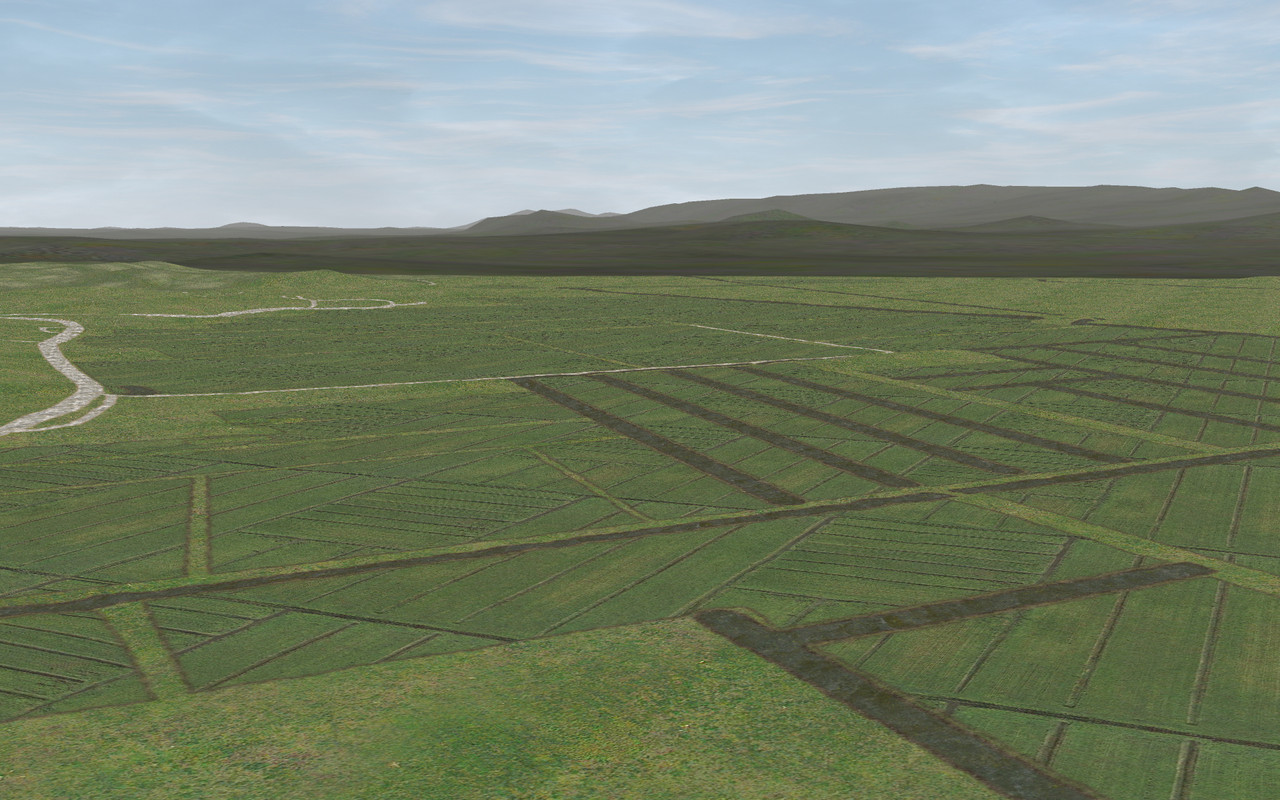
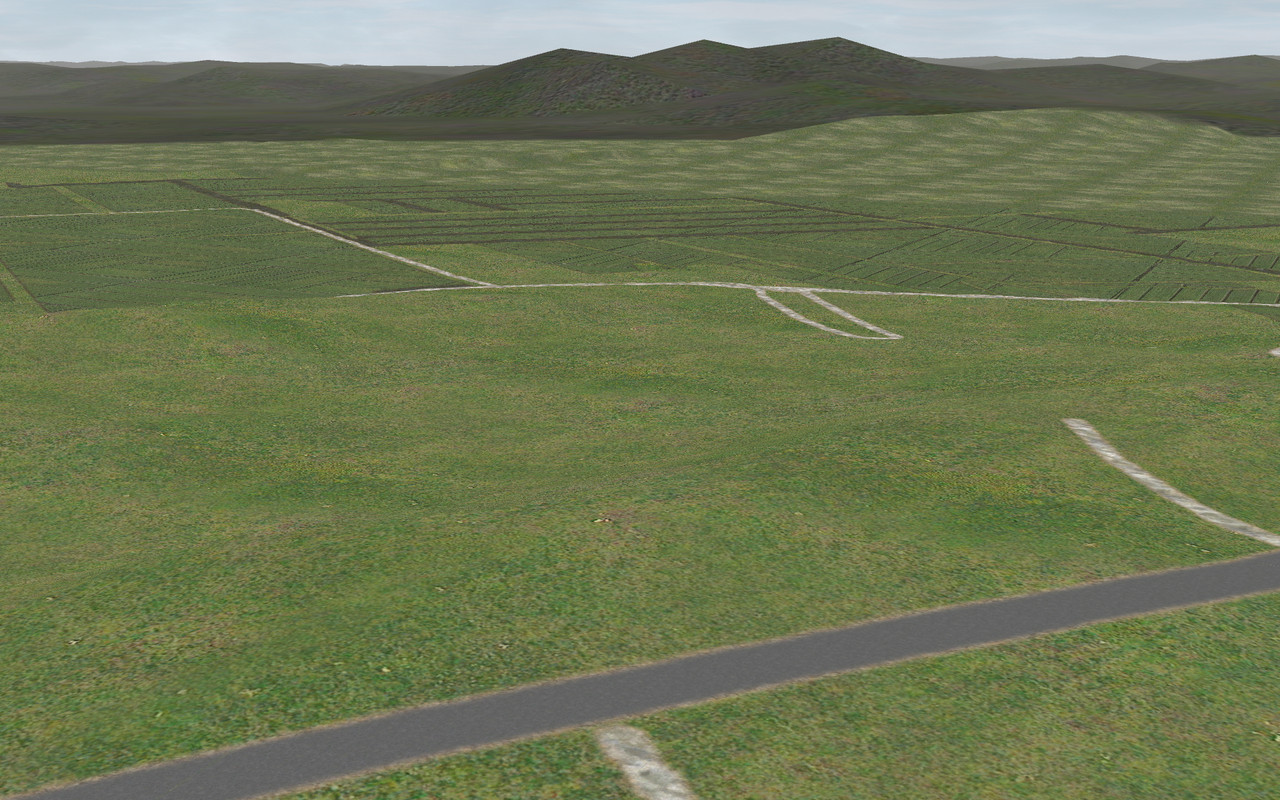
                      It worked - a full 16384x16384 image properly applied to a full tile - without using Mosaic at all.

                      I tested the bleed edge in Mosaic with smaller tiles - won't work - as it shifts everything a bit so that nothing lines up. I know I need to address MipMaps at some point. I am using ACE for now and they are needed for TSRE - my end goal is to create DDS for ORTS. Fortunately - ImageMagick can create the DDS natively from my C program.

                      Next - I need to load up zlib to attempt to compress and uncompress tiles without using TSUtils.


                      2025-04-19 10_00_59-Greenshot.jpg

                      Regards,
                      Scott
                      <a href=https://www.trainsim.com/forums/filedata/fetch?filedataid=80663&type=full title=thumb_80663.png >thumb_80663.png</a>​ My Blender Models

                      Comment

                      • eric
                        9500 Post Veteran and Administrator


                        • Dec 2002
                        • 9583
                        • NS MP245.4 CNO&TP South District
                        • English, SQL
                        • General

                        #12
                        Now take on geotiff....

                        Sent from my SM-S911U using Tapatalk

                        If you like what you see here at Trainsim.com, be it the discussions and knowledge in the forums, or items available in our library, I hope you'll consider a paid membership to help support keeping the site operating.... Thanks!

                        Comment

                        • EldoradoRailroad
                          Senior Member

                          • May 2010
                          • 212

                          #13
                          Originally posted by scottb613

                          I had to flip my entire source image in both the vertical and horizontal before dicing. After dicing - I had to flip each of the 256 patches in both the vertical and horizontal - to get everything to line up.
                          Egad...trying to imagine what you are saying. I wish there were a few pictures that describe what you wrote.

                          Originally posted by scottb613
                          It worked - a full 16384x16384 image properly applied to a full tile - without using Mosaic at all.
                          Before/after pictures and why it was worth the effort??

                          There are still some areas with repeated patches that in my very BIASED opinion, kinda don't "look too good" in the sim. I have manually randomized the orientation of the patches in MOSAIC for other routes. Will MOSAIC not choke and die if you try to randomize the orientation with 1024x1024 patches even if only doing that to one tile at a time?

                          Steve

                          Comment

                          • scottb613
                            2500 Post Veteran


                            • Apr 2003
                            • 2848
                            • Downeast Maine (soon)
                            • ORTS

                            #14
                            Originally posted by eric
                            Now take on geotiff....

                            Sent from my SM-S911U using Tapatalk
                            Hi Eric,

                            Hah - for the record - I am by no means a programmer - just an Admin who's picked up enough code over the years - out of necessity - to be dangerous...

                            That said - I've thought about a DEMEX replacement a bunch - not that anything will ever come of it...

                            The processing of Geotiffs is manageable - they have embedded data that can be extracted and read - we use RAW files that can be produced - - - the UNKNOWN - - - is Open Rails. QGIS/GDAL can do all this - it's well documented - what to do with the information once we have it is the problem - where do we dice up the Geotiff to produce the RAW - from my understanding a RAW file is a binary file that just contains elevation data - it doesn't have of the location data - so that would need to pulled and populated on the Tile for reference. How any of this is done on the Open Rails side - no clue. I really don't even have everything I need to do the Terrtex work.

                            We'll see...

                            In TSRE - any shot we can change the saved map name to the tile name instead of a name that is extremely hard to cross reference and pretty useless?

                            Code:
                            Source Image Hex Name Tile Address
                            -109894395.png  -04bbc480  -10988 14395
                            -109894394.png  -04bbc48c  -10988 14394
                            -109894401.png  -04bb3bb0  -10988 14401
                            -110214359.png  -04bea740  -11020 14359
                            -110024370.png  -04bbcf98  -11001 14370
                            For example - the first line Source Image Name should be "-1098814395.png"? With an actual tile address - I can get the hex code.


                            Originally posted by EldoradoRailroad
                            Egad...trying to imagine what you are saying. I wish there were a few pictures that describe what you wrote.

                            Before/after pictures and why it was worth the effort??

                            There are still some areas with repeated patches that in my very BIASED opinion, kinda don't "look too good" in the sim. I have manually randomized the orientation of the patches in MOSAIC for other routes. Will MOSAIC not choke and die if you try to randomize the orientation with 1024x1024 patches even if only doing that to one tile at a time?

                            Steve
                            Hi Steve,

                            Hah - think of the fun I had trying to figure out what was actually happening. The flipping or mirroring a texture sheet is a staple of any paint program - I just had to do a bit more of that than usual.


                            First off - I'm stuck on 1024 terrtex - 512 doesn't work for me.

                            One of the hardest things in TSRE to get looking good are crop fields - I've spent hours on them (ruler) and I've never been happy with the result. One of the biggest shortcomings is we can't scale or rotate a texture in TSRE. So you need to make all new textures if you want to change the angle or scale of crop rows - not so in an image editor with seamless textures. The real-world maps just make it too easy to get the variety, randomness, and distribution you get when viewing actual farmland.

                            Yeah - I'm far from done - I'm sure I can figure out how to rotate a Patch randomly - my thought - I was thinking of not processing any Patches that just contains the default terrain - saving on overhead. That way if a Patch doesn't have water, crops, roads, or something in it - it just uses Terrain.ace and not some custom texture.

                            Thanks for the comments.​ Still a ways to go...


                            Regards,
                            Scott
                            <a href=https://www.trainsim.com/forums/filedata/fetch?filedataid=80663&type=full title=thumb_80663.png >thumb_80663.png</a>​ My Blender Models

                            Comment

                            Working...