TDB Corruption on Route Save?

Collapse
X
 
  • Time
  • Show
Clear All
new posts
  • eolesen
    9500 Post Veteran and Administrator


    • Dec 2002
    • 9583
    • NS MP245.4 CNO&TP South District
    • English, SQL
    • General

    #1

    TDB Corruption on Route Save?

    OK, I'm running into a couple issues.... has anyone else experienced this with TSRE?

    1) Random pieces of track are disappearing. Today it was SR_END_W_03Dx2.s and SR_1TSTR_W_090M.s sections, in areas I hadn't touched for weeks.

    2) TDB lines which used to be connected are somehow disconnecting...

    3) TDB lines dropping without having been Z'd....

    Broken TDB lines... I can fix them, save, close, and they'll be broken again after a subsequent save.
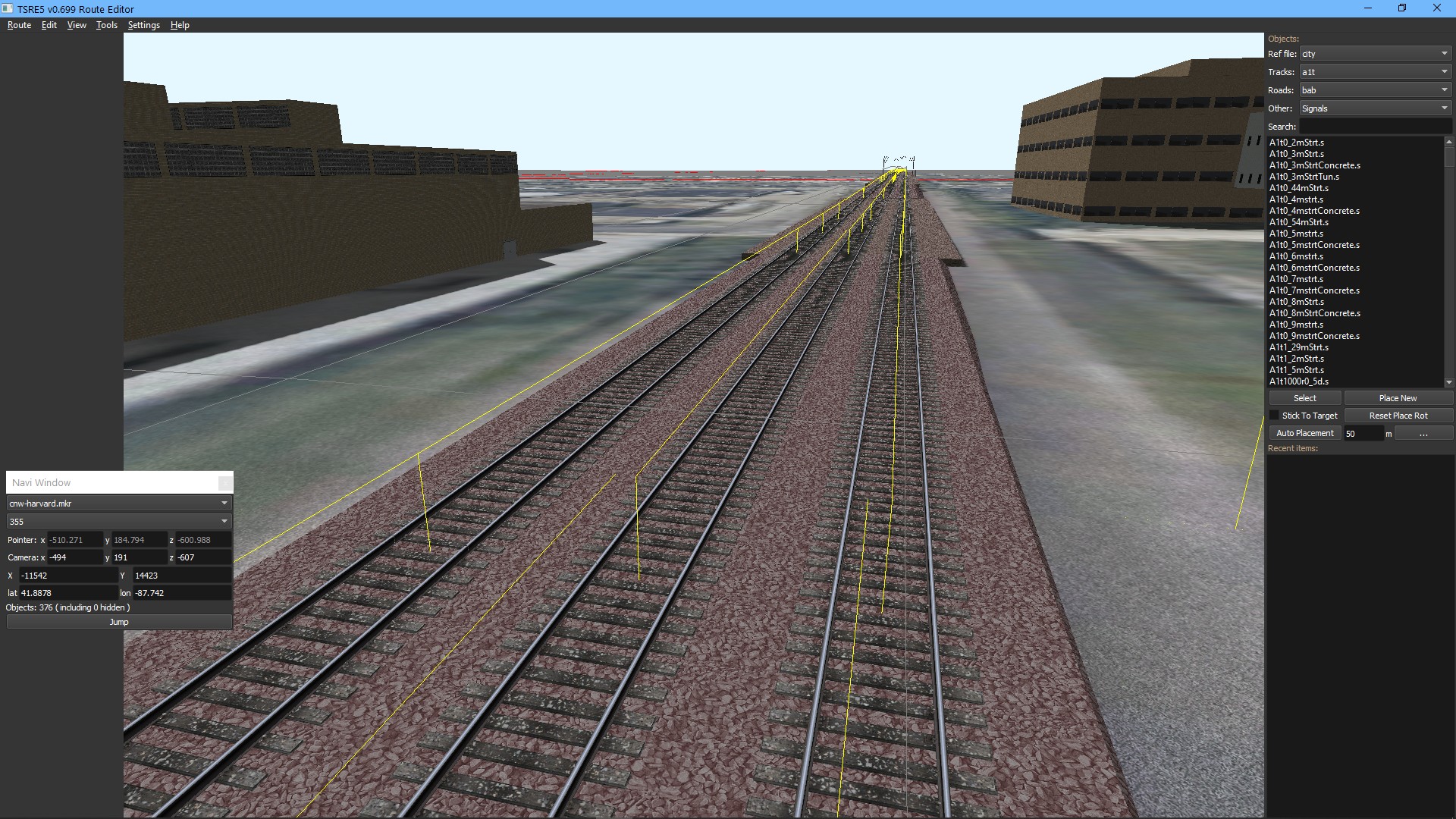


    Multi-track pieces dropping one vector at random:
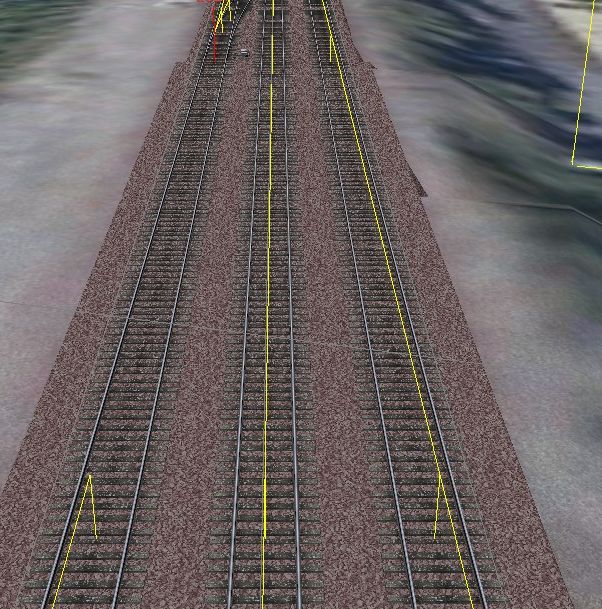


    My guess... there's an issue with the calculations that is causing the vectors to break and skew when being written to the TDB. The track in the W files hasn't been changed (although I didn't check to see if the non-rendered track was still in the W file and simply didn't render...).


    A couple of these are on very long vectors (i.e. 5-8 miles without a node) so I'm wondering maybe it's just a different manifestation of "broken coupler syndrome" and the vectors need dummy nodes added to break things up?
    If you like what you see here at Trainsim.com, be it the discussions and knowledge in the forums, or items available in our library, I hope you'll consider a paid membership to help support keeping the site operating.... Thanks!
  • joe_star
    Senior Member
    • Mar 2012
    • 394

    #2
    I can comment on some of them from my experience:

    1) Did you run the route thru route riter CLRDB routine? I had route riter try to "clean up" switches laid in TSRE which had multiple JNODEPOSN entries in the w file. The multiple entries get written anytime you reposition a switch in TSRE after laying it.

    Also, route riter throws up a ton of TDB errors for my routes edited with TSRE, especially on the TrItem side. Nothing so far that impacted performance so far though.

    2) misaligned TDB lines: I experience these usually only after having "Z" ed thru them to realign track, "Z"ing back to capture the new alignment, and saving, but one end follows the old TDB line resulting in the misalignment. The fix is to delete the vectors from both sides, SAVE, then add back the vectors. This seems to save both ends correctly

    Multi track vector dropping: the vector isn't dropped, but it's rotation inverted by 180 degrees in the TRVectorNode entry. If you are comfortable with TDB manual editing, the fix is easy, just correcting the vector bearing entry for that particular vector. It's easy to find as that number will stick out like a sore thumb when straight track is involved. Otherwise "Z" the entire section works as well. I notice this happens with multitrack pieces and also the vector connecting to switches when you go back in and edit a track section.

    Comment

    • eolesen
      9500 Post Veteran and Administrator


      • Dec 2002
      • 9583
      • NS MP245.4 CNO&TP South District
      • English, SQL
      • General

      #3
      Thanks for that.

      1a) I did not run CLRDB yet. Last time I did, my route appeared somewhat slagged with track completely missing in areas yet TDB lines showing up (and yes, I did copy over the new W files). Fortunately I had a backup to fall back to.

      1b) Yes, I've seen the multiple JNODEPOSN entries. That's something I can catch and fix via WFH (I'm working on a new version that's a little more TSRE aware).

      2) If I'm reading correctly, if section B has zags, then cycling Z on sections A, B and C should clear this up?
      If you like what you see here at Trainsim.com, be it the discussions and knowledge in the forums, or items available in our library, I hope you'll consider a paid membership to help support keeping the site operating.... Thanks!

      Comment

      • joe_star
        Senior Member
        • Mar 2012
        • 394

        #4
        Originally posted by eric
        Thanks for that.

        1a) I did not run CLRDB yet. Last time I did, my route appeared somewhat slagged with track completely missing in areas yet TDB lines showing up (and yes, I did copy over the new W files). Fortunately I had a backup to fall back to.

        1b) Yes, I've seen the multiple JNODEPOSN entries. That's something I can catch and fix via WFH (I'm working on a new version that's a little more TSRE aware).

        2) If I'm reading correctly, if section B has zags, then cycling Z on sections A, B and C should clear this up?
        2) I would remove tdb for section A B C using Z, SAVE, then add them back using Z

        Just cycling without the save in middle doesn’t seem to lock in the update

        Also for the disappearing (ie inverted) vectors, I just noted from your screenshots they are happening on vectors connecting to a switch, exactly as i described. I used to think this only happened on edited track sections (node to node) which had interactives installed, but I have lately seen cases where it happens even on sections without interactives.
        Last edited by joe_star; 12-30-2020, 03:32.

        Comment

        • eolesen
          9500 Post Veteran and Administrator


          • Dec 2002
          • 9583
          • NS MP245.4 CNO&TP South District
          • English, SQL
          • General

          #5
          Something else that might not be helping matters -- I'd enabled useOnlyPositiveQuaternions right before this sprint.

          I just disabled it.

          Latest issue is certain shapes not rendering. Had a SR_1tstr_w_090.s with blue poles and a yellow line but no track. It shows up fine in ORTS, and there's no error in the TSRE log...


          capture__300104.jpg
          Last edited by eric; 12-30-2020, 09:09.
          If you like what you see here at Trainsim.com, be it the discussions and knowledge in the forums, or items available in our library, I hope you'll consider a paid membership to help support keeping the site operating.... Thanks!

          Comment

          • eolesen
            9500 Post Veteran and Administrator


            • Dec 2002
            • 9583
            • NS MP245.4 CNO&TP South District
            • English, SQL
            • General

            #6
            Tried the un-Z, save, exit, re-open, re-Z, save, exit, re-open, and all the Zigs are back.....

            Ah well, that was at least worth a try.


            New working theory.... these are areas where I used the Transform function to tweak the Y rotation. Perhaps that isn't doing the QDirection calc quite as cleanly as it should, or is dropping a decimal somewhere? Dunno.

            Using Tangent, I went back and calculated the actual QDirections needed to hit two points. After a couple different editing sessions, the zags haven't returned, so maybe that's it. I hope not -- I'd used Transform quite a bit on realigning the 15 miles of track I did over the last two weeks, and am now paying a bit of a price for not having struck the right QD's in the first place.
            Last edited by eric; 12-31-2020, 05:18.
            If you like what you see here at Trainsim.com, be it the discussions and knowledge in the forums, or items available in our library, I hope you'll consider a paid membership to help support keeping the site operating.... Thanks!

            Comment

            • joe_star
              Senior Member
              • Mar 2012
              • 394

              #7
              Thats interesting. I have never used the transform functions on track pieces, only static objects. I've always used the standard RE approach of snapping one end to the railhead and using the track elevation to adjust grade. When joining 2 sections coming from different directions, I use the elevation & rotate functions to fine tune the final joint.

              Comment

              • GokuMK
                Senior Member

                • Oct 2015
                • 729
                • Poland

                #8
                This bug with last traksection wrong rotation is known, but I couldn't reproduce it, so can't fix it.

                Other your problems I think is your fault, because you are a "hacker"

                Comment

                • eolesen
                  9500 Post Veteran and Administrator


                  • Dec 2002
                  • 9583
                  • NS MP245.4 CNO&TP South District
                  • English, SQL
                  • General

                  #9
                  I specifically don't hack track objects in order to avoid TDB updates...

                  Seriously, there's something odd going on with an array that you keep the track DB in.

                  If I un-Z a shape and re-Z it, it's retaining rotation and other attributes such as sticking to an adjacent piece of track at the wrong angle.

                  If I move that same piece without un-Z'ing and then un-Z it after moving it, the track will attach cleanly to the same adjacent piece of track.... it's like the data cleans itself up when it got moved without the TDB removal.
                  If you like what you see here at Trainsim.com, be it the discussions and knowledge in the forums, or items available in our library, I hope you'll consider a paid membership to help support keeping the site operating.... Thanks!

                  Comment

                  • GokuMK
                    Senior Member

                    • Oct 2015
                    • 729
                    • Poland

                    #10
                    Originally posted by eric
                    If I un-Z a shape and re-Z it, it's retaining rotation and other attributes such as sticking to an adjacent piece of track at the wrong angle.
                    joe_star already explained you that you have to un-Z adjacent tracks on both ends in case of such error, because track section position and rotation is related to a position of a previous track section in a track vector. So you don't know which one is wrong.
                    If you un-Z only one track section with somehow broken rotation, this rotation is moved to a new endnode. Then if you use Z again, this broken rotation stored in end node will return to a track section.

                    Comment

                    • eolesen
                      9500 Post Veteran and Administrator


                      • Dec 2002
                      • 9583
                      • NS MP245.4 CNO&TP South District
                      • English, SQL
                      • General

                      #11
                      I've gone back as far as three track sections in either direction. If the join between C and D is broken, I am removing A B C D E F, and it will display fine until I exit.

                      When I reload the route and go to that spot, or if I run a train, the joint at C and D is still broken.

                      I've also deleted the entire vector using the Hacks menu. There shouldn't be any endpoint data saved, right? Then I re-add the sections in order A-B-C-D-E-F and the joint will be broken when I exit and re-open the route.

                      The only way I can explain an error like that returning consistently after several delete/exit/re-add/exit cycles is if you are calculating the vector wrong when you re-write out the TDB. It's not rendering incorrectly in either TSRE or ORTS. It's only the TDB vector.

                      It could be the calculation use by transformation, or perhaps there's a decimal value being dropped in the process. Either way, the vector line is visually correct after updating A-B-C/D-E-F yet it's not being saved that way after a restart.

                      I'll keep testing later....
                      Last edited by eric; 12-31-2020, 15:06.
                      If you like what you see here at Trainsim.com, be it the discussions and knowledge in the forums, or items available in our library, I hope you'll consider a paid membership to help support keeping the site operating.... Thanks!

                      Comment

                      • GokuMK
                        Senior Member

                        • Oct 2015
                        • 729
                        • Poland

                        #12
                        You can send me a demo route and instruction how to cause this bug.

                        Comment

                        • eolesen
                          9500 Post Veteran and Administrator


                          • Dec 2002
                          • 9583
                          • NS MP245.4 CNO&TP South District
                          • English, SQL
                          • General

                          #13
                          I was able to recreate in a blank route....

                          Lay six sr_3tstr_y_100m pieces in a row
                          Save/exit
                          Re-open
                          transform piece C rotate Y by 0.4
                          snap connect piece D
                          transform piece D rotate Y by -0.4
                          snap connect piece E and F
                          Save/exit
                          Reopen....
                          Lines will be broken at C-D and D-E

                          I was also able to go in, select and un-Z the entire vector, save/close, re-open, re-Z the entire vector, close, reopen, and it would break again.

                          This is on a route that I've never run WFH on, btw...

                          TDB entries

                          Code:
                          				TrackNode ( 39
                          			TrEndNode ( 0 )
                          			UiD ( -11907 13931 6 0 -11907 13931 855.63141 164.81444 -946.8053 0 3.1415896 0 )
                          			TrPins ( 1 0
                          				TrPin ( 40 0 )
                          			)
                          		)
                          
                          TrackNode ( 40
                          			TrVectorNode (
                          				TrVectorSections ( 6
                                    2 23619 -11907 13931 12 4 5 00 -11907 13931 856.32965 164.814 -346.80728  0 3.1415901 0 
                                    2 23619 -11907 13931 11 1 0 00 -11907 13931 856.32965 164.814 -446.80728  0 3.1415901 0 
                                    2 23619 -11907 13931 10 1 0 00 -11907 13931 856.32965 164.814 -546.80743  0 3.1415901 0
                                    2 23619 -11907 13931  9 1 0 00 -11907 13931 856.32965 164.814 -646.80743  0 3.1415901 0     <--- UID 9 zigged
                                    2 23619 -11907 13931  8 1 0 00 -11907 13931 855.63165 164.814 -746.77753  0 3.1485739 0     <--- UID 8 zagged
                                    2 23619 -11907 13931  6 1 0 00 -11907 13931 855.63141 164.81444 -846.8053 0 3.1415901 0 )
                          			)
                          			TrPins ( 1 1
                          				TrPin ( 41 1 )
                          				TrPin ( 39 1 )
                          			)
                          		)
                          		TrackNode ( 41
                          			TrEndNode ( 0 )
                          			UiD ( -11907 13931 12 4 -11907 13931 856.32965 164.814 -346.80728 0 6.2831826 0 )
                          			TrPins ( 1 0
                          				TrPin ( 40 1 )
                          			)
                          		)
                          W-file entries

                          Code:
                          		
                          	TrackObj (
                          		UiD ( 6 )
                          		SectionIdx ( 23619 )
                          		Elevation ( 0 )
                          		CollideFlags ( 39 )
                          		FileName ( SR_3tStr_y_100m.s )
                          		StaticFlags ( 00200180 )
                          		Position ( 859.594 164.814 -946.805 )
                          		QDirection ( 0 0 0 1 )
                          		VDbId ( 4294967295 )
                          	)
                          	TrackObj (
                          		UiD ( 8 )
                          		SectionIdx ( 23619 )
                          		Elevation ( 0 )
                          		CollideFlags ( 39 )
                          		FileName ( SR_3tStr_y_100m.s )
                          		StaticFlags ( 00200180 )
                          		Position ( 859.594 164.814 -846.805 )
                          		QDirection ( 0 0 0 1 )
                          		VDbId ( 4294967295 )
                          	)
                          	TrackObj (
                          		UiD ( 9 )
                          		SectionIdx ( 23619 )
                          		Elevation ( 0 )
                          		CollideFlags ( 39 )
                          		FileName ( SR_3tStr_y_100m.s )
                          		StaticFlags ( 00200180 )
                          		Position ( 859.594 164.814 -746.805 )
                          		QDirection ( 0 -0.00349065 0 0.999994 )
                          		VDbId ( 4294967295 )
                          	)
                          	TrackObj (
                          		UiD ( 10 )
                          		SectionIdx ( 23619 )
                          		Elevation ( 0 )
                          		CollideFlags ( 39 )
                          		FileName ( SR_3tStr_y_100m.s )
                          		StaticFlags ( 00200180 )
                          		Position ( 860.292 164.814 -646.807 )
                          		QDirection ( 0 -2.32831e-10 0 1 )
                          		VDbId ( 4294967295 )
                          	)
                          	TrackObj (
                          		UiD ( 11 )
                          		SectionIdx ( 23619 )
                          		Elevation ( 0 )
                          		CollideFlags ( 39 )
                          		FileName ( SR_3tStr_y_100m.s )
                          		StaticFlags ( 00200180 )
                          		Position ( 860.292 164.814 -546.807 )
                          		QDirection ( 0 -2.32831e-10 0 1 )
                          		VDbId ( 4294967295 )
                          	)
                          	TrackObj (
                          		UiD ( 12 )
                          		SectionIdx ( 23619 )
                          		Elevation ( 0 )
                          		CollideFlags ( 39 )
                          		FileName ( SR_3tStr_y_100m.s )
                          		StaticFlags ( 00200180 )
                          		Position ( 860.292 164.814 -346.807 )
                          		QDirection ( 0 -1 0 -4.37114e-08 )
                          		VDbId ( 4294967295 )
                          	)
                          )
                          Last edited by eric; 01-01-2021, 04:04.
                          If you like what you see here at Trainsim.com, be it the discussions and knowledge in the forums, or items available in our library, I hope you'll consider a paid membership to help support keeping the site operating.... Thanks!

                          Comment

                          • eolesen
                            9500 Post Veteran and Administrator


                            • Dec 2002
                            • 9583
                            • NS MP245.4 CNO&TP South District
                            • English, SQL
                            • General

                            #14
                            Originally posted by eric
                            1) Random pieces of track are disappearing. Today it was SR_END_W_03Dx2.s and SR_1TSTR_W_090M.s sections, in areas I hadn't touched for weeks.
                            Figured out what's happening on this, but no idea how to address it.

                            Here's what the TSRE log.txt says when I place a SR_1tstr_w_090m.s or SR_1tstr_c_090m.s:

                            Code:
                            [I] "engItemSelected"
                            [I] "E:/Dropbox/MSTS/global/shapes/SR_1tStr_w_090m.s"
                            [I] found :  0
                            [I] "placeTool"
                            [I] 1:  -11546   -14423   187.83   190.404   650.047
                            [I] 2:  -11546   -14423   187.83   190.404   650.047
                            [I] "trackobj"   "SR_1tStr_w_090m.s" 593
                            [I] Nowy  651  shape:  "E:/Dropbox/MSTS/global/shapes/SR_1tStr_w_090m.s"
                            [I] "E:/Dropbox/MSTS/global/shapes/SR_1tStr_w_090m.s|E:/Dropbox/MSTS/routes/cnw-harvard/textures"
                            [I] #SFile - undefined token "@@\u0000"
                            That last line is presumably why the shape won't render... There are other shapes where this is happening.

                            If I decompile and uncompress the shape, it renders....
                            If you like what you see here at Trainsim.com, be it the discussions and knowledge in the forums, or items available in our library, I hope you'll consider a paid membership to help support keeping the site operating.... Thanks!

                            Comment

                            • eolesen
                              9500 Post Veteran and Administrator


                              • Dec 2002
                              • 9583
                              • NS MP245.4 CNO&TP South District
                              • English, SQL
                              • General

                              #15
                              I've found 53 Scalerail shapes that can't be opened in TSRE while in binary compressed form due to the undefined token issue:


                              SR_1tSwt_w_im03dR_Div.s @@\u0000
                              SR_1tBrg_c_0150r10d.s i
                              SR_1tBrg_w_0150r10d.s i
                              SR_1tCrv_c_00100r03_5d.s @@\u0000
                              SR_1tCrv_w_00100r03_5d.s @@\u0000
                              SR_1tEnd_c_03dx2.s @@\u0000
                              SR_1tEnd_c_05dL.s @@\u0000
                              SR_1tEnd_w_03dx2.s @@\u0000
                              SR_1tEnd_w_05dL.s @@\u0000
                              SR_1tEru_c_06d.s @@\u0000
                              SR_1tEru_w_06d.s @@\u0000
                              SR_1tStr_c_090m.s @@\u0000
                              SR_1tTun_c_05dL.s @@\u0000
                              SR_1tTun_c_Crv_02000r10d.s @@\u0000
                              SR_1tTun_w_05dL.s @@\u0000
                              SR_1tTun_w_Crv_02000r10d.s @@\u0000
                              SR_1tWye_c_a10.s @@\u0000
                              SR_1tWye_c_m10.s @@\u0000
                              SR_1tWye_w_a10.s @@\u0000
                              SR_1tWye_w_m10.s @@\u0000
                              SR_1tYrd_c_0250r05dG.s \u0087
                              SR_1tYrd_w_0250r05dG.s \u0087
                              SR_2tBrg_w_1500r05d.s @@\u0000
                              SR_2tCrv_c_03000r05d.s @@\u0000
                              SR_2tCrv_w_00150r05d.s @@\u0000
                              SR_2tCrv_w_03000r05d.s @@\u0000
                              SR_2tStr_c_200m.s \u0096
                              SR_2tStr_n_500m.s @@\u0000
                              SR_4tStr_c_080m.s @@\u0000
                              SR_4tStr_c_150m.s @@\u0000
                              SR_4tStr_w_080m.s @@\u0000
                              SR_4tStr_w_150m.s @@\u0000
                              SR_City_4LStr_080m.s `
                              SR_Country_2LCrv_0250r20d.s @@\u0000
                              SR_Hiway_4LStr_050m.s @@\u0000
                              SR_Town_2LCrv_0200r10d.s å
                              SR_Town_2LCrv_1000r01d.s [
                              SR_Town_2LCrv_1500r10d.s @@\u0000
                              SR_Town_2LStr_040m.s d
                              SR_Town_Repl03.s ¡
                              SR_Urban_4LCrv_1500r20d.s @@\u0000
                              SR_Urban_4LStr_090m.s `
                              SR_XtBrg_n_0500r10dA.s ã
                              SR_XtCrv_c_00700r05dA.s \u0088
                              SR_XtCrv_w_00700r05dA.s \u0088
                              SR_XtEnd_c_05dLA.s @@\u0000
                              SR_XtEnd_c_05dLB.s @@\u0000
                              SR_XtEnd_c_05dLD.s @@\u0000
                              SR_XtEnd_c_05dLE.s @@\u0000
                              SR_XtEnd_w_05dLA.s @@\u0000
                              SR_XtEnd_w_05dLB.s @@\u0000
                              SR_XtEnd_w_05dLD.s @@\u0000
                              SR_XtEnd_w_05dLE.s @@\u0000

                              If you decompile these with FFEDITC_UNICODE, they render just fine...

                              I can't imagine these are the only shapes that might be compromised, but I only had time to check the 3100 or so Scalerail/Scaleroads shapes...
                              If you like what you see here at Trainsim.com, be it the discussions and knowledge in the forums, or items available in our library, I hope you'll consider a paid membership to help support keeping the site operating.... Thanks!

                              Comment

                              Working...