TSRE Question: Snapping Tracks

Collapse
X
 
  • Time
  • Show
Clear All
new posts
  • AS353
    New Member
    • Jan 2019
    • 2

    #1

    TSRE Question: Snapping Tracks

    Hello everyone,

    I'm new to the forums and to TSRE, and I'm using it to make routes for Open Rails. I found that when snapping track, a piece can only snap from the point at which you are holding it from, and not from other points.

    As shown in the picture below, I am trying to snap a switch piece to the node on the curve piece circled in red, using one of the converging tracks, and it doesn't work. The piece is being held by the mouse from the point labeled 53.
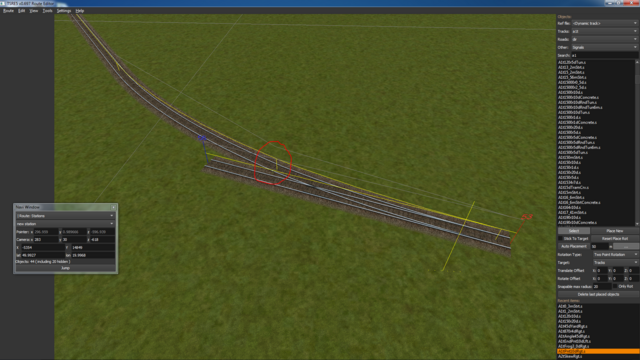


    Is there any way around this? Do I have to enable some settings? Any help would be appreciated.

    Also, if this thread is being posted for the second time somehow, I apologize, I understand that a new account must go through a process to begin posting on forums.

    Thank you!
  • Vince
    6500 Post Veteran

    • Nov 1999
    • 6961
    • Mohave

    #2
    Hi and welcome,

    With the switch selected, press the 'X' key to snap in in succession to all available points.
    The track you are snapping to, the curved section must have the yellow TDB line over the track and . . .
    NEVER move a track section with a yellow TDB line above it. 'Z' it first!

    Go through the Manual and you'll find all sorts of interesting stuff.

    regards.
    ............Vince ..............
    ...... Author NECv4 .......
    .... LIRR BUILD PHOTOS ....
    ...... Eschew Obsfucation ......

    On the The Statue of Liberty in New York Harbor there is a Tablet. On it is written:
    "Give me your tired, your poor, your huddled masses yearning to breathe free,
    the wretched refuse of your teeming shore, send these, the homeless, tempest-tossed to me,
    I lift my lamp beside the golden door!"

    Comment

    • AS353
      New Member
      • Jan 2019
      • 2

      #3
      Oh, thank you very much! I just didn't seem to find this in the manual, which is otherwise definitely very helpful.

      Comment

      • Vince
        6500 Post Veteran

        • Nov 1999
        • 6961
        • Mohave

        #4
        You're welcome.

        User's guide here. http://koniec.org/tsre5/
        Also see tips in this forum

        regards,
        ............Vince ..............
        ...... Author NECv4 .......
        .... LIRR BUILD PHOTOS ....
        ...... Eschew Obsfucation ......

        On the The Statue of Liberty in New York Harbor there is a Tablet. On it is written:
        "Give me your tired, your poor, your huddled masses yearning to breathe free,
        the wretched refuse of your teeming shore, send these, the homeless, tempest-tossed to me,
        I lift my lamp beside the golden door!"

        Comment

        • muskokaandtahoe
          3000 Post Veteran

          • Apr 2003
          • 3003
          • Silicon Valley, CA, USA.
          • ORTS

          #5
          Vince, I had an interesting "failure to snap" yesterday -- had a road on a grade and was trying to extend it but the added section would consistently place itself about 6 inches too high. Trying the same sections on a flat area they worked just fine. What ultimately seemed to be the problem was the height of the ground! It was a bit high at the point of junction and it appears the software was using the ground instead of the adjacent road to determine where it would be set.

          The only odd thing about this is my roads are 3d (they are arched and do have things like curbs and /or gravel foundations which means the low point of the gutter and/or gravel is below the origin point). Have you experienced anything like this?
          Dave Nelson
          sigpic
          Seldom visiting, posting less often that that.

          Comment

          • ebnertra000
            1500 Post Veteran


            • Jun 2013
            • 1778
            • Minnesota

            #6
            Once in a while I will have long straight track pieces that don't quite line up with a track piece after that. Usually it can be corrected, but it is a little unnerving when a piece I know is straight suddenly is an inch or two off...

            Comment

            • GokuMK
              Senior Member

              • Oct 2015
              • 729
              • Poland

              #7
              Vince, I had an interesting "failure to snap" yesterday -- had a road on a grade and was trying to extend it but the added section would consistently place itself about 6 inches too high. Trying the same sections on a flat area they worked just fine. What ultimately seemed to be the problem was the height of the ground! It was a bit high at the point of junction and it appears the software was using the ground instead of the adjacent road to determine where it would be set.
              That's not true at all. If next track doesn't fit previous one, then there is only reason, the previous shape was moved after adding to tdb.
              With the mouse rotation it sometimes can happen by a mistake.

              Once in a while I will have long straight track pieces that don't quite line up with a track piece after that. Usually it can be corrected, but it is a little unnerving when a piece I know is straight suddenly is an inch or two off...
              It's the mouse rotation. I had this issue several times when building my 50 km long route.

              Comment

              • Vince
                6500 Post Veteran

                • Nov 1999
                • 6961
                • Mohave

                #8
                I too have had the TDB lines either go out of alignment (and I don't know why) when I was building a new yard at Lewisville on the PRR East in the last couple of days.
                I would go to snap a new track to, for example, an existing track section that I had installed the previous day and I see a serious vertical missmatch between the new section (that looks ok) and the previous installed section.
                What i have had to do several times during this year long rebuild and elimination of database errors is:
                1. I select the previously installed track.
                2. Press 'Z' to remove from the tdb.
                3. Select the previously installed track again and using the mouse wheel to move the track vertically ONE step up then ONE step down to its original position then press 'Z' to add it back to the TDB.
                4. The TDB line on the previously installed track now 'looks' okay and snapping a new section to it confirms it is as it should be.

                I have no idea how or when this happens but only to say when installing track pay close attention to the TDB yellow lines, checking to see that all are in alignment.
                There are still some unexplained bugs but these are the only ones I seen lately.
                Things like missing one missing TDB line showing up on a four track section, a 10m section in the case I saw.
                Now missing a TDB line on a single track section (seen this too!) may be easier to explain but a single TDB line missing on a four track section I find hard to believe is something I caused . . . that is probably the "loaded with ugly tdb errors" reason as this is the PRR-East. Fact is, it's why I picked the PRR to upgrade. It's TDB was a horror but no longer. I have eliminated over 300 database errors but evidently some still remain. but careful attention to details I hope will prevent such problems getting worse.

                Goku, if your listening, these errors seem to show up if I have set UseEmptyTdbItems set TRUE. I do not see these errors creeping in with the UseEmptyItems set as false.

                I count over 500 empty items in the PRR TDB and could really use a function to remove these Empty Items. I'm sure liking the way your editor sorts the TIT entries. Much easier to find items. I use Context for database editing.

                Rebuilding the TDB I 'know' is not a trivial task requiring a huge re-indexing of the TDB and TIT files but urge you to consider some sort of a track database rebuilder.
                I know I've asked you about this previously but please don't think this is a 'nag' but just a cheerful reminder.

                Your TSRE editor is a wonderful new tool and as with every tool, caution must be exercised in it's use.

                best regards,
                ............Vince ..............
                ...... Author NECv4 .......
                .... LIRR BUILD PHOTOS ....
                ...... Eschew Obsfucation ......

                On the The Statue of Liberty in New York Harbor there is a Tablet. On it is written:
                "Give me your tired, your poor, your huddled masses yearning to breathe free,
                the wretched refuse of your teeming shore, send these, the homeless, tempest-tossed to me,
                I lift my lamp beside the golden door!"

                Comment

                • ebnertra000
                  1500 Post Veteran


                  • Jun 2013
                  • 1778
                  • Minnesota

                  #9
                  Vince,

                  That 10m yellow line going missing...I think I might have seen that, too. I don't think it's going missing at all, but it actually reversing direction. I've seen this happen a few times in the RE, and found a couple while running in the sim, too. I have a picture or two around, I'll have to attach one

                  Comment

                  • Vince
                    6500 Post Veteran

                    • Nov 1999
                    • 6961
                    • Mohave

                    #10
                    Yes.

                    Here's one example, an underground orphan tracksection that seems to have folded the TDB yellow line back on itself . . . sort of.
                    EndNode 3525 with EndNode3524 flipped over.

                    Twisted UiD 5 FROM ERROR REPORT (Custom).jpg

                    regards,
                    ............Vince ..............
                    ...... Author NECv4 .......
                    .... LIRR BUILD PHOTOS ....
                    ...... Eschew Obsfucation ......

                    On the The Statue of Liberty in New York Harbor there is a Tablet. On it is written:
                    "Give me your tired, your poor, your huddled masses yearning to breathe free,
                    the wretched refuse of your teeming shore, send these, the homeless, tempest-tossed to me,
                    I lift my lamp beside the golden door!"

                    Comment

                    • ebnertra000
                      1500 Post Veteran


                      • Jun 2013
                      • 1778
                      • Minnesota

                      #11
                      That looks problematic, but that isn't what I saw. Here is what I ran into
                      Bad_node-2.jpg
                      and what happens when you try to run a train over that
                      bad_node-1.jpg
                      For reference, the train is coming from around the corner in the distance. When the lead unit reached the switch, it buried its front end in the ground, bounced back up and broke a coupler. Well, then...

                      Comment

                      • Vince
                        6500 Post Veteran

                        • Nov 1999
                        • 6961
                        • Mohave

                        #12
                        Yes, I've had your exact problem also.
                        I've always been able to repair the problem following the procedure I laid out in my post # 9 above.

                        regards,
                        ............Vince ..............
                        ...... Author NECv4 .......
                        .... LIRR BUILD PHOTOS ....
                        ...... Eschew Obsfucation ......

                        On the The Statue of Liberty in New York Harbor there is a Tablet. On it is written:
                        "Give me your tired, your poor, your huddled masses yearning to breathe free,
                        the wretched refuse of your teeming shore, send these, the homeless, tempest-tossed to me,
                        I lift my lamp beside the golden door!"

                        Comment

                        • muskokaandtahoe
                          3000 Post Veteran

                          • Apr 2003
                          • 3003
                          • Silicon Valley, CA, USA.
                          • ORTS

                          #13
                          Originally posted by GokuMK
                          That's not true at all. If next track doesn't fit previous one, then there is only reason, the previous shape was moved after adding to tdb.
                          With the mouse rotation it sometimes can happen by a mistake.


                          It's the mouse rotation. I had this issue several times when building my 50 km long route.
                          Not sure what you mean by mouse rotation Goku. Could you explain?

                          To date the only way I change the pitch is by typing a number into angle. I (try to) always set the pitch to zero before flipping a track around and on those few occasions when I've goofed I delete the offending track and start over. This event with the road shapes struck me as different because the second shape was placed higher than either end o f the first shape. n I hadn't seen that before.

                          But now that I think... if I dropped the height of the first shape at thew wrong time the second one would have a problem....

                          Would applying a color to the .tdb line be helpful in noticing things like this? If it was very close to the yellow tsection line any lack of parallel alignment would indicate a problem.
                          Dave Nelson
                          sigpic
                          Seldom visiting, posting less often that that.

                          Comment

                          • GokuMK
                            Senior Member

                            • Oct 2015
                            • 729
                            • Poland

                            #14
                            Originally posted by muskokaandtahoe
                            Not sure what you mean by mouse rotation Goku. Could you explain?
                            If you press the left button longer, then you can rotate selected shape using mouse. But it works only in one axis, so it is not possible to make it higher/lower.
                            Originally posted by muskokaandtahoe
                            To date the only way I change the pitch is by typing a number into angle. I (try to) always set the pitch to zero before flipping a track around and on those few occasions when I've goofed I delete the offending track and start over. This event with the road shapes struck me as different because the second shape was placed higher than either end o f the first shape. n I hadn't seen that before.
                            Are you using new versions? There was a bug with huge elevations in older TSRE versions.

                            Originally posted by muskokaandtahoe
                            Would applying a color to the .tdb line be helpful in noticing things like this? If it was very close to the yellow tsection line any lack of parallel alignment would indicate a problem.
                            Is your problem something like this - TDB line seems to be ok, but Tsection line is not aligned?


                            In this case there is no problem with TSRE, but with TSRE and MSRE compatibility. TSRE lays flipped track in a little different way than MSRE and track placed using MSRE can sometimes look bad aligned in TSRE. But you don't have to fix these "errors" unless you want to continue work in TSRE. In this case simple double Z will fix this problem.

                            Comment

                            • peacockg
                              Member
                              • May 2010
                              • 56

                              #15
                              Something that is easy to do to cause the track to be at the wrong level is to rotate the mouse wheel after the track has been placed and before you have deselected it.
                              So you place the track and it clicks into place, a slight movement of the mouse wheel will raise or lower the track piece but leave the yellow Tsection lines joined correctly. The next track piece joins onto the yellow Tsection line and off you go along the route placing track. It is only when you come to run a train that you notice the "odd" piece of track that is too high or low.
                              Garry

                              Comment

                              Working...