Question on if anyone knows which MSTSbin I need to install for a MLT route
Collapse
X
-
-
So question regarding that, about the folder that you have called "NEW". If I want to install routes off from the library here, am I able to install them all under a new custom folder that I created that I could put them in or would I have to put them in the folder that contains the 4 basic folders such as Global, Routes, Sound and Trains? Just curious because I actually just re-organized my folders and basically started from fresh.
The MLT description has not kept pace with the times. All of MLT's routes were built for MSTS, can be run in Open rails, but you don't need the MSTSBin if you plan to run in Open Rails exclusively. Hence the outdated description. And generally the Xtracks and Newroads would already be installed if you have other MSTS grade payware and freeware routes in the same installation folder that needs them.
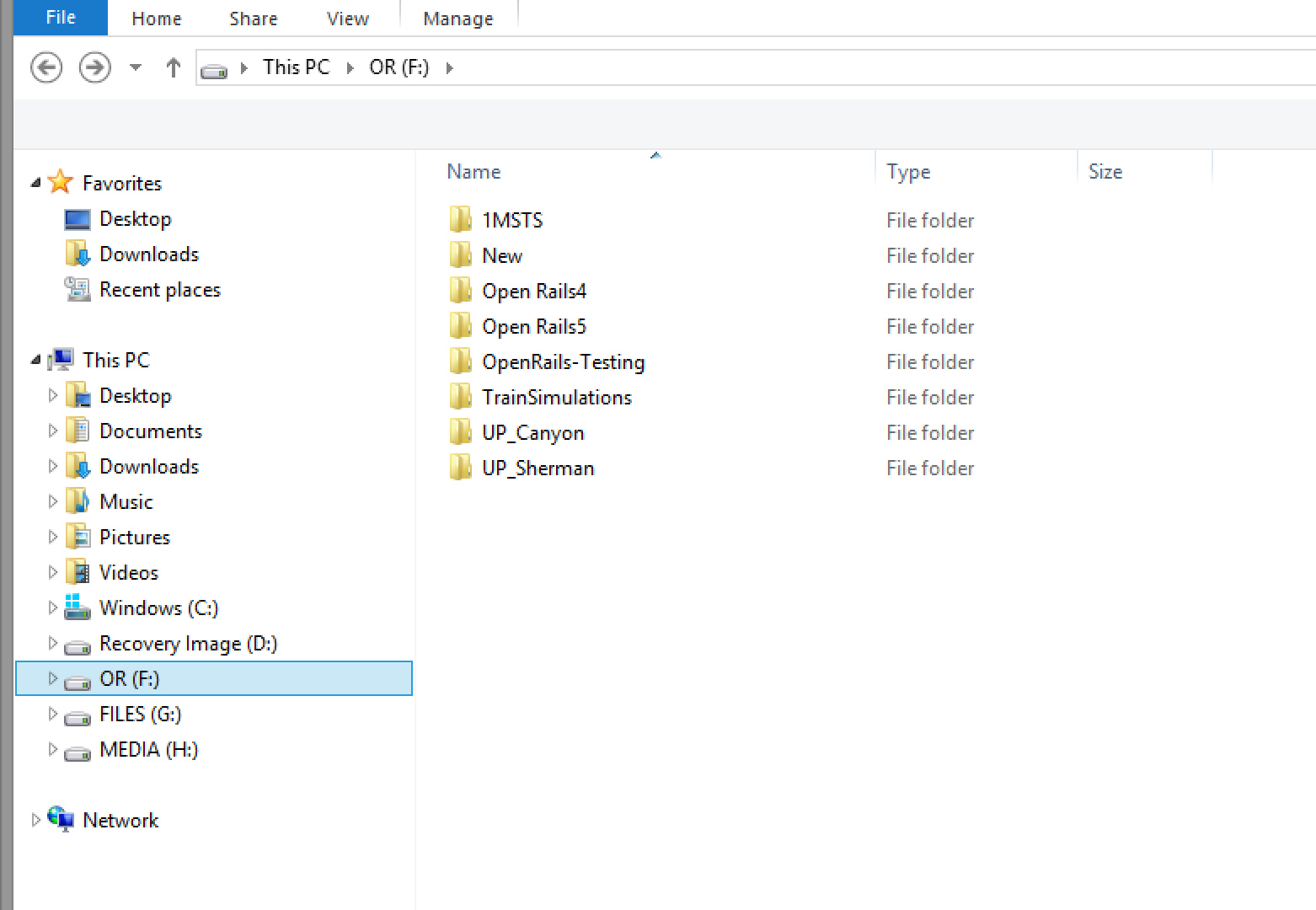
Here is my sim folder. Keep things short and sweet. I keep working copies of older versions of Open Rails just to test functionality against the current version. Sometimes, the newer version can break things.
1MSTS folder contains all my MSTS grade routes. The "1MSTS" folder name originated from the old Steam4Me tutorial for installing MSTS on WIN 7 and above Operating Systems. Realistically, you can name that folder anything.
NEW is an empty folder than I usually install new content into so things can be checked out before moving them to the proper installation
OPENRAILS4 contains a functional copy of the Open Rails 1.4 stable (executables only, no route or trainset content)
OPENRAILS5 contains a functional copy of the Open Rails 1.5.1 stable (executables only, no route or trainset content)
OPENRAILS-TESTING contains a functional copy of the current open rails Testing version. This is 1.5.1 + the 1600 or so additional mods to the code that have taken place in the last 2 years (again, executables only, no route or trainset content)
TRAINSIMULATIONS contains all the Open rails-grade routes that have been produced (named for the one vendor producing OR-grade routes). These need to kept separate from MSTS routes because of changes in texture formats and other OR-related feature upgrades.
The UP_CANYON (feather river) AND UP_SHERMAN are the 2 MSTS-grade routes from 3DTrains. Both had some custom experimental versions of ScaleRail and ScaleRoads packages and were better suited for a MINI-ROUTE type of setup. These routes cannot share the same global folder with other MSTS routes (or each other) that utilized ScaleRail or ScaleRoads.
Route content installations only need 4 basic folders, GLOBAL, ROUTES, SOUND and TRAINS. I keep a dummy copy of the train.exe in them to fake out some older MSTS-grade utilities that need to see that named file in order to work properly.

https://www.youtube.com/watch?v=oN5Cwc16KTIComment
-
The New folder is something that I do, its not really for a newbie. When I buy, say, a boxcar pack, I will point the installer to new, so it ends up being the only material in that folder. Then I will modify file names to whatever naming convention I have customized, I will undo some of the include statements and add that text direct to the wag file, etc. That is just how I prefer things. Then I move the modded material to the shared installation folders. Again, that is not anything for a new person to dwell on. You do that kind of stuff after you get time under your belt. If you are a new person and keep the supplied names and include files as provided in the boxcar pack, then you dont need it.
The takeaway is I have 3 folders with different Open Rails version executables (one is used 99% of the time, the others only when needed to test something), two folders with "shared" route/trainset content (one for MSTS grade routes, and one for OR grade routes) and in my case two folders with mini-routes where said named route is the only route in that folder. I would include London and Port Stanley, the Monon, and the PRR Eastern as singular mini routes, I just don't keep them installed. The shared TRAINSIMULATIONS folder contains Scenic, Seligman, Ruel, Mullan and Shasta. The shared 1MSTS contains all the downloaded library routes or any MSTS grade payware (DRGW Green River, CN Bala, SP Cascades, anything from MLT or 3DTrainstuff, etc). All content folders, whether shared or mini, will need those 4 basic GLOBAL, ROUTES, SOUND and TRAINS.
On the A-Tracks replacing X-tracks, there should be two versions of Atracks, one with shape files that call upon ACE textures and the other whose shapes call upon DDS textures. Only the TRAINSIMULATIONS shared content folder uses DDS exclusively. There are 3 TS routes that were built with Xtracks before they changed over to ScaleRail. If you are upgrading the Xtracks for those 3 routes to Atracks, then you use the DDS version of Atracks since the DDS version of the textures are already present. The ACE version is for upgrading Xtracks routes in the 1MSTS folder, since MSTS routes used ACE files exclusively (the old MSTS app never knew was a DDS file was and would error boink and stop if it found any)
My Open Rails videos https://www.youtube.com/@lakecities3663/videos👍 1Comment
-
There isn't a separate release for ATracks with DDS at this time. ORTS gives preference to DDS when a DDS texture is available, even if ACE is what's defined in the shape.
If you install ATracks in a TrainSimulations\Global\Shapes folder, and overwrite the shapes that come with TSN's installer, while the shapes will be technically looking for an ACE texture, ORTS will apply the DDS textures that appear in the route's Textures folder.If you like what you see here at Trainsim.com, be it the discussions and knowledge in the forums, or items available in our library, I hope you'll consider a paid membership to help support keeping the site operating.... Thanks!Comment
-
Well, my bad. I must have done that conversion myself and forgot about it. One thing is for sure, I never rely on that kind of code-rigging to avoid compliance requirements. Hence my own conversion effort. Because some day that code-rig will be an impediment to some other progression point and some programmer will remove it, and suddenly everyone's lazy approach will break. It has happened before.My Open Rails videos https://www.youtube.com/@lakecities3663/videosComment
-
Yep, and when the day comes, it'll be a 2 hour job for me or someone else to re-compile and compress the shapes to reference DDS textures with the same UV coordinates.
I just don't want to overly confuse people with too many options -- the intent of that project was a drop-in replacement so you could enjoy older routes without the visual downgrade of top hat track.If you like what you see here at Trainsim.com, be it the discussions and knowledge in the forums, or items available in our library, I hope you'll consider a paid membership to help support keeping the site operating.... Thanks!Comment
-
Ohh, okay I see. Alright awesome, thanks!The New folder is something that I do, its not really for a newbie. When I buy, say, a boxcar pack, I will point the installer to new, so it ends up being the only material in that folder. Then I will modify file names to whatever naming convention I have customized, I will undo some of the include statements and add that text direct to the wag file, etc. That is just how I prefer things. Then I move the modded material to the shared installation folders. Again, that is not anything for a new person to dwell on. You do that kind of stuff after you get time under your belt. If you are a new person and keep the supplied names and include files as provided in the boxcar pack, then you dont need it.
The takeaway is I have 3 folders with different Open Rails version executables (one is used 99% of the time, the others only when needed to test something), two folders with "shared" route/trainset content (one for MSTS grade routes, and one for OR grade routes) and in my case two folders with mini-routes where said named route is the only route in that folder. I would include London and Port Stanley, the Monon, and the PRR Eastern as singular mini routes, I just don't keep them installed. The shared TRAINSIMULATIONS folder contains Scenic, Seligman, Ruel, Mullan and Shasta. The shared 1MSTS contains all the downloaded library routes or any MSTS grade payware (DRGW Green River, CN Bala, SP Cascades, anything from MLT or 3DTrainstuff, etc). All content folders, whether shared or mini, will need those 4 basic GLOBAL, ROUTES, SOUND and TRAINS.
On the A-Tracks replacing X-tracks, there should be two versions of Atracks, one with shape files that call upon ACE textures and the other whose shapes call upon DDS textures. Only the TRAINSIMULATIONS shared content folder uses DDS exclusively. There are 3 TS routes that were built with Xtracks before they changed over to ScaleRail. If you are upgrading the Xtracks for those 3 routes to Atracks, then you use the DDS version of Atracks since the DDS version of the textures are already present. The ACE version is for upgrading Xtracks routes in the 1MSTS folder, since MSTS routes used ACE files exclusively (the old MSTS app never knew was a DDS file was and would error boink and stop if it found any)Comment


Comment