Question on if anyone knows which MSTSbin I need to install for a MLT route

Collapse
X
 
  • Time
  • Show
Clear All
new posts
  • TrainGuy17
    Senior Member
    • Jan 2021
    • 142

    #1

    Question on if anyone knows which MSTSbin I need to install for a MLT route

    Hello everyone, does anyone know which MSTSBin I need to install for open rails in order to run a certain route from the MLT website, MapleLeaf Tracks, called the CN Bala Sub? Or even for other routes from the library here as well? I installed one of them which was the work release 1.8 and I was going through the installer instructions but when it came to deciding which root folder to copy/put the bin files in, I was trying to put it in my roots folder that has all the different sections such as routes, global, trains, trainsets, and etc but I kept on getting an error saying that Open Rails cannot open the file directory location of Open Rails, that I provided. Reason also why I am asking this is because I was about to purchase and install the route from the website but under the description of the route, it also said that XTracks, NewRoads, & MSTSBin are required.

    Also since I am learning this, what is the difference between the two bin files such as the bin work release and the bin stable release?
    Any advices are welcomed. Thanks.
  • Darkhorse427
    Senior Member


    • Mar 2012
    • 284
    • Eugene Or.
    • ORTS

    #2
    MSTSBin was an update to MicroSoft Train Simulator.. hence the name "MSTS" using Open rails to run the route you do not need it. you will still need to have xtracks (or better yet Eric's new Atrack replacement and NewRoads installed in the installation folder where you have this route installed at.

    Comment

    • dcarleton
      1000 Post Veteran


      • Nov 2008
      • 1004
      • MSOR

      #3
      Warning - Sharp Learning Curve Ahead - Please Slow Down!
      Before any consideration of MSTSbin, you must have a valid installation of MSTS. The procedure for installing that is found here in these forums, and it must be followed to the letter.
      For XTracks you can use the ATracks found here in the library because they contain a very comprehensive collection of track pieces, certainly all you need for an MLT route.
      For NewRoads, use the latest version found here in the library.

      And that brings us to OpenRails. If you have a valid installation of MSTS, OpenRails will find it in your registry and all of it's contents will be available. But it is very important to remember OpenRails does not get installed into your MSTS installation or any part of your MSTS installation. Do not install it in TRAINS or ROUTES or GLOBAL etc.

      If you download the free demonstrator route from TrainSimulations, it installs that and offers to install a version of OpenRails too. If you chose to do that, OpenRails will be in a safe location. But a word of caution - TrainSimulations routes use a different set of track pieces that will cause trouble if you try to mix their routes with MLT routes. TrainSimulations routes will be placed by their installer into a folder called TrainSimulations, so you're still safe. You'll just have to tell OpenRails where to look for you other routes.

      Comment

      • TrainGuy17
        Senior Member
        • Jan 2021
        • 142

        #4
        Ahh, okay I see! That all makes sense as I truly didn't know about this. Thank you both for your advices and warnings. Truly appreciated it! dcarleton and Darkhorse427

        Comment

        • derekmorton
          5500 Post Veteran


          • Nov 1999
          • 5699
          • Eltham, Victoria, Australia.
          • ORTS

          #5
          And further to the cautions, do not install any content under an OpenRails folder, the OR folder gets deleted as part on an automatic OR update.

          Comment

          • TrainGuy17
            Senior Member
            • Jan 2021
            • 142

            #6
            Ah, really okay that I didn't know as well. I will take note of that. So, the OpenRails folder being the default folder right? Because I have a custom separate folder for where I have all my routes, global, trains, and all of that in it and that is where I mostly install my contents from the library into.

            Comment

            • derekmorton
              5500 Post Veteran


              • Nov 1999
              • 5699
              • Eltham, Victoria, Australia.
              • ORTS

              #7
              The OpenRails folder is where the executable file is, and the first folder inside is a "content" folder.

              Comment

              • TrainGuy17
                Senior Member
                • Jan 2021
                • 142

                #8
                Ah, okay I see. Alright cool

                Comment

                • TrainGuy17
                  Senior Member
                  • Jan 2021
                  • 142

                  #9
                  Originally posted by derekmorton
                  The OpenRails folder is where the executable file is, and the first folder inside is a "content" folder.
                  Oh, and last question. For the XTracks in which I am able to use the ATracks for that, is it just the Defualt Replacement ATracks file I need to install or do I also need the Defaultment MTracks as well? Because it looks like I already do have a set of ATracks or just the MSTS XTracks v3 standard (Im not sure which one I have because it has been a while that I played this game) in my folder and I am able to see them visible on the route though sometimes when I play a route, it seems like most tracks are missing...
                  But also if wanted, could I install the MSTS XTracks V3.2 Standard Edition as well?

                  Comment

                  • rdayt
                    1000 Post Veteran

                    • Nov 2007
                    • 1291
                    • SW MO
                    • ORTS

                    #10
                    Be sure to keep your OpenRails folder for the OpenRails program only.
                    The content containing the global, routes, sound, trains folders has to remain separate from the OpenRails folder.
                    The reason is, when you update OpenRails it will wipe everything in the OpenRails folder. You don't want that to wipe your content.

                    Randy

                    Comment

                    • TrainGuy17
                      Senior Member
                      • Jan 2021
                      • 142

                      #11
                      Originally posted by rdayt
                      Be sure to keep your OpenRails folder for the OpenRails program only.
                      The content containing the global, routes, sound, trains folders has to remain separate from the OpenRails folder.
                      The reason is, when you update OpenRails it will wipe everything in the OpenRails folder. You don't want that to wipe your content.

                      Randy
                      Ahh, I see. Makes sense.

                      Comment

                      • TrainGuy17
                        Senior Member
                        • Jan 2021
                        • 142

                        #12
                        Originally posted by rdayt
                        Be sure to keep your OpenRails folder for the OpenRails program only.
                        The content containing the global, routes, sound, trains folders has to remain separate from the OpenRails folder.
                        The reason is, when you update OpenRails it will wipe everything in the OpenRails folder. You don't want that to wipe your content.

                        Randy
                        Yeah, I do have a separate folder that contains all the global, routes, sounds, and trains away from the OpenRails folder. Though, I guess I could just make a new folder again and include what I need from my other folder that's separated from the OpenRails folder and see what happens because I also have another separated folder that contains two routes I purchased and install from like last year from TrainSimulations and it works fine.

                        Comment

                        • geepster775
                          2500 Post Veteran


                          • Sep 2006
                          • 2846
                          • .
                          • General

                          #13
                          Originally posted by TrainGuy17
                          Reason also why I am asking this is because I was about to purchase and install the route from the website but under the description of the route, it also said that XTracks, NewRoads, & MSTSBin are required.
                          The MLT description has not kept pace with the times. All of MLT's routes were built for MSTS, can be run in Open rails, but you don't need the MSTSBin if you plan to run in Open Rails exclusively. Hence the outdated description. And generally the Xtracks and Newroads would already be installed if you have other MSTS grade payware and freeware routes in the same installation folder that needs them.

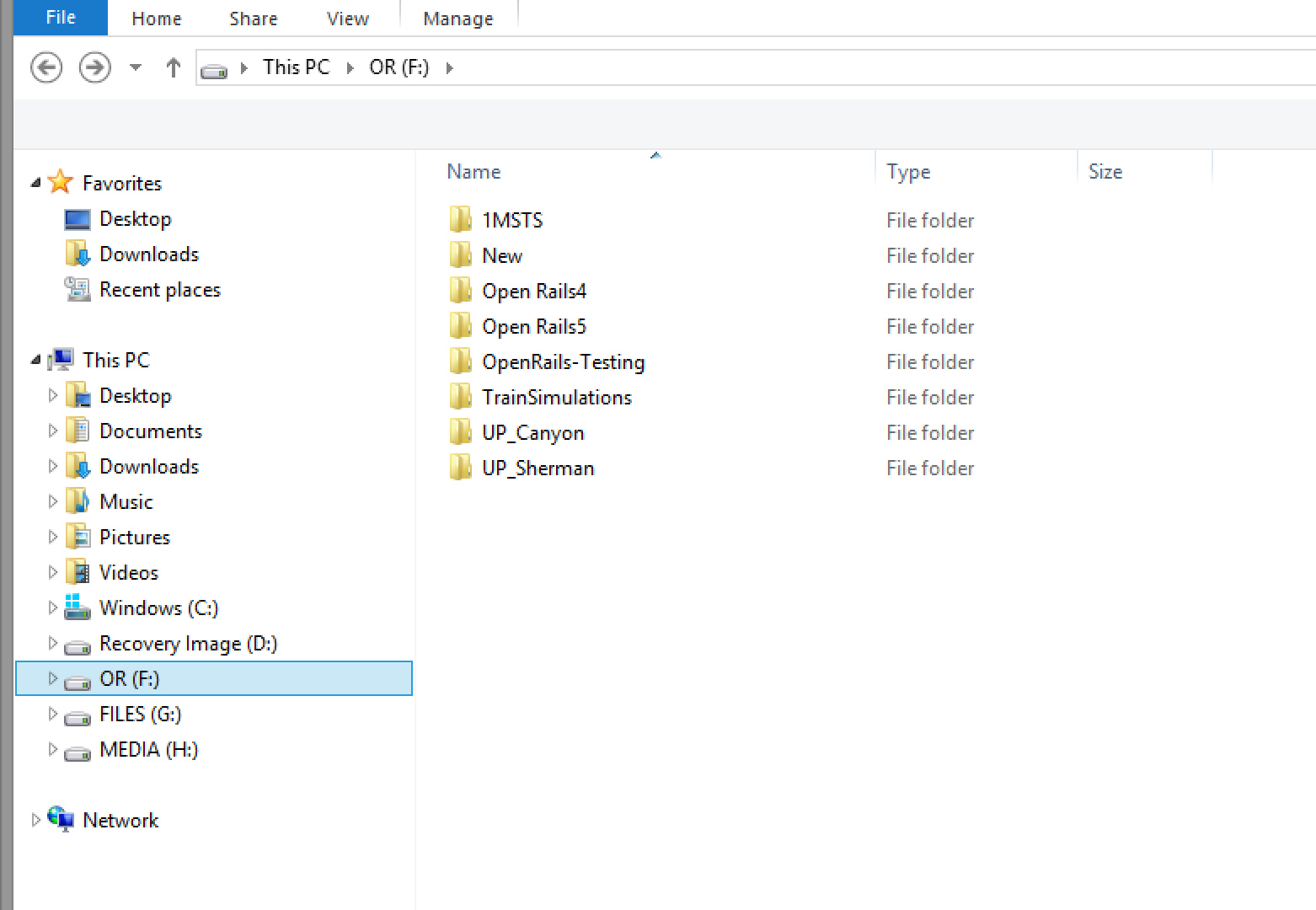
                          Here is my sim folder. Keep things short and sweet. I keep working copies of older versions of Open Rails just to test functionality against the current version. Sometimes, the newer version can break things.

                          1MSTS folder contains all my MSTS grade routes. The "1MSTS" folder name originated from the old Steam4Me tutorial for installing MSTS on WIN 7 and above Operating Systems. Realistically, you can name that folder anything.

                          NEW is an empty folder than I usually install new content into so things can be checked out before moving them to the proper installation

                          OPENRAILS4 contains a functional copy of the Open Rails 1.4 stable (executables only, no route or trainset content)

                          OPENRAILS5 contains a functional copy of the Open Rails 1.5.1 stable (executables only, no route or trainset content)

                          OPENRAILS-TESTING contains a functional copy of the current open rails Testing version. This is 1.5.1 + the 1600 or so additional mods to the code that have taken place in the last 2 years (again, executables only, no route or trainset content)

                          TRAINSIMULATIONS contains all the Open rails-grade routes that have been produced (named for the one vendor producing OR-grade routes). These need to kept separate from MSTS routes because of changes in texture formats and other OR-related feature upgrades.

                          The UP_CANYON (feather river) AND UP_SHERMAN are the 2 MSTS-grade routes from 3DTrains. Both had some custom experimental versions of ScaleRail and ScaleRoads packages and were better suited for a MINI-ROUTE type of setup. These routes cannot share the same global folder with other MSTS routes (or each other) that utilized ScaleRail or ScaleRoads.

                          Route content installations only need 4 basic folders, GLOBAL, ROUTES, SOUND and TRAINS. I keep a dummy copy of the train.exe in them to fake out some older MSTS-grade utilities that need to see that named file in order to work properly.


                          My Open Rails videos https://www.youtube.com/@lakecities3663/videos

                          Comment

                          • dcarleton
                            1000 Post Veteran


                            • Nov 2008
                            • 1004
                            • MSOR

                            #14
                            Remember - Sharp Leaning Curve - Slow Down

                            You have a choice between legacy XTracks -or- default replacement ATracks. The objects in either package have the same names, so the replacement ATracks overwrite XTracks.

                            XTracks have the same cross-section as the fat tracks that came with MSTS. To be honest, some content creators made textures for those that looked rather good even though the railheads are twice as wide as they should be.

                            Default Replacement ATracks have a realistic narrower railhead, and the edge of the ballast slopes away from the tracks, but sometimes textures that were optimized to look good on XTracks can look strange on the replacement ATracks.

                            Your choice.

                            Comment

                            • TrainGuy17
                              Senior Member
                              • Jan 2021
                              • 142

                              #15
                              Originally posted by geepster775

                              The MLT description has not kept pace with the times. All of MLT's routes were built for MSTS, can be run in Open rails, but you don't need the MSTSBin if you plan to run in Open Rails exclusively. Hence the outdated description. And generally the Xtracks and Newroads would already be installed if you have other MSTS grade payware and freeware routes in the same installation folder that needs them.

                              Here is my sim folder. Keep things short and sweet. I keep working copies of older versions of Open Rails just to test functionality against the current version. Sometimes, the newer version can break things.

                              1MSTS folder contains all my MSTS grade routes. The "1MSTS" folder name originated from the old Steam4Me tutorial for installing MSTS on WIN 7 and above Operating Systems. Realistically, you can name that folder anything.

                              NEW is an empty folder than I usually install new content into so things can be checked out before moving them to the proper installation

                              OPENRAILS4 contains a functional copy of the Open Rails 1.4 stable (executables only, no route or trainset content)

                              OPENRAILS5 contains a functional copy of the Open Rails 1.5.1 stable (executables only, no route or trainset content)

                              OPENRAILS-TESTING contains a functional copy of the current open rails Testing version. This is 1.5.1 + the 1600 or so additional mods to the code that have taken place in the last 2 years (again, executables only, no route or trainset content)

                              TRAINSIMULATIONS contains all the Open rails-grade routes that have been produced (named for the one vendor producing OR-grade routes). These need to kept separate from MSTS routes because of changes in texture formats and other OR-related feature upgrades.

                              The UP_CANYON (feather river) AND UP_SHERMAN are the 2 MSTS-grade routes from 3DTrains. Both had some custom experimental versions of ScaleRail and ScaleRoads packages and were better suited for a MINI-ROUTE type of setup. These routes cannot share the same global folder with other MSTS routes (or each other) that utilized ScaleRail or ScaleRoads.

                              Route content installations only need 4 basic folders, GLOBAL, ROUTES, SOUND and TRAINS. I keep a dummy copy of the train.exe in them to fake out some older MSTS-grade utilities that need to see that named file in order to work properly.


                              https://www.youtube.com/watch?v=oN5Cwc16KTI
                              Ah, okay thank you so much for this, cause when it comes to files and stuff...yeah I am not that very organized and so I guess that is why sometimes I do get confused a lot. So just by looking at your example of what you have, just gave me a little snap in my body that I should organize my folders like that. So, therefore thank you!

                              Comment

                              Working...