


I downloaded the ICRR SD70s a while back and I can't seem to get them to show in game as IC. I've tried editing the shape file inn SFM to match the ace/dds files included in each folder. I have also tried converting the ace to dds or even deleting either the ace/dds files and no avail. What is the fix? I feel like I've tried just about everything, but I also feel like I've missed something glaringly obvious. Any help would be greatly appreciated.
-
-
do you know what files are missing from the ICRR sd70? you said textures what missing from itLast edited by Jdark34; 02-28-2025, 17:07. -
Did you rename the FA shape files as directed by the instructions?
4. Rename NS_SD70_2579FA.s to the files listed in this folder, too and ADD FA after the file name:
- IC_SD70_1001FA.s
- IC_SD70_1004FA.s
- IC_SD70_1009FA.s
- IC_SD70_1016FA.s
- IC_SD70_1018FA.s
- IC_SD70_1020FA.s
- IC_SD70_1027FA.s
- IC_SD70_1031FA.s
- IC_SD70_1035FA.s
- IC_SD70_1036FA.sCheers, Gerry
"A mind is like a parachute. It doesn't work if it is not open." Frank Zappa
It's my railroad and I'll do what I want! Historically accurate attitude of US Railroad Barons.
Forever, ridin' drag in railroad knowledge.
Audi, Vide, Tace, Si Vis Vivere In Pace
https://www.trainsim.com/forums/filedata/fetch?filedataid=79656&type=medium https://www.trainsim.com/forums/filedata/fetch?filedataid=79654&type=smallComment
-
It looks like all the dds files in the download file are all wrong. None of them are of the IC units.They are all showing the NS_SD70_2579 unitComment
-
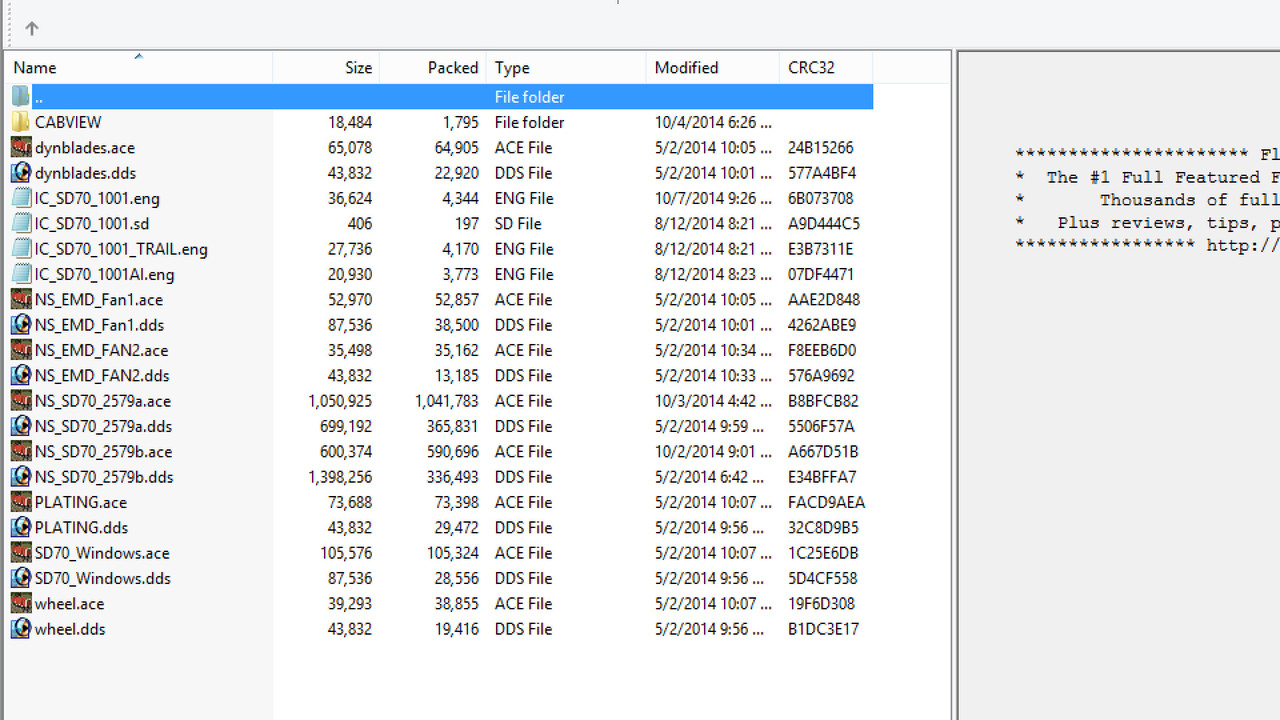
If you are going to properly name the image calls inside the shape file (an improvement) then the actual texture files provided in the download need to be similarly named (and not NS_SD70_2579 yada yada that was provided in the download) By renaming the texture calls it is considered an improvement in that all the unit numbers can now reside in a single directory. The reason the download provides individual unit number directories in because all the textures for each IC number are named the same NS 2579 and as such multiple IC numbers cannot share a single directory. You dont show what the textures are named in your installation.
This is one of those download examples that were not done very efficiently as they tried to avoid modifying texture calls inside the shape file. It was designed to require a simple drag and drop on the NS 2579 shapes without needing any shape file edits.My Open Rails videos https://www.youtube.com/@lakecities3663/videosComment
-
Just wanting to verify that this is what you were talking about. In SFM the image section I need to match the dds file name with those provided in each folder from the download correct?Comment
-
Change dds to ace in the shape files. I got them working properly
images ( 8
image ( NS_SD70_2579a.ace )
image ( NS_SD70_2579b.ace )
image ( SD70_Windows.dds )
image ( NS_EMD_Fan1.dds )
image ( NS_EMD_FAN2.dds )
image ( dynblades.dds )
image ( wheel.dds )
images ( 2
image ( NS_SD70_2579b.ace )
image ( NS_SD70_2579a.ace )Last edited by bigmak1313; 03-04-2025, 00:59.Comment
-
Yes.
The download contained both DDS and ACE texture formats. If you are going to put DDS in the image calls, then you need to rename the DDS texture files contained in the download from NS_SD70_2579 to IC_SD70_1001 (this example) or whatever the IC number of the other units are.
I would alter my folder view to include all filename details. Right now, in your screens, the DDS files are listed as Paint.net images.
The NS SD70 pack was released at a time when Streamlines was providing content for both MSTS and OR. The MSTS compatbility and the lack of MSTS robustness was why there was a need to break out the details as a separate freight animation.
If you are using Open Rails exclusively, then I would eliminate one texture type and keep the other. I would counsel against mixing DDS and ACE calls inside a shape file as many of the jimmy-rigs done inside the OR code to accommodate such a lack of consistency by displaying another texture type if the other is missing may not stand up to the test of time and when those jimmy-rigs get removed (as they have in the past), a lot of these shape files containing mixed texture calls will suddenly break down the road.
Also if you are using OR exclusively, then delete the AI and Trail eng files as they are unnecessary and outright polluting.
The screen below is what is in the original download, with the main IC number textures named as NS SD70 2579. I changed them to the actual IC number and then I could combine all the IC numbers in one directory
 Last edited by geepster775; 03-04-2025, 02:19.My Open Rails videos https://www.youtube.com/@lakecities3663/videos
Comment


Comment