


Hi Folks,
Anyone who's done any switching with ORTS knows the tools we presently have available - leave much to be desired.
Given: Switching now comprises having to utilize three different screens to get all the information necessary for said operation.
I broached this subject on Elvas - about this time last year - what I didn't know was that Mauricio and Siebren took on this proposal - ran with it - and made it far better than I could have hoped for - in my absence.
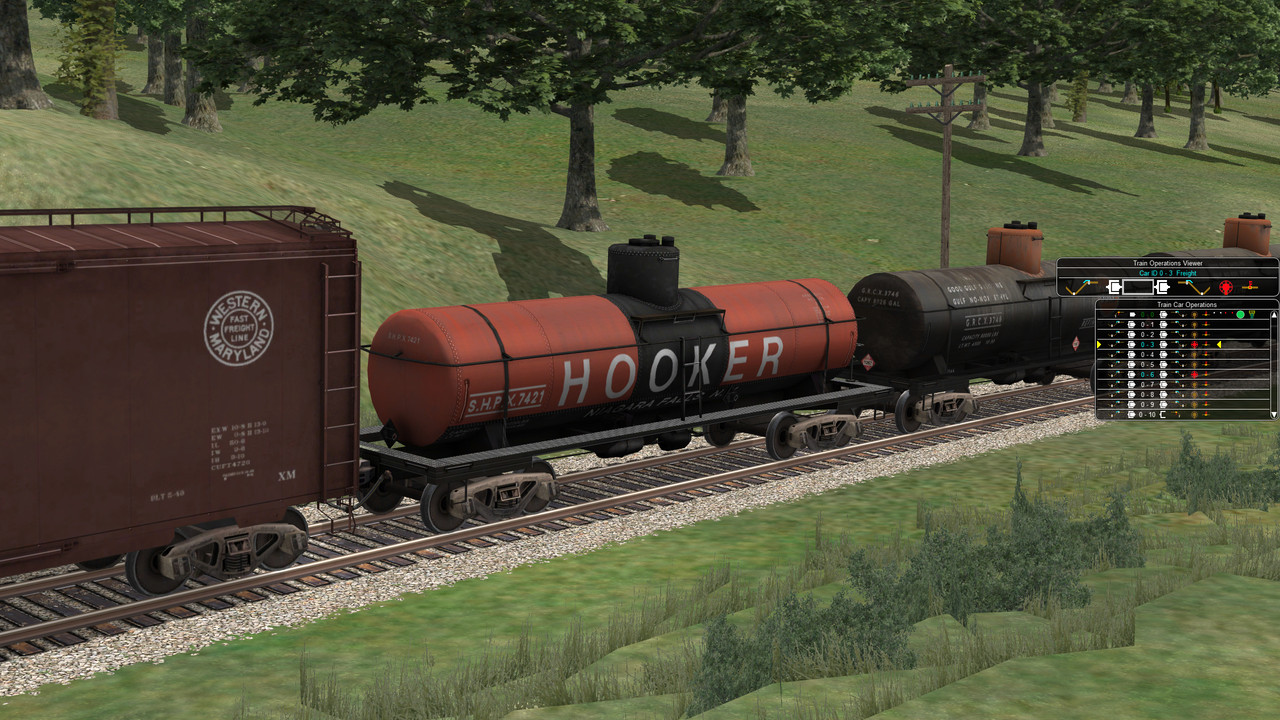
If you haven't seen it - let me introduce you to the NEW: F9 Train Operations.
I believe it's only in the Unstable Version of ORTS and you access it via [Ctrl][Alt][F9].
On pressing these keys - you are greeted with a visual representation of your entire train - with indicators for - air valves - bleed valves - couplers, air hoses, hand brakes. No need to troll three different screens to get all the information presented here - no need for spam messages that are easily missed or forgotten - it's a real time indicator.
Click on an individual car number and it will popup the car operations window - shown above your train - for a larger presentation. All the indicators are clickable to change their state. It will also switch you to your outside camera view - on press - focused on the actual car in question - so no more guessing - was it five back or six - it's actually staring you in the face.
If a car is "Not Ready" for normal operations - running - the car will be presented in cyan - to focus your attention.
Finally - all this is available via the WEB Interface - if you want to use your iPad or second monitor - to control everything.
All I can say is WOW - what a vast improvement.
Please thank Mauricio and Siebren if you see them around - it's an incredible effort and just makes ORTS better.
Give it a run - I'm sure they would appreciate feedback.
It makes actual switching - fun again.
Regards,
Scott
Anyone who's done any switching with ORTS knows the tools we presently have available - leave much to be desired.
Given: Switching now comprises having to utilize three different screens to get all the information necessary for said operation.
- Train Operations - to move through the train - select car for [Car Operations] - and uncouple cars.
- Car Operations - to [Toggle Handbrake] [Toggle Brake Hose] [Toggle Front Angle Cock] [Toggle Rear Angle Cock] [Toggle Bleed Off Valve]
- [Ctrl F5] Hud - to get status of handbrakes and connections.
I broached this subject on Elvas - about this time last year - what I didn't know was that Mauricio and Siebren took on this proposal - ran with it - and made it far better than I could have hoped for - in my absence.
If you haven't seen it - let me introduce you to the NEW: F9 Train Operations.
I believe it's only in the Unstable Version of ORTS and you access it via [Ctrl][Alt][F9].
On pressing these keys - you are greeted with a visual representation of your entire train - with indicators for - air valves - bleed valves - couplers, air hoses, hand brakes. No need to troll three different screens to get all the information presented here - no need for spam messages that are easily missed or forgotten - it's a real time indicator.
Click on an individual car number and it will popup the car operations window - shown above your train - for a larger presentation. All the indicators are clickable to change their state. It will also switch you to your outside camera view - on press - focused on the actual car in question - so no more guessing - was it five back or six - it's actually staring you in the face.
If a car is "Not Ready" for normal operations - running - the car will be presented in cyan - to focus your attention.
Finally - all this is available via the WEB Interface - if you want to use your iPad or second monitor - to control everything.
All I can say is WOW - what a vast improvement.
Please thank Mauricio and Siebren if you see them around - it's an incredible effort and just makes ORTS better.
Give it a run - I'm sure they would appreciate feedback.
It makes actual switching - fun again.
Regards,
Scott


Comment