


Was wondering if I made more shapes available as shown here (longer, bending in degrees, if people were able to help get it usable (I tried making a custom tsection.dat to test it, failed, don't know what SectionIdx is etc, so if people can help with that I can make more ballasted track shapes available. I feel there isn't enough raised rail.
-
-
Why not just make them replacement shapes for Xtracks, in the US/DBTracks style? That way you don't have to mess with the tsection at all -
I thought they all had to go through the tsection. How would I go about this? Are the shapes directly in the route/shapes folder? Accessible in TSRE? ThanksComment
-
DBTracks/UStracks are designed to be "drop in replacement", meaning you still build and edit and maintain any future editable copies of the route in Xtracks, but then at the final route beautification stage, you drop in the replacement shapes that upgrade the visual appearance of Xtracks to something new and starkly different. Each final beautification stage is disposable, meaning if you want to later change the route or TDB by adding new track, you have to go back to the preserved Xtracks copy, make your edits, and then "beautify it" with DB or US track again. The lack of understanding of this workflow has created a bunch of dead-end beautified routes by those who jumped right in and began applying USTracks to many older routes as the first step, rather than the final step, only to find they are now stuck and unable to ever modify the tracks again, lest they lose all their scenery related turd-polishing time investment.
This is different from scalerail, where each track piece needed its own entry in the Tection and the route actually was built by selecting and laying scalerail track piecesMy Open Rails videos https://www.youtube.com/@lakecities3663/videosComment
-
Bear in mind that if the goal is to use the new track system for new routes, then placing Xtracks shapes and immediately converting them to said new track shapes (TSRE has a means of doing this) is perfectly viable. I've been doing this for years without issue. That way, you know on the spot if you even have a shape for that piece, and what that track piece will look like in the final routeComment
-
Place it as XTracks, and then edit the shape name to match your new shapes.
The only reason you'd need to modify the TSection is if you're creating new geometry or lengths not already covered by one of the tens of thousands of shapes already present in the TSection....If you like what you see here at Trainsim.com, be it the discussions and knowledge in the forums, or items available in our library, I hope you'll consider a paid membership to help support keeping the site operating.... Thanks!Comment
-
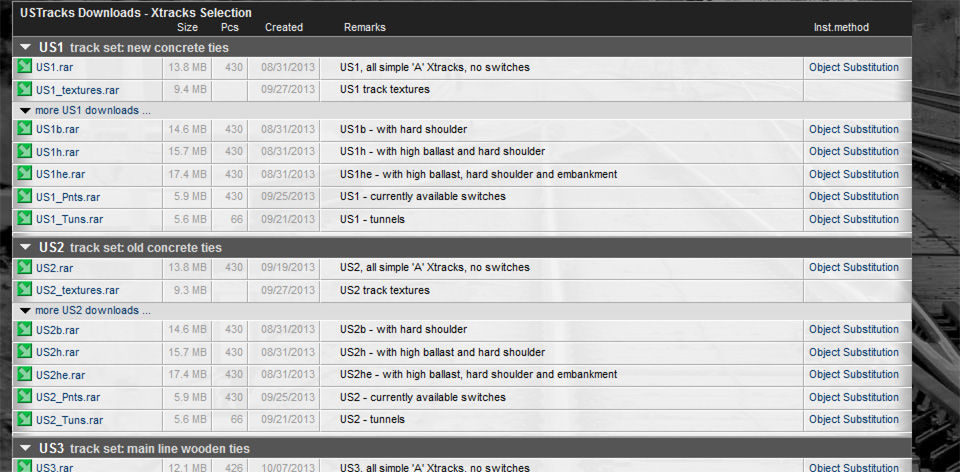
UStracks/DBtracks already come in a variety of shoulder styles
Basic package has no hard shoulder. Alternate packages come with hard shoulder, hard shoulder with high ballast, and hard shoulder with high ballast and embankments. And the textures for these shapes can mix/match with new concrete, old concrete, mainline wood, and aged spur wood ties.
While open rails has a basic UStracks trackprofile that allows the use of superelevation features with UStracks/DBtracks, the trackprofile aspect is not sophisticated enough to handle the high ballast and embankment options of UStracks yet. Nobody has replicated the higher ballast profiles yet.
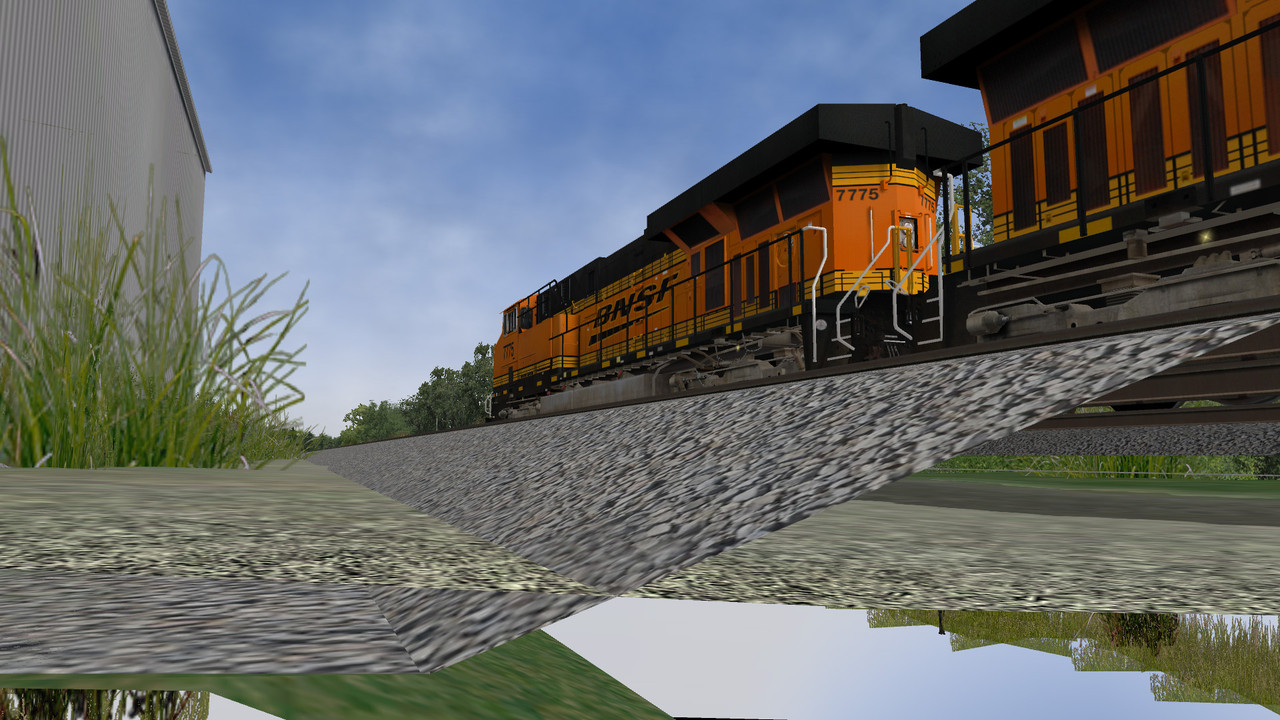
UStracks with high ballast, from ground level. Yellowish rock is ground terrtex
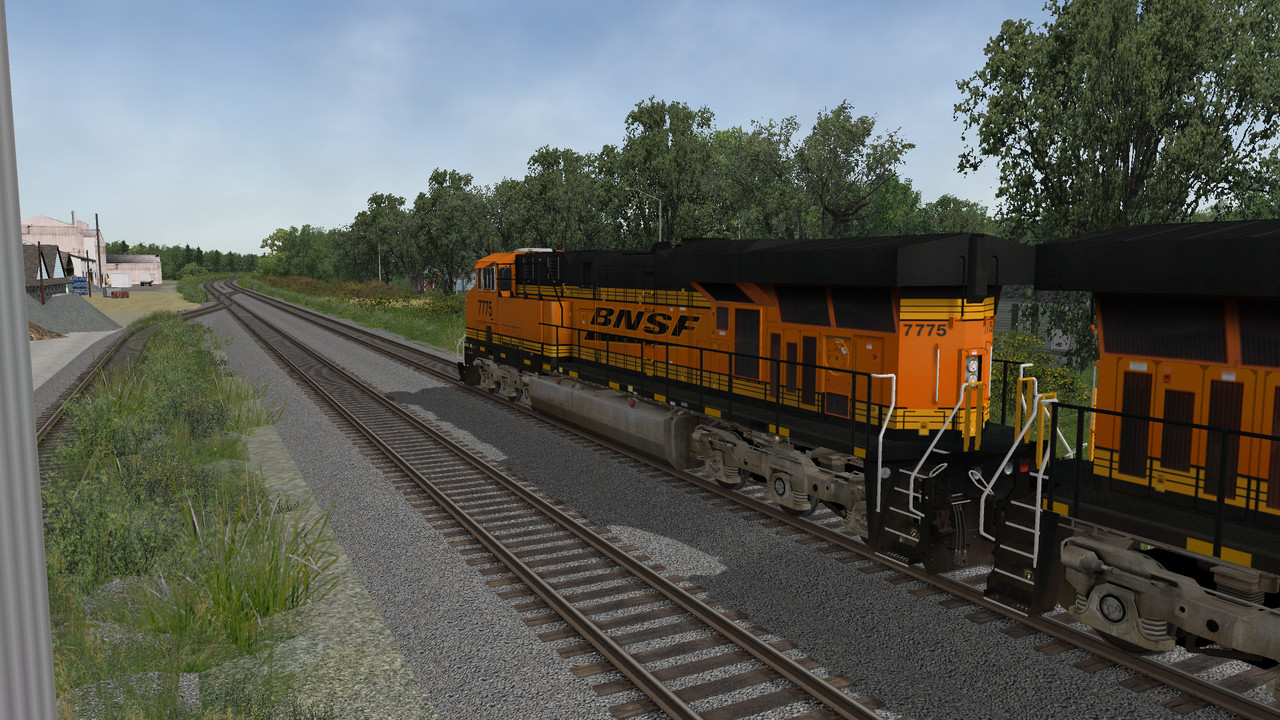
UStracks with high ballast, from above level
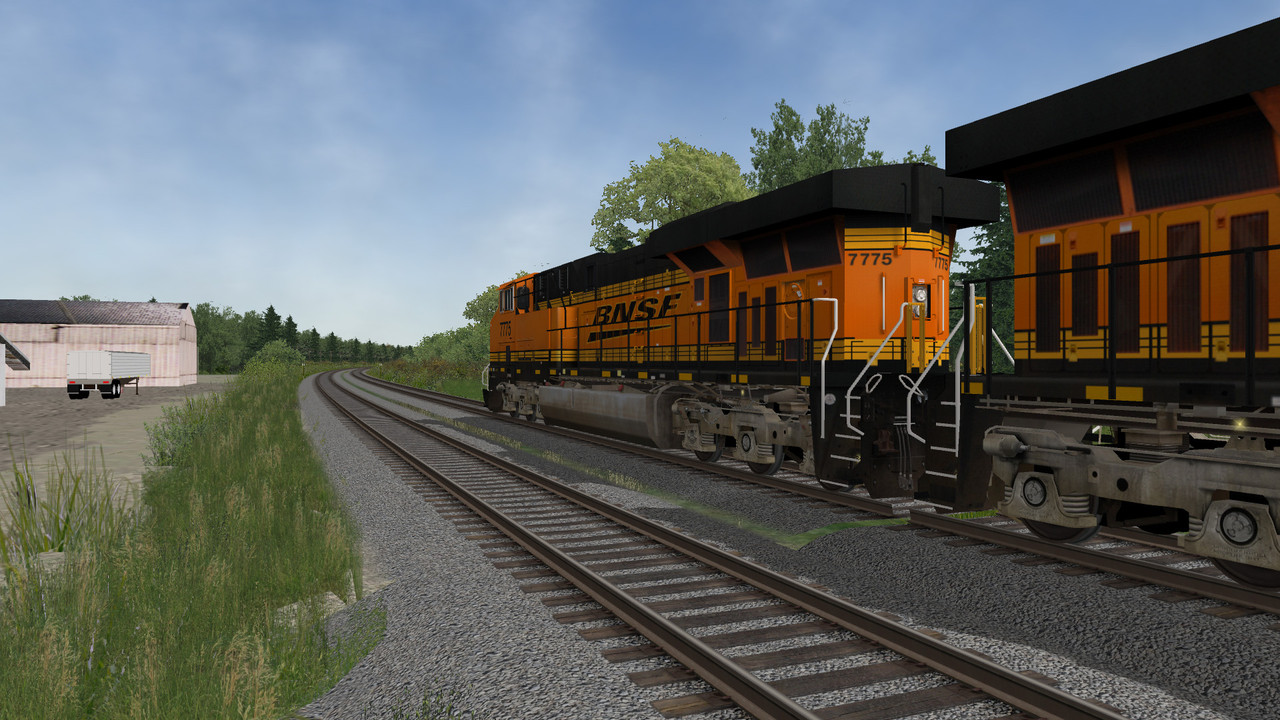
High ballast straight transition to superelevated curve. Notice the lack of high ballast and hard shoulders for the dynamic track that pops in to provide the superelevation. Moral of the story: Unless you want to turn off superelevation and go without that feature, you are limited at present to lower height ballast versions of UStracks without visuals getting really bad looking at the transitions.
 My Open Rails videos https://www.youtube.com/@lakecities3663/videos
Comment
-
It's possible to deal with super-elevation if you have separate berm pieces to go under the dynamic track substitution...If you like what you see here at Trainsim.com, be it the discussions and knowledge in the forums, or items available in our library, I hope you'll consider a paid membership to help support keeping the site operating.... Thanks!Comment
-
This is indeed for the creation of a new route, I have no push to try for a new route with the original track, it kills any immersion for me.
One question, if I've built the new track piece higher on some ballast, will switching with the Xtrack piece raise the height as well? Will a train sit at the right height of the new piece?
Interested to know how to do this through TSRE?Originally posted by ebnertra000
So steps involve- install xtracks to my separate OR individual route, start TSRE, lay a few rails, then switch them out using the TSRE method above (which I hope is explained if possible?) and is it possible to switch a few over as I go so I can evaluate how they sit? (Hearing earlier that it should be done at the end.
Thanks.Comment
-
The DBTracks/USTracks installation method is listed as "object substitution".
What that means is you add the US/DB shapes to your common Global folder, and then edit the W files to to add a US/DB prefix to the track piece names. UStracks uses the same naming convention for track pieces as Xtracks, but just adds a prefix to each track piece name.
The upside is any converted route CAN share the same global folder with an unconverted route (unconverted routes look for A1t... files inside Global, and any converted routes look for US3_A1t... files). Another upside is you can have US1, US2, US3 and US4 (new concrete, old concrete, mainline wood, aged spur wood) files all together and can actually use them together IN THE SAME ROUTE. You can have new concrete on curves, old concrete on mainlines, mainline wood in passing sidings, and aged wood on setout tracks. To me, this is the power that UStracks has. Even Scalerail can't do that; it remains limited like Xtracks was.
The downside is the converted route cannot be edited or re-worked or changed in RE, since there is no US3_A1t... or US2_A2t... references in Tsection. The conversion is dead-end, that converted copy of the route becomes disposable (throw away) if you absolutely need to change the track. After you change the track using your Xtracks master copy, you need to re-convert the route again as outlined in the video (not a hard task, really)
Other people simply strip the "US3_" prefix off the USTracks shapes and let them overwrite the original Xtracks shapes in Global.
The upside is the converted route remains editable, as the editor is still seeing traditional Xtracks names that ARE referenced in Tsection even if the actual shape is no longer of the original Xtrack countour.
The downside is any unconverted Xtracks route CANNOT share the same global folder with a converted route, as the wholesale replacement of Xtracks pieces with USTracks contour pieces will display as US shapes in other unconverted Xtracks routes that share the same Global. Another downside is you are limited to one one type of UStracks shape, you cannot use the four varying types of crossties in the same route.
As for the substitution that TSRE does, I have no direct experience with that yet, but I have a hunch there will be some limitations introduced to the route, either in the form of only one replacement track type, or if not, I don't know just how it squares any non-standard track piece name prefix with the lack of entries in Tsection to allow the route to remain editable. Is TSRE just replacing the route riter/notepad function from the video?My Open Rails videos https://www.youtube.com/@lakecities3663/videosComment
-
TSRE has a function built right in that allows swapping out shapes. On the left side of the screen near the top is a field displaying the shape's name. Under it is a button named 'Edit' where you can change the name of the selected shape. Assuming you did it right, the swapped-in shape will replace the original.
I will take issue with one of geepster's comments: namely that once placed, you can never edit converted track shapes. I have tweaked, modified, and even re-graded countless miles of USTracks without issue. Maybe MSTS didn't like that (not that that says much - MSTS didn't like anything), but TSRE can do it just fine. This, of course, assumes that there are no interactives on said track...Comment
-
So to clarify your installation, Travis
Your Global contains
Xtracks
all standard shapes for US1 thru US3 + US3r
all hard berm shapes from US1b thru US3b + US3br
all high ballast shapes from US1h thru US3h + US3hr
all embankment shapes from US1he thru US3he + US3her
- US1 being new concrete
- US2 being old concrete
- US3 being mainline wood ties
- USr version is rotten ties, rusty rail
In TSRE, are you placing Xtracks and "renaming it" (converting it) to any of the USx variety by adding the prefix? Or vice versa, stripping any prefix?
Or are you directly placing any of the USx variety shapes that have their name prefix intact?
When TSRE saves, what does the resulting W file look like? Does TSRE add its own data to a W file? What track piece name is planted in there to be called up within the game?
How does TSRE associate track pieces beginning with the prefix USx_a1t.... to the standard a1t... references that are usually in Tsection? Or does it ignore Tsection in order to keep a route editable after a conversion that adds a whole bunch of prefix names not listed in Tsection?
Please confirm your installation approach and help walk us through what you think happens "under the hood" to arrive at the necessary W file structure?My Open Rails videos https://www.youtube.com/@lakecities3663/videosComment
-
No sweat. You gotta remember US/DB came about in 2013, well before TSRE ever became a thing. Procedures were developed around the tools that existed then and that's what's represented in the video. Hell, even the cantankerous old MSTS RE could edit a converted route IF the US tracks were installed (differently) by stripping off the prefix from the name and overwriting the Xtracks files in Global. So while we hear about success with TSRE, no one else knows those installation details.My Open Rails videos https://www.youtube.com/@lakecities3663/videosComment
-
My install only has the US3/US3r shapes currently, along with DB2 bridge track (USTracks does not have bridge shapes). I used to have the hard-shoulder and embankment shapes, but when I discovered the superelevation issue, I removed them. I had US1 and US2 at one time, but never used them. I have not overwritten the default Xtracks shapes.
In TSRE, I place the Xtracks shape (let's use A1t40mStrt as an example), set orientation for curves and switches, and then open the shape editor window (upper left, click 'edit' button), adding the US3_ prefix (I usually copy-paste the prefix for simplicity's sake - works great unless I misplace it).
It is my understanding that as far as the .w file is concerned, the shape is just a visual representation of the track, and does not indicate which tsection entries to use. The line that indicates the tsection entry(ies) to be used is the 'SectionIdx' line. I could replace the track shape with a tree, and while it would look rather odd, it would work just fine. I've even replaced an A1t40mStrt with a 10d switch shape to represent a spiked switch. Worked great.
I suspect that TSRE checks the SectionIdx of a track shape only when the initial shape is placed, just so it knows what to put in that .w file entry. After that, it just refers to said .w file entry to determine what SectionIdx to use, so at that point, it could care less what the shape is called.
Note that I have no actual knowledge of how these things are really handled by TSRE, but this seems to be the case based on extensive observationsComment
-
Absolutely correct
Almost correct. TSRE checks the sectionIDX so it knows what to put into the TDB entry.
I suspect that TSRE checks the SectionIdx of a track shape only when the initial shape is placed, just so it knows what to put in that .w file entry.
Sent from my SM-G981U using TapatalkIf you like what you see here at Trainsim.com, be it the discussions and knowledge in the forums, or items available in our library, I hope you'll consider a paid membership to help support keeping the site operating.... Thanks!Comment


Comment