Slow lever movement

Collapse
X
 
  • Time
  • Show
Clear All
new posts
  • HookitandBookit
    Member
    • Feb 2021
    • 68

    #1

    Slow lever movement

    Hello,

    I run into a problem especially when driving steam that the movement of the levers when using keyboard is too slow, it takes forever to move the reverser forward and aft for instance. Is there any way to speed up the response to keyboard inputs so that these levers can be manipulated a little better?
  • scottb613
    2500 Post Veteran


    • Apr 2003
    • 2848
    • Downeast Maine (soon)
    • ORTS

    #2
    Originally posted by HookitandBookit
    Hello,

    I run into a problem especially when driving steam that the movement of the levers when using keyboard is too slow, it takes forever to move the reverser forward and aft for instance. Is there any way to speed up the response to keyboard inputs so that these levers can be manipulated a little better?
    Hi...

    In my following image - it's the 3rd field on each control which sets the number of notches - you can speed it up by making the notches bigger. See the highlighted line and the third field highlighted in black:

    Capture.JPG

    Regards,
    Scott
    <a href=https://www.trainsim.com/forums/filedata/fetch?filedataid=80663&type=full title=thumb_80663.png >thumb_80663.png</a>​ My Blender Models

    Comment

    • superheatedsteam
      Senior Member


      • Jun 2004
      • 764
      • Perth, WA, Australia.

      #3
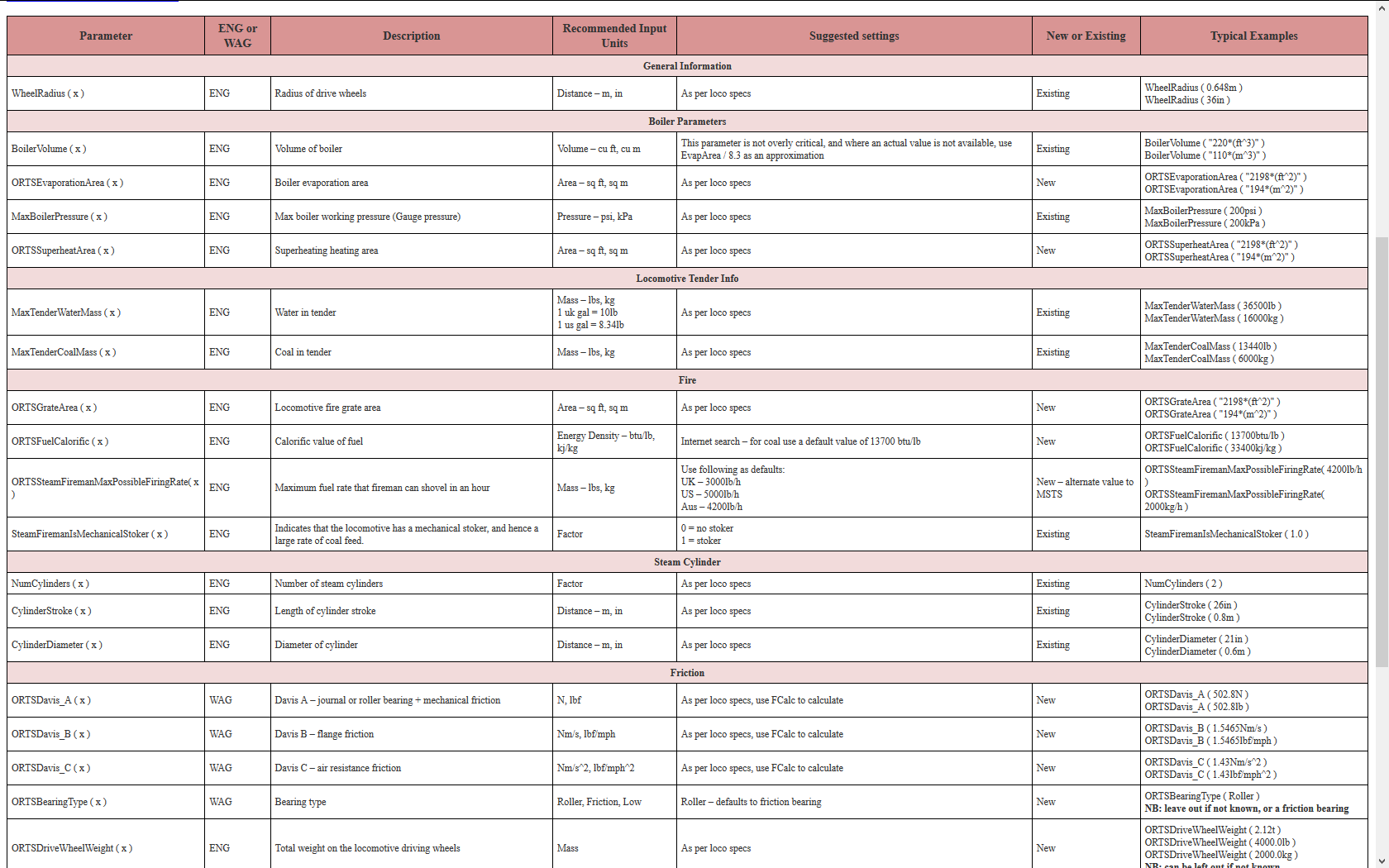
      Hi Scott (or anyone else). Do you have a reference for what all the cab control values are? Each couple of years when I build another cab I have to relearn everything. A central source of truth would be a time saver.

      Cheers,

      Marek.

      Comment

      • scottb613
        2500 Post Veteran


        • Apr 2003
        • 2848
        • Downeast Maine (soon)
        • ORTS

        #4
        Originally posted by superheatedsteam
        Hi Scott (or anyone else). Do you have a reference for what all the cab control values are? Each couple of years when I build another cab I have to relearn everything. A central source of truth would be a time saver.

        Cheers,

        Marek.
        Hi Marek,

        Yeah - honestly - I just copy my old controllers from one locomotive to the next. I use "include" files which makes it pretty transportable.

        Regards,
        Scott
        <a href=https://www.trainsim.com/forums/filedata/fetch?filedataid=80663&type=full title=thumb_80663.png >thumb_80663.png</a>​ My Blender Models

        Comment

        • HookitandBookit
          Member
          • Feb 2021
          • 68

          #5
          Originally posted by scottb613
          Hi...

          In my following image - it's the 3rd field on each control which sets the number of notches - you can speed it up by making the notches bigger. See the highlighted line and the third field highlighted in black:

          [ATTACH=CONFIG]82686[/ATTACH]

          Regards,
          Scott
          Thank you sir, absolutely LOVE your LHR Heavy Mountain by the way, thank you for that too.

          Comment

          • scottb613
            2500 Post Veteran


            • Apr 2003
            • 2848
            • Downeast Maine (soon)
            • ORTS

            #6
            Originally posted by HookitandBookit
            Thank you sir, absolutely LOVE your LHR Heavy Mountain by the way, thank you for that too.
            Hi...

            Thanks - she's in the shops now - the LHR model is quite old - my skills have improved a bit since then. I'm working on the B&M R-1-A first - I plan on going through the series until I get to the R-1-D again - of which the LHR model was based. There will be far more detail and some better textures.

            BM482_R1A by Scott B, on Flickr

            Regards,
            Scott
            <a href=https://www.trainsim.com/forums/filedata/fetch?filedataid=80663&type=full title=thumb_80663.png >thumb_80663.png</a>​ My Blender Models

            Comment

            • steamer_ctn
              Member
              • May 2010
              • 87

              #7
              Are these the sort of things that you are after?


              Comment

              • superheatedsteam
                Senior Member


                • Jun 2004
                • 764
                • Perth, WA, Australia.

                #8
                Thank you Peter, your efforts are appreciated.

                Outstanding work Scott.

                Comment

                • scottb613
                  2500 Post Veteran


                  • Apr 2003
                  • 2848
                  • Downeast Maine (soon)
                  • ORTS

                  #9
                  Originally posted by superheatedsteam
                  Thank you Peter, your efforts are appreciated.

                  Outstanding work Scott.
                  Hi Marek,

                  Thank you sir - a long way to go - as I suspect you know from modeling but I've been making good progress. Been working on all the piping lately.

                  Regards,
                  Scott
                  <a href=https://www.trainsim.com/forums/filedata/fetch?filedataid=80663&type=full title=thumb_80663.png >thumb_80663.png</a>​ My Blender Models

                  Comment

                  Working...