Tracks are Back Now everything is in the Air!

Collapse
X
 
  • Time
  • Show
Clear All
new posts
  • crstagg
    4500 Post Veteran


    • Nov 1999
    • 4885
    • Huntsville, AL
    • Texan
    • MSOR

    #16
    Originally posted by dkingsburg
    No That isn't What is Happening. The Activity Starts and the Tracks Are In the Air Above the Scenery Like they Are on a Bridge.
    The 6 MSTS Routes are the Way They Should Be with Nothing Suspended or Floating.
    I am Running them in OR not MSTS.
    I Have Most of the Maple Leaf Tracks Routes Except Michigan Iron Ore and the DRGW Route. I Have Redding, Hamilton-Norfolk, SAL,
    Goodrich-Exeter, Conn River, and East Metro.
    All of them have the Tracks Floating/Suspended.
    DaveKfromUP

    I think I know what you are seeing but it would be nice if you could post a pic. Guess you can't do that either.
    Charles

    Comment

    • crstagg
      4500 Post Veteran


      • Nov 1999
      • 4885
      • Huntsville, AL
      • Texan
      • MSOR

      #17
      Originally posted by R. Steele
      This may not be your problem, but floating tracks in OR can be the result of not having the "y.raw" files in the TILES folder. So pick a route that has floating tracks and check the "TILES" folder to make sure it contains the "y.raw" files.

      [ATTACH=CONFIG]81059[/ATTACH]
      Just checked the routes that I just tested and found that one, ATSF Herford Sub, did not have any y.raw files. Only .t files in the tiles folder. All the other routes did have y.raw files.
      Charles

      Comment

      • R. Steele
        3500 Post Veteran

        • Feb 2013
        • 3928
        • known universe
        • ORTS

        #18
        Originally posted by crstagg
        Just checked the routes that I just tested and found that one, ATSF Herford Sub, did not have any y.raw files. Only .t files in the tiles folder. All the other routes did have y.raw files.
        For Open Rails you can delete all the "e.raw" and "n.raw" files in the TILES folder and gain some disk space. OR still needs the "f.raw" [which I think relates to passenger stations?? not sure about that] and the "y.raw" files. Remove all the "y.raw" files and OR will still load the route, but see what happens.

        Aren't the e&n raw files the "buffer" files that MSTS generated?
        Cheers, Gerry
        "A mind is like a parachute. It doesn't work if it is not open." Frank Zappa
        It's my railroad and I'll do what I want! Historically accurate attitude of US Railroad Barons.
        Forever, ridin' drag in railroad knowledge.
        Audi, Vide, Tace, Si Vis Vivere In Pace​

        https://www.trainsim.com/forums/filedata/fetch?filedataid=79656&type=medium​ https://www.trainsim.com/forums/filedata/fetch?filedataid=79654&type=small

        Comment

        • crstagg
          4500 Post Veteran


          • Nov 1999
          • 4885
          • Huntsville, AL
          • Texan
          • MSOR

          #19
          Found a route that does what I think the problem is. Route is in the ATSFCH folder. It is the Chilicothe sub. Tiles folder only has .t files. No y.raw files.

          Is this the problem?
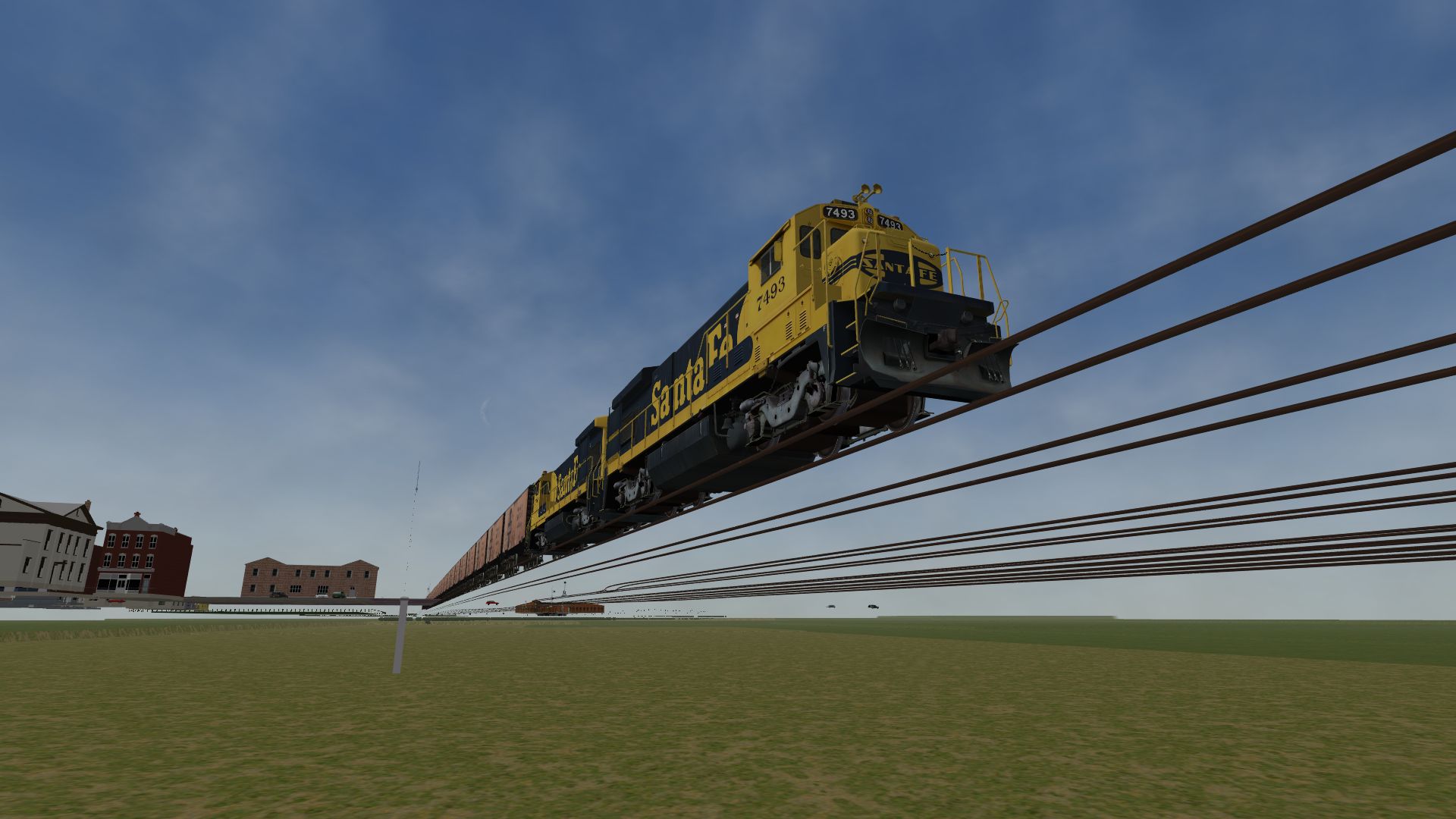
          Charles

          Comment

          • crstagg
            4500 Post Veteran


            • Nov 1999
            • 4885
            • Huntsville, AL
            • Texan
            • MSOR

            #20
            Originally posted by crstagg
            Just checked the routes that I just tested and found that one, ATSF Herford Sub, did not have any y.raw files. Only .t files in the tiles folder. All the other routes did have y.raw files.

            OOPS!! Re-looked at Herford Sub and it does have floating track just like the Chilicothe sub.
            Charles

            Comment

            • dkingsburg
              Senior Member
              • May 2010
              • 564
              • Cabot, Arkansas
              • MSOR

              #21
              Yes, It Loads that Way and Stays Like That Over the Whole Route.
              DaveKfromUP

              Comment

              • dkingsburg
                Senior Member
                • May 2010
                • 564
                • Cabot, Arkansas
                • MSOR

                #22
                Charles,
                Yes, that's Exactly What I'm Seeing.
                I'm Working on Following Your Instructions to Send the Log Files. In Some Ways I'm Good with the Computer but in Other Ways I'm Stupid.
                I Work for the Union Pacific in North Little Rock at the Ramp and Use the Computer all the Time to Do My job for Ordering Parts and Creating Work Packages. But Everything I Need is in the System Computer program so I Have Very Few problems.
                At home I Have Windows 10 and All the New Stuff that Go's with 10 are a Nightmare. It Used to be Easy but Now They've Added all these new Items and I'm Still Trying to Figure Things Out.
                Thankyou,
                DaveKfromUP

                Comment

                • crstagg
                  4500 Post Veteran


                  • Nov 1999
                  • 4885
                  • Huntsville, AL
                  • Texan
                  • MSOR

                  #23
                  Problem solved for my routes. Dug into a 500Gb HD attached to my PC via a USB connection. Found the ZIP for the Herford Sub. Opened the ZIP to the ATSFHS folder. Drug the Tiles folder from the ZIP to my ...\ROUTES\ATSFHS folder reinstalling the Tiles folder. Now no floating track.

                  So, Dave, you can either fix your routes that way or just reinstall the routes that have the floating track. Routes that are just the files compressed can be fixed by just unzipping the Tiles folder. Bu the routes with an Executable installer will need to be completely reinstalled.
                  Charles

                  Comment

                  • R. Steele
                    3500 Post Veteran

                    • Feb 2013
                    • 3928
                    • known universe
                    • ORTS

                    #24
                    Originally posted by crstagg
                    Problem solved for my routes. Dug into a 500Gb HD attached to my PC via a USB connection. Found the ZIP for the Herford Sub. Opened the ZIP to the ATSFHS folder. Drug the Tiles folder from the ZIP to my ...\ROUTES\ATSFHS folder reinstalling the Tiles folder. Now no floating track.

                    So, Dave, you can either fix your routes that way or just reinstall the routes that have the floating track. Routes that are just the files compressed can be fixed by just unzipping the Tiles folder. Bu the routes with an Executable installer will need to be completely reinstalled.
                    My emphasis, I don't think so, why install anything again and risk more trouble. Just unzip the route or run the route exe file and install to a temp location of your choosing ( Like C:\MSTS\TempROUTES ) and then COPY only the "y.raw" and "f.raw" files from the route TILES folder and paste them in your working location ( the one with all the floating stuff ) problem solved.

                    Perhaps, that's what Charles meant?
                    Anyway...
                    Do it for one route and check to make sure it cured the problem, then do the others. When all repairs are made, simply delete the temp folder you created...AND THEN...make a backup of the working routes.

                    First though, check each route to make sure the "y.raw" files are missing from the TILES folder.
                    Cheers, Gerry
                    "A mind is like a parachute. It doesn't work if it is not open." Frank Zappa
                    It's my railroad and I'll do what I want! Historically accurate attitude of US Railroad Barons.
                    Forever, ridin' drag in railroad knowledge.
                    Audi, Vide, Tace, Si Vis Vivere In Pace​

                    https://www.trainsim.com/forums/filedata/fetch?filedataid=79656&type=medium​ https://www.trainsim.com/forums/filedata/fetch?filedataid=79654&type=small

                    Comment

                    • crstagg
                      4500 Post Veteran


                      • Nov 1999
                      • 4885
                      • Huntsville, AL
                      • Texan
                      • MSOR

                      #25
                      Originally posted by R. Steele
                      My emphasis, I don't think so, why install anything again and risk more trouble. Just unzip the route or run the route exe file and install to a temp location of your choosing ( Like C:\MSTS\TempROUTES ) and then COPY only the "y.raw" and "f.raw" files from the route TILES folder and paste them in your working location ( the one with all the floating stuff ) problem solved.

                      Perhaps, that's what Charles meant?
                      .........
                      Good idea and what I already decided to do for my routes.

                      Wonder how all these y.raw files got deleted in the first place. They are not all deleted just in some routes. Wonder if the "new" Route Riter is to blame?
                      Charles

                      Comment

                      • crstagg
                        4500 Post Veteran


                        • Nov 1999
                        • 4885
                        • Huntsville, AL
                        • Texan
                        • MSOR

                        #26
                        Dave,
                        Since most of your routes have the floating track problem, I am guessing that when you did your reinstall of MSTS outside of the Program Files folder you copied your Routes folder from the Program Files folder to the new install. Thus taking your problem with you to the new install.

                        I spent some time today researching old posts on the forum. Guess what I found back in 2016. A post about tracks floating in air above the terrain. Guess who was the OP. A guy named dkingsburg! And guess what he was told to do to fix the problem. Reinstall the route(s).
                        Charles

                        Comment

                        • R. Steele
                          3500 Post Veteran

                          • Feb 2013
                          • 3928
                          • known universe
                          • ORTS

                          #27
                          Originally posted by crstagg
                          Good idea and what I already decided to do for my routes.

                          Wonder how all these y.raw files got deleted in the first place. They are not all deleted just in some routes. Wonder if the "new" Route Riter is to blame?
                          Well, for myself, a confession, I had the same problem some years ago, early days of OR, I had read ( not too carefully as it turned out ) that OR didn't need the raw files in the TILES folder...I missed the part about still needing the y&f raw files, so I deleted all of them...and I had all floating track routes ( plus buildings,etc. ) Fortunately I had backups of everything, so once I figured it out, I just copied and pasted the y&f raw files --- problem solved.

                          New route riter from "who shall not be named"? Maybe, looks like you'll have to try an experiment...I don't have a copy of it.
                          Cheers, Gerry
                          "A mind is like a parachute. It doesn't work if it is not open." Frank Zappa
                          It's my railroad and I'll do what I want! Historically accurate attitude of US Railroad Barons.
                          Forever, ridin' drag in railroad knowledge.
                          Audi, Vide, Tace, Si Vis Vivere In Pace​

                          https://www.trainsim.com/forums/filedata/fetch?filedataid=79656&type=medium​ https://www.trainsim.com/forums/filedata/fetch?filedataid=79654&type=small

                          Comment

                          • dkingsburg
                            Senior Member
                            • May 2010
                            • 564
                            • Cabot, Arkansas
                            • MSOR

                            #28
                            Charles,
                            Even though I Moved all of my Routes to a Temporary Folder None of them had the y Tiles. I Downloaded the Routes to My Desktop and then Transferred the Tiles File Back Into the Routes. So Far Cheyenne, East Metro and SAL Are Corrected and Everything is back to Normal.
                            Bala2, Conn River and Mactier are Back to Normal with the Exception of Gray Area's Along the Track and At All Switches, Diamonds, Road Crossings.
                            Thankyou,
                            DaveKfromUP

                            Comment

                            Working...