Assist request with AI Horn Blowing

Collapse
X
 
  • Time
  • Show
Clear All
new posts
  • qballbandit
    6500 Post Veteran

    • Jan 2006
    • 6522
    • Elgin Il., USA.
    • MSOR

    #1

    Assist request with AI Horn Blowing

    Hello,

    I attempted to add AI horn blowing into OR on one route, and have questions that I hope you can help guide me through -

    First, I wanted to add AI horn blow capability to a grade crossing that I believe OR would consider a "simple road crossing".
    This grade crossing intersects the beginning of a signaled passing siding. I placed a waiting point approximately 25 car lengths ahead of the crossing. I put the wait time as 60018, which equated to like 7 or 8 seconds of horn blow time. There are no other waiting points in the AI path. My player train is in the siding, waiting for this AI to clear the main, so I can proceed.

    After adding the above, the AI train now stops at the waiting point and has a red signal protecting the main, and I'm not sure why, or how I correct this? Without this waiting point, the AI train breezes right through on the main.

    Second question - for the "regular" level crossings where I need to insert the following into the .act file:

    ORTSAIHornAtCrossings ( 1 )
    is inserted into the activity file following the line:
    NextActivityObjectUID ( 32768 )


    Is there a utility I can use to edit activity files, or is it safe to change them to text files for editing?

    Thanks very much!
    Neil

    Chicago Railroading Fan
  • niknak
    1000 Post Veteran


    • Nov 1999
    • 1254
    • UK.
    • MSOR

    #2
    Hi Neil, Can't help you with the first query I'm afraid but regarding the second, I have added the "Horn at crossings" line to all of my activities using notepad and it works just fine.
    Regards,

    Nick

    ( ' boffin0_reprised ' on TikTok )


    Cyberpower Desktop with AMD Ryzen 5 CPU /. 16GB RAM /. ATI AMD Radeon RX6700 12GB graphics /. Windows 11 Home 64bit /. RailDriver /. Partridge in a pear tree....​

    Comment

    • qballbandit
      6500 Post Veteran

      • Jan 2006
      • 6522
      • Elgin Il., USA.
      • MSOR

      #3
      Thanks niknak, that is half of the equation! I didn't want to fudge those files up by changing them, and making them unreadable by OR.
      Neil

      Chicago Railroading Fan

      Comment

      • geepster775
        2500 Post Veteran


        • Sep 2006
        • 2846
        • .
        • General

        #4
        Sounds like you are using the AE to place wait point horn honks instead of trackviewer. Not sure if AE is an adequate tool.

        My Open Rails videos https://www.youtube.com/@lakecities3663/videos

        Comment

        • qballbandit
          6500 Post Veteran

          • Jan 2006
          • 6522
          • Elgin Il., USA.
          • MSOR

          #5
          I am not using AE, don't even have it installed. I am using the OR trackviewer.
          Neil

          Chicago Railroading Fan

          Comment

          • csantucci
            Senior Member
            • Nov 1999
            • 856
            • Torino, Italy.

            #6
            Neil, the AI train shouldn't stop, and setting the WP to 60018 is correct.
            Can you post a Trackviewer screenshot of that part of the AI path?
            sigpic

            Comment

            • qballbandit
              6500 Post Veteran

              • Jan 2006
              • 6522
              • Elgin Il., USA.
              • MSOR

              #7
              Good evening, Carlos.
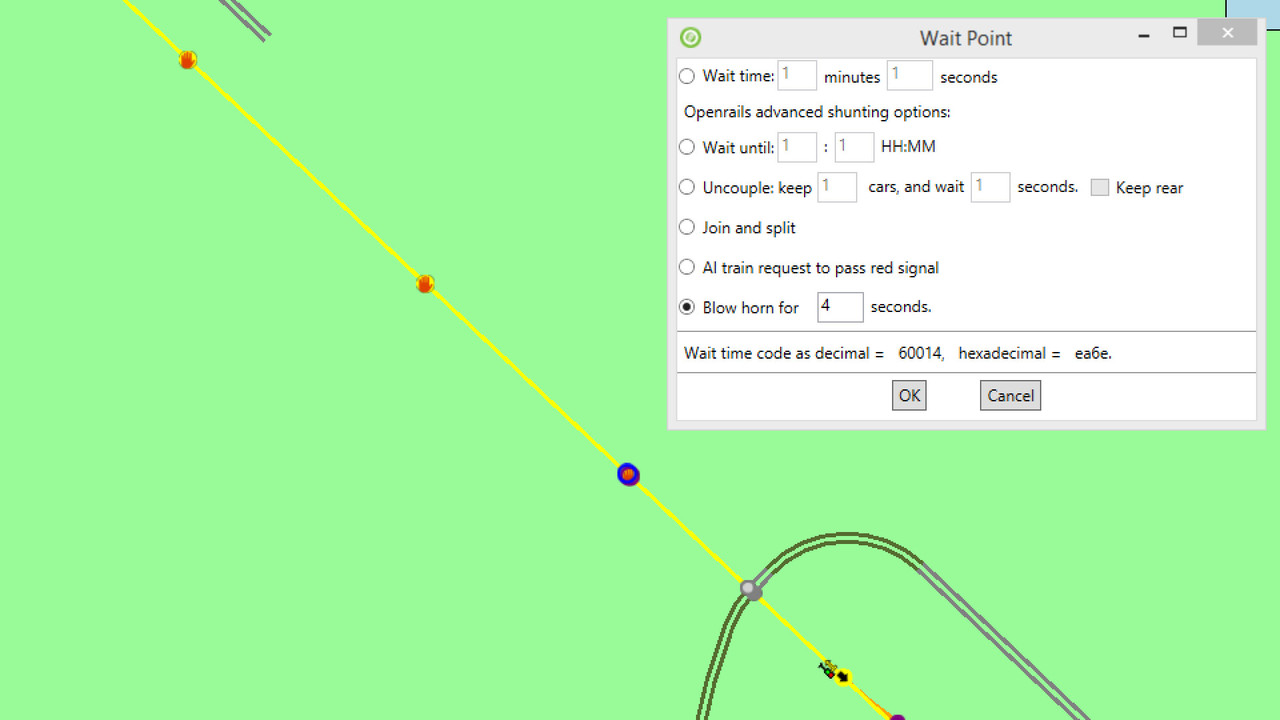
              Thanks for taking a look. Here is the screenshot. You can see the wait point on the left, the AI path using the main, the crossing, signal, etc.
              Ideas??


              **Note: I quickly recreated this screenshot for your viewing. With my original attempt where the train held at the wait point, I had a value of "0" on the top line "Wait Time".
              Attached Files
              Neil

              Chicago Railroading Fan

              Comment

              • csantucci
                Senior Member
                • Nov 1999
                • 856
                • Torino, Italy.

                #8
                Neil,
                I have generated an activity which is quite similar to yours on the original Marias Pass; the AI train arrives from Summit and enters Bison on the main track. Signals are like in your case. The waiting point is set at 60018. I attach here the activity. The AI train behaves as intended.

                TestHornNeil.zip

                I'll see if I'm able to download the Blackfoot Summer Edition route in reasonable time (I have no First Class membership). Could you pack the stripped-down activity and attach it?
                sigpic

                Comment

                • geepster775
                  2500 Post Veteran


                  • Sep 2006
                  • 2846
                  • .
                  • General

                  #9
                  Neil, are you trying to modify an existing end-to-end path that was built with the AE before your PC upgrade? Or is it an entirely new path?

                  As an FYI I have re-ran my activties that feature AI horns and all are still working as intended using the current testing version.
                  My Open Rails videos https://www.youtube.com/@lakecities3663/videos

                  Comment

                  • qballbandit
                    6500 Post Veteran

                    • Jan 2006
                    • 6522
                    • Elgin Il., USA.
                    • MSOR

                    #10
                    Carlo,
                    I'll attach the activity on Monday. I am sorry you went through the trouble to pack that activity - I no longer have any default routes installed.

                    geepster,
                    It is an activity created via the RE, yes, quite about a year ago. Why do you ask this?
                    Neil

                    Chicago Railroading Fan

                    Comment

                    • qballbandit
                      6500 Post Veteran

                      • Jan 2006
                      • 6522
                      • Elgin Il., USA.
                      • MSOR

                      #11
                      BF3 ACT.zip

                      Here you go, Carlo! I've tried adjusting the wait point to different distances from the grade crossing, but I just can't get the AI train to get a clear signal. I remove the wait point, and the signal is clear as the AI train approaches the siding.
                      Last edited by qballbandit; 12-28-2020, 13:13.
                      Neil

                      Chicago Railroading Fan

                      Comment

                      • csantucci
                        Senior Member
                        • Nov 1999
                        • 856
                        • Torino, Italy.

                        #12
                        Hi Neil,
                        I find only the .act and the .asv files in your .zip file. I need at least also the path file of the AI train to perform a test (better would be path files for AI train and player train, service files for them and traffic file).
                        sigpic

                        Comment

                        • qballbandit
                          6500 Post Veteran

                          • Jan 2006
                          • 6522
                          • Elgin Il., USA.
                          • MSOR

                          #13
                          My apologies, here you have them all.
                          I appreciate your assistance very much!
                          Attached Files
                          Neil

                          Chicago Railroading Fan

                          Comment

                          • geepster775
                            2500 Post Veteran


                            • Sep 2006
                            • 2846
                            • .
                            • General

                            #14
                            Your supplied files are working just fine here. Testing 275. About 8 seconds of horn + bell then probably 24 more seconds of bell for the max of 30. The only edits via notepad were to the two services files to change out consists to some I already had on hand.

                            My Open Rails videos https://www.youtube.com/@lakecities3663/videos

                            Comment

                            • geepster775
                              2500 Post Veteran


                              • Sep 2006
                              • 2846
                              • .
                              • General

                              #15
                              Modified AI path producing the entire sequence

                              Attached Files
                              My Open Rails videos https://www.youtube.com/@lakecities3663/videos

                              Comment

                              Working...