DAR SW1200 Cabviews>

Collapse
X
 
  • Time
  • Show
Clear All
new posts
  • lateagain
    2500 Post Veteran
    • Jul 2004
    • 2727
    • Wareham, Dorset, U.K.

    #1

    DAR SW1200 Cabviews>

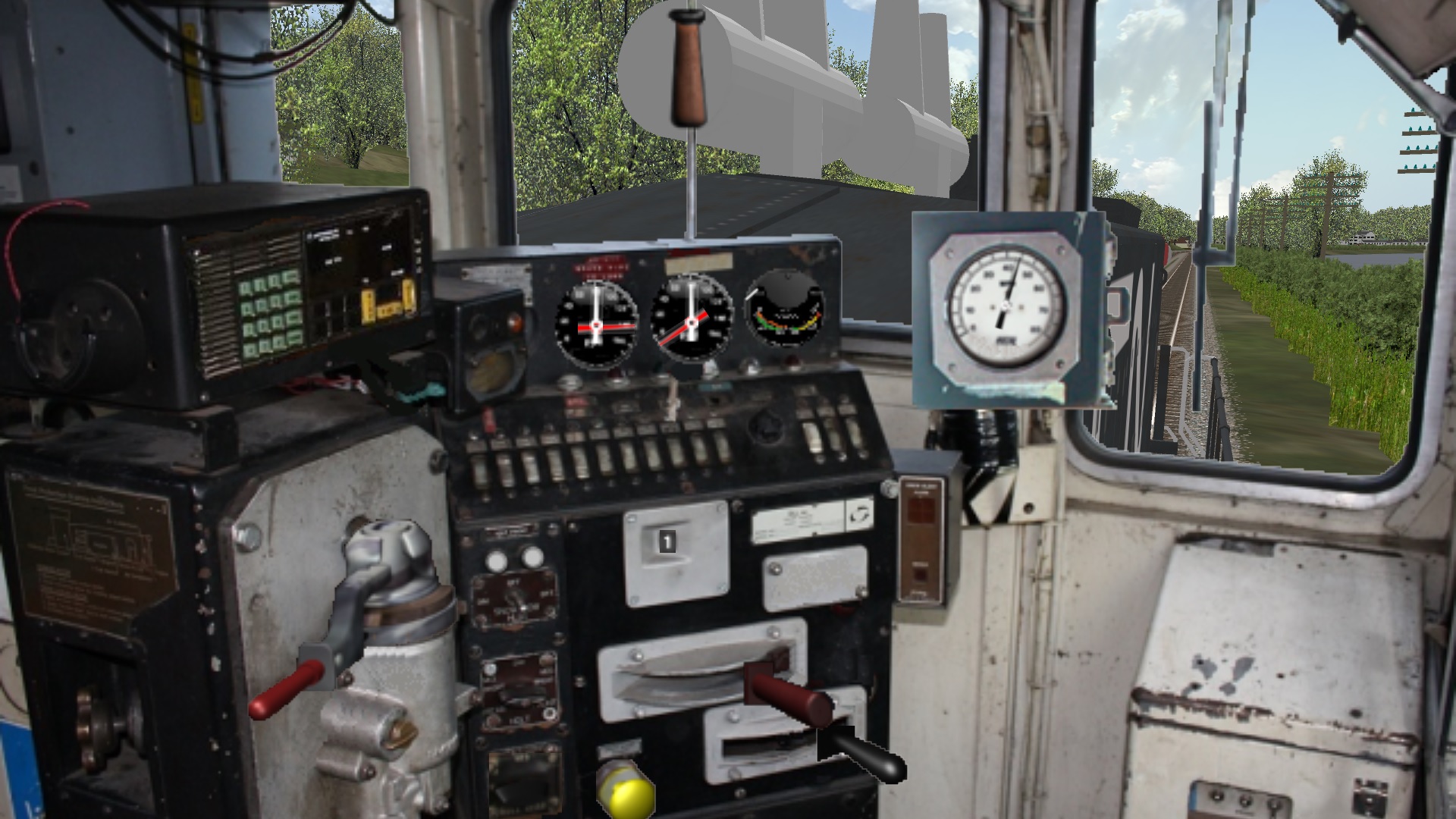
    Well on my 16x9 monitor the existing Front cab view was looking down into the cab and the rear one was also looking down at the track.

    The latter was simple it only required a modification to the figures in the CVF file.

    I had a go at distorting/correcting the front view and placing the driver with a useful front view.

    Unfortunately that of course is where the greater skills in cabview building come in. Now all the controls, switches and dial needles all need repositioning too.

    If any cabview builder wants to take up that challenge I'll happily share what I've done so far, which still needs some tweaking with the Alpha channel.

    Tiffin time here now and time for a cool drink.....
    Attached Files
    Geoff
    Dorset - near The Swanage Railway.
    UK
  • charland
    3000 Post Veteran


    • Dec 2006
    • 3107
    • Brockville, ON, CA
    • General

    #2
    Seeing as the cabview was made for a 4x3 monitor, you might want to have a look at your Open Rails monitor settings. I have mine set to 1-24 x 768 and my FOV set to 60 and this is what I see:


    Paul

    Comment

    • crstagg
      4500 Post Veteran


      • Nov 1999
      • 4885
      • Huntsville, AL
      • Texan
      • MSOR

      #3
      Geoff,
      Compare the location of the Needles and the Throttle handle in your pic with the Needles and the Throttle in Paul's pic.
      Charles

      Comment

      • lateagain
        2500 Post Veteran
        • Jul 2004
        • 2727
        • Wareham, Dorset, U.K.

        #4
        Originally posted by charland
        Seeing as the cabview was made for a 4x3 monitor, you might want to have a look at your Open Rails monitor settings. I have mine set to 1-24 x 768 and my FOV set to 60 and this is what I see:


        Paul
        Yet again I see no image Paul ....and yet yours seem to be the ONLY images I can't see

        BUT lets forget that.

        THE one big plus that Open Rails gave us (before the MSTS patch) was the ability to enjoy routes in CORRECT aspect ratio in wide screen (16x9) monitors.

        NOW we all know that 99% of the stock folk are running in Open Rails was originally modelled for MSTS and therefore Cab Views were all created for that Sims 4x3 aspect ratio.

        I guess I need to put some cards on the table in this discussion.

        1) I have NO interest in seeing controls in a Cabview. See SLI's Cabviews for what I'm on about. When you drive your car you KNOW where the controls are and you never look at them? You just USE them. What you do (if you're a safe driver) is look at the view out of the window because that is what you MUST concentrate on?

        2) The only thing that OR cannot correct in Widescreen mode is the Cabview. It's stretched. So are my modifications above.

        3) What open rails DOES allow you to do is raise or lower your view in the front view.

        4) There is a suggestion as to how you can correct the "stretched" cabviews for Open Rails. REALITY CHECK GUYS..... IF I set about doing that for the hundreds of cabviews I must have..... well fixing cab views would take ALL my hobby time?! ...so I can live with a stretched view AS LONG as I can see what the driver would be expected to be able to see.

        ....so having laid my cards on the table I'm aware that many folk DON'T run OR or MSTS in widescreen format. Their choice, just like I'll always drink Tea instead of Coffee.... simple.

        So my mod is not for those who are happy with the view in 4x3. It's to give a better DRIVERS view for 16x9.

        Sadly Charles I can't see Paul's picture so I don't understand the significance of that. Obviously I've had the view in Photoshop and corrected the Verticals. Obviously that has moved the base image out of line with the carefully placed controls in the original. That can be corrected but as I've zero experience of building cab views I figured that anyone who did could fix that quicker than it'll take me to find the tutorial on how to do it. Just getting the drivers head position and the cab front in as near to a realistic position as possible took me an hour or so of trial and error.
        Geoff
        Dorset - near The Swanage Railway.
        UK

        Comment

        • derekmorton
          5500 Post Veteran


          • Nov 1999
          • 5699
          • Eltham, Victoria, Australia.
          • ORTS

          #5
          >Yet again I see no image Paul ....and yet yours seem to be the ONLY images I can't see

          You are the only one that cannot see the images!!

          Check your house first.

          Comment

          • lateagain
            2500 Post Veteran
            • Jul 2004
            • 2727
            • Wareham, Dorset, U.K.

            #6
            Originally posted by derekmorton
            >Yet again I see no image Paul ....and yet yours seem to be the ONLY images I can't see

            You are the only one that cannot see the images!!

            Check your house first.
            Amazing that you know exactly what EVERYONE else can see Derek. I bow to your superpower. Perhaps that Superpower can explain why I have no issues with seeing any other images..... Perhaps it might then come back to the topic? Of course if you wanted to be helpful you could copy the image I can't see (for whatever reason) and re-post it in the thread?

            BTW did you bother to read my response to Charles point?
            Geoff
            Dorset - near The Swanage Railway.
            UK

            Comment

            • derekmorton
              5500 Post Veteran


              • Nov 1999
              • 5699
              • Eltham, Victoria, Australia.
              • ORTS

              #7
              Is anyone else mentioning a problem?

              You are always very quick to blame other people for things.

              The internet is a network of many parts and sometimes small parts of it have problems that only seem to effect us.


              Comment

              • lateagain
                2500 Post Veteran
                • Jul 2004
                • 2727
                • Wareham, Dorset, U.K.

                #8
                Originally posted by derekmorton
                Is anyone else mentioning a problem?

                You are always very quick to blame other people for things.

                The internet is a network of many parts and sometimes small parts of it have problems that only seem to effect us.


                I haven't BLAMED anyone!!!!! I merely said I cannot see the image. I further stated that I don't have a problem seeing any other images. TWO FACTS. Where's the blame?

                Perhaps you'd like to help me fix something that doesn't seem to be broke my end? It may well be something my end but I'm at a loss to see what when I have no other issues with other posts or any other site come to that.
                Geoff
                Dorset - near The Swanage Railway.
                UK

                Comment

                • derekmorton
                  5500 Post Veteran


                  • Nov 1999
                  • 5699
                  • Eltham, Victoria, Australia.
                  • ORTS

                  #9
                  >Yet again I see no image Paul ....and yet yours seem to be the ONLY images I can't see

                  Paul posts his images to imgbox.com, which I trace to Holland.

                  For whatever reason, YOU are having trouble reaching imgbox.com.

                  Comment

                  • lateagain
                    2500 Post Veteran
                    • Jul 2004
                    • 2727
                    • Wareham, Dorset, U.K.

                    #10
                    Originally posted by derekmorton
                    >Yet again I see no image Paul ....and yet yours seem to be the ONLY images I can't see

                    Paul posts his images to imgbox.com, which I trace to Holland.

                    For whatever reason, YOU are having trouble reaching imgbox.com.
                    Thanks Derek.

                    imgbox.com was the weak link. A quick Google threw up scores of "issues" with imgbox BUT thankfully also the simple solution.

                    Basically once I cleared the Cache in Chrome Paul's pictures all appeared.

                    Back to the Cab.....

                    I wasn't getting anything like Pauls shots so obviously I hadn't set something up in OR. I'll go back and check the original view but I'm a bit puzzled that Paul's shots show a widescreen shot when I understood (misunderstood?) he was running the Sim 4x3. I mention this as the only thing I didn't change was the FOV. Obviously as the shot shows setting any FOV has a different effect in 4x3 and 16x9 so what would I put in the variable box ?
                    Attached Files
                    Geoff
                    Dorset - near The Swanage Railway.
                    UK

                    Comment

                    • charland
                      3000 Post Veteran


                      • Dec 2006
                      • 3107
                      • Brockville, ON, CA
                      • General

                      #11
                      The shot I posted was off a laptop that is 9x16. I have OR set to 1024x768 so OR is clipping a bit off the top and the bottom compared to a 4x3 monitor, but keeping it proportionate, that's why the needles in the gauges are correct.

                      Paul

                      Comment

                      • crstagg
                        4500 Post Veteran


                        • Nov 1999
                        • 4885
                        • Huntsville, AL
                        • Texan
                        • MSOR

                        #12
                        Originally posted by lateagain
                        Thanks Derek.

                        imgbox.com was the weak link. A quick Google threw up scores of "issues" with imgbox BUT thankfully also the simple solution.

                        Basically once I cleared the Cache in Chrome Paul's pictures all appeared.

                        Back to the Cab.....

                        I wasn't getting anything like Pauls shots so obviously I hadn't set something up in OR. I'll go back and check the original view but I'm a bit puzzled that Paul's shots show a widescreen shot when I understood (misunderstood?) he was running the Sim 4x3. I mention this as the only thing I didn't change was the FOV. Obviously as the shot shows setting any FOV has a different effect in 4x3 and 16x9 so what would I put in the variable box ?
                        You need to change the 38 to 60 in Viewing Vertical FOV and Window Size to 1024 x 768
                        Charles

                        Comment

                        • lateagain
                          2500 Post Veteran
                          • Jul 2004
                          • 2727
                          • Wareham, Dorset, U.K.

                          #13
                          Originally posted by crstagg
                          You need to change the 38 to 60 in Viewing Vertical FOV and Window Size to 1024 x 768
                          Yes I tried that and of course it does work. That is of course a 4 x 3 aspect ratio (as were the orignal MSTS screens, as were most monitors back in 2002) and as the model was built for that it works.

                          However what this thread shows is that now we have Open Rails we have user choice variables. None of them are RIGHT.... None of them are WRONG? They are merely personal choices.

                          Personally I find that a FOV of 60 gives a VERY wide angled view as the starting point in ALL cameras. The settings I had (see image above) gave what I consider to be a far better "starting point" (not forgetting that you can zoom in or out to any FOV with the mouse wheel) so that I can quickly set the cameras to the FOV I want.

                          AGAIN this is personal choice...
                          The Perspective the human eye sees the world is the equivalent of a FOV of 29 degrees. I tend to set ALL my CAMS to that FOV when I start using OR. Until these cabs cropped up that's never been a problem.

                          SO... far from "blaming anyone else" I set about fixing the Cabview so that it would work in 16 x 9 screens in OR. I'm getting there slowly. I hadn't realised that repositioning controls and needles in Cabview Editor was so easy! However I hit a problem with the night cab testing earlier that's going to take some more work.

                          Obviously not everyone using OR in 16x9 is going to choose MY preferred FOV setting?

                          So I guess this project is just for me?

                          Oh and BTW the "fix" to get imgbox to work that worked on my win10 desktop has NOT worked on SWMBO's laptop, both Win10, both using Chrome. No big deal because I only look at the forum on here.

                          It's a shame because so many image sites have closed down or watermarked folks images to demand an extravagant premium. I'll do some more searches. There's no shortages of complaints on the web.
                          Geoff
                          Dorset - near The Swanage Railway.
                          UK

                          Comment

                          Working...