Open Rails Activity Load Error

Collapse
X
 
  • Time
  • Show
Clear All
new posts
  • ekeating
    Senior Member
    • Apr 2015
    • 147

    #1

    Open Rails Activity Load Error

    All,

    I'm currently working on creating new activities for Surfliner 2.3 (or attempting to, at least) on TSRE when I came across this one I was working on this evening. When attempting to test a validation state, the ORTS screen gave me a load error message as seen below.
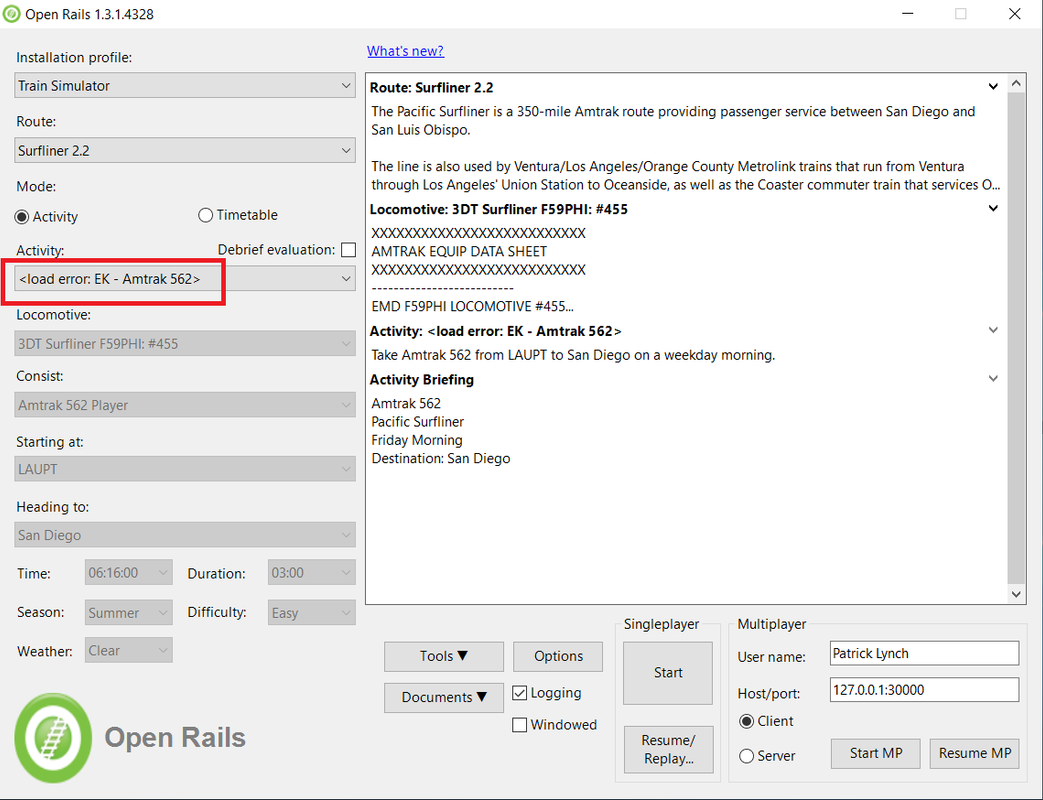


    I was able to push through it and load the activity without issue. Which leads me to the following questions:

    1. What may cause this? I haven't seen it happen before and RouteRiter doesn't notify of any activity errors.
    2. What might I be able to do to fix this?

    Thanks to all in advance.

    EK
    Last edited by ekeating; 05-08-2020, 21:49.
  • R. Steele
    3500 Post Veteran

    • Feb 2013
    • 3928
    • known universe
    • ORTS

    #2
    When the error happened, did you check the OpenRailsLog.txt file on the desktop?
    Cheers, Gerry
    "A mind is like a parachute. It doesn't work if it is not open." Frank Zappa
    It's my railroad and I'll do what I want! Historically accurate attitude of US Railroad Barons.
    Forever, ridin' drag in railroad knowledge.
    Audi, Vide, Tace, Si Vis Vivere In Pace​

    https://www.trainsim.com/forums/filedata/fetch?filedataid=79656&type=medium​ https://www.trainsim.com/forums/filedata/fetch?filedataid=79654&type=small

    Comment

    • ekeating
      Senior Member
      • Apr 2015
      • 147

      #3
      Gerry,

      I should have attached these to begin with, my apologies. I've attached a copy of both the ORTS and TSRE logs, I have a terrible time attempting to understand most of these error messages I receive.

      EK
      Attached Files

      Comment

      • R. Steele
        3500 Post Veteran

        • Feb 2013
        • 3928
        • known universe
        • ORTS

        #4
        Well, let's see...
        Same missing sound files keep appearing: These shouldn't stop the activity from loading, unless they are for the player. There's so many that it might cause OR to crash, if the they kept adding up while testing the activity.
        Warning: File ../P42_Cab_Radio.wav missing from C:\1MSTS\trains\trainset\SLI_AMT_SWCHIEF_2012\soun d\..\..\Common.GLW\GE_7FDL16_P42DC\Alias

        Warning: File ../P42_HEP_Generator2.wav missing from C:\1MSTS\trains\trainset\SLI_AMT_SWCHIEF_2012\soun d\..\..\Common.GLW\GE_7FDL16_P42DC\Alias

        Warning: File ../Chug_RamUp.wav missing from C:\1MSTS\trains\trainset\SLI_AMT_SWCHIEF_2012\soun d\..\..\Common.GLW\GE_7FDL16_P42DC\Alias

        Warning: File ../P42_HEP_Generator.wav missing from C:\1MSTS\trains\trainset\SLI_AMT_SWCHIEF_2012\soun d\..\..\Common.GLW\GE_7FDL16_P42DC\Alias
        These missing sound files do not appear as often --- they wouldn't stop the activity from loading...unless they were for the player.
        Warning: File x_CEM_flat.wav missing from C:\1MSTS\trains\trainset\SM_MetrolinkRotemCoaches\ sound

        Warning: File 6900_flat.wav missing from C:\1MSTS\trains\trainset\SM_MetrolinkRotemCoaches\ sound

        Warning: File pass_flat_ml.wav missing from C:\1MSTS\trains\trainset\3DTrains_Metrolink\sound\ ..\..\3DTrains_Surfliner\Sound
        A few of these world file warnings...they refer to a comment RouteRiter adds to world files after the last bracket...it's added during one the world file tests..cannot remember which one. They will not stop the activity from loading. They're easy to remove, just use zipper to unzip the world files ( or Route Riter I suppose ) and use any find&replace to remove the line and replace it with a blank space.
        Warning: Expected end of file in C:\1MSTS\ROUTES\Surfliner2-3\World\w-012860+013996.w:line 96

        SSWW

        Warning: Expected end of file in C:\1MSTS\ROUTES\Surfliner2-3\World\w-012860+013998.w:line 114

        SSWSSSSSSSW

        Warning: Expected end of file in C:\1MSTS\ROUTES\Surfliner2-3\World\w-012860+014000.w:line 459
        These warnings are common errors found in many MSTS wag&eng files... suffix n/m should be n/m/s ---- most often an error in the Coupler Damping values. "27.2.2" looks like an incorrect value in a wagon brake and "4e70" is from an engine file...the warning gives the line number and the engine file...easy enough to find and correct. None of these are going to stop the activity from loading.
        Warning: Found a suffix 'n/m' which could not be parsed as a Resistance unit in C:\1MSTS\trains\trainset\SCAX_bdir_c\SCAX_bdir_c_c ab.eng:line 15

        Warning: Found a suffix 'n/m' which could not be parsed as a Resistance unit in C:\1MSTS\trains\trainset\SCAX_bdir_c\SCAX_bdir_c_c ab.eng:line 15

        Warning: Cannot parse the constant number 4e70 in C:\1MSTS\trains\trainset\METROLINK_F59PH_H3\METROL INK869.eng:line 18

        Warning: Cannot parse the constant number 4e70 in C:\1MSTS\trains\trainset\METROLINK_F59PH_H3\METROL INK869.eng:line 18

        Warning: Found a suffix 'n/m' which could not be parsed as a Resistance unit in C:\1MSTS\trains\trainset\3DTrains_FreightPack\Deko _Fc89_JTTX2.wag:line 17

        Warning: Found a suffix 'n/m' which could not be parsed as a Resistance unit in C:\1MSTS\trains\trainset\3DTrains_FreightPack\Deko _Fc89_JTTX2.wag:line 17

        Warning: Cannot parse the constant number 27.2.2 in C:\1MSTS\trains\trainset\SLI_BNSF_FREIGHT\BNSF_516 1_HOPPER_480274_LD.wag:line 60

        Warning: Cannot parse the constant number 4e70 in C:\1MSTS\trains\trainset\METROLINK_F59PH_H3\METROL INK854.eng:line 18

        Warning: Cannot parse the constant number 4e70 in C:\1MSTS\trains\trainset\METROLINK_F59PH_H3\METROL INK854.eng:line 18

        Warning: Found a suffix 'n/m' which could not be parsed as a Resistance unit in C:\1MSTS\trains\trainset\SNDX_bdir_c\SNDX_bdir_c_c ab.eng:line 15

        Warning: Found a suffix 'n/m' which could not be parsed as a Resistance unit in C:\1MSTS\trains\trainset\SNDX_bdir_c\SNDX_bdir_c_c ab.eng:line 15
        The track node and duplicate signal warnings...get them all the time and they never have stopped the show. I don't use TSRE much, so perhaps they might give it a problem. Don't know.

        There are some "Sd Shape: not exist " in the TSRE log...that may present a problem, hopefully a member that's familiar with TSRE will find the thread and take a look. Sorry I couldn't be helpful. When I've encountered this problem it was usually something wrong or missing with the Player in the consist. Or a mismatch between the Route name used in the acitivity and the correct name of the route. Once it was an extra space in a file.
        Cheers, Gerry
        "A mind is like a parachute. It doesn't work if it is not open." Frank Zappa
        It's my railroad and I'll do what I want! Historically accurate attitude of US Railroad Barons.
        Forever, ridin' drag in railroad knowledge.
        Audi, Vide, Tace, Si Vis Vivere In Pace​

        https://www.trainsim.com/forums/filedata/fetch?filedataid=79656&type=medium​ https://www.trainsim.com/forums/filedata/fetch?filedataid=79654&type=small

        Comment

        • mmax45581
          Senior Member
          • May 2018
          • 117
          • Musterhausen

          #5
          I had a similar problem a few days ago. In my case, there was a matching pair of brackets () as part of the Traffic definition name which confused the activity file parser. To correct this issue, I opened the file in a text editor (I use Kate, but any editor will work, really) and added double quotes " " around the Traffic names in the activity file, which made the problem go away.
          Travel where imagination takes you. – Æ

          Comment

          • klsc85
            Senior Member
            • Jul 2004
            • 312
            • Coldwater, MI, USA.

            #6
            Originally posted by mmax45581
            I had a similar problem a few days ago. In my case, there was a matching pair of brackets () as part of the Traffic definition name which confused the activity file parser. To correct this issue, I opened the file in a text editor (I use Kate, but any editor will work, really) and added double quotes " " around the Traffic names in the activity file, which made the problem go away.
            So that was the culprit, eh? It showed up for me a few days ago too. Newly created activities could run in 4328 despite the error message but not in MG (either 32 or 64 bit). I returned to my old MSTS AE because of it. Thanks for your detective work; I'll have to do some sleuthing of my own.

            Uncle E
            Whatever's cold in my fridge is the Official Beer of ​sigpicOpen Rails.

            Comment

            • geepster775
              2500 Post Veteran


              • Sep 2006
              • 2846
              • .
              • General

              #7
              When you install version 2.3 of the route all the core files still say 2.2?
              My Open Rails videos https://www.youtube.com/@lakecities3663/videos

              Comment

              • crstagg
                4500 Post Veteran


                • Nov 1999
                • 4885
                • Huntsville, AL
                • Texan
                • MSOR

                #8
                The cause of the Error is in your Trainset. Most probably the ENG file. Please attach your ENG file for EK - Amtrak 562
                Charles

                Comment

                • ekeating
                  Senior Member
                  • Apr 2015
                  • 147

                  #9
                  Charles,

                  I've attached both ENG files and the CON file for good measure.

                  EK

                  A562.zip

                  Comment

                  • crstagg
                    4500 Post Veteran


                    • Nov 1999
                    • 4885
                    • Huntsville, AL
                    • Texan
                    • MSOR

                    #10
                    Originally posted by ekeating
                    Charles,

                    I've attached both ENG files and the CON file for good measure.

                    EK
                    Mothing wrong with the ENGs. CON had problems. Filename and TrainCfg case did not match, but I doubt that would cause ORTS to error. Also, there were UiD line errors: duplicate UiD #s and incorrect NextUiD value. Attached is corrected CON. Try it. BUT again I don't think that the UiDs were the cause.

                    I notice that the ACT file name starts with your Initials, so I assume it is one you created. You could check the ACT file to see if each file listed (SVC and PAT) are present in their folders and that the CONs referenced in the SRV files are present. Or Zip up the ACT, SRV and PAT files and post it. I assume the Act is for one of the Surfliner routes. I have both free and pay.
                    Attached Files
                    Charles

                    Comment

                    • crstagg
                      4500 Post Veteran


                      • Nov 1999
                      • 4885
                      • Huntsville, AL
                      • Texan
                      • MSOR

                      #11
                      BTW don't you have the payware version of ConBuilder? Test the ACT in Conbuilder using the test tool (Icon looks like a Circle pie chart) or Tests>Activities on Menu.
                      Charles

                      Comment

                      • crstagg
                        4500 Post Veteran


                        • Nov 1999
                        • 4885
                        • Huntsville, AL
                        • Texan
                        • MSOR

                        #12
                        Originally posted by R. Steele
                        Well, let's see...
                        ........


                        There are some "Sd Shape: not exist " in the TSRE log...that may present a problem, hopefully a member that's familiar with TSRE will find the thread and take a look. Sorry I couldn't be helpful. When I've encountered this problem it was usually something wrong or missing with the Player in the consist. Or a mismatch between the Route name used in the acitivity and the correct name of the route. Once it was an extra space in a file.
                        Gerry,

                        The missing SD files are for Freight Anim Shapes which do not have SD files. Every piece of rolling stock for Surfliner has the car number or name in a FreightAnim Shape. One Shape file for each Car type and multiple WAG & S files with the ####s. Common for all passenger equipment from 3dTrains.
                        Charles

                        Comment

                        • R. Steele
                          3500 Post Veteran

                          • Feb 2013
                          • 3928
                          • known universe
                          • ORTS

                          #13
                          Originally posted by crstagg
                          Gerry,

                          The missing SD files are for Freight Anim Shapes which do not have SD files. Every piece of rolling stock for Surfliner has the car number or name in a FreightAnim Shape. One Shape file for each Car type and multiple WAG & S files with the ####s. Common for all passenger equipment from 3dTrains.
                          Thanks Charles, was wondering about that. I've read that OR does not use SD files, and then it does use them??? Seems to be some confusion on that --- or maybe I don't have all the facts. If OR truly doesn't use SD files then the warnings seem pointless.
                          Cheers, Gerry
                          "A mind is like a parachute. It doesn't work if it is not open." Frank Zappa
                          It's my railroad and I'll do what I want! Historically accurate attitude of US Railroad Barons.
                          Forever, ridin' drag in railroad knowledge.
                          Audi, Vide, Tace, Si Vis Vivere In Pace​

                          https://www.trainsim.com/forums/filedata/fetch?filedataid=79656&type=medium​ https://www.trainsim.com/forums/filedata/fetch?filedataid=79654&type=small

                          Comment

                          • crstagg
                            4500 Post Veteran


                            • Nov 1999
                            • 4885
                            • Huntsville, AL
                            • Texan
                            • MSOR

                            #14
                            Originally posted by R. Steele
                            Thanks Charles, was wondering about that. I've read that OR does not use SD files, and then it does use them??? Seems to be some confusion on that --- or maybe I don't have all the facts. If OR truly doesn't use SD files then the warnings seem pointless.
                            Well for certain TSRE does not check as to what kind of shape it is when it checks for SD files to report them missing. Matter of how it is coded.
                            Last edited by crstagg; 05-09-2020, 14:15.
                            Charles

                            Comment

                            • R. Steele
                              3500 Post Veteran

                              • Feb 2013
                              • 3928
                              • known universe
                              • ORTS

                              #15
                              Oh gads, my fault, got the log files mixed up --- the SD warnings were in the TSRE log...but still I've read that OR does and doesn't use the data in SD files?? Guess I'll have to spend some time tracking down what's really going on.

                              Say, if you have time and know anything about CabViews...I'm just about ready to post a problem I've had ( and cannot figure out ) with a dynamic nums display in a cabview. I'll post in the MSTS Cab Design forum...I really do not know if this a problem with OR or the design of the cabview, cvf, or what the heck!
                              Cheers, Gerry
                              "A mind is like a parachute. It doesn't work if it is not open." Frank Zappa
                              It's my railroad and I'll do what I want! Historically accurate attitude of US Railroad Barons.
                              Forever, ridin' drag in railroad knowledge.
                              Audi, Vide, Tace, Si Vis Vivere In Pace​

                              https://www.trainsim.com/forums/filedata/fetch?filedataid=79656&type=medium​ https://www.trainsim.com/forums/filedata/fetch?filedataid=79654&type=small

                              Comment

                              Working...