Timetable Issue

Collapse
X
 
  • Time
  • Show
Clear All
new posts
  • dcytguy
    New Member
    • Feb 2018
    • 6

    #1

    Timetable Issue

    I am driving myself insane trying to figure this out, so I'm hoping there are some timetable-editing aficionados on here that can tell me what I'm doing wrong.

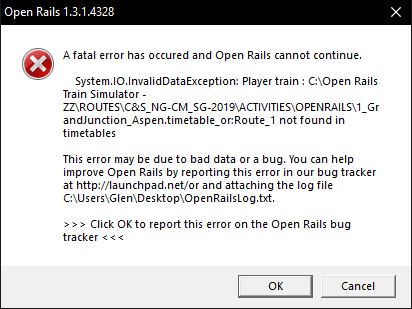
    When I try to run OR with the timetable I've created, it crashes on this error:

    Here is the definition from the editor:
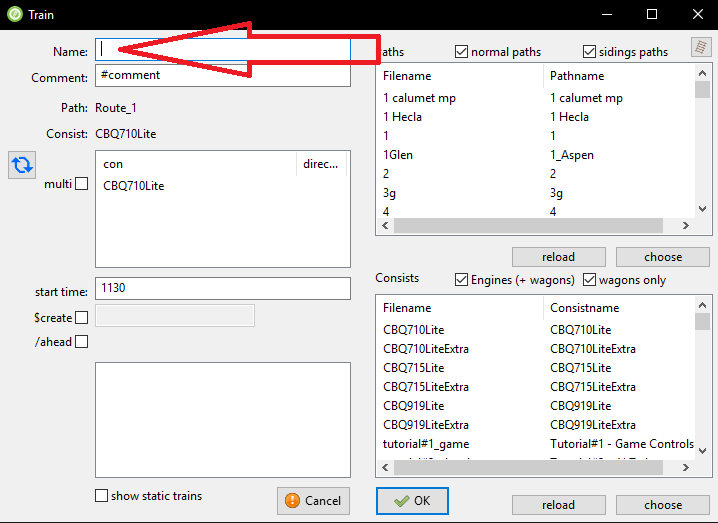

    I have blanked it out here to put that red arrow to highlight it, but I previously had it as Route_1 in that Name field, but no matter what I put in there, I crash on this "not found in timetables" error. What is it looking for that isn't there?

    What am I missing/doing wrong here, anyone know?
  • kutr
    New Member
    • May 2010
    • 2

    #2
    Put : between hours and minutes in start time

    Comment

    • dcytguy
      New Member
      • Feb 2018
      • 6

      #3
      Thanks for the suggestion, but that didn't resolve the issue -- crashed on the same thing with a : in the start time.

      Comment

      • kutr
        New Member
        • May 2010
        • 2

        #4
        Could you show your timetable screen?

        Comment

        • dcytguy
          New Member
          • Feb 2018
          • 6

          #5
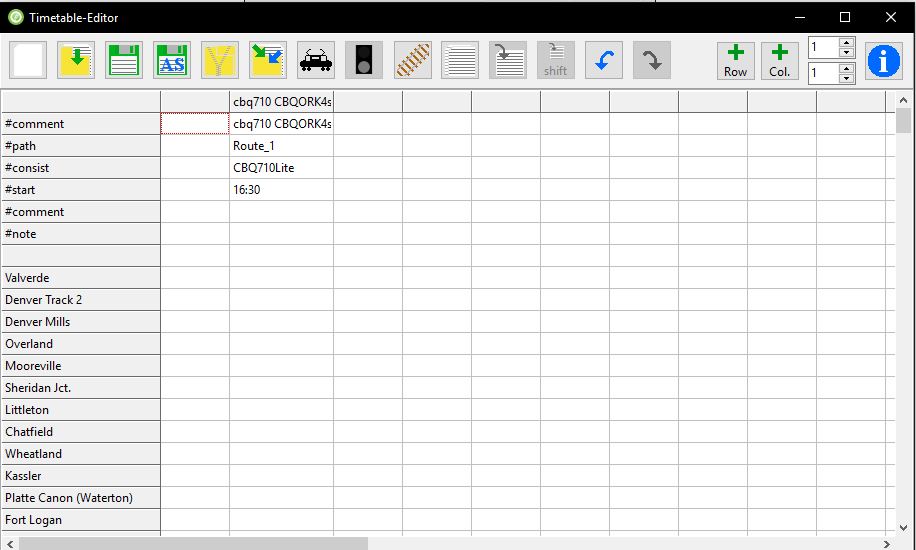
          Here's the definition portion at the top:


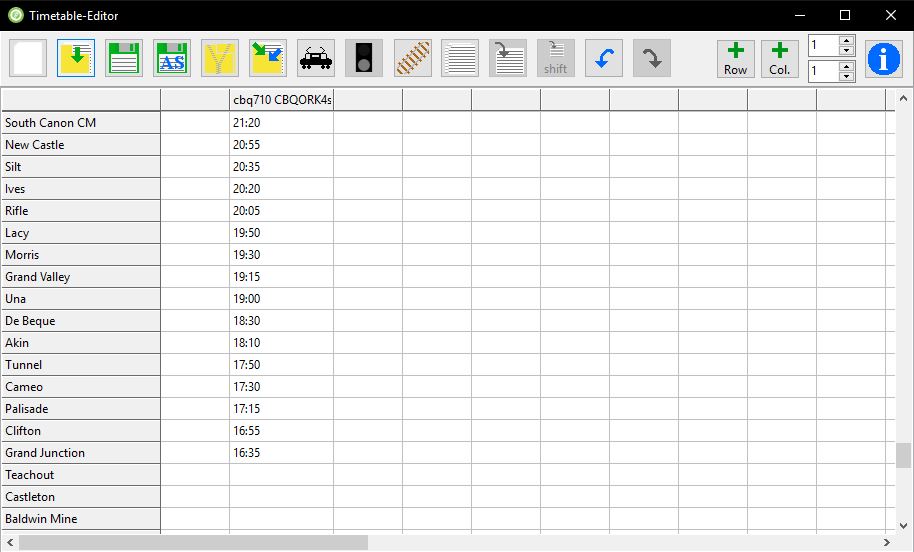
          Here's the station times filled in:


          Thanks for your help with this!

          Comment

          • roeter
            Senior Member
            • Nov 1999
            • 171
            • Netherlands.

            #6
            First of all, it would help if you attached the full logfile, this gives much more and more detailed information of what's going wrong.
            If you have logging enabled in the main menu, you will find the logfile on your desktop.

            In the error window it is noted that there is a problem with the train's path - it states that 'route_1' is not found.
            Perhaps the path is defined but may be broken. You should check the path with the OR track viewer and see if it is defined and correct.

            Regards,
            Rob Roeterdink

            Comment

            • dcytguy
              New Member
              • Feb 2018
              • 6

              #7
              Okay, I'll check the path more carefully then. I definitely have a path called Route_1, so it must be something within the path itself that is wrong. Thanks for the reply.

              Comment

              • NorthernWarrior
                6500 Post Veteran


                • Apr 2007
                • 6922
                • Swindon, England

                #8
                Sorry to bump this but I'm getting exactly the same problem. Set up a timetable for my Far North route and no matter which train I select, including those for which I set up fresh paths today, am getting this error message. I really want to get this working so any help would be appreciated.

                Copy of OR error log attached.
                Attached Files
                Vern.

                Comment

                • NorthernWarrior
                  6500 Post Veteran


                  • Apr 2007
                  • 6922
                  • Swindon, England

                  #9
                  And screen dump of TT.
                  Attached Files
                  Vern.

                  Comment

                  • mnowosad
                    Senior Member

                    • May 2010
                    • 126

                    #10
                    Hello. In the Timetable Editor window I see an error in the fifth column - start time. It should be 17:19 and it is 1719.
                    In Timetable mode you have to be as meticulous as an accountant

                    Greetings, Marek
                    https://www.youtube.com/playlist?lis...SIYbL4sRM-VMd7

                    Comment

                    • NorthernWarrior
                      6500 Post Veteran


                      • Apr 2007
                      • 6922
                      • Swindon, England

                      #11
                      I fixed that Marek but problem still persisted.

                      So I started a fresh spreadsheet where I spotted what I think my error was, that I had messed up the first column which is reserved for the timetable name. I entered one train in a fresh column and was able to load that in the sim. I'm now going to edit the sheet one train at a time and test in order to avoid the same thing happening. I think it is a case of becoming familiar with what the editor requires, starting simple then moving forward to more complex setups.
                      Vern.

                      Comment

                      • bertwise
                        Member

                        • Jul 2007
                        • 83
                        • .

                        #12
                        Hi Vern

                        When I look at one of my timetables the first column is blank and the second column has the heading "#comment" with the name of my timetable in the first row. The third column has the information about the first train in the timetable.

                        It doesn't appear that your first column is blank and you are missing the heading "#comment" in the column with your timetable name "Far North Weekday Passenger Only".

                        This is the first timetable I've set up so I'm no expert but those are the 2 differences I see between mine (which works) and yours.

                        Hope this helps

                        Bert

                        Comment

                        • NorthernWarrior
                          6500 Post Veteran


                          • Apr 2007
                          • 6922
                          • Swindon, England

                          #13
                          Thanks Bert - yes I think that was the cause of the problem.
                          Vern.

                          Comment

                          Working...