Question about organizing OR folders

Collapse
X
 
  • Time
  • Show
Clear All
new posts
  • michelouim
    Senior Member

    • Jul 2013
    • 322
    • Mont-St-Hilaire, QC

    #1

    Question about organizing OR folders

    Hi,

    I did install at last OR on my transition from MSTS. Since my MSTS installation is "C:/MSTS", my OR is "C:/Open Rails". When getting the latest version of OR, i saw the offer to have the Scenic route. So i downloaded it and followed the installation recommended by TrainSimulations. I also saw when starting OR (installation profile), that it knew where my MSTS installation is and so i seem to have access to everything there is in MSTS, i will have to check to be certain.

    When following the procedure to install the Scenic route, i saw something that i did not understand at the time but i just accepted it and when the install was finish, i just began to play with the new route. Today, i am more interested in understanding than playing.

    So here are my questions: why during the installation, Trainsimulations instructed me to use another folder than the "C:/Open Rails"? Is there something with that OR folder that i am not aware of and that it should be strictly reserved to the OR software?

    Since my OR profile indicates that i have 2 installations (Train Simulator(MSTS assets) and TrainSimulations(Scenic route)), I understand that i can have more than 1 installation, am I correct and is there a limit?

    I did some reading about OR but i didnt see anything about the organisation of the folders, except something about the 3 sub-folders "GLOBAL", "ROUTES" and "TRAINS", that one including "Consists" and "Trainsets". Is there a limit about how many files there can be in those 2 sub-folders? Can they have sub-folders (like organizing the Consists with 1 sub-folder for each route or having 1 sub-folder in Trainsets for each type of rolling stock)? I remember that there is a limit on the files in Trainsets in MSTS.

    Thanks

    Michel
  • geepster775
    2500 Post Veteran


    • Sep 2006
    • 2846
    • .
    • General

    #2
    It appears that Trainsimulations is attempting to shed the ace texture file formats from their Open Rails payware routes and rolling stock packs and are relying upon .dds textures exclusively for their open rails content. They literally have gone all-in on ORTS-only features. They even have their own version of xtracks installed with their Open Rails routes that use .dds textures for the track shapes. The different Xtracks files is why they very carefully warn people to install these routes in OR installations that are separate from their old MSTS routes (the "1MSTS" installation folder) and separate from older ORTS routes that relied upon ace files with older versions of XTracks. You can still run them all side by side in separate installations on your PC (old MSTS, old ace-equipped ORTS routes, and the new dds-only setup they are pushing now, but the global folders for each must remain separate and distinct.

    People run into trouble when they do not follow the directions and mix these new OR-only payware routes with older installations that relied on the older ace file formats. The XTracks track shape files get overwritten with the dds only version, and that breaks the older ace-based routes in the same installation that share the same (now erroneously modified) global folder.
    My Open Rails videos https://www.youtube.com/@lakecities3663/videos

    Comment

    • michelouim
      Senior Member

      • Jul 2013
      • 322
      • Mont-St-Hilaire, QC

      #3
      Originally posted by geepster775
      It appears that Trainsimulations is attempting to shed the ace texture file formats from their Open Rails payware routes and rolling stock packs and are relying upon .dds textures exclusively for their open rails content. They literally have gone all-in on ORTS-only features. They even have their own version of xtracks installed with their Open Rails routes that use .dds textures for the track shapes. The different Xtracks files is why they very carefully warn people to install these routes in OR installations that are separate from their old MSTS routes (the "1MSTS" installation folder) and separate from older ORTS routes that relied upon ace files with older versions of XTracks. You can still run them all side by side in separate installations on your PC (old MSTS, old ace-equipped ORTS routes, and the new dds-only setup they are pushing now, but the global folders for each must remain separate and distinct.

      People run into trouble when they do not follow the directions and mix these new OR-only payware routes with older installations that relied on the older ace file formats. The XTracks track shape files get overwritten with the dds only version, and that breaks the older ace-based routes in the same installation that share the same (now erroneously modified) global folder.
      Thanks for your reply...i will not mix their products with the others.


      Michel

      Comment

      • michelouim
        Senior Member

        • Jul 2013
        • 322
        • Mont-St-Hilaire, QC

        #4
        I am still having the questions about the file structure, can someone give me some clues?

        Michel

        Comment

        • baldwin
          6000 Post Veteran


          • Nov 1999
          • 6358
          • Chippenham, Wiltshire, UK.
          • ORTS

          #5
          If you look at the file structure of the TrainSimulations install, that is all you need in the way of folders/files for Open Rails.


          There is no limit on the number of consists or trainset items because Open rails will only load what is needed after you select the route and activity. At present there is no provision for separate consists and trainsets for individual routes within an installation.
          Beer is not a matter of life or death, it is much more serious than that.

          Comment

          • michelouim
            Senior Member

            • Jul 2013
            • 322
            • Mont-St-Hilaire, QC

            #6
            Originally posted by baldwin
            If you look at the file structure of the TrainSimulations install, that is all you need in the way of folders/files for Open Rails.


            There is no limit on the number of consists or trainset items because Open rails will only load what is needed after you select the route and activity. At present there is no provision for separate consists and trainsets for individual routes within an installation.
            A follow-up question: What is the best place to have the OR assets (GLOBAL, ROUTES AND TRAINS)? Is it as sub-folders of the OR folder created at the installation or, like TrainSimulations, in another folder? From what I now understand, I can have the MSTS assets in its actual location, the TrainSimulations in the location created by them, the OR folder containing the software and, if it is a better practice, a folder having the OR assets.

            Michel

            Comment

            • ebnertra000
              1500 Post Veteran


              • Jun 2013
              • 1778
              • Minnesota

              #7
              I have a few installations that have the GLOBAL, ROUTES, etc. in them. They're all in the root of C: drive (C:/MSTS, C:/RO, etc., mostly for routes originating in different countries)

              Comment

              • geepster775
                2500 Post Veteran


                • Sep 2006
                • 2846
                • .
                • General

                #8
                The TrainSimulations folder is just the name of the installation folder they suggested for their new routes. This is just a place to keep all the routes for Open Rails they release on account of their special Xtracks files that occupy the GLOBAL folder within.

                You should never install your routes or rolling stock assets within the Open Rails application folders. Depending upon the degree of changes, the updater can (and has) deleted all conflicting files inside the application folder. If your routes and rolling stock are a subfolder there, they might get deleted. Plus, on rare occasion, when the updater borks for some unknown reason, you as the user might need to outright delete the application folder and replace it with a freshly unzipped X copy from time to time. The Open Rails app folder is only for the executables.

                As for your other older, existing routes, you can place them in any number of other installations that you decide to create. You can order them, name them, and bunch routes together any way you want. Each installation is linked to the Open Rails app via the CONTENT tab under OPTIONS.

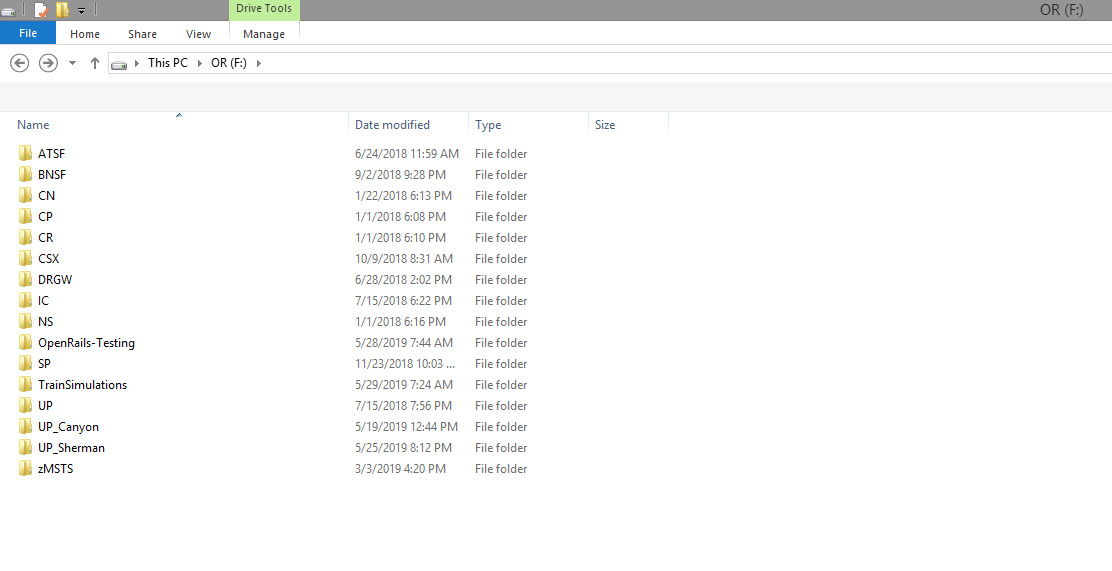
                Other people may do things differently based on their interests (steam, early diesel, foreign, etc), but below is simply how I chose to organize my Open Rails disk drive. I organized my installations based on which routes are used by which railroads.


                The TrainSimulations folder contains my new OR routes that use DDS textures exclusively. I may move them around at a later date pending further DDS modifications to the other BNSF routes. I likewise had to break out the UP Canyon (Feather river) and UP Sherman because of incompatibilities in scalerail/scaleroads packages. Like the new TrainSimulations stuff, these routes could not share a common GLOBAL folder. There is only the one respective route in each installation (much like a MSTS mini-routes of old)

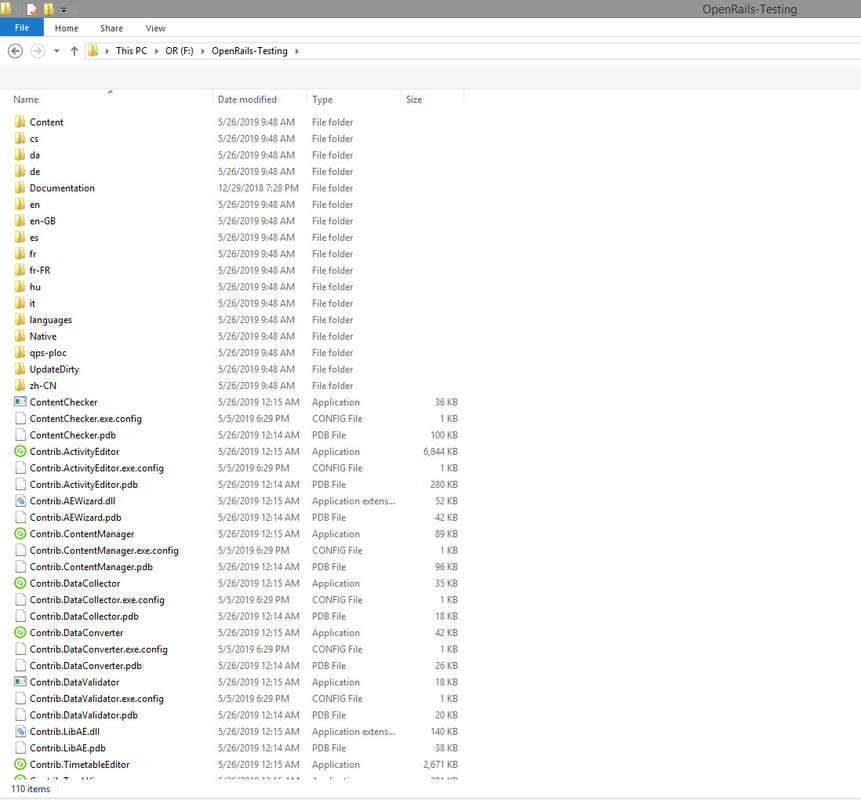
                The Open Rails Testing folder contains only the Open Rails executables and nothing else. The only mods done to it are made by the Open Rails Updater process. I have no copy of the stable installation and use the daily X version only.


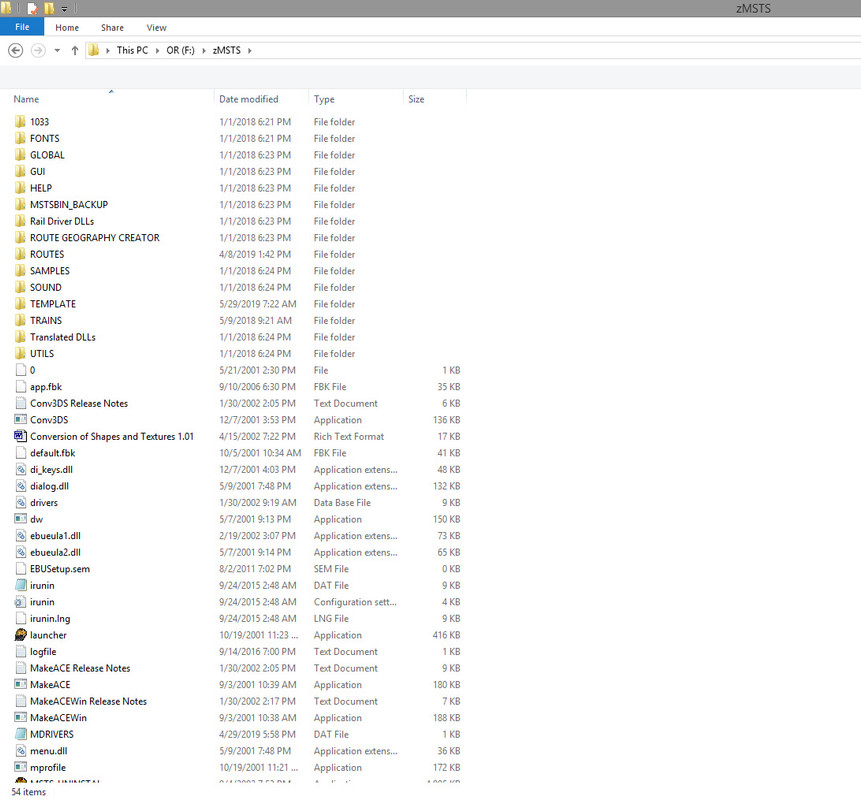
                The next screen is of my old MSTS folder. I prefaced my MSTS install with a "z" instead of a "1" like the Steam4Me site suggests as I wanted the MSTS installation alphabetically at the bottom of my folder list, not at the top. I hate tripping over old things. Everything in this folder is what is needed to run MSTS (rarely) on this desktop.


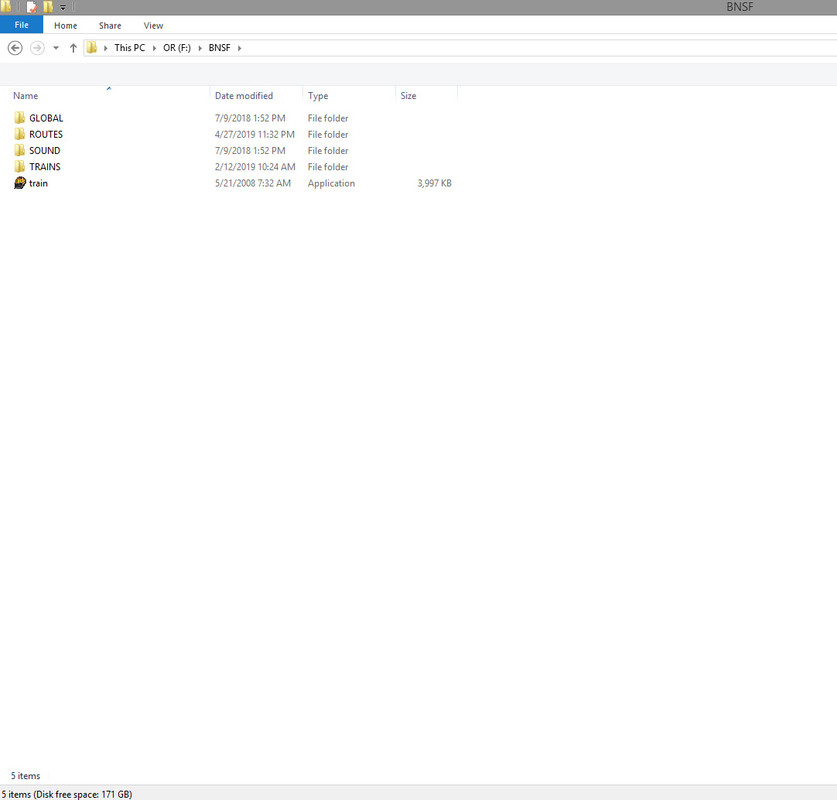
                Now compare the clutter of the MSTS folder above containing the old MSTS executables with my BNSF Installation below. Very clean, just the 4 main folders needed for Open Rails routes/stock. Every one of my open rails installations contains a copy of the Train.exe file that I put there to fool a bunch of older utilities like Route Riter and Conbuilder into changing their working directory, allowing me to manage the routes, Trainset folders, or create consists in each installation.


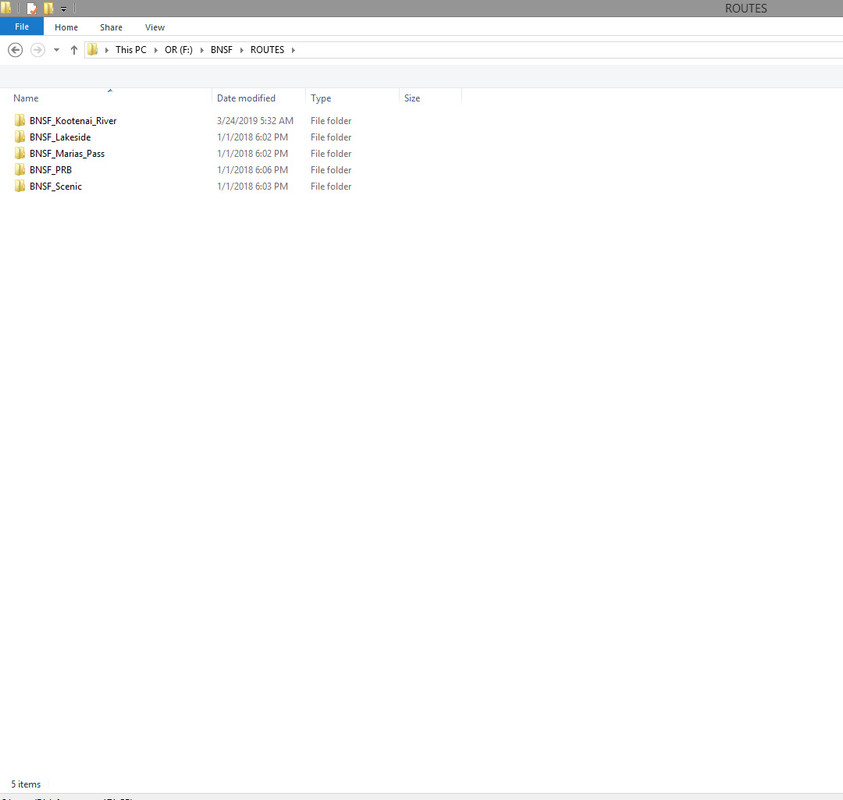
                Drilling own into the ROUTES folder in BNSF shows I have 5 BNSF routes that share the same copy of Trainset, the same consists, and the same GLOBAL folder. One is payware, 4 are freeware. Some people create installations that organize their routes by payware vs freeware, but I mix the two and organize by rail company name instead because all these routes can share the same basic consists that have BNSF power. The same goes for the CN folder, there are 3 CN routes (2 payware, 1 freeware) that can share the same basic CN powered consists that exist in that installation.


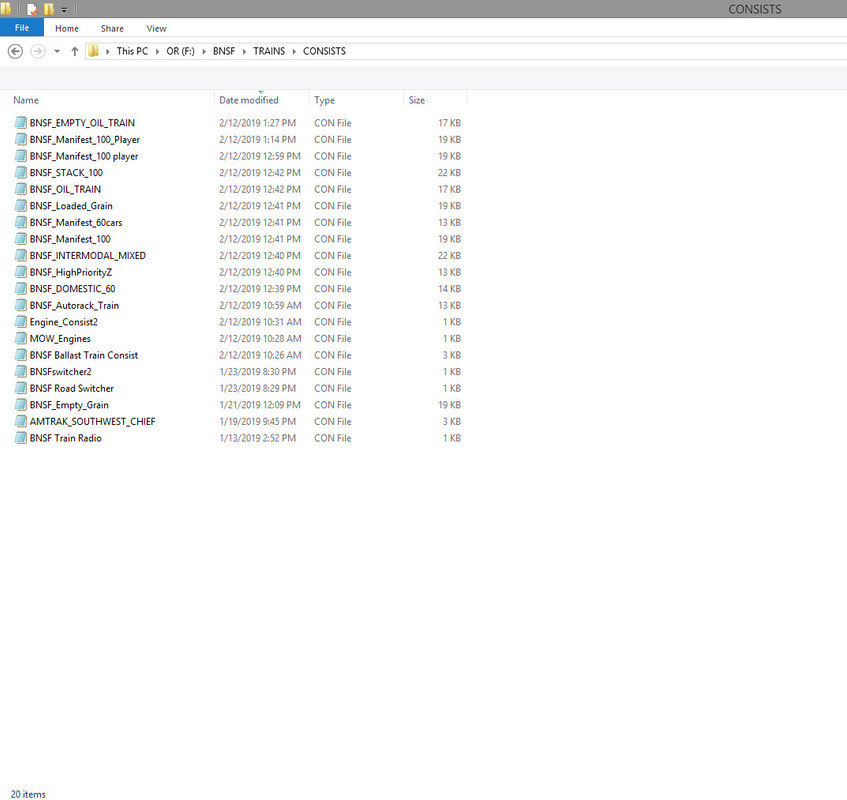
                Coming back up and drilling down into the TRAINS/CONSISTS folder shows the BNSF consists that can be utilized when making activities for any of these 5 BNSF routes. Since Open Rails can support 100+ AI movements which were impossible under MSTS, I didn't want to have to make that quantity of unique BNSF powered consists for every route. I can use the same consists in any BNSF route activity and they look completely at home. So by placing all my BNSF routes in one installation, consist management is minimized. The ability to share the consists between routes of the same corporate owner is largely why I organized my installations by rail company and not by payware routes vs freeware routes or any other type of structure.

                I keep any foreign (like BHP Australia), odd-ball (Sea View), or fictitious routes (Lasalle) under my MSTS installation, and those are the ONLY routes in the MSTS routes folder nowadays. Odd stuff that has no other convenient place to go.

                My Open Rails videos https://www.youtube.com/@lakecities3663/videos

                Comment

                • michelouim
                  Senior Member

                  • Jul 2013
                  • 322
                  • Mont-St-Hilaire, QC

                  #9
                  Thanks Geepster775,

                  That is very comprehesive. You have a very well organized installation and i will follow how you did it. That organization you have based on railroads is what i had in mind. I will just adjust it to fit my hardware (laptop) and probably consider buying an external hard drive and move all my assets there.

                  I also understand by what you say that the GLOBAL folder can also separate the routes, for that i will have to be careful. The only negative point is the fact that, if a car is used in consists in more than 1 railroad, it will be in as many Trainsets as needed but space i can manage.

                  Thank you very much

                  Michel

                  Comment

                  • R. Steele
                    3500 Post Veteran

                    • Feb 2013
                    • 3928
                    • known universe
                    • ORTS

                    #10
                    Originally posted by michelouim
                    Thanks Geepster775,
                    ... The only negative point is the fact that, if a car is used in consists in more than 1 railroad, it will be in as many Trainsets as needed but space i can manage.

                    Thank you very much

                    Michel
                    There is always the use of Junction Points...I have found that very helpful, especially for Common folder...like Common.cab, Common.snd and Common.inc. Also stock that is useful in many routes can be linked to all trainsets through the use of Junction Points. There has been some suggestions in threads to incorporate this into OR...although how that would be accomplished...???

                    My install looks very much like geepsters...although with certain routes I have made a dedicated trainset and OR profile...Horseshoe, Feather River, Pacific Surfliner, CN Blackfoot, Buffalo Template, Monon, Blue Comet Route, to mention a few.

                    Just remember, OR can be directed to any content that contains the 4 prerequisite folders ( and sub folders ) --- you could have separate installations for the same route that reflects different historical railroad eras. The system is very flexible and entirely up to the user to design to meet their needs.
                    Cheers, Gerry
                    "A mind is like a parachute. It doesn't work if it is not open." Frank Zappa
                    It's my railroad and I'll do what I want! Historically accurate attitude of US Railroad Barons.
                    Forever, ridin' drag in railroad knowledge.
                    Audi, Vide, Tace, Si Vis Vivere In Pace​

                    https://www.trainsim.com/forums/filedata/fetch?filedataid=79656&type=medium​ https://www.trainsim.com/forums/filedata/fetch?filedataid=79654&type=small

                    Comment

                    • michelouim
                      Senior Member

                      • Jul 2013
                      • 322
                      • Mont-St-Hilaire, QC

                      #11
                      Hi Gerry,

                      you mention "4 prerequisite folders ( and sub folders )", i was under the impression of 3, GLOBAL, ROUTES and TRAINS. When looking again at geepsters's reply, i saw SOUND, is it the 4th one?

                      Michel

                      Comment

                      • crstagg
                        4500 Post Veteran


                        • Nov 1999
                        • 4885
                        • Huntsville, AL
                        • Texan
                        • MSOR

                        #12
                        Originally posted by michelouim
                        Hi Gerry,

                        you mention "4 prerequisite folders ( and sub folders )", i was under the impression of 3, GLOBAL, ROUTES and TRAINS. When looking again at geepsters's reply, i saw SOUND, is it the 4th one?

                        Michel
                        RTFM! Pages 8 & 9
                        Charles

                        Comment

                        • R. Steele
                          3500 Post Veteran

                          • Feb 2013
                          • 3928
                          • known universe
                          • ORTS

                          #13
                          Originally posted by michelouim
                          Hi Gerry,

                          you mention "4 prerequisite folders ( and sub folders )", i was under the impression of 3, GLOBAL, ROUTES and TRAINS. When looking again at geepsters's reply, i saw SOUND, is it the 4th one?

                          Michel
                          To follow up --- Yes.

                          Also...Charles has a very good point, that bears repeating...Goodness, after all these years of people carping and posting about NO Documentation, lack of documentation, and scanty documentation for MSTS....We now have a (searchable)pdf Manual with illustrations, charts, and graphs, that is reasonably kept up to date by volunteers and people just don't read the@#%#$%#$ thing!

                          Save yourself some grief and educate yourself, just dive in somewhere and start to read....the first chapters are good...a real page turner!
                          There is so much in there...I've spent the last 6 years reading and re-reading it...Start now. Okay...end of tirade.
                          Cheers, Gerry
                          "A mind is like a parachute. It doesn't work if it is not open." Frank Zappa
                          It's my railroad and I'll do what I want! Historically accurate attitude of US Railroad Barons.
                          Forever, ridin' drag in railroad knowledge.
                          Audi, Vide, Tace, Si Vis Vivere In Pace​

                          https://www.trainsim.com/forums/filedata/fetch?filedataid=79656&type=medium​ https://www.trainsim.com/forums/filedata/fetch?filedataid=79654&type=small

                          Comment

                          • michelouim
                            Senior Member

                            • Jul 2013
                            • 322
                            • Mont-St-Hilaire, QC

                            #14
                            Guity as charged for not rolling back to pages 8-9...

                            Fast reading over the first chapters and memory did not catch entirely what was said, as i mention i was in a hurry to try the Scenic sub, so i was more in chapters 6 and 7 in configuration and playing mode (even at 70, I am still acting as a child with a new toy, sorry if it never happens to some people, but i will continue to read and enjoy your post as I have in the past learn more from you than from any manual....). And maybe i overlooked those pages because i thought i saw somewhere that it was only 3 required folders. the end of that.


                            By the way, is it my Adobe or a feature in the manual, but each time i open it, i am at the page i closed it. If it is an OR feature, that is a very very good one....as all there is so far with OR.

                            Michel

                            Comment

                            • R. Steele
                              3500 Post Veteran

                              • Feb 2013
                              • 3928
                              • known universe
                              • ORTS

                              #15
                              Originally posted by michelouim
                              ...(even at 70, I am still acting as a child with a new toy, sorry if it never happens to some people, Michel
                              Brother, do I understand that...same age group, rediscovering a youthful interest and aptitude for math and physics...besides I get to play with trains. IMO, much better than the old Lionel on the basement floor with a paper mache tunnel.

                              Originally posted by michelouim
                              By the way, is it my Adobe or a feature in the manual, but each time i open it, i am at the page i closed it. If it is an OR feature, that is a very very good one....as all there is so far with OR.Michel
                              Hmmm, mine does not do that...perhaps there is an option I've missed...I always open up at the title page.
                              Cheers, Gerry
                              "A mind is like a parachute. It doesn't work if it is not open." Frank Zappa
                              It's my railroad and I'll do what I want! Historically accurate attitude of US Railroad Barons.
                              Forever, ridin' drag in railroad knowledge.
                              Audi, Vide, Tace, Si Vis Vivere In Pace​

                              https://www.trainsim.com/forums/filedata/fetch?filedataid=79656&type=medium​ https://www.trainsim.com/forums/filedata/fetch?filedataid=79654&type=small

                              Comment

                              Working...