MSTS Illinois Central SD70 Ten-Pack

Collapse
X
 
  • Time
  • Show
Clear All
new posts
  • wcl
    Senior Member
    • May 2010
    • 417

    #1

    MSTS Illinois Central SD70 Ten-Pack

    I downloaded this pack here:

    MSTS Illinois Central SD70 Ten-Pack
    [ Download | View ]

    Name: icrr_sd70.zip
    Size: 29,259,053 Date: 10-08-2014 Downloads: 372


    MSTS Illinois Central SD70 Ten-Pack. These are ten repaints that are numbered from the Streamlines Norfolk Southern Continuous Welded Rail Trainset. In order for you to use the renumbers, you must own this set for the freight animation shape file, locomotive shape file, and sound folder. Also, you will need the MSTS SHR EMD-STD-70 Cab for cabview by Charles Sibaja (SHRSTD70.ZIP). Original shape by Streamlines. Repaint and renumbers by Don Newman, Jr.

    And when I make a train in the editor, it shows up as this:
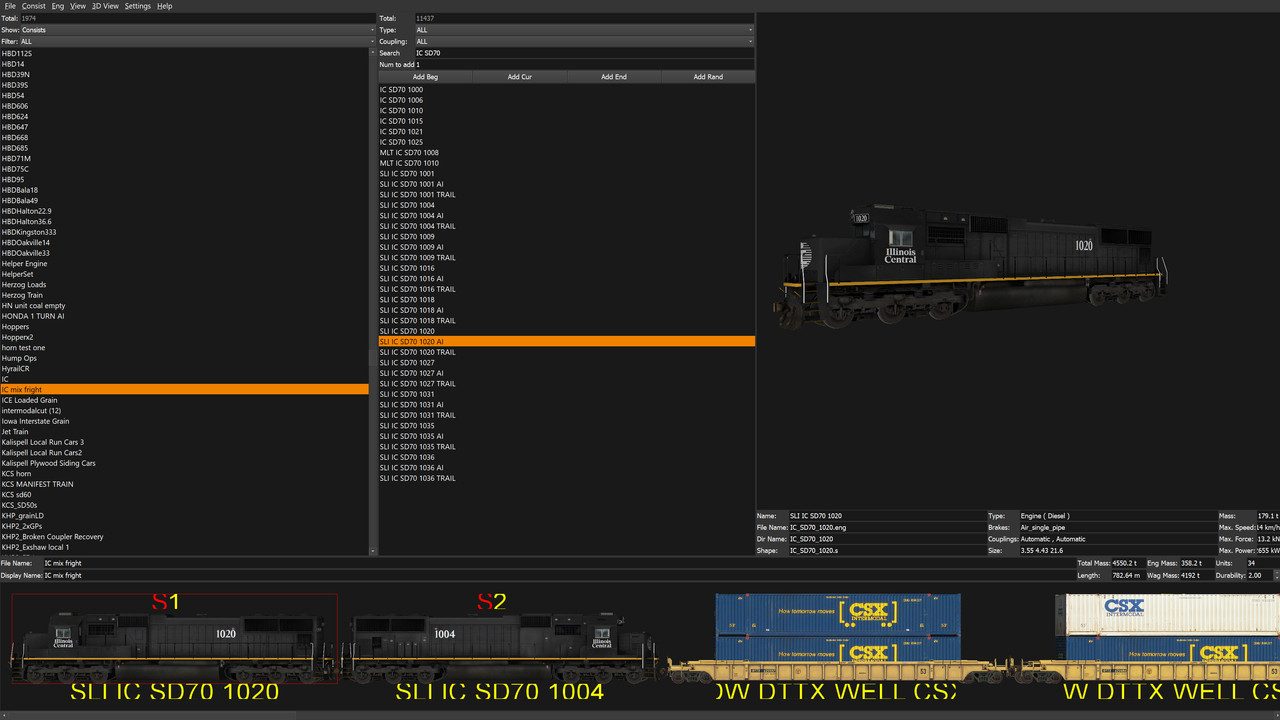


    But in the game, it shows up as this:


    Any idea on what is going on here??
  • Rick-MONON
    1500 Post Veteran
    • Feb 2008
    • 1795
    • Elizabethtown, Ky
    • ORTS

    #2
    Check your .eng file

    The line:
    WagonShape ( XXXXXXX.s )

    the XXXXXXX should be changed to the shape for that .eng file you are trying to get.
    Rick

    http:\\mononrr.com

    MONON-2

    sigpic

    Comment

    • wcl
      Senior Member
      • May 2010
      • 417

      #3
      They do say

      Wagon ( IC_SD70_1001
      Type ( Engine )
      WagonShape ( IC_SD70_1001.s )
      FreightAnim ( IC_SD70_1001FA.s 1 1 )
      Size ( 3.55m 4.43m 21.6m )
      Comment ( 395,000 lbs )

      Comment

      • wcl
        Senior Member
        • May 2010
        • 417

        #4
        And have done all this stuff as well:

        MSTS Illinois Central SD70 10-Pack
        __________________________________________________ __

        INFORMATION AND REQUIREMENTS
        ___________________________________

        These are 10 repaints that are numbered from the Streamlines Norfolk Southern Continuous Welded Rail Trainset. In order for you to use the renumbers, you must own THIS SET for the Freight Animation Shape file, Locomotive Shape file, and Sound Folder. Also, you will need the MSTS SHR EMD-STD-70 Cab for cabview by Charles Sibaja. ( files: shrstd70.zip )

        INSTALLATION INSTRUCTIONS
        ___________________________________

        1. Extract this folder to your TRAINSET directory of MSTS.

        2. You must use the NS_SD70_2579 shape AND its matching freight animation. Copy the following files from the SLI_NS_SD70 folder to this folder:

        - SOUND FOLDER
        - NS_SD70_2579.s
        - NS_SD70_2579FA.s

        3. Rename NS_SD70_2579.s to the files listed in this folder:

        - IC_SD70_1001.s
        - IC_SD70_1004.s
        - IC_SD70_1009.s
        - IC_SD70_1016.s
        - IC_SD70_1018.s
        - IC_SD70_1020.s
        - IC_SD70_1027.s
        - IC_SD70_1031.s
        - IC_SD70_1035.s
        - IC_SD70_1036.s

        4. Rename NS_SD70_2579FA.s to the files listed in this folder, too and ADD FA after the file name:

        - IC_SD70_1001FA.s
        - IC_SD70_1004FA.s
        - IC_SD70_1009FA.s
        - IC_SD70_1016FA.s
        - IC_SD70_1018FA.s
        - IC_SD70_1020FA.s
        - IC_SD70_1027FA.s
        - IC_SD70_1031FA.s
        - IC_SD70_1035FA.s
        - IC_SD70_1036FA.s

        4. You will need the MSTS SHR EMD-STD-70 Cab for cabview by Charles Sibaja. ( files: shrstd70.zip )


        5. Make a consist and enjoy!

        Comment

        • wcl
          Senior Member
          • May 2010
          • 417

          #5
          I just don't get how it shows up IC on the editor, but in the game, it shows up NS?? How is that even possible??

          Comment

          • rdayt
            1000 Post Veteran

            • Nov 2007
            • 1291
            • SW MO
            • ORTS

            #6
            Looks like you may have to edit the .s files to use the correct textures.
            It's not hard to do.

            Randy

            Comment

            • tie
              Senior Member

              • May 2010
              • 926
              • Saskatchewan, CA

              #7
              SFm. Shape File manager is what I use to change the textures. They're easy enough to find as you scroll down the .s file
              Rory

              Comment

              • wcl
                Senior Member
                • May 2010
                • 417

                #8
                That's odd that they didnt say to edit any of the .S files in the readme but to just rename the stuff instead

                Comment

                • R. Steele
                  3500 Post Veteran

                  • Feb 2013
                  • 3928
                  • known universe
                  • ORTS

                  #9
                  Originally posted by wcl
                  That's odd that they didnt say to edit any of the .S files in the readme but to just rename the stuff instead
                  Not odd...a very common mistake I've found in many of the readme's...my practice is to check the shape files/images to make sure they refer to the proper ace files.
                  Cheers, Gerry
                  "A mind is like a parachute. It doesn't work if it is not open." Frank Zappa
                  It's my railroad and I'll do what I want! Historically accurate attitude of US Railroad Barons.
                  Forever, ridin' drag in railroad knowledge.
                  Audi, Vide, Tace, Si Vis Vivere In Pace​

                  https://www.trainsim.com/forums/filedata/fetch?filedataid=79656&type=medium​ https://www.trainsim.com/forums/filedata/fetch?filedataid=79654&type=small

                  Comment

                  • dcarleton
                    1000 Post Veteran


                    • Nov 2008
                    • 1004
                    • MSOR

                    #10
                    The archive contains ace files and dds files. Could it be that the ace files are IC and the dds files are NS? Or vice versa?

                    Comment

                    • DirtyRam
                      Senior Member

                      • May 2010
                      • 107
                      • Northwest Lake Ontario
                      • North - North American
                      • General

                      #11
                      Originally posted by wcl
                      That's odd that they didnt say to edit any of the .S files in the readme but to just rename the stuff instead
                      Good day, I did these back some time ago and I checked the .s files and sure enough I emended them,
                      Shapes
                      images ( 8
                      image ( IC_SD70_1001a.ace )
                      image ( IC_SD70_1001b.ace )
                      image ( SD70_Windows.ace )
                      image ( NS_EMD_Fan1.ace )
                      image ( NS_EMD_FAN2.ace )
                      image ( dynblades.ace )
                      image ( wheel.ace )
                      image ( PLATING.ace )
                      F/As
                      images ( 2
                      image ( IC_SD70_1001b.ace )
                      image ( IC_SD70_1001a.ace )
                      )

                      Mike

                      Gerry is right on, that's exactly what I do
                      Last edited by DirtyRam; 05-13-2019, 17:12. Reason: emended

                      Comment

                      • rdayt
                        1000 Post Veteran

                        • Nov 2007
                        • 1291
                        • SW MO
                        • ORTS

                        #12
                        How did CE know which textures to use?
                        Curiouser and curiouser.

                        Randy

                        Comment

                        • DirtyRam
                          Senior Member

                          • May 2010
                          • 107
                          • Northwest Lake Ontario
                          • North - North American
                          • General

                          #13
                          Originally posted by dcarleton
                          The archive contains ace files and dds files. Could it be that the ace files are IC and the dds files are NS? Or vice versa?
                          I'm thinking you would have to open the dds files to change to IC, would you not? I never put them in with the ones I did.

                          Mike

                          Comment

                          • 1995fan
                            New Member
                            • Apr 2013
                            • 4

                            #14
                            So to fix this issue do I go into SFM and change the .s file to match the .ace file?

                            Comment

                            • R. Steele
                              3500 Post Veteran

                              • Feb 2013
                              • 3928
                              • known universe
                              • ORTS

                              #15
                              The following should clear up the mystery as to why the CE and OR displayed them as the OP illustrated

                              The ICRR repaints were done using ace files, the DDS are the original NS textures. So with the DDS option checked in OR all the engines show as the same NS original number. The DDS files need to be stored, so when the DDS options is checked in OR the locomotives will appear with the newer ace file, which are the ICRR logos. July 31, 2015 gds

                              Elvas thread: http://www.elvastower.com/forums/ind...34#entry186334
                              The above is a note I made to myself and included with the set.
                              Cheers, Gerry
                              "A mind is like a parachute. It doesn't work if it is not open." Frank Zappa
                              It's my railroad and I'll do what I want! Historically accurate attitude of US Railroad Barons.
                              Forever, ridin' drag in railroad knowledge.
                              Audi, Vide, Tace, Si Vis Vivere In Pace​

                              https://www.trainsim.com/forums/filedata/fetch?filedataid=79656&type=medium​ https://www.trainsim.com/forums/filedata/fetch?filedataid=79654&type=small

                              Comment

                              Working...