Disappearing tracks and ballast

Collapse
X
 
  • Time
  • Show
Clear All
new posts
  • ragtimer
    2000 Post Veteran
    • May 2005
    • 2009
    • Stalinist,broke United Kingdom (Hey buddy,can you spare �1.3 trillion?))

    #1

    Disappearing tracks and ballast

    Just to see if OR had improved,today I downloaded the latest version and the free route from Train Simulations.Yes,that route works fine but every other X tracks route has no track or ballast.
    From a post over at UK Trainsim,someone else had this problem,caused by the shapes installed by the free route.I have asked OR to provide a solution.Has anyone else a fix ?
  • baldwin
    6000 Post Veteran


    • Nov 1999
    • 6358
    • Chippenham, Wiltshire, UK.
    • ORTS

    #2
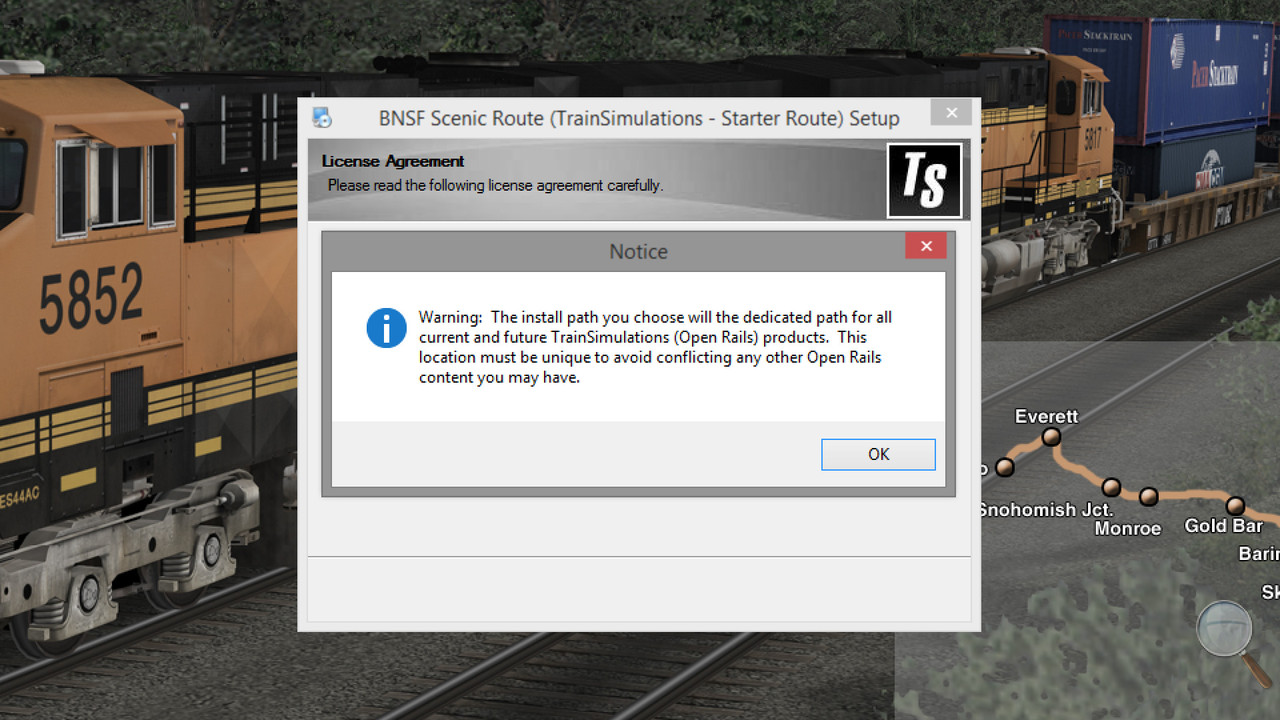
    Not tried the free offering, but if you directed the install into your MSTS folders, then some of the files in your Global/Shapes folder have been overwritten with files that use DDS textures instead of ace textures. As far as I am aware the installation should have offered to install into a new Trainsimulations folder that sets the route up for running in OR without affecting any existing routes.


    The only fix I am aware of is to reinstall Xtracks, delete the free route from your routes folder and reinstall the route outside of your MSTS folders.
    Beer is not a matter of life or death, it is much more serious than that.

    Comment

    • rdayt
      1000 Post Veteran

      • Nov 2007
      • 1291
      • SW MO
      • ORTS

      #3
      From the Scalerail readme.
      Scalerail Readme.JPG

      That's a place to start.

      Randy

      Comment

      • crstagg
        4500 Post Veteran


        • Nov 1999
        • 4885
        • Huntsville, AL
        • Texan
        • MSOR

        #4
        Originally posted by rdayt
        From the Scalerail readme.
        [ATTACH=CONFIG]76513[/ATTACH]

        That's a place to start.

        Randy
        THAT will not help the OP's problem at all. The textures provided by 3dTrains for ScaleRail and ScaleRoad are ace files. The Train Simulations route creators have edited the ALL the SHAPE files in the Global folder in their download to reference DDS files rather than ACE files. BUT they did not include the DDS textures to go with ALL the shapes. Probably because they did not use the shapes in their route, but left the edited shape files in the download. So installing ScaleRail/ScaleRoads ACE textures in a route will not fix this problem.
        Charles

        Comment

        • geepster775
          2500 Post Veteran


          • Sep 2006
          • 2846
          • .
          • General

          #5
          That is why their installer deliberately prompted the user to avoid installing that route anywhere near an existing MSTS installation. Part of that evil ploy known as "Operation: Shed The Past".

          Since the loco numbers in the free Scenic route package available on the ORTS website were not included in the later ORTS Seligman payware route, but when those 2 routes are combined in the same new ORTS installation, you end up generally with the full compliment of previous GE numbers you had when you combined the old MSTS versions of the Scenic and Seligman routes. I think it is safe to say a fuller compliment of Xtracks DDS textures are made available to the same global folder by the combination of those routes, too.

          This is a tussle between an envelope-pushing content provider wanting new stuff to stand free from the old MSTS bureaucracy and a late-to-the-party OR user bringing in too much MSTS groupthink routine and is nothing that the OR devs need to 'solve'.
          My Open Rails videos https://www.youtube.com/@lakecities3663/videos

          Comment

          • dcarleton
            1000 Post Veteran


            • Nov 2008
            • 1004
            • MSOR

            #6
            Install the Train Simulations routes (this is just the first one!) where the installer wants to put it (in its own Train Simulations folder), and install your legacy MSTS content somewhere else; and everything will be just fine!

            Comment

            • crstagg
              4500 Post Veteran


              • Nov 1999
              • 4885
              • Huntsville, AL
              • Texan
              • MSOR

              #7
              Originally posted by dcarleton
              Install the Train Simulations routes (this is just the first one!) where the installer wants to put it (in its own Train Simulations folder), and install your legacy MSTS content somewhere else; and everything will be just fine!
              You really mean REinstall the legacy MSTS content somewhere else, because installing the TrainSimulation route where the original legacy MSTS content was installed has ruined the MSTS install.
              Charles

              Comment

              • ragtimer
                2000 Post Veteran
                • May 2005
                • 2009
                • Stalinist,broke United Kingdom (Hey buddy,can you spare �1.3 trillion?))

                #8
                I contacted OR about this and the attitude was "Tough,get on with it".After posting here,I found a post at UK Trainsim with the same problem.Solved by importing the shapes folder from my MSTS installation on my Win 7 machine and ditching the corrupt one.The free route still seems to have its tracks although I have not checked the whole route...and not likely to do so.Surprisingly enough,I am stubborn in my detestation of OR and have told them so.

                Comment

                • slipperman
                  3500 Post Veteran


                  • May 2010
                  • 3787
                  • Worksop, UK
                  • MSOR

                  #9
                  Hi Peter,
                  We know and, I hope, respect each other, so I'm going to be a little blunt with you! Although I'm MSTS at heart, I appreciate the enhancements Open Rails has made to the 'old girl'. There is nothing wrong with OR!!

                  Your problem was caused by you not following the instructions to install the TSN OR route into its own root folder. I'm not into North American routes in any big way, but have installed this route and successfully run it alongside, but separate from, my many other MSTS installations.

                  Cheers,
                  Ged
                  Last edited by slipperman; 03-19-2019, 04:09.

                  Comment

                  • ragtimer
                    2000 Post Veteran
                    • May 2005
                    • 2009
                    • Stalinist,broke United Kingdom (Hey buddy,can you spare �1.3 trillion?))

                    #10
                    No problem,Ged but I did not see any instructions not to place it in the default MSTS folder.There has been a similar thread over at UK Trainsim where the OP did the same as me and I have been PMed by someone on here with exactly the same thing,so the instructions cannot be that clear.I shall just have forget OR for reasons that I have already stated in these forums and others which I am not prepared to share.

                    Comment

                    • geepster775
                      2500 Post Veteran


                      • Sep 2006
                      • 2846
                      • .
                      • General

                      #11
                      You must have missed this then

                      My Open Rails videos https://www.youtube.com/@lakecities3663/videos

                      Comment

                      • qballbandit
                        6500 Post Veteran

                        • Jan 2006
                        • 6522
                        • Elgin Il., USA.
                        • MSOR

                        #12
                        I installed the route into my own personal folder, yet my MSTS Global folder was still updated by the install. I had to swap my old Global folder back in.
                        Neil

                        Chicago Railroading Fan

                        Comment

                        • baldwin
                          6000 Post Veteran


                          • Nov 1999
                          • 6358
                          • Chippenham, Wiltshire, UK.
                          • ORTS

                          #13
                          If you had just let it install to the folder it was going to use, your Global would not have been overwritten. If your MSTS Global folder is in your personal folder then it is inevitable that the install will overwrite it.
                          Beer is not a matter of life or death, it is much more serious than that.

                          Comment

                          • qballbandit
                            6500 Post Veteran

                            • Jan 2006
                            • 6522
                            • Elgin Il., USA.
                            • MSOR

                            #14
                            Nope, just an empty work folder I use for things like this - unpacking, as I never unpack anything directly into my main working MSTS install. Installed the entire route, and train equipment content into my work folder, as I directed it to.
                            I suddenly ran into issues with routes using xtracks; they were not showing. I then noticed some issues when using the RE where files we missing .dds textures.
                            That's when it dawned on me that the install hit my master Global folder.
                            Neil

                            Chicago Railroading Fan

                            Comment

                            • baldwin
                              6000 Post Veteran


                              • Nov 1999
                              • 6358
                              • Chippenham, Wiltshire, UK.
                              • ORTS

                              #15
                              Run another test install, this time without directing it to any folders and see where it wants to go. If it suggests (drive)/TrainSimulations, that is where all of the files will go and not touch your MSTS folders. That is where it should have gone in the first try at installing.
                              Beer is not a matter of life or death, it is much more serious than that.

                              Comment

                              Working...