Open Rails Dispatcher Issue

Collapse
X
 
  • Time
  • Show
Clear All
new posts
  • baldwin
    6000 Post Veteran


    • Nov 1999
    • 6358
    • Chippenham, Wiltshire, UK.
    • ORTS

    #16
    If I run in windowed mode, I have no need to use Alt +Tab because the taskbar is visible. To select Dispatcher window I hover the mouse over the OR taskbar icon where mini versions of OR and dispatcher become visible.

    If I run in full screen mode and hit Alt + Tab a window opens with large icons of all running programs and I select the dispatcher window there.


    Using Win 10.
    Beer is not a matter of life or death, it is much more serious than that.

    Comment

    • geepster775
      2500 Post Veteran


      • Sep 2006
      • 2846
      • .
      • General

      #17
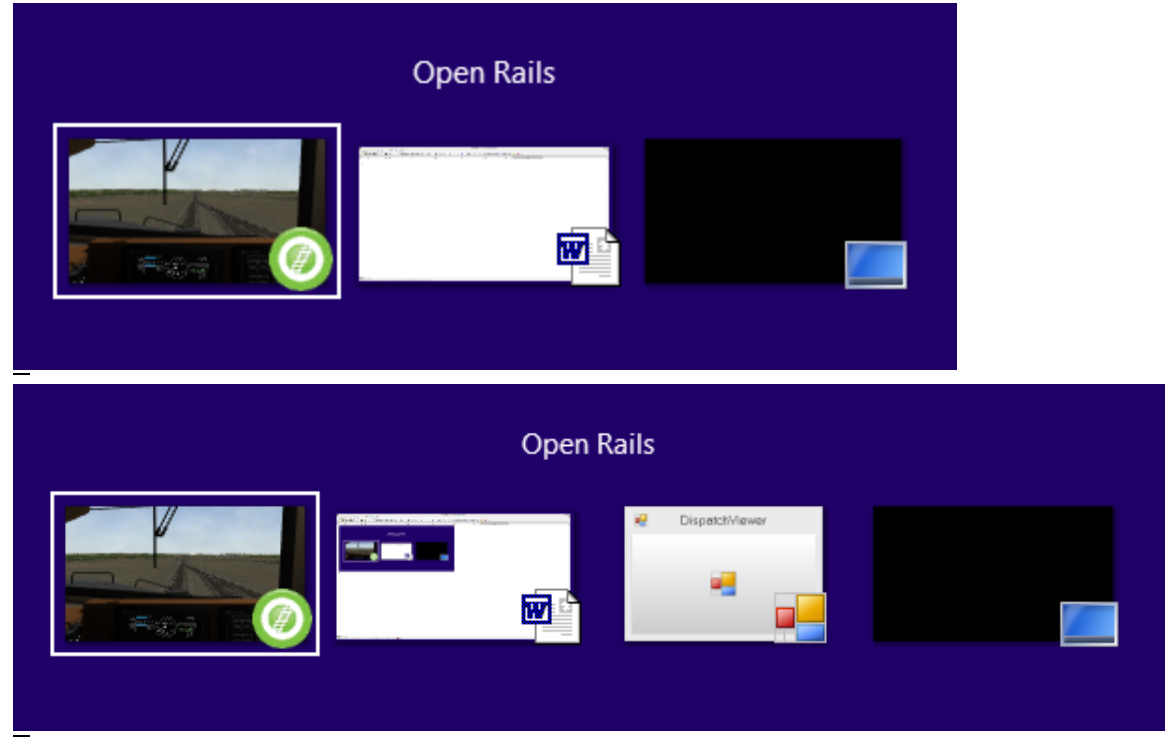
      On my desktop, I opened up an empty Word template (necessary to catch the screen grabs given the keystrokes in play) , and then opened up Open Rails full screen and entered one of the Seligman ORTS activities.

      The top line of graphics shows my choices when using ALT-TAB Left to right, Open Rails, Word and the Desktop

      I then toggle back to Open Rails, hit CTRL-9 to open the DS panel behind the scene, and now when using ALT-TAB, the DS screen shows as the 4th open window option. If I toggle over to the DS screen, Open Rails snaps back with the DS screen on top.


      If you are seeing something different and cannot do the same, then you have an issue with your desktop setup.

      P.S., the ORTS Seligman route I am running in this example has a sigcfg of 1,426 lines. Your file is 100 times as large. That's not a few erroneous duplicate entries. That's a major self-inflicted hosing of some sort.
      My Open Rails videos https://www.youtube.com/@lakecities3663/videos

      Comment

      • fchrist16
        Senior Member


        • Apr 2005
        • 747
        • California

        #18
        Let me try and answer all this in order...

        Charles: Yes I have tried CTRL+9 (dispatch display) and ALT+TAB, which shows NOTHING. I have closed out everything except ORTS and tried this multiple times, I can somehow only run ORTS in windowed mode anyway, my graphics on this laptop won't let it do full screen.

        Geepster: Just for "shits and giggles" I copied the PacSurf SigCfg file over to my route, after properly backing up my current file. I then kept JUST Firefox and ORTS open, picked a good path, used the default Dash9 + 20 Intermodal and hit "start". The log file below is what I got after a "crash back to home screen" in ORTS...So I don't think it's the SigCfg file.


        Regards,

        -Frank C.

        Comment

        • geepster775
          2500 Post Veteran


          • Sep 2006
          • 2846
          • .
          • General

          #19
          I see from your log

          FastFullScreenAltTab = False


          When running full screen, you need to have both boxes checked:


          Dispatcher Window under Options/General

          and

          Fast Full Screen Alt-Tab under Options/Video
          My Open Rails videos https://www.youtube.com/@lakecities3663/videos

          Comment

          • fchrist16
            Senior Member


            • Apr 2005
            • 747
            • California

            #20
            Originally posted by geepster775
            I see from your log

            FastFullScreenAltTab = False


            When running full screen, you need to have both boxes checked:


            Dispatcher Window under Options/General

            and

            Fast Full Screen Alt-Tab under Options/Video

            Well since it's better in Windowed mode anyway for me, I won't worry about that for now...

            Regards,

            -Frank C.

            Comment

            • baldwin
              6000 Post Veteran


              • Nov 1999
              • 6358
              • Chippenham, Wiltshire, UK.
              • ORTS

              #21
              Originally posted by fchrist16
              I can somehow only run ORTS in windowed mode anyway, my graphics on this laptop won't let it do full screen.


              Regards,

              -Frank C.
              If you are running in a window, your taskbar should be visible, Alt + 9 activates the dispatcher window which can then be accessed by hovering the cursor over the OR taskbar icon. Doing that you should see two thumbnails popout, OR and the dispatcher window, select from there.
              Beer is not a matter of life or death, it is much more serious than that.

              Comment

              • fchrist16
                Senior Member


                • Apr 2005
                • 747
                • California

                #22
                Originally posted by baldwin
                If you are running in a window, your taskbar should be visible, Alt + 9 activates the dispatcher window which can then be accessed by hovering the cursor over the OR taskbar icon. Doing that you should see two thumbnails popout, OR and the dispatcher window, select from there.
                Shouldn't it be CTRL+9 that activates the dispatcher display? At least that's what I have in my keyboard config! Either way, it won't come up.

                Regards,

                -Frank C.

                Comment

                • crstagg
                  4500 Post Veteran


                  • Nov 1999
                  • 4885
                  • Huntsville, AL
                  • Texan
                  • MSOR

                  #23
                  Originally posted by fchrist16
                  Shouldn't it be CTRL+9 that activates the dispatcher display? At least that's what I have in my keyboard config! Either way, it won't come up.

                  Regards,

                  -Frank C.
                  Correct.

                  Does "it won't come up" mean you keyed CTRL+9 and there is no Dispatcher Window displayed or you keyed CTRL+9 then placed cursor on the OR taskbar icon and only the OR window showed?
                  Charles

                  Comment

                  • fchrist16
                    Senior Member


                    • Apr 2005
                    • 747
                    • California

                    #24
                    Originally posted by crstagg
                    Correct.

                    Does "it won't come up" mean you keyed CTRL+9 and there is no Dispatcher Window displayed or you keyed CTRL+9 then placed cursor on the OR taskbar icon and only the OR window showed?
                    Charles, when ATTEMPTING to start my route with Dispatcher Display ENABLED it crashes back to the "home screen" of ORTS. In any other route, ORTS starts fine, I key in CTRL+9, but get NOTHING. ALT+TAB shows just ORTS and Firefox open.

                    Yes I have checked to make sure the key combo is CTRL+9 and nothing else. I have also reset it as well.

                    Regards,

                    -Frank C.

                    Comment

                    • baldwin
                      6000 Post Veteran


                      • Nov 1999
                      • 6358
                      • Chippenham, Wiltshire, UK.
                      • ORTS

                      #25
                      Sorry, yes, Ctrl+9. my bad.
                      Beer is not a matter of life or death, it is much more serious than that.

                      Comment

                      • baldwin
                        6000 Post Veteran


                        • Nov 1999
                        • 6358
                        • Chippenham, Wiltshire, UK.
                        • ORTS

                        #26
                        If the key combo works in other routes, there must be something wrong with your route that is preventing the dispatcher window from opening.
                        Beer is not a matter of life or death, it is much more serious than that.

                        Comment

                        • fchrist16
                          Senior Member


                          • Apr 2005
                          • 747
                          • California

                          #27
                          Originally posted by baldwin
                          If the key combo works in other routes, there must be something wrong with your route that is preventing the dispatcher window from opening.
                          So if that is the case, where do I start looking? Besides as stated the SigCfg file, as I swapped it out already with a known "good" one and still got the same issue.

                          Regards,

                          -Frank C.

                          Comment

                          • peterman
                            Senior Member

                            • May 2010
                            • 151
                            • Great White North
                            • ORTS

                            #28
                            Howdy...

                            Looks like several different ways to view the Dispatcher screen... I may as well throw "my way" into the ring.

                            Ctrl + 9 ( to activate dispatcher )
                            start + tab ( to toggle through any windows that are present )... ( continue to hold start while hitting Tab )

                            Handy when you have more than one program running.

                            Peter

                            Comment

                            Working...