Some little bugs

Collapse
This topic is closed.
X
X
 
  • Time
  • Show
Clear All
new posts
  • northeastern292
    Member

    • May 2010
    • 27

    #1

    Some little bugs

    To the OR team:

    First off, congrats on the v0.8 release. The new features are wonderful! Looking good, except for a few things...

    1) Any SLI Genesis locomotive will crash when I load OR.
    2) Sounds have become another issue. The Acela's bell doesn't work and you can't hear the horn from the cab. And i9t's not the only locomotive like that. The GO Bombardier Bilevel Cab Cars that comes with MLT's Greater Toronto Area have issues with the bells. Press the bell and you'll have brake valve noises for your entire run.
    3) The ATSF Marceline subdivision route still refuses to work with OR.

    Just thought I'd report.
    Last edited by eric; 05-30-2015, 17:40.
  • mikephfl
    Senior Member
    • Jul 2004
    • 524
    • Clearwater, FL

    #2
    I'm able to load and run a lot of SLI engines. The horn sounds are a bit weak, as if it's using the interval sound even when you are outside. My biggest complaint is not being able to play a short blast of the whistle. Considering that probably 99.% of all North American routes have grade crossings and they require long long short long, I would have thought being able to play a short would have been in this version. I know they are working on doing sounds differently and know about this, but I had hoped for at least a work around to play a short. I have routes with lots of grade crossings and for me, that is a large part of the experience. It's not all of it. I don't just sit here and blow the horn, but if I'm trying to hit a few shorts when leaving a station, or 3 when I want to back up, it doesn't sound right for 3 longs when I want to back up.

    I've also noticed, that horn doesn't trigger bell, even if it is set to do that. Bell needs to be started manually. That's not a big issue, just wanted to let ya'll know. In case ya didn't.

    As for SLI engines, I found in my notes from another poster here previously...

    I was able to get Open Rails to work with the SLI P42DC locomotive by making an edit to the cab view file. Open file P42CAB.cvf and find the CombinedControl element. The NumPositions element first has a count of the number of positions and then a list of index values between zero to one less than the count. The first index is out of bounds and needs to be changed.

    NumPositions ( 10 1056964608 0 0 0 0 0 0 0 0 0 )

    Change the value of the first index value after the position count to zero.

    NumPositions ( 10 0 0 0 0 0 0 0 0 0 0 )

    Again, this fix is not mine, it's posted else where here, but I put it in my notes in myTrains directory so it would be easy for me to find. I hope this helps.
    Last edited by mikephfl; 09-30-2012, 11:22. Reason: Bell note
    Mike
    Proud Supporter of OR
    Creator of YardMaster
    "Thanks for using YardMaster"

    Comment

    • northeastern292
      Member

      • May 2010
      • 27

      #3
      I'll give that a shot. Thanks! And I know, this is a work in progress, and I know that bugs are to be abound. But it's much more stable than MSTS, so I'm lucky that the TS community has such an effort. The FS community has zero.

      And I'm aware of the bell situation.

      Comment

      • eolesen
        9500 Post Veteran and Administrator


        • Dec 2002
        • 9583
        • NS MP245.4 CNO&TP South District
        • English, SQL
        • General

        #4
        I've had a few minor issues as well. I have a set of Gaetan's freeware CNW Alco C428's which refuse to be displayed in the sim aside for the lights... That's the only locomotive I've discovered so far that just refuses to behave. A few cabviews are not working, but I suspect the fix mentioned earlier will resolve those.

        Multi-player has been spotty for me, but that could be the second PC I'm using and the fact both are on wifi. Will be trying with wired connections to see if the issues resolve. In one run, the game clocks were off by 5 minutes between the two (one kept freezing up) even though they were running side by side...

        Question for the developer team --- is there a check that the TDB versions are in synch with the server? In one session, I had my train on Track 1, and on my PC, the second player's train was on Track 2, whereas on the second player's PC, it was appearing on Track 3. After looking, the TDBs were definitely different versions...

        All in all, I'm quite happy with it.
        If you like what you see here at Trainsim.com, be it the discussions and knowledge in the forums, or items available in our library, I hope you'll consider a paid membership to help support keeping the site operating.... Thanks!

        Comment

        • jjtang
          Senior Member
          • Nov 1999
          • 200
          • .

          #5
          You may try to connect to the IP and port listed in http://tsimserver.com/ORFiles031205/ServerInfo.html (ports are changed so please check this file before connecting).

          When connect to these ports, do not choose "Act as Server", as the program behind the ports will declare the dispatcher based on who connects first. This server determines if you have the same route as the dispatcher by route directory name at this time, better checking may be needed.

          Using two wireless computer at the same time may have each other interfering thus slow connection.

          Comment

          • eolesen
            9500 Post Veteran and Administrator


            • Dec 2002
            • 9583
            • NS MP245.4 CNO&TP South District
            • English, SQL
            • General

            #6
            Having one on a wired connection seems to have addressed the lagging game clock on the non-server...

            Had another instance of two trains connecting to each other, and the camera views getting swapped (PC1 had all of its camera views on PC2's train, and vice versa...). Also had fighting engines (MU'd, they were both going in their native forward or reverse, thus going nowhere).

            Then, to add wierdness to oddity, on PC1's monitor, Train2 was moving forward, while on PC2's monitor, Train2 was moving in reverse.... I suspect it all comes back to the two trains connecting, because it wasn't doing that until that point in the game.

            The two wouldn't have connected if the switches had stayed aligned as they'd been set.... on a passing path, I had the north switch set to take the southbound onto a passing siding, but the switch re-set itself when the northbound passed the south switch...

            This is all in dark territory.
            If you like what you see here at Trainsim.com, be it the discussions and knowledge in the forums, or items available in our library, I hope you'll consider a paid membership to help support keeping the site operating.... Thanks!

            Comment

            • jjtang
              Senior Member
              • Nov 1999
              • 200
              • .

              #7
              The experimental release has some improvements; http://openrails.org/experimental.html

              In the upcoming experimental release, we will have a code that disables auto-switch (if a dispatcher chooses to), thus makes the game more predictable. When connecting two trains with high speed, oddity can happen.

              Never saw train swapped, what user names did you input? Also, Alt-9 can jump to other trains. What have you seen on the dispatcher window?

              Comment

              • dennisat
                Member
                • May 2010
                • 33

                #8
                Whilst running an AI heavy act on the UK Dorset Coast route (in single player mode) I noticed that at least some AI doesn't seem to make its timetabled station stops. Is this already known about?

                Dennis

                Comment

                • gpz
                  Member
                  • Jul 2012
                  • 49
                  • Budapest, Hungary

                  #9
                  I also found a very little bug in r1265: The scrollbar widgets (e.g. in window opened by hitting F1) work a bit weirdly. When I try to scroll by left mouse button, the window gets moved instead of the scrollbar, though the text is being scrolled in it.
                  Last edited by gpz; 10-02-2012, 04:33.
                  Peter Gulyas

                  sigpic

                  Comment

                  • gpz
                    Member
                    • Jul 2012
                    • 49
                    • Budapest, Hungary

                    #10
                    I get many error messages in log file for routes I usually start, such like this one:
                    Code:
                    Error: System.IO.InvalidDataException: {TileX:-5366 TileZ:14871 X:512.382 Y:1.67039 Z:-263.691} signal 2199 unit 1 has invalid sub-object node-name HEAD20.
                      in ORTS.SignalShape.SignalShapeHead..ctor(Viewer3D viewer, SignalShape signalShape, Int32 index, SignalHead signalHead, SignalItem mstsSignalItem, SignalSubObj mstsSignalSubObj)
                      in ORTS.SignalShape..ctor(Viewer3D viewer, SignalObj mstsSignal, String path, WorldPosition position, ShapeFlags flags)
                      in ORTS.WorldFile..ctor(Viewer3D viewer, Int32 tileX, Int32 tileZ)
                      in ORTS.SceneryDrawer.Load()
                      in ORTS.World.Load()
                      in ORTS.Viewer3D.Load()
                      in ORTS.LoaderProcess.Load()
                      in ORTS.LoaderProcess.DoLoad()
                      in ORTS.LoaderProcess.LoaderThread()
                      in System.Threading.ThreadHelper.ThreadStart_Context(Object state)
                      in System.Threading.ExecutionContext.runTryCode(Object userData)
                      in System.Runtime.CompilerServices.RuntimeHelpers.ExecuteCodeWithGuaranteedCleanup(TryCode code, CleanupCode backoutCode, Object userData)
                      in System.Threading.ExecutionContext.RunInternal(ExecutionContext executionContext, ContextCallback callback, Object state)
                      in System.Threading.ExecutionContext.Run(ExecutionContext executionContext, ContextCallback callback, Object state)
                      in System.Threading.ThreadHelper.ThreadStart()
                    I think these error messages are there becasue of some wrong signal definitions in the route, not because of an OR bug. But I cannot figure out where this sub-object node-name (HEAD20 in this example) should be defined for it to get valid. I could track back the signal's .s file, by searching for the signal id (here is 2199) in .w file based on tile coords, and was able to find this .s file's definition in sigcfg.dat, where I could find the HEAD20 SignalSubObj(). But then I am stuck with it there. Where else should it be defined for making it valid?

                    And would it be possible to hadle this error message in a bit friendlier way in OR, such as a warning message, keeping its first line only? The routes work despite of this error, and it is too freigthening in this form.
                    Last edited by gpz; 10-02-2012, 14:26.
                    Peter Gulyas

                    sigpic

                    Comment

                    • csantucci
                      Senior Member
                      • Nov 1999
                      • 856
                      • Torino, Italy.

                      #11
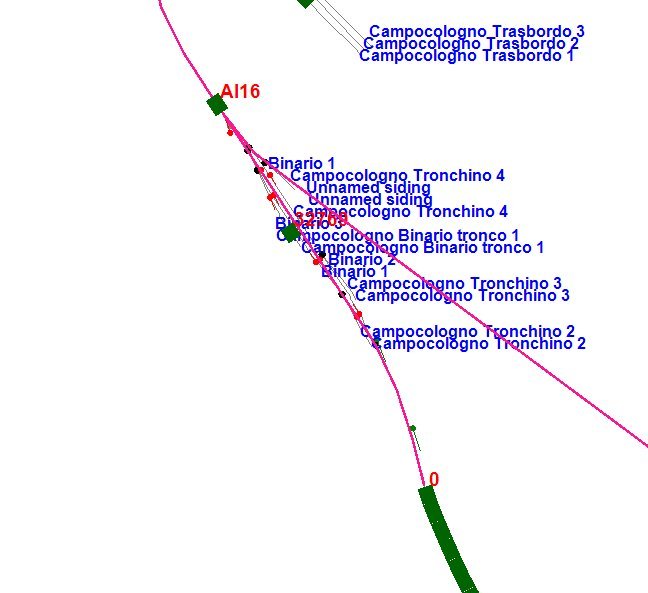
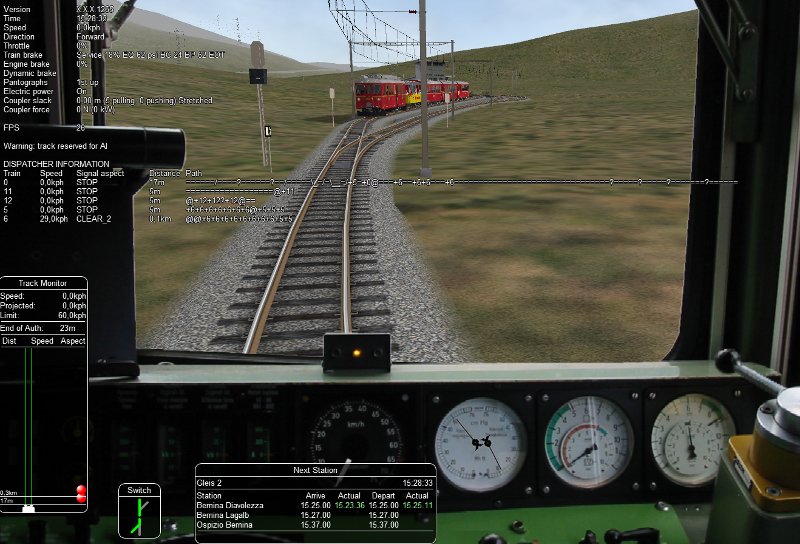
                      Here I have some problems about AI dispatching on r1265
                      Here

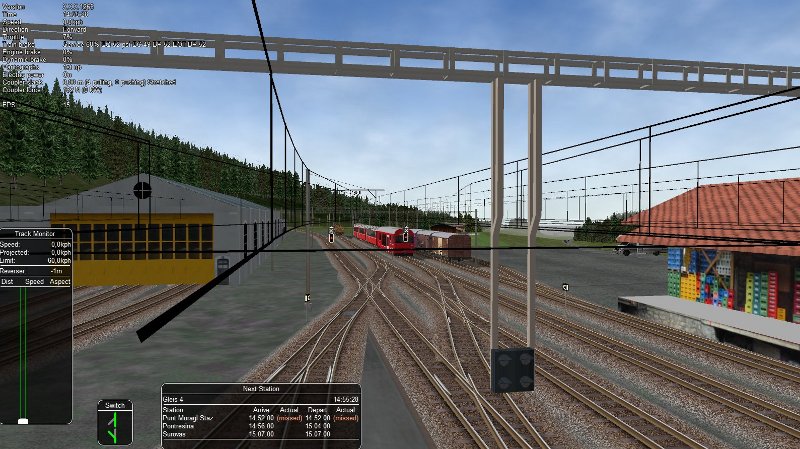
                      AI train 16 should continue along its path (that has no obstacles) passing the switch, that is correctly diverging. Instead it stops before the switch. Pls. notice that when I tested with accelerated clock speed it passed the switch and correctly reached end of path! On this image also a signal can be seen in front of the AI train. This signal should be shown with opposite direction. It is a group signal and this type of signals are in fact oriented with an opposite logic with respect to all other signals, as correctly shown by MSTS.

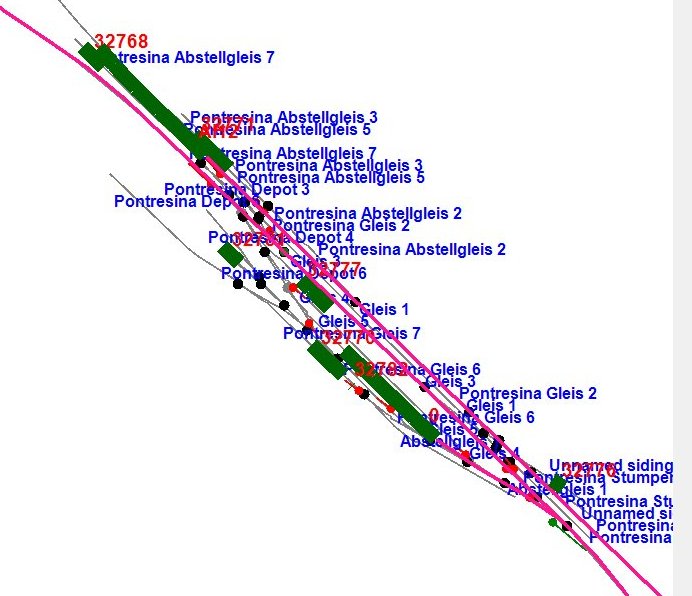
                      Here


                      you can see at the left above (strings are superimposed so it is not immediately clear) AI train 12 stopped before a switch (you can see the red train in the simulation picture). This train has a path that proceeds to lower end of station and then has a reverse point on the same track, returning on the line where the train arrived from. There is no reason why the train should be stopped there. Notice also that the path proceeds straight ahead even after end of track without taking into account the reverse point.

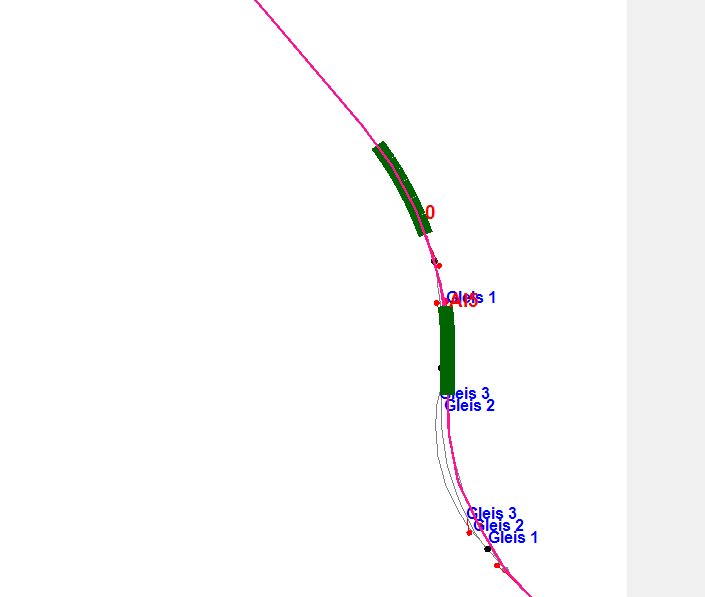
                      Here


                      the player train arrives in front of AI train 5 waiting for meet. Player train path foresees that the switch in front of the train is in diverging position. Such switch instead is in straight position and, if forced with the dispatcher window to diverging, returns after few seconds to straight position.

                      At last in my experience passenger in this ORTS relese AI trains do not stop at stations where a stop is foreseen in the activity.

                      In general my experience is that by the moment it is quite difficult to develop single-player activities with meets on single-track line.

                      Moreover I hope that the team will add the possibility of starting the dispatcher window also after having resumed a saved game.
                      I would also suggest to display on the dispatcher window only one string for every platform/siding, and not two as is now. In my opinion the window is overcrowded with strings. The solution of MSTS with only one string and the two blue bars at beginning and end of platform/siding seems to me better.
                      Referring to the intention of the ORTS team to allow dispatchers to disable automatic alignment of the switches, I hope that this is implemented by a checkbox on the dispatcher window, that can be checked and unchecked many times during the simulation, accordingly to need.

                      Pls. consider this post as positive indications and proposals. I am really impressed by ORTS and by the work the ORTS dev team has done!
                      Last edited by csantucci; 10-02-2012, 15:00.
                      sigpic

                      Comment

                      • twpol
                        Senior Member
                        • Oct 2009
                        • 434
                        • United Kingdom

                        #12
                        Originally posted by gpz
                        I get many error messages in log file for routes I usually start, such like this one:
                        Code:
                        Error: System.IO.InvalidDataException: {TileX:-5366 TileZ:14871 X:512.382 Y:1.67039 Z:-263.691} signal 2199 unit 1 has invalid sub-object node-name HEAD20.
                        I think these error messages are there becasue of some wrong signal definitions in the route, not because of an OR bug. But I cannot figure out where this sub-object node-name (HEAD20 in this example) should be defined for it to get valid. I could track back the signal's .s file, by searching for the signal id (here is 2199) in .w file based on tile coords, and was able to find this .s file's definition in sigcfg.dat, where I could find the HEAD20 SignalSubObj(). But then I am stuck with it there. Where else should it be defined for making it valid?
                        The error occurs because sigcfg.dat defines the sub-object HEAD20, but this sub-object does not exist within the shape file.

                        As to the error message itself, it probably should be a warning, though it should be noted that it may be a problem which prevents you from using the route in some cases as the signals could be inoperable. I'll look at re-wording it in a future update.
                        James Ross
                        Open Rails Management Team
                        sigpic

                        Comment

                        • gpz
                          Member
                          • Jul 2012
                          • 49
                          • Budapest, Hungary

                          #13
                          Thank you very much for the guide! In fact I have one another type of an error message regarding the signals. It is also repeated many times exactly in same form in the log file, but this one is totally uninformative about the word file and signal UID this error occures at. However OR still starts despite of these error messages. For me it is absolutely clear that this one is also not an OR bug, but the problem of the route. This might be the result of a partly-successful rebuild track database process of the RouteRiter utility. But it would be a big help, I suppose, if a reworded warning message of this error contained some additional information, that helped the debugging of the route.
                          Code:
                          Error: System.NullReferenceException: Object reference not set to an instance of an object.
                             in ORTS.SignalObject.NextNode(Int32& node, Int32& direction, Int32& prevnode)
                             in ORTS.SignalObject.route_set(Int32 req_mainnode)
                             in ORTS.SignalHead.route_set()
                             in ORTS.SIGSCRfile.SH_function_value(SignalHead thisHead, SCRStatTerm thisTerm, Int32[] localFloats, SIGSCRfile sigscr)
                             in ORTS.SIGSCRfile.SH_processSingleCondition(SignalHead thisHead, SCRConditions thisCond, Int32[] localFloats, SIGSCRfile sigscr)
                             in ORTS.SIGSCRfile.SH_processConditionStatement(SignalHead thisHead, ArrayList thisCStatList, Int32[] localFloats, SIGSCRfile sigscr)
                             in ORTS.SIGSCRfile.SH_processIfCondition(SignalHead thisHead, SCRConditionBlock thisCond, Int32[] localFloats, SIGSCRfile sigscr)
                             in ORTS.SIGSCRfile.SH_process_StatementBlock(SignalHead thisHead, ArrayList Statements, Int32[] localFloats, SIGSCRfile sigscr)
                             in ORTS.SIGSCRfile.SH_process_script(SignalHead thisHead, SCRScripts signalScript, SIGSCRfile sigscr)
                             in ORTS.SIGSCRfile.SH_update(SignalHead thisHead, SIGSCRfile sigscr)
                             in ORTS.SignalHead.Update()
                             in ORTS.SignalObject.Update()
                             in ORTS.Signals.Update(Single elapsedClockSeconds)
                             in ORTS.Simulator.Update(Single elapsedClockSeconds)
                             in ORTS.Viewer3D.Update(Single elapsedRealTime, RenderFrame frame)
                             in ORTS.UpdaterProcess.Update()
                             in ORTS.UpdaterProcess.DoUpdate()
                             in ORTS.UpdaterProcess.UpdaterThread()
                             in System.Threading.ThreadHelper.ThreadStart_Context(Object state)
                             in System.Threading.ExecutionContext.runTryCode(Object userData)
                             in System.Runtime.CompilerServices.RuntimeHelpers.ExecuteCodeWithGuaranteedCleanup(TryCode code, CleanupCode backoutCode, Object userData)
                             in System.Threading.ExecutionContext.RunInternal(ExecutionContext executionContext, ContextCallback callback, Object state)
                             in System.Threading.ExecutionContext.Run(ExecutionContext executionContext, ContextCallback callback, Object state)
                             in System.Threading.ThreadHelper.ThreadStart()
                          Anyway, I am absolutely surprised how fine OR runs even these routes with so many inconsistencies, and how good signals work with the error message above is getting repeated so many times at loading time.
                          Last edited by gpz; 10-04-2012, 14:50.
                          Peter Gulyas

                          sigpic

                          Comment

                          • twpol
                            Senior Member
                            • Oct 2009
                            • 434
                            • United Kingdom

                            #14
                            Originally posted by gpz
                            Thank you very much for the guide! In fact I have one another type of an error message regarding the signals. It is also repeated many times exactly in same form in the log file, but this one is totally uninformative about the word file and signal UID this error occures at. However OR still starts despite of these error messages. For me it is absolutely clear that this one is also not an OR bug, but the problem of the route. This might be the result of a partly-successful rebuild track database process of the RouteRiter utility. But it would be a big help, I suppose, if a reworded warning message of this error contained some additional information, that helped the debugging of the route.
                            Code:
                            Error: System.NullReferenceException: Object reference not set to an instance of an object.
                            Anyway, I am absolutely surprised how fine OR runs even these routes with so many inconsistencies, and how good signals work with the error message above is getting repeated so many times at loading time.
                            Actually, any error that mentions an exception (e.g. System.NullReferenceException) should be considered an OR bug; it might be caused by bad data, but it typically indicates that it was not handled as bad data and instead something outright broke. The previous instance you found regarding signals was a special case where we had used an exception to intentionally report a data error - but I've updated the code now to be a warning and not to mention it being an exception, as that was mearly an internal implementation detail. However, the error quoted above is an OR bug.

                            Would you mind sharing the name of a freeware route that exhibits this error, so that we may investigate it fully?

                            Thanks.
                            James Ross
                            Open Rails Management Team
                            sigpic

                            Comment

                            • gpz
                              Member
                              • Jul 2012
                              • 49
                              • Budapest, Hungary

                              #15
                              The route can be downloaded from this website: http://users.atw.hu/diesirae/TS/balaton/balaton.html (Download the links with labeleld "Letöltés" from 1 to 11, and "4.04 Javítás" as a patch.) The route can be tested with paths already bundled in, they prettily bring up the error messages in subject. Thank you very much for dealing with this!
                              Last edited by gpz; 10-05-2012, 02:35.
                              Peter Gulyas

                              sigpic

                              Comment

                              Working...