BVE: Idea for making route backgrounds

Collapse
This topic is closed.
X
X
 
  • Time
  • Show
Clear All
new posts
  • techno79
    Member
    • Sep 2003
    • 78
    • Tampa Bay, Florida, USA.

    #1

    BVE: Idea for making route backgrounds

    Hi all, haven't posted in a while.
    I wanted to start work on a smaller streetcar line. At least the first three stations and see how that goes. A couple blocks.

    My question is this. Anyone ever use photo's for the background? I'm sure there are places where you'd need to make a real object and such. But if I have buildings a few hundred feet away, or if my streetcar is making a 90 degree turn, why can't I have a photo of the street ahead where I'm making the turn. Would I have to put them at an angle in the route, or 90 degrees from my point of view? Etc
    Just curious if this has been attempted. I'm not a graphic genious, so it woudln't be easy for me to make every building a nice looking object.

    Otherwise I guess I'll have to experiment a little.

    Jeff
  • smace
    Senior Member
    • Apr 2003
    • 481
    • .

    #2
    RE: Idea for making route backgrounds

    When I updated teh Xmas tree route for BVE to version 4, I usde a photo taken in my house for the background and for some of the distante objects. It can be done. Jusat use a flat panel and map the photo to it. If it is far enought away or placed properly, you can not tell if it is a 12d or 3d object. Just make sure there is not a lot of depth to the photo.

    Comment

    • TrainUKer
      Member
      • Jan 2005
      • 30
      • London, England.

      #3
      RE: Idea for making route backgrounds

      I also have this problem with backdrop scenery in my tram route, whilst driving through Croydon! I don't really know how to solve it either, so I intend on building all the shops etc along the roads, see how that looks and decide whether or not I need a backdrop of the buildings. However, I'll need to go and get photos of the shops first, when I can be bothered!
      Currently Developing Croydon Tramlink Route 3 for BVE:
      New Addington - Croydon - Mitcham Junction - Wimbledon

      http://www.freewebs.com/bvelondontramlink/index.htm

      Comment

      • smile2evan
        Senior Member
        • Apr 2003
        • 143
        • Athens, Greece.

        #4
        RE: Idea for making route backgrounds

        I think there is a similar approach in Neustadt tramlines (line 1&4) where a picture is used as background in a 90 degree turn just after the first stop.
        See http://www.bve-tram-neustadt.de.vu - the routes were designed for BVE 2.6 and the relevant files are in .rw format but can be altered with BRR in .csv.

        Smile2evan

        Comment

        • Stooopid_person
          1500 Post Veteran
          • Nov 1999
          • 1592
          • Planet Stooopid.

          #5
          RE: Idea for making route backgrounds

          Go download this short Taiwan route as well. Once the train leaves the tunnel, look to your left. It looks brilliant.


          Alternatively, take a look at the left of the last 2 screenshots on the page... (but I'm sure downloading it is better)

          Comment

          • techno79
            Member
            • Sep 2003
            • 78
            • Tampa Bay, Florida, USA.

            #6
            RE: Idea for making route backgrounds

            I love that route, short but sweet. Took me days to physically recover it was done so nicely.

            I understand what's going on in the route, I'm not sure if I can apply that to a ground level streetcar except in certain open area's.
            I was working on my route today, without the background experiment, and it takes hours to design a trashcan even. I'm trying not to reinvent the wheel. And I haven't noticed many objects I can borrow, with permission, along the line. Hopefully once you have the base objects, it won't feel as tedious.

            So far so "good".

            I'm attempting to do the TECO streetcar btw.

            Comment

            • smace
              Senior Member
              • Apr 2003
              • 481
              • .

              #7
              RE: Idea for making route backgrounds

              Several months ago, I wrote a piece for Vitural Railroding that shows how to use Photos and a program I wrote to make objects. There is a specific section on turning the (mostly) 3d objects into flats. If you have the photos, this might be of some use to you
              MINITOTO merupakan situs Slot toto resmi yang menyediakan link slot gacor paling viral gampang menang hari ini dengan akses cepat serta sistem responsif untuk pengalaman bermain slot 88 yang lancar dan praktis.

              Also makes some general simple objects easy, like traffic cones, round trash cans long square light poles.
              If you hgave questions, send me an email.

              Comment

              • mfonda
                Senior Member
                • Jul 2004
                • 231
                • Ottawa, Ontario, Canada.

                #8
                RE: Idea for making route backgrounds

                What would be wrong in changing the background occasionally when the
                surroundings call for this, like a city background when approaching a city? Just asking.

                Comment

                • techno79
                  Member
                  • Sep 2003
                  • 78
                  • Tampa Bay, Florida, USA.

                  #9
                  RE: Idea for making route backgrounds

                  Hello. I got lazy, but the last two weeks I've kicked it in high gear. A few hours sitting once a week.
                  Guess I was inspired.

                  It's an interesting idea, because I didn't want the route to look too sloppy and generic, but I also get trapped into thinking I need exact models of each building along the route. Which is a mistake. So I am trying to keep a balance. Keep it looking nice, with details, but not too much. Generic brick buildings with brick textures are doing the trick wonderfully.

                  If textures make a world of difference, I hope I can get a level up doing this. Along with being lazy. I need to take more photos with my now broken camera, possibly my cell phone will be good enough. But I don't want to have a photo representation of EVERY building. I'm hoping for some balance. My work stops once I find I don't know what the building looks like, or I run out of images.

                  Haven't gotten to my 90 degree turn yet. 2 blocks away. Google Earth helps greatly. I can take all my measurements and have a reference without going to location.

                  I'm inspired again.
                  To show a demonstration on what I'm working on, and the general idea of what I mean. I hate to post images of something so unfinished otherwise. Maybe I'll update once I get one finished scene. I just have to remember, "it's only version 1 Beta"

                  Even though this is freeware, I am assuming that I should make sure I don't include anything trademarked right? I bet the streetcar logo isn't a no-no at all. I know they would be flattered actually.

                  If someone has a photoreal concrete embedded tracks, you can contribute to my experiment. Ignore the cloudy sky background, that's just a placemarker.


                  Comment

                  • techno79
                    Member
                    • Sep 2003
                    • 78
                    • Tampa Bay, Florida, USA.

                    #10
                    RE: Idea for making route backgrounds

                    I guess I changed the route from my original idea to start the thread. Looks like I'm just doing photoreal buildings.

                    What I was originally asking about was a photo every x meters of the background. Not easy for close buildings, like beginning of my route.
                    But looking at these buildings, they're not really complex. You can get the patterns pretty easy I suppose. But also not easy to take 10 steps, photo, 10 steps, photo either probably.

                    Like this scene. Unless I have a video and splice it into 25meter frames, looks like I'll probably be doing it the usual way, except for a few places and 90 degree turns.

                    Maybe I can try a block, but it's sounding ridiculous now.


                    Comment

                    • VICTOR
                      Senior Member
                      • Jun 2004
                      • 396
                      • Zagreb, Croatia

                      #11
                      Luigi's advices really can help. It is on Italian, but I am sure that it is understandable.

                      http://bvepastel.blog131.fc2.com/

                      Comment

                      • tof63
                        Senior Member
                        • Apr 2003
                        • 392
                        • Turin, Italy.

                        #12
                        This the translation (excuse my English, please) of an answer concerning BVE backgrounds that I gave a couple of years ago to a similar question:
                        The BVE background is a BMP format picture, either 8 or 24 bit colors showing the backgound of the scenery.

                        The background is never approached during the travel, but it can be changed every 25 meters using the .back instruction.

                        When the train is running a curve, the background is moved laterally from right towards left (or viceversa), while the given impression is that it is in a fixed position while the rest of the landscape is rotating.

                        The background portion, disappearing from one side for the curve's effect, appears from the opposite side without continuity solution (like if the player were inside an empty cylinder rotating on its axis).

                        The dimensions in pixel of the portion visualized, apart from the BMP file size, are:
                        - 640x320 with screen resolution 640x480 (and in windowed mode)
                        - 800x400 with screen resolution 800x600
                        -1024x512 with screen resolution 1024x768

                        Saying this, even if whichever image can be used as background, to obtain better results:
                        - the right end of the image must match with the left end in order avoiding the "breach" in the background.
                        - optimal dimensions in pixel for BMP picture are 1024x512 for BVE 4 and 640x320 for BVE 2 in order to reduce the distortion automatically introduced from BVE (anyway a 2:1 relationship between width and height is preferred)
                        - The use of bigger pictures is absolutely counter-productive both for disk space and game fluidity.
                        - Most of backgrounds can have the same yield with 8 bit colors with a remarkable saving of disk space and memory, regarding the same 24 bit image.
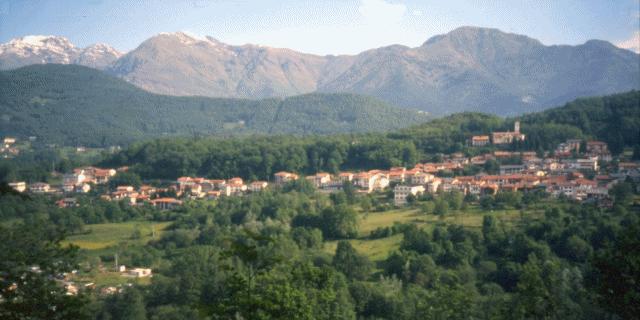
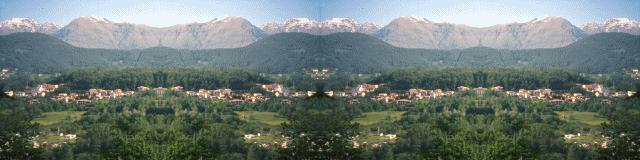
                        Supposing to use this image (already 640x320 pixels resized) as background, the following procedure can be used.


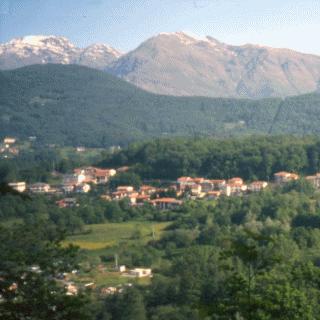
                        1 - Cut off the half right of the image, obtaining this:


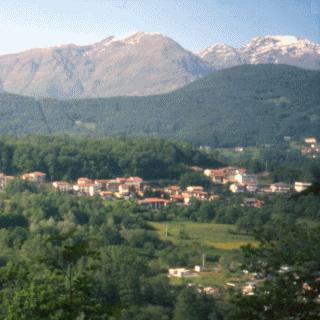
                        2 - Mirror rotate it, obtaining this:


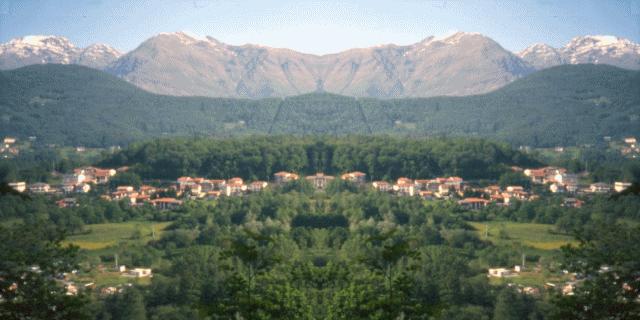
                        3 - Add the picture of step 2 to the right side of the one of step 1, obtaining our background for BVE:


                        This picture is made using 2 copies of the background placed side by side and shows what it will be on the simulator:


                        Obviously not every photo is suitable to make backgounds and a little "pixelating" (not done here) is needed for better results.

                        Luigi Cartello
                        Last edited by tof63; 12-21-2007, 14:34.
                        Luigi Cartello

                        http://bve.altervista.org

                        Comment

                        • techno79
                          Member
                          • Sep 2003
                          • 78
                          • Tampa Bay, Florida, USA.

                          #13
                          That is a great idea for the background. I don't know why I did not think of that.

                          I should have said route scenery and not "route backgrounds" for my original question/idea.

                          Production is mostly on hold. Camera issues. Broken. Big part of my project was getting textures and buildings for the extremely dense first segment of the route.

                          Comment

                          Working...